Showing posts with label wmi. Show all posts

Sunday, July 20, 2014

5 Stupid IT Questions - Part 2 - The Electric Boogaloo

It's that time again.  Enjoy...


Question 1 - "I have about 50 to 60 desktops and laptops, and about 10 servers in my AD environment at work.  I don't have a patch management product yet, I currently patch my Windows machines manually or using scripts.  Is there a good reason *not* to use WSUS?"

Answer:  First off, you need to start drinking. Your doctor would agree with me.  I think.  Well, anyhow, if your environment is built on versions of Windows which can be supported by WSUS, then the answer is NO: there isn't a "good" reason to *not* use a free product that at least gets you closer to the goal line.  How's that for a double-double-double negative statement?  I should've been a politician.

Are there better products?  Sure.  For free?  Maybe.  Is WSUS "good enough" for most shops like yours?  Probably.

Question 2 - "My significant-other spends a lot of time reading, studying, and playing in a lab to stay current with his/her career.  Is there anything I can do for him/her?"

Answer: Yes!  Feed them.  Scratch their back.  Rub their feet. Make them laugh.  And most important, feed them some more. They need to be sure to return the favor though.  My wife is amazing, but I have to remember to rub her feet too (she deserves it).

Question 3 - "I have scheduled tasks running on computers which run under the local SYSTEM account, but when they try to execute commands or access resources from remote UNC shares, they are denied access.  What am I doing wrong?"

Answer:  Two things... the first problem is that you're not sending me cash to help me pay my bills.  Just kidding.  Second, you didn't grant sufficient permissions to the share and/or the underlying NTFS folder path.  Remember, the local SYSTEM account runs as a proxy for the computer itself (when operating in a domain context).  So, when it knocks on the door of a remote shared resource, that resource sees the domain computer account in the peep hole.  (you thought I was going to say glory hole, didn't you?  sick puppy you are).

For example, if one computer is "DT1234" and is running a task that requests a connection to server "FS0005", then that server will see "DT1234$" (they append the dollar sign to indicate you paid a lot of money for that license.  ha ha . kidding again).  Actually, if the domain is "constoso.com", then the server sees user "CONTOSO\DT1234$" (NetBIOS name + computer sAMAccountName) knocking at the door.

By default, domain-joined computer accounts are not members of the AD domain "everyone" or "domain users" security groups.  They're not even members of any group (by default) besides "Domain Computers".  Therefore, you need to grant rights on resources to that domain security group, and your domain-joined computers should be able to knock at the door and get some free food.

TIP: a simple way to test local SYSTEM access to remote shares, is to use the "psexec.exe" utility (Microsoft/Sysinternals) with the "/s" option to launch CMD.exe.  Then within the command console, running in the local SYSTEM context, try to connect or query remote resources to see what happens.

Question 4 - "I'm building a custom app/script that helps manage things within System Center Configuration Manager 2012 R2.  It needs to read and write information as well, but it looks like I can do that by ADO and SQL commands, or by WMI and WBEM commands. Which should I use?"

Answer:  (long, long inhale.... get ready, here it comes...)  Okay.  Both.  No, wait.  Neither.  No, wait, that's wrong.  Both.  Sort of.  Hold on.  This may seem a little complicated. And even if it wasn't complicated, I'm a professional, and complicating things is what I get paid to do.  That's not true either.  Just a minute. Okay. So drink up, strap in, or strap on, or buckle up, whatever...

You know how they say "never say never"?  Well, NEVER, yes, that's right, I just said "NEVER", ever write to a System Center Configuration Manager database directly.  All "write" (aka update/insert/delete) operations should be done through WMI/WBEM statements. I'll get to the "why" in a minute.

First things first:  While you absolutely can request information from the database using WMI/WBEM queries, I recommend that you do your read operations directly from the SQL Server database, rather than via WMI/WBEM.  The reason is that they're going to perform faster than WMI/WBEM requests (assuming you know how to form proper T-SQL statements).  More importantly: WMI/WBEM query statements are way more limited than T-SQL as far as what kinds of operations you can perform.  For example COALESCE, TRY_CONVERT and CASE statements, to name a few. And I won't even get into things like DATEDIFF, CAST or SUBSTRING.

Next, the reason you shouldn't push anything into the database directly is that SCCM relies on a delicate, complicated and, let's be honest, confusing-as-hell sequential process for handling change requests.  That is, updates, additions, deletions, and so on.  Each request is queued, prioritized, processed and logged.  The "processed" part involves even more sequential handling with triggers and more logging, and if you go around back, break open the window and climb in the back room, the alarm will go off and the SWAT team will repel down from helicopters and kill you.  Okay, not really.  But it will very likely break your SCCM site entirely.

When you submit requests properly using WMI/WBEM requests, they are like well-trained school kids lining up to go to the cafeteria.  They get their lunches, sit down, eat and smile the whole time.  When you shove them in directly via ADO/ADO.NET, shit will just break. Trust me. If you don't trust me, go ahead and setup a lab environment and kick those tires.  When the air blows out, don't come crying to me.

Finally, or thirdly? -  if you plan on making the same types of requests for information (read operations, that is) and they involve SQL "JOIN" statements, I recommend you create some VIEWs and apply indexing.  SQL will outperform application processing like Stephen Colbert having a debate with your dead cat.  If you've been strapping together messy "SELECT blah FROM whatever LEFT OUTER JOIN something  ON this = that..." and so on, in your script code, STOP!  Do that within the database (or create another database on the same server to pull data for abstraction and aggregation work, etc.).  So, to summarize all that blabber...

READ == Direct from the Database (SQL + ADO or ADO.NET)
WRITE ==  Through the WMI/WBEM interface

If you're thinking which is "faster": COM scripting or .NET scripting (e.g. VBScript vs. PowerShell), it depends on what you're doing, but for most things it's break-even.  The biggest factor will be where the bulk of logic handling and processing is being done:  in the database/WMI request itself, or on the information obtained therefrom.  I can already sense the .NET nerds flipping out right now. Spitting coffee through their nostrils.  Exclaiming "WTF?!!", knocking over their stacks of stale donuts and breaking pencils.   Oh well.

Question 5 - "My company is looking for a good service request ticketing system product. What products would you recommend?"

Answer: None of them.  Or all of them. The problem is that every organization that's existed for more than a few years, has evolved their own internal processes for handling requests.  Staffing varies.  Methods vary.  Resources vary.  The retail products you will try on will almost certainly be like a "one-size fits-all" suit.  Lot's of Velcro straps and adjuster things to help you pull in the tight spots to fit better.  But it's going to feel like that too.

Most off-the-shelf products will expect you to make some concessions with regards to "how" you do things.  That's not always bad, though.  Read up on ITIL, and even if you hate ITIL, it's good to have something to base your processes upon.  That or a suitcase full of drugs and a fast getaway car.  I have no idea what that's about though.

If your environment has implemented ITIL with gold medal effort, you may do really well with almost any off-the-shelf product.  However, I haven't seen an ITIL gold-medal shop in my lifetime.  I've heard stories of them, but I've never seen one.  Kind of like unicorns and leprechauns.

I see two options:  Build your own with whatever tools you have, or buy one and suck it up.  Just be warned:  The bigger your organization (staff and customer numbers), the more work it's going to be, for either direction you choose.  Be cautious of vendors offering "customization" services too.  That's their bread-and-butter.  Am I a bit pessimistic?  Yes.  It's a lot like shopping for document management solutions, or vacation homes.  I wish I could afford a vacation home.  Heck, I wish I could afford to take a vacation.


Th-th-that's all for now, folks.  Have a good week!

Monday, November 26, 2012

It's Scripting Time Again! AD Server Descriptions

This issue has come up a LOT in my career, but I don't know why.  It seems like something that Microsoft should address with some "feature" or utility or something.  What I'm blabbering about is updating the description for each Active Directory server account to match whatever the local computer description is.  The local computer description is what you see (and can update) from the Computer "Properties" form.

Local Computer Description

Active Directory Computer Description

It came up again tonight when a friend (called asking for help.  I happened to have the pieces of code on my server and glued them together in a few minutes (the mess below).  Every time I do something like this, I see horrifically bad coding habits from years past and do my best to clean them up before sharing them.

Is this Earth-shatteringly unique?  No.  Is it the only script of its kind? No.  Can you find alternatives on the web that will do just as well?  Absolutely.  If I get a little spare time, I will try to post this in PowerShell format (unless you want to submit that and I will post it, giving you full credit).

In any case, I hope this helps someone out there.  Read the WARNING and DISCLAIMER at the bottom!

'****************************************************************
' Filename..: server_descriptions.vbs
' Author....: David M. Stein
' Date......: 11/26/2012
' Purpose...: update AD computer descriptions from local descriptions
' Usage.....: cscript server_descriptions.vbs >output.log
' (note: the above redirect to output.log is optional)
'****************************************************************

Set objRootDSE = GetObject("LDAP://rootDSE")
ldapRoot = objRootDSE.Get("defaultNamingContext")

Const ADS_SCOPE_SUBTREE = 2
Const E_ADS_PROPERTY_NOT_FOUND = &h8000500D

' parse out NetBIOS domain name (e.g. "CONTOSO.COM")
nbDomain = Mid(Split(ldapRoot,",")(0),4)

wscript.echo "info: LDAP root is " & ldapRoot
wscript.echo "info: NetBIOS domain is " & nbDomain

serverlist = GetServerList()

For each strServer in Split(serverlist, ",")
  wscript.echo "server_name...: " & strServer
  strOUpath  = ComputerOU(strServer)
  localDesc  = GetLocalDescription(strServer)
  domainDesc = ADComputerDescription(strOUpath)

  If localDesc = "" Then
    localDesc = "NOT_DEFINED"
  End If

  wscript.echo "ou_path.......: " & strOUPath
  wscript.echo "local_descrip.: " & localDesc
  wscript.echo "domain_descrip: " & domainDesc

  If localDesc <> "NOT_DEFINED" Then
    try = ChangeADDescription(strOUPath, localDesc)
    wscript.echo "desc_updated..: " & try

  End If

  wscript.echo "----------------------------------------"
Next

'----------------------------------------------------------------
' function: get list of servers from domain using OS captions
'----------------------------------------------------------------

Function GetServerList()
  Dim conn, cmd, query, retval : retval = ""
  Dim rs, strOS, strName, counter : counter = 0

  wscript.echo "info: querying server names from active directory..."

  Set cmd = CreateObject("ADODB.Command")
  Set conn = CreateObject("ADODB.Connection")
  conn.Provider = "ADsDSOObject"
  conn.Open "Active Directory Provider"
  cmd.ActiveConnection = conn
  
  query = ";(objectCategory=computer);" & _
    "name,distinguishedName,operatingSystem;subtree"

  cmd.CommandText = query
  cmd.Properties("Page Size") = 100
  cmd.Properties("Timeout") = 30
  cmd.Properties("Cache Results") = False

  Set rs = cmd.Execute

  Do Until rs.EOF
    strOS = rs.Fields("operatingSystem").value
    If InStr(UCase(strOS), "SERVER") > 0 Then   
      strName = rs.Fields("name").value   
      If retval <> "" Then
        If InStr(retval, strName) < 1 Then
          retval = retval & "," & strName
          counter = counter + 1
        End If
      Else
        retval = strName
        counter = counter + 1
      End If
    End If
    rs.MoveNext
  Loop

  rs.Close
  conn.Close
  Set rs = Nothing
  Set cmd = Nothing
  Set conn = Nothing

  wscript.echo "info: " & counter & " servers were found"
  GetServerList = retval

End Function

'----------------------------------------------------------------
' function: get current computer OU from active directory
'----------------------------------------------------------------
 
Function ComputerOU(netBiosName)
  Dim objConnection, objCommand, objRecordSet, strQuery
  Set objConnection = CreateObject("ADODB.Connection")
  Set objCommand = CreateObject("ADODB.Command")
  objConnection.Provider = "ADsDSOObject"
  objConnection.Open "Active Directory Provider"
  Set objCommand.ActiveConnection = objConnection
  objCommand.Properties("Page Size") = 1000
  objCommand.Properties("Searchscope") = ADS_SCOPE_SUBTREE
  strQuery = "Select ADsPath From 'LDAP://" & ldapRoot & _
    "' WHERE objectCategory='computer'" & _
    " AND name='" & netBiosName & "'"
  
  On Error Resume Next
  objCommand.CommandText = strQuery
  Set objRecordSet = objCommand.Execute
  objRecordSet.MoveFirst
  Do Until objRecordSet.EOF
    strResult = objRecordSet.Fields("ADsPath").Value
    objRecordSet.MoveNext
  Loop
  ComputerOU = strResult
End Function

'----------------------------------------------------------------
' description: get local description from remote computer via WMI
'----------------------------------------------------------------

Function GetLocalDescription(strName)
  Dim objWMI, colItems, objItem
  Dim query, retval : retval = ""
  On Error Resume Next
  Set objWMIService = GetObject("winmgmts:\\" & strName & "\root\CIMV2") 
  If err.Number = 0 Then
    query = "SELECT * FROM Win32_OperatingSystem"
    Set colItems = objWMIService.ExecQuery(query,,48) 
    For Each objItem in colItems 
      retval = objItem.Description
    Next
    If IsNull(retval) or Trim(retval) = "" Then
      retval = ""
    End If
  Else
    wscript.echo "error: " & strName & " is offline or inaccessible"
  End If
  GetLocalDescription = retval
End Function

'----------------------------------------------------------------
' function: get AD computer description
'----------------------------------------------------------------

Function ADComputerDescription(strLDAP)
  Dim objComputer, retval, try, ldapstring
  ldapstring = strLDAP
  On Error Resume Next
  Set objComputer = GetObject(ldapstring)
  try = objComputer.Get("description")
  If Err.Number = E_ADS_PROPERTY_NOT_FOUND Then
    retval = ""
    Err.Clear
  Else
    retval = try
  End If
  ADComputerDescription = retval
End Function

'----------------------------------------------------------------
' function: set AD computer description (limit 48 chars)
' refer to: http://msdn.microsoft.com/en-us/library/windows/desktop/aa394239(v=vs.85).aspx
'----------------------------------------------------------------

Function ChangeADDescription(strLdapName, strDesc)
  Dim objPC, retval
  wscript.echo "info: modifying domain description..."
  On Error Resume Next
  Set objPC = GetObject(strLdapName)
  objPC.Description = strDesc
  objPC.SetInfo
  retval = err.Number
  If retval <> 0 Then
    retval = retval & " / " & err.Description
  Else
    retval = "SUCCESS"
  End If
  Set objPC = Nothing
  ChangeADDescription = retval
End Function

Warning

This script example includes MINIMAL error handling.  Always TEST, TEST, TEST, and when you think it works properly, TEST it some more.

Disclaimer

Use this script code AT YOUR OWN RISK.  Always test thoroughly in an isolated "test" or "development" environment to avoid negatively impacting production computers.  The author assumes/accepts NO LIABILITY for any direct or derivative use or consequential damages, however, the author wouldn't mind a little constructive feedback if it helps you in any way.

Sunday, November 11, 2012

Crude But Effective: Part 2, the Electric Boogaloo

In my previous article I described a system for replicating some of the functionality of the ConfigMgr Right-Click Tools (aka "SCCM Right-Click Tools"), through a web interface (intranet web portal application) using a combination of HTML, ASP, and a database back-end   What I planned to do was provide a little more detail of each of the pieces in follow-on articles.  This way, if you really cared enough, you could build your own setup (and probably do a better job of it than I have).

In this article I'm going to expand on the part of the process which involves the database back-end  and the script that runs on a schedule to query, process and update the database table.

The Database Table

To bring all of the processing into one central "hub", I chose to use a Microsoft SQL Server database, and create a table to capture the incoming requests from the portal.   My database server is named "DB1" and is running on SQL Server 2012, but it doesn't matter what version you use really.  I've tested this setup on 2005, 2008 and 2008 R2 with equal results.  The name of my database is "AMS" (for Asset Management Services), but you can call it whatever you want, just modify the names below to suit your needs.  The table I created is named "ClientToolsLog", but again, that's not required, so you could name it "DogPoo" and it won't matter.

USE [AMS]

SET ANSI_NULLS ON
GO

SET QUOTED_IDENTIFIER ON
GO

SET ANSI_PADDING ON
GO

CREATE TABLE [dbo].[ClientToolsLog](
 [ID] [int] IDENTITY(1,1) NOT NULL,
 [ActionName] [varchar](50) NOT NULL,
 [Network] [varchar](50) NOT NULL,
 [Comment] [varchar](255) NULL,
 [AddedBy] [varchar](50) NOT NULL,
 [DateAdded] [smalldatetime] NOT NULL,
 [DateProcessed] [smalldatetime] NULL,
 [ResultData] [varchar] (50) NULL,
)
GO

GRANT SELECT, INSERT, UPDATE, DELETE on ClientToolsLog TO amsManager
GO
 
GRANT SELECT on ClientToolsLog TO amsReadOnlyUser
GO

The Table Structure

Each of the columns has a purpose, so I'll explain them each below:
  • ID - This is used to identify the specific row in the table.  Because it's an integer value, and auto-incremented by 1, you don't specify a value for this field when inserting a new row. You only need it if you want to query, modify, or delete a specific row.
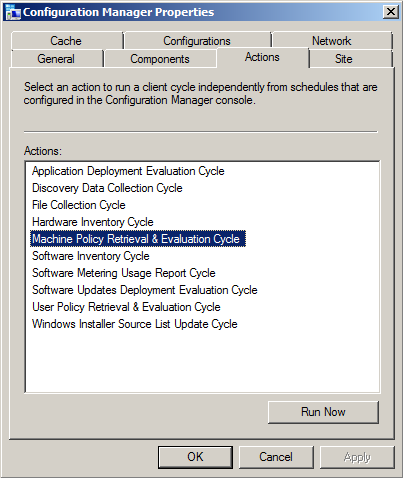
  • ActionName - (required) This is where the specific action name is entered.  I use my own abbreviated codenames to save on space (this log can easily grow very quickly with multiple users!).  For example, I use "MACHINE_POLICY" to indicate "Machine Policy Retrieval and Evaluation", and "HWINV" to indicate "Hardware Inventory Cycle", and so on. (see image below for the list of default available actions for ConfigMgr 2012 clients)
  • Network - (required) This is for storing the AD domain name or the CM site name, the choice is yours and it really doesn't matter, but I made it mandatory so you can modify "NOT NULL" to "NULL" if you prefer.  It's just there to enable filtering on specific environments when needed.
  • Comment - (optional) This is for entering a comment if desired. I had initially intended this to be a [textarea] field on the web form, but decided to skip it to avoid unnecessary data.
  • AddedBy - (required) This stores the username of the person who submitted the request from the web site form.  For this to work, you MUST enable "Windows Authentication" in IIS for the web site or the virtual folder.  If you leave it on "Anonymous" there won't be any way to track who the user was unless you build in forms-based authentication (yuck!)
  • DateAdded - (required) This stores the date and time when the request was submitted
  • DateProcessed - This is initially NULL until the script comes along and processes the request, at which time it enters the date and time it was completed.
  • ResultData - This is also initially NULL until the script updates the row when the request has been processed.

Security

I chose SQL accounts for this setup, but you could use mixed-mode.  I do a lot of things by force of habit, so SQL accounts are pretty common for my work, so I tend to use mixed-mode setups.  In any case, I have two user accounts for this system:
  • amsManager - This account has rights to SELECT, INSERT, UPDATE and DELETE data and rows in the table.  I use this account from within the web application to insert new records, and it's used in the script (discussed later) to update the rows when requests are processed.
  • amsReadOnlyUser - This account only has SELECT rights, and is used for any applications/scripts/processes where someone needs to be able to consume (read) the data but not have the ability to modify or delete anything.

The Script

Now that the database is created, the table created and the permissions applied to the table, the next step is getting a script to work with it to do the heavy-lifting.  You can do this with almost any language, including PowerShell, VBscript, KiXtart, Perl, Python or whatever.  As long as the language you choose can do the following things it should work fine:
  • Open a database connection to query (read) and update data in the rows.
  • Execute shell operations to call external .exe applications (SendSchedule.exe), as well as invoke COM interfaces such as WMI and SWBEM requests.
Again, out of habit, I chose VBScript.  I was going to do it with PowerShell, but I got lazy.  Here's the code, but I have to mention that one key "action" is left out for now, and that's the "Re-Run Advertisement" option.  The reason is that I'm still working on this part and having some challenges.  When I get it working reliably and consistently I will post an update:

'****************************************************************
' Filename..: ams_client_tools.vbs
' Author....: David M. Stein
' Date......: 11/11/2012
' Purpose...: invoke ConfigMgr Agent "client actions" on remote clients
'             using a SQL table and WMI invocation
' SQL.......: DB1\AMS
' Comment...: Beware of line-wrapping!  If I wrap it I used [& _]
'****************************************************************
Dim query, conn, cmd, rs, objShell, scriptPath, recID, objFSO

' controls DebugPrint output
Const verbose = True

' database connection
Const dsn = "DRIVER=SQL Server;SERVER=DB1;database=AMS;UID=amsManager;PWD=P@ssw0rd$123;"

' database table name
Const strTable = "dbo.ClientToolsLog"

'------------------------------------------------------------
scriptPath = Replace(wscript.ScriptFullName, "\" & wscript.ScriptName, "")
'------------------------------------------------------------
' constants used by this script (abridged format)
'------------------------------------------------------------
Const adOpenDynamic = 2 Const adOpenStatic = 3 Const adLockReadOnly = 1 Const adLockPessimistic = 2 Const adLockOptimistic = 3 Const adUseServer = 2 Const adUseClient = 3 Const adCmdText = &H0001 Const adStateClosed = &H00000000 Const adStateOpen = &H00000001 Const ForReading = 1 Const ForWriting = 2 Const ForAppend = 8 Const TristateUseDefault = -2 Const TriStateTrue = -1 Const TriStateFalse = 0 '------------------------------------------------------------ DebugPrint "info: begin processing..." Set objShell = CreateObject("Wscript.Shell") query = "SELECT * FROM " & strTable & _ " WHERE DateProcessed IS NULL ORDER BY ID" Set conn = CreateObject("ADODB.Connection") Set cmd = CreateObject("ADODB.Command") Set rs = CreateObject("ADODB.Recordset") On Error Resume Next conn.ConnectionTimeOut = 5 conn.Open dsn If err.Number <> 0 Then wscript.echo "fail: database connection failed" wscript.quit(err.Number) Else On Error GoTo 0 End If rs.CursorLocation = adUseClient rs.CursorType = adOpenStatic rs.LockType = adLockReadOnly Set cmd.ActiveConnection = conn cmd.CommandType = adCmdText cmd.CommandText = query rs.Open cmd If Not(rs.BOF And rs.EOF) Then xrows = rs.RecordCount counter = 0 Do Until rs.EOF recID = rs.Fields("ID").value compName = rs.Fields("ClientName").value actName = rs.Fields("ActionName").value actCode = ClientActionCode(actName) addBy = rs.Fields("AddedBy").value DebugPrint "record id...... " & rs.Fields("ID").value DebugPrint "client name.... " & compName DebugPrint "action name.... " & actName DebugPrint "action code.... " & actCode DebugPrint "requestor...... " & addBy DebugPrint "request date... " & rs.Fields("DateAdded").value DebugPrint "network........ " & rs.Fields("Network").value If IsOnline(compName) Then retval = ExecAction(compName, actName, actCode, addBy) Else DebugPrint "result......... offline!" retval = 100 End If DebugPrint "result......... " & retval MarkRecord recID, retval DebugPrint "-------------------------------------------" rs.MoveNext Loop DebugPrint "info: " & counter & " processed" Else DebugPrint "info: no records found" End If rs.Close conn.Close Set rs = Nothing Set cmd = Nothing Set conn = Nothing '------------------------------------------------------------ ' function: return datestamp formatted for log file use '------------------------------------------------------------ Function LogTime() LogTime = FormatDateTime(Now, vbShortDate) & " " & _ FormatDateTime(Now, vbLongTime) End Function '------------------------------------------------------------ ' function: return TRUE if computer responds to a PING request
' note: this features can be impacted by firewall settings!
'------------------------------------------------------------

Function IsOnline(strComputer)
  Dim objPing, query, objStatus, retval
  If strComputer <> "" Then
    query = "SELECT * FROM Win32_PingStatus WHERE Address='" & strComputer & "'" 
    Set objPing = GetObject("winmgmts:{impersonationLevel=impersonate}")._
      ExecQuery(query)
    For Each objStatus in objPing
      If Not(IsNull(objStatus.StatusCode)) And objStatus.StatusCode = 0 Then
        IsOnline = True
      End If
    Next
  End If
End Function

'------------------------------------------------------------
' function:
'------------------------------------------------------------

Function ClientActionCode(actionName)
  Select Case actionName
    Case "MACHINE_POLICY":
      ' Machine Policy Retrieval and Evaluation Cycle
      ClientActionCode = "{00000000-0000-0000-0000-000000000021}"
    Case "HWINV":
      ' Hardware Inventory Cycle
      ClientActionCode = "{00000000-0000-0000-0000-000000000001}"
    Case "SWINV":
      ' Software Inventory Cycle
      ClientActionCode = "{00000000-0000-0000-0000-000000000002}"
    Case "DISCOVERY":
      ' Discover Data Collection Cycle
      ClientActionCode = "{00000000-0000-0000-0000-000000000003}"
    Case "RERUN_ADV":
      ' Re-Run Advertisement
      ClientActionCode = "RERUNADV"
    Case "INST_SOURCE":
      ' Windows Installer Source List Update Cycle
      ClientActionCode = "{00000000-0000-0000-0000-000000000032}"
    Case "UPDATE_SCAN":
      ' Software Updates Scan Cycle
      ClientActionCode = "{00000000-0000-0000-0000-000000000113}"
    Case "AMT_PROV":
      ' AMT Auto Provisioning Policy / Out-of-Band Mgt Scheduled Event
      ClientActionCode = "{00000000-0000-0000-0000-000000000120}" 
    Case "BRANCH_DP":
      ' Branch Distribution Point Maintenance Task 
      ClientActionCode = "{00000000-0000-0000-0000-000000000062}"
    Case "UPDATE_DEP":
      ' Software Updates Deployment Evaluation Cycle 
      ClientActionCode = "{00000000-0000-0000-0000-000000000108}"
    Case "SW_METERING":
      ' Software Metering Usage Report Cycle 
      ClientActionCode = "{00000000-0000-0000-0000-000000000031}"
    Case "USER_POLICY":
      ClientActionCode = "{00000000-0000-0000-0000-000000000027}"
    Case Else:
      ClientActionCode = ""
  End Select
 
  ' list of codes for future inclusion...
  '
  '{00000000-0000-0000-0000-000000000010}  File Collection
  '{00000000-0000-0000-0000-000000000021}  Request machine assignments
  '{00000000-0000-0000-0000-000000000023}  Refresh default MP
  '{00000000-0000-0000-0000-000000000024}  Refresh location services
  '{00000000-0000-0000-0000-000000000025}  Request timeout value for tasks
  '{00000000-0000-0000-0000-000000000026}  Request user assignments
  '{00000000-0000-0000-0000-000000000032}  Request software update source
  '{00000000-0000-0000-0000-000000000061}  DP: Peer DP status report
  '{00000000-0000-0000-0000-000000000062}  DP: Peer DP pending status check
  '{00000000-0000-0000-0000-000000000111}  Send unset state messages
  '{00000000-0000-0000-0000-000000000112}  Clean state message cache
  '{00000000-0000-0000-0000-000000000114}  Refresh update status
End Function

'--------------------------------------------------------
' function: 
'--------------------------------------------------------

Function ExecAction(clientName, actionName, actionCode, userID)
  Dim strCmd, result

  DebugPrint "info: executing action request for " & clientName

  If actionCode = "RERUNADV" Then
    ' result = RerunAdv(compName, advID)
    ' [[ I will cover this in part 4 of this article ]]
    result = 200 ' denotes request was ignored (for now)
  Else
    strCmd = scriptPath & "\SendSchedule.exe " & actionCode & " " & clientName
    wscript.echo "info: command = " & strCmd
    result = objShell.Run(strCmd, 1, True)
  End If

  '--------------------------------------------------------

  ExecAction = result

End Function

'------------------------------------------------------------
' function: 
'------------------------------------------------------------

Sub MarkRecord(recID, pVal)
  Dim query, conn, cmd, rs

  wscript.echo "info: marking record completed..."

  DebugPrint "info: id = " & recID & " / result = " & pval

  query = "SELECT * FROM " & strTable & " WHERE id=" & recID
 
  Set conn = CreateObject("ADODB.Connection")
  Set cmd  = CreateObject("ADODB.Command")
  Set rs   = CreateObject("ADODB.Recordset")
 
  On Error Resume Next
  conn.ConnectionTimeOut = 5
  conn.Open dsn
  If err.Number <> 0 Then
    wscript.echo "fail: connection failed"
    wscript.quit(err.Number)
  Else
    On Error GoTo 0
  End If
 
  rs.CursorLocation = adUseClient
  rs.CursorType = adOpenDynamic
  rs.LockType = adLockPessimistic
 
  Set cmd.ActiveConnection = conn
 
  cmd.CommandType = adCmdText
  cmd.CommandText = query
  rs.Open cmd
 
  If Not(rs.BOF And rs.EOF) Then
    rs.Fields("DateProcessed").value = Now
    rs.Fields("ResultData").value = pVal
    rs.Update
  Else
    DebugPrint "error: no records found"
  End If
 
  rs.Close
  conn.Close
  Set rs = Nothing
  Set cmd = Nothing
  Set conn = Nothing

End Sub

'------------------------------------------------------------
' function: verbose echo printing
'------------------------------------------------------------

Sub DebugPrint(s)
  If verbose = True Then
    wscript.echo s
  End If
End Sub

What The Script Does

As I mentioned before, each time the Scheduled Task runs, it calls the script.  The script performs the following actions in the order/sequence listed below:
  • Opens a Connection to the database using ADO (COM) with SQL user permissions
  • Submits a Query for all rows where the DateProcessed value is NULL (indicating the request has not been processed yet).  The results are obtained as an ADO RecordSet object.
  • Iterates the RecordSet rows to gets the remote Computer Name, and ActionName field to determine the specific things that need to be done for the requested action (for example: look up the Action Code GUID)
  • Initiates a WMI (Win32_Ping) request to determine if the remote computer is online.
    • If not online, the ResultData column is updated with a value to indicate the client was offline
    • If online, the Action is processed...
  • Executes the requested Action:
    • If a "Client Action" is requested: Open a Shell session using WScript Shell object (COM) and executes the SendSchedule.exe application with the appropriate GUID for the Action and the name of the remote computer.  Gets the result/exit code from the SendSchedule process.
    • If "Re-Run Advertisement" is requested:  (to be continued)
  • Updates the database table row by entering the appropriate result code (ResultData) and the timestamp of the completion (DateProcessed)
  • Exits
Not really complicated actually.  This is a pretty straightforward and common process for interacting with database tables with ADO.  You could separate the requests and the results into two tables if you prefer, but I'm not shooting for 3NF or 4NF here.  I'm too lazy for that much work.

The Scheduled Task

This is where the Security aspect comes into play.  You need to execute the script under a context which has permissions to invoke the Configuration Manager Agent on remote computers over your network from a WMI interface.  I created a special Domain user account for this and added to the local Administrators group on every desktop and laptop computer using Group Policy and Restricted Groups.

Before setting up the Scheduled Task, I highly recommend testing the script directly.  Open a session (interactive login or use RunAs to open a CMD console) under the credentials of the user account you intend to use for the Scheduled Task.  Test the script until you are satisfied it works correctly.

As a force of habit, I use a simple BAT script to wrap my calls to VBScript to I can pipe the output (wscript.echo or DebugPrint results) to a log file if I want.  Or you can do it from within the VBScript code using basic FileSystemObject (FSO) methods if you prefer.  Either way, it can be helpful to generate a log file to diagnose issues where the database is unavailable for some reason when the scheduled task is executed.

The Schedule you choose is entirely arbitrary.  I run mine at ten (10) minute intervals all day, every day.  It also doesn't matter how you choose to create the Scheduled Task.  You can obviously use the GUI, or do it from the command line using SchTasks.exe, or from a script or whatever.

Summary

All of this I've covered here is essentially the "back-end" of the process.  I hope it you find it useful and helpful.  Let me know by posting a comment below?  In the next part of this article I will delve into the web form and the user interaction aspects.

Saturday, November 10, 2012

Crude But Effective (ConfigMgr Right-Click Tools Trickery)

Intro:  I just took the wraps of this particular "feature" within a web application project I've been working on for some time now.  So I figured it was a good time to share some thoughts about why I spent the time and effort to make it work.  I'm not going to say it's 100% complete yet, and I still have some features to fill-out, but it's walking on two legs and says "Daddy!" so I'm kind of proud of it.  I actually submitted this for another blog site but it was rejected as not being within the topic set they prefer, so I'm posting it here. 

A Little Background

Anyone who grew up watching the original Star Trek series on TV should recall a particularly famous line quoted by Spock, where he said "Crude, but effective".  The implication made was that a “solution” doesn't always have to be elegant or optimal in order to be sufficient.  Hence the name of this article for the mini-project I’m about to describe and bore you to death. So, let’s get started!

One of the most widely-used tools in the world of Microsoft enterprise systems management, is System Center Configuration Manager.  One of the most widely-used tools to extend the functionality of Configuration Manager is (or are) the "SCCM Right-Click Tools", developed and supported by Rick Houchins (link).
The tool-set installs a set of scripts, and some XML extensions to the MMC console snap-in for Configuration Manager.  The result is an additional set of pop-out menus when you right-click on resources in the MMC console.  They are grouped into "Tools", "Actions", "Log Files" and so on, each having a set of links to perform useful tasks, upon a single resource (computer) or all of the resources in a selected Collection. Some of the features it provides include:
●     Invoke ConfigMgr Agent actions such as:
○     Hardware (and Software) Inventory
○     Machine (and User) Policy Retrieval and Evaluation
○     Discovery Data Collection Cycle
○     More
●     Run Client Tools such as:
○     Restart ConfigMgr Agent service
○     Uninstall/Re-install ConfigMgr Client
○     Re-Run Advertisements
●     View Client Log Files
●     View Reports for selected Clients or Collections

There are quite a few versions of this out in the wild, and I've rarely seen, or heard of two IT shops using the same (or even latest) version.  Regardless, Rick's product has become so popular and widely-known, that's it’s hard to find a ConfigMgr Administrator anywhere in the world that hasn't heard of it, let alone one that doesn't use it every day.  It’s even spawned inspired projects such as Client Tools (link) and SCCM Client Actions Tool (link).  Some have taken off, while others have not.  Ultimately, it's a good thing to inspire others to try good things for the good of others, is it not?
One of the larger projects I've been working on for the past year is a web-based tool for integrating and managing multiple enterprise "islands" of information to achieve an holistic management tool.  This involves Configuration Manager, Active Directory, legacy inventory management systems, multiple databases, and rolls all of that into a Role-Based Access Control interface that maps the features to the discrete functional groups within their IT department, as well as specific features made available to end users.
Some of you might wonder if this has anything to do with my old "Windows Web Admin" project that I killed a while ago.  The answer to that is "yes".  WWA formed the basis of this project, but if WWA was 1.0, this project is approximately 5.0.  There’s a lot of change and scaling out in this one, but it's genesis was WWA.  Okay, enough of that. Let's move on...
One of the most daunting challenges that I've been trying to solve is how to incorporate my own set of "client tools" into the web interface.  Why is this so difficult?  Primarily, the biggest concern is security risk and exposure.  There are quite a few potential ways to approach this, but let’s break it down in the most basic terms:

The Goal

The goal of this particular subset of the project is to be able to directly invoke processes on remote computers over a network connection, and initiate this from within a web browser.  Some aspects of the Right-Click tools are easy to implement via a web interface, such as exploring the C: drive, opening the remote log or cache folder, and ping for connectivity testing.  But the features which require invoking a WMI or WBEM/SWBEM interface remotely are a little more complicated to achieve from within a local web browser session.  At least they are for my limited set of abilities.
In the simplest terms, WBEM, or Web-Based Enterprise Management, is the web interface for WMI services on a given computer.  WBEM is the mechanism by which you connect to, and interact with, the ConfigMgr client on a remote computer.  It’s also how you connect to, and interact with the site server, but that’s for another article.
WMI and WBEM can be a little complicated to describe, but that’s not necessary for this article.  But you do need at least a basic understanding of WBEM as it pertains to "what it is", so that you can appreciate what’s going on under the hood when you turn the key and start this beast up.
The good news is that you don’t have to roll up your sleeves and get dirty with programming code in order to leverage WBEM's benefits.  There are packaged utilities that can do the messy work for you, such as the SendSchedule.exe utility included with the Microsoft ConfigMgr Toolkit v2.
There are probably more potential "options" to solving this dilemma, but I've boiled it down to three:

Option 1 - Client-Side Code

It could be done with some JavaScript code with JSON or JQuery, or whatever, running as a client-side process (on the computer where the browser is active).  This makes it possible to run in the context of the logged on user.
The problem with the client-side script option is security context and "sand-boxing" with respect to invoking other local scripts, or an executable, under the logged-on user context.  There's also the challenge of maintaining centralized access control and logging. The security model in this scenario relies on individual user accounts having permissions to invoke remote interfaces like the ConfigMgr Client Agent service.  This isn't a bad thing however, but it does depend on diligent administration of an AD security group.

Option 2 - Server-Side Code

It could be done with server-side code, but that would involve forked or marshaled processes running under the context of a proxy account.  Or it could be run in the context of the IIS application pool, or even the IIS web site.
The biggest problem with the server-side code approach is the use of a proxy user account, and controlling access to the folders and files in which the user context can execute.  The security model in this scenario is a single "proxy" user account, with permissions granted to allow it to invoke remote interfaces on client computers.

Option 3 - A Real Developer

It could also be done with custom programming using .NET or Java and a compiled executable or even a browser add-in.
The security model in this scenario could be either of the two described in the first two options above, or even a hybrid of both of them.  However, the less obvious "problem" with this approach comes down to complexity, time and resources.  Very often the fourth issue is budget.  In our case, we don’t have this as a viable option at our disposal.  What we do have at our disposal is.... me. 
That’s right.  Simple. Basic. Me.  My skill set is not the most robust on Earth, big shock, I know, but it does contain enough database, and coding skills, and a fetish for application design, to be dangerous.  And if you (ok, I) add a pinch of stupidity, sarcasm and bad humor, and a teaspoon of caffeine to the mix, you have a concoction that get it done.  So this led me to option 4...

Option 4 - Duct Tape, Chewing Gum, and Bailing Wire

The old McGyver approach.  This is actually a very old method, but it's a tried-and-true method, that has stood the test of time and many, many projects.  It's the old "web-database-scheduler" approach.  Let me digress...
In the most basic terms possible:
There’s a web interface for submitting the requested "action" to be performed on a remote client.  This captures the basic information: the client (or collection) name, and the action to be performed.  Before you start flapping away about which language is "best" for this role, I’ll just gently close your lips with my greasy fingers, encased in old welding gloves, and whisper: "shhhhhhhh... it doesn’t really matter."  It's true. You could crank this out using PHP, ASP, ASP.NET, Ruby, Python, Mython, Yourthon, Therethon or Whateverthon.  As long as it can display a web form in a browser session, collect the input, and interact with a database to store the information, you’re good to go.
Next, there's a database table for storing the submitted requests entered from the web form.  This includes the client name, the action to be performed, as well as who requested it, and when (date and time), and task-related things like "is-completed" and when, along with other optional pieces of information.
Then there's a scheduled task, which reads the database table, on a frequent and recurring schedule, fetching only those rows which have not already been processed (completed), and executes the requested action on the specified remote computer.  After each task is completed, the corresponding row in the database table is updated to indicate it was completed and time-stamped.  This is what effectively prevents the entire process from melting down by re-running every row every time.
So, putting this all together, you get a process that works like this:
1      Authorized user of the web site opens a web page for a particular computer or Collection of computers, and clicks a button/link for "Client Tools".  This opens a web form with a list of available "actions" to perform on the computer(s) remotely.  User selects the desired action and clicks "Submit".  The information is then entered into a database table.  In my case, I'm using SQL Server 2008 R2.  But you could use Oracle, MySQL, Sybase, Informix, DB2, or just about anything that’s "robust" enough to support a business environment with multiple users.
2      The scheduled task, running under the context of a proxy account with permissions to invoke client agent actions remotely, executes a script on the next cycle.  The script reads all rows which are not yet marked as being completed.  Iterating through the set of rows, it reads the name of the computer to be acted upon, and the requested "action" to invoke.  The script checks for connectivity to the remote computer, and then executes the remote action using either SWBEM interface (via COM or .NET), or in the case of my lazy-ass approach: executes the SendSchedule.exe utility (included with the ConfigMgr Toolkit v2 download).  After running the task, it updates the row to set the "completed" field and enters a time-stamp to indicate when it was processed.
3      The remote client receives the request from the remote script execution, under the user context of the scheduled task/job that launched it.  It then verifies authentication and, if allowed, invokes the client action or other (possibly) custom task.
Clunky?  Yep.  Complicated?  Not really (I've seen things MUCH more complicated doing much less).  Could it be done more simply or more elegantly?  You betcha!  

Some Advantages

So, what additional benefits does this approach provide?  For starters, since the action is really based on a SQL database repository, and a job scheduler, I have a centralized model.  That means I have the means to log everything going on.  Now, instead of every console-user running a local task, with log files on their computer and the remote computers, everything is in one place, where it's easy to sort and manage and get useful reports out.  It's also easy to apply a security model to restrict access in one place at one time.  I'm not going to say web applications are a panacea, but they do offer some very attractive capabilities.

Here's a few screen shots of it.  The first image is the Resource details view, which is showing the general "Computer System" properties.  The "Client Tools" button is at the upper-right corner.


After clicking the "Client Tools" button, the pop-up form is shown (below).  Right now, I only have three of the Client Actions exposed, not because there's a problem with them, but because I'm working on role-based filtering of features. The user session for this example doesn't have access to the other actions.

The image below is the log report, which captures every submitted request and shows when it was processed and the result.


Conclusion Contusion

Could this all have been a different/better way?  I'm sure it could have, but I'm working against two huge constraints: time and skill set.  Time is very limited and my skill set is still mostly ASP/SQL.  I've done a lot with PHP also, but in this environment it didn't make sense to shoehorn it in.  I used to work with ASP.NET for a brief period, but that was a while ago and I haven't had the opportunity to brush up on the newer technologies.  I know: excuses-excuses.  Feh.
The third constraint is budget.  Budgets are awesome.  If only we had one.  For now, duct tape and chewing gum will do just fine.

Sunday, April 15, 2012

Help? Running Remote WMI/WBEM from IIS Applications

This post is really more of a question than an answer.

One of the projects I work on is an ASP web application that provides a management interface to integrate Active Directory, System Center Configuration Manager, various Inventory Databases, various business systems and so on.  We also heavily rely upon the MMC (console) use of Configuration Manager for a good portion of management tasks.  One of the things we also rely upon are the SCCM "Right-Click Tools" produced by Rick Houchins.  These are essentially a collection of client-side scripts (kept on the computer where the MMC is used, not on the remote client, however some remote script aspects are involved).  We also use the SCCM Client Center application, provided on SourceForge by Roger Zander.  Both are invaluable tools for efficient management of a Configuration Manager environment.

I've been asked if we can somehow integrate some of the functionality into the web interface, which is running from an IIS 7.5 instance on the intranet using AD integrated security.  I've done some research on alternative methods for making this work, but every option seems risky and klunky as well.

The only functions I've been asked to consider for this are the following:

  • Retrieve and Evaluate the Machine Policy
  • Re-Run Advertisement
Both of these features involve COM interface connection to the remote client using the CPApplet automation class.  I don't expect anyone to offer up detailed code or instructions or anything like that.  I'm just looking for general direction and advise.  Any help will be greatly appreciated.  Thank you!

Thursday, March 22, 2012

LDAP User Account Properties: The WMI way

This is just something I ran across working on a recent project.  You can replace "." (local computer) with any valid NetBIOS name on your network (as long as you execute the script code with sufficient privileges to access the WMI Namespace)

[code]
strComputer = "." 
Set objWMIService = GetObject("winmgmts:\\" & strComputer & "\root\directory\LDAP") 
Set colItems = objWMIService.ExecQuery("SELECT * FROM ds_user",,48) 
For Each objItem in colItems 
    Wscript.Echo "-----------------------------------"
    Wscript.Echo "ds_user instance"
    Wscript.Echo "-----------------------------------"
    'Wscript.Echo "DS_objectGUID: " & objItem.DS_objectGUID
    'Wscript.Echo "DS_objectSid: " & objItem.DS_objectSid
    Wscript.Echo "DS_pwdLastSet: " & objItem.DS_pwdLastSet
    Wscript.Echo "DS_sAMAccountName: " & objItem.DS_sAMAccountName
    Wscript.Echo "DS_sAMAccountType: " & objItem.DS_sAMAccountType
    Wscript.Echo "DS_whenCreated: " & objItem.DS_whenCreated
    Wscript.Echo "DS_whenChanged: " & objItem.DS_whenChanged
Next
[/code]

Note that I commented out the GUID and SID properties.  That was for simplicity. You can fetch them to a variable, convert them to an appropriate data type, so that WSH / VBScript can correctly "echo" the results.  Cheers!

Tuesday, September 27, 2011

10 Ways to Manage Windows Services

  1. Services Console (services.msc)
  2. Command Line: sc.exe
  3. WMI / COM Script: VBscript, KiXtart, Javascript, Perl, etc.
  4. .NET Script: PowerShell
  5. WMI Class Provider: Win32_Service
  6. Group Policy Object
  7. Group Policy Preferences
  8. Utilities: PSService.exe (Sysinternals/Microsoft)
  9. .MSI installer
  10. .EXE application or installer

5 Ways to Read Windows Event Logs

  1. Event Viewer application (eventvwr.msc or eventvwr.exe)
  2. Command Line: wevutil.exe
  3. WMI/COM Scripting: VBscript, KiXtart, Javascript, Perl, etc.
  4. .NET Scripting: PowerShell
  5. Collectors and Forwarders: wecutil.exe

Friday, June 10, 2011

Mapping Out Windows 7 Automation Options

This is another one of those projects I’ve had swimming around in the back of my puny brain for a long time.  Think of it like an ant rollerskating around the inside of a vacant Walmart building.  Yeah.  Kind of like that.

The idea was to map out various “common” IT chores against the four most common methods for automating them and checking which ones work best and which are the “easiest” to implement.  Is it perfect?  Ha!  If you know anything about me you’ll know it’s at least sincere and fairly thorough, but I cannot claim 100% accuracy.  It is a living document since I’m using one of Google’s coolest and most flexible tools: Google Sites List Page template.  It lets you define your own list structures, including data types per column (text, date, URL, checkbox, drop-down, etc.) and specify the default sorting options. 

I plan on adding to this and updating it as time permits and as something new comes up.  I welcome any input and corrections, so chime in and I will be sure to post credit for submissions/corrections on the page.  I hope it helps system admins to more quickly pick an option to solve an automation challenge using one of the many built-in features of Windows 7 and Windows Server 2008 R2.

https://sites.google.com/site/skatterbrainz/automation

Please check it out and let me know what you think?  Thank you!

Thursday, December 16, 2010

Systems Management Interfaces

I'm sure I'm missing a bunch of other items, but this is a rough start anyway.  I was thinking of what "things" a system admin deals with most often, as it pertains to local vs remote management of each item.  The two that bother me most are Power Plans and Scheduled Tasks.  I sure hope Microsoft decides to clean those up within WMI.  On an even more grandiose delusion I have: I'd love to see them standardize their command syntax and syntactical structures.  Just compare the SC, SCHTASKS and POWERCFG commands (use /? for each).  Holy crap!   And the first person who chimes with "PowerShell is the standard command structure…": Wrong!  It's a bandaid on an amputated leg.  You don't add tools to fix a problem.  You replace them.  It's called efficiency.  I'm cranky tonight.  Going for a walk in the icy slush, which makes me even crankier because cold weather SUCKS!

  COMMAND REMOTE IMPORT EXPORT WMI (root/) WMIC
Scheduled Tasks SCHTASKS YES YES YES ? JOB
Services SC YES NO NO CIMV2, Win32_Service SERVICE
Registry REG YES YES YES DEFAULT, StdRegProv REGISTRY
Event Logs WEVTUTIL YES YES YES CIMV2, Win32_NTLogEvent NTEVENT
Power Plans POWERCFG NO YES YES CIMV2\Power -
Computer Serial Number - - - - CIMV2, Win32_SystemEnclosure SYSTEMENCLOSURE
Drive Mappings NET USE NO NO NO CIMV2, Win32_LogicalDisk NETUSE
Shared Folders NET SHARE YES NO NO CIMV2, Win32_Share SHARE

Wednesday, October 27, 2010

All Dressed Up and Nowhere to Query

I worked on a weird little script and played with it for hours and hours.  Sort of like how guitarist Adrian Belew describes his practice sessions.  Anyhow, I posted it on my Scriptzilla blog in case anyone finds it useful.  But what makes this unusual, from an unusually unusual guy like me, which makes this unusually unusually unusual is that I can’t recall ever toying with something without some “goal” or end game defined.  This is so, uh, un-goalishly un-endgame-ish of me.

Thursday, March 18, 2010

SCHTASKS vs AT vs WMI - We All Lose

Dear Microsoft MSDN folks:
It's now 2010 and Windows 7 is your current wunderkind product.
After you get done drinking and partying, and clean up all the puke and beer stains on the rugs, maybe you can take a look at something that has been BROKEN FOR A LONG LONG LONG LONG LONG LONG LONG TIME?
It's the CIM model for handling things like Task Scheduler (no, not AT, so if you start blabbering about AT and WMI just please STFU).  There are a few others, but this is really busted broke and needs some tender loving care.
Why do you still support two entirely separate job scheduling mechanisms on a client?  Why are they incompatible?  Why haven't you at least provided a wrapper object to aggregate the two?  If you laid off the folks that could have fixed this, why not just release a free bandaid to help us insignificant customers of yours out a little?
Now, I'm back to writing my own crude XML dump utility which uses SCHTASKS like a whipping boy.  God, this is so frigging stupid as hell, but here’s the code: Scriptzilla Blog Post

Thursday, February 4, 2010

Is Microsoft Imploding?

My brothers sent me (separately) links to the recent NYT article by Dick Brass on the demise of Microsoft at their own hand.  It’s titled “Microsoft’s Creative Destruction”.  My first reply was kind of errantly focused on the broader issues of Apple and Google and whether Microsoft really figures into that triad of triviality.  Whatever that means.

My second reply came after a few more re-readings…

“Ok, after a second, and indeed a third reading of this article, I wanted to address it from his same point of view:

He's correct.

From what I gather from talking with the few I know who work there, or used to work there, there are bright spots within the company: The System Center division is producing remarkable products and gaining not only accolades but marketshare.  Office 2010 is already garnering praise in ways similar to Windows 7.
One of the blogs I follow daily is that of "Mini-Microsoft".  An (supposedly) unidentified "insider" who has become widely recognized as the internal voice of "what's wrong" within the inerds.  Even MS execs cite his posts often (there's even a Channel 9 video interview with Lisa Brummel, Microsoft's VP of Human Resources which focuses almost entirely on Mini's complaints and suggestions).
The company is fucking huge. Too huge.  It's like GM.  World-wide, multi-cultural and multi-language.  I have no idea how anyone could effectively manage a project which is literally parsed out around the globe like Windows and Office are.  It reminds me of the overwhelming complexity of designing and building an aircraft carrier.  It's just magic I suppose.  I may never understand how it works.
I agree with his overall take and that it's a big question mark.  Most would agree that one of their biggest faults is that they're easily distracted by irrelevant markets and deluded into believing they become threatening “competition”.  Markets like mobile media players, game consoles, web browsers, search services, and mobile operating systems.  They chase the wrong vermin.  It wastes their time, energy and budgets and makes them look oafish in the end.
As a comparison however, Apple has had their share of problems and problem decisions.  They are executing fairly well overall, but lately they too seem to be wavering a bit.  Ironically, the iPad is a good example mainly because there was almost nothing announced that wasn't anticipated.  That's a subtle but significant "first" for Apple in over a decade.  The iPad should've blown people away.  Instead it was just "pretty cool".  I don't know anyone, Apple enthusiast or not, who is saying "I have GOT to get one of those!"  Not like they did with the iPod Touch or the iPhone.  Even Macbook's got more excitement buzzing from their launch than this.  And like I said before: the design is shockingly un-exciting for an Apple "first".  It's just, well, Microsoft-ish.
A lot of buzz is coming out of Google that they too are facing a point of inflection.  They've grown in size to rival early Microsoft.  Shear number of employees, global dispersion (time zones, languages, cultures), and now they're starting to feel the gradual tug of market gravity as they fall into a (for now) tiff with Apple in both the phone and tablet markets.  Did you notice that within 24 hours of Jobs making his recent "Google is evil" comment that Google unlocked the multi-touch feature on the Nexus phone?  It was sure talked about in the tech community.  They've already been showing off their Chrome OS tablet with multi-touch as well.  Schmidt and Jobs are shaping up to be quite a pair.  All they need is TMZ following them around and it will be great ratings fodder.
But, the issue there is that Google is starting to chase side markets.  Remember, they get almost 99 percent of their revenue from advertising.  Everything else is given out "free" or laced with ads.  It's a smart approach, but only while the game rules are like they are now.  Things will change of course.
And what will happen to Apple when Jobs departs (or passes on)?  There really isn't anyone else with the same charisma, command and confidence to instill a sense of a bold future beyond that.  Schiller? Oppenheimer?  Cook?  Serlet?  Tammadon?  I don't think so.
It seems to be shaping up like Gates handing the baton to Ballmer.  What a mess.
So, back to the path:  Yes, Microsoft has dealt themselves some pretty horrific blows over the years.  He didn't even touch on the NetDocs vs Office battle that raged for years.  That was infamous.  They're still blowing their own heads off in the Windows Mobile space (WM 7 has been promised and delayed for years.  Still not certain).  They shot from the hip with Windows Home Server, which is an amazing product, released with almost no meaningful official "push", more of a small-team grass-roots effort.  But the only partners they could rustle up were Toshiba and HP and only HP is making any profit.  They're still scoffing at Netbooks and gave up on Tablets (like he mentioned).  And they've taken way too long to counter Google Docs.  However, Google has remained silent on a counter to Microsoft's SkyDrive, which blows my f**king mind to Jupiter how they could have missed that obvious opportunity.  Microsoft actually has multiple, including Live Mesh.  Another example of a multi-headed beast marching in twenty directions at once.
I could go on and on, but for every goof they've made, they've somehow managed to crank out an equal success,even if small.  I think that's how they've managed to hold on.  That and the fact that they've won over IT geeks for years with their focus and attention on the plumbing technologies like COM, WMI, SNMP, LDAP, .NET, RPC, WinRM, WPF and so on.  They are the absolute king of API's and documentation. They know how to make building blocks that stick together like Lego's.  That is like heroin for enterprise IT admins and corporate developers. Actually, more like crack.  IBM ignored that too long and lost the game.  Apple ignores it.  Google sees that but is only building the kits for use outside the corporate space, which is a gamble.  Time will tell.
Footnotes:
XBox comment – Yes, it’s a worthy component of their consumer base.  But it’s widely believed to be a break-even prospect for them internally.  Even their relationship with Bungee has been someone unclear at times.
WHS comment – The storage problem early on highlighted a disparity between the WHS group and other groups dealing with storage.  The lack of partner product momentum at the outset was an indication of initial uncertainty, when it should have been more prominent and visible.
Plumbing technologies comment – Yes, I know they didn’t invent many of those mentioned, but they did exert incredible effort in tying them into their products across multiple divisions no less.  And the efforts of TechNet and MSDN are no less than amazing in their own rite.
Google – I didn’t really dive into the fact that they too have bought into their share of empowerment without building it themselves.  YouTube is a great example.  Orkut however is a horrible example.

Saturday, October 17, 2009

My Windows 8 Wishlist

I might as well get started early, right?  Ultimately, none of this means squat.  Microsoft doesn’t read this crap anyway.  And given the degression of of beta program in general (see my previous blog post on this), I expect the next “beta” to end up being a “here it is, hope you like it, but don’t tell us what you think, we don’t care anymore”.

  1. Pervasive Recycle Bin:
    It should become the “bin” for all things delete-able.  Including Scheduled Tasks, Registry Keys, and so on.  Anything that can be deleted from any part of or feature within the operating system should go into the bin and support undelete.
  2. A Self-documenting Registry:
    Keys should be tied to descriptors in the same way they are (optionally) in Group Policy Objects.  Maybe it’s time to move the registry into a more robust data store while you’re at it.
  3. Integrated App-V Client:
    Screw MDOP.  Just put the App-V client into the OS.  Make it pervasive and ubiquitous.  Imagine the potential savings for enterprise IT departments over current application conflict management issues.
  4. Run IE in an App-V Package:
    As an extension of number 3 above, this would eliminate browser vulnerability exploits.
  5. Close WMI structural gaps:
    Time to close the holes in the WMI (CIM) model.  It’s definitely a huge improvement over previous versions, but holes remain.  Logical to physical disk interface mapping would be a nice start.
  6. UI on PowerShell:
    Just like Exchange 2007 and 2010 are UI shells on top of PowerShell, the same should go for the operating system itself.  This might go hand-in-hand with the next item actually.
  7. Refactor all CMD Utilities:
    Shore up syntax consistency between all command utilities like REG, SC, NET X, NETSH, SHUTDOWN, MSIEXEC, etc.  Choose whether arguments will use a dash or a slash.  Whether hostnames will require \\ prefixes or not.  Use a consistent noun/verb structure.  Finish the PRINT command library (correctly?).  Maybe combine and consolidate with Sysinternals utilities.  For God’s sake: clean house!
  8. Visual Time Synch Alerts:
    How about making the clock show an alert (symbol, red, etc.) when it determines that NTP synch discovery is failing, or NTP drift is reaching marginal limits, etc.?  Something to visually indicate there may be a problem with time sychronization.  Especially on domain controllers, but even on clients this could be useful.
  9. I’m still thinking.  Check back later…

Wednesday, August 19, 2009

Querying Active Directory vs SQL Server

Warning: This is a meandering rant.  Drink plenty of caffeine to avoid crashing into a guard rail.

I’ve had a few friends/co-workers hit me up about this subject recently.  For what reason – I don’t know.  Why me?  I’m only guessing it’s something to do with my extensive work gluing together web services and web apps using SQL Server, Active Directory and plumbing in things like WMI/SWBEM/WQL and so on.  My background is more in software development than in systems engineering, so I look at something like Active Directory and immediately want to take it apart and see what makes it tick.  Kerberos, KCC topology, links and replication processes, DFSR, events and logs, WMI and ADSI, and LDP.  Everything in the software world looks like Legos to me.  Microsoft really doesn’t get the credit they deserve for, as Paul Thurrott says: building a business of building platforms.  They are the king of platforms.  And nobody goes to the extent they do to document their numerous platforms.

Where was I?  Oh yeah, sorry.  I was blabbering about myself, as if anyone cares.

So, the issue is what are the concerns and what are the trade-offs between querying Active Directory directly as opposed to using SQL Server as a middle man (between the data and the consuming service or application).  The answer is (drum roll please):  it depends.

For most general information gathering, it’s fine to query AD directly.  The AD schema and various tentacles into it are actually tuned more for read/fetch operations than for write/modify operations.  That’s because the nature of AD is authentication and look-up.  Both of those chores involve far more reading than writing.  Don’t believe me?  Just think about how often you logon to you network as opposed to how often you change your password or some property within your user account.  Think about how often you boot up a computer as opposed to how often you join it to the domain.  That’s one of the reasons Microsoft didn’t push harder to move the AD partition suite into a relational database.  Some argued for doing that, but really, the cost factor just doesn’t offset the gains in performance or capability.

That said (yes, all of that… phew!) there are times when it makes sense to introduce a data store in the middle.  This can be XML, SQL, or just about anything.  Why?  Because maybe you want to maintain a faster performing cache with a subset of the overall data store.  You can dynamically filter LDAP, WMI, and so on, sure.  But sometimes it helps to at least tape things together a bit.  An example?  Ok.  One project I worked on involved pulling aggregate information about employees from several data stores, including AD.  The end result needed to be able to instantly display employee data, as well as AD and Exchange data, and things about the computer that employee uses.  Rather than having the web app reach out and query all of the domain controllers (to get the last logon data, for example), I used a SQL process to fetch and update that periodically and that allowed the web application to fetch the end result much quicker and with more reliability.

A relational database is also great for storing historical information in ways that are often cumbersome to do with native platform APIs.  One example is monitoring AD replication status.  A project I worked on involved running REPADMIN, NETDIAG and DCDIAG, on each of the clients domain controllers and feeding parsed results into a SQL database on a recurring schedule.  This is very similar to what MOM/SCOM does obviously, but you can do much of the same yourself with a little elbow grease (and much cheaper).  The EVENTTRIGGERS command also helps in this regard.  When collected into one data store like this, it is much more efficient to analyze it, query it and run secondary processes from it (alerts, reports, automated diagnostics and repair, etc.).

As I said, this article is really a frame of thought about how to approach these two avenues, more than giving discrete examples.  I may post some real examples if anyone is interested.  Some of them might take some serious prep work to shoehorn into a blog post.

Friday, April 24, 2009

WMIC Quips Tips Flips and Blips

WMIC, or WMI Command-line, or Windows Management Instrumentation Command-line, or whatever, is a condensed-form utility for running queries, pushing updates, and performing various WMI-related stuff via the CMD console.

It's very handy for quick checks on what your system is doing. For example:

> wmic os list brief

Will show you a top-level summary of your operating system information. In my case it shows the following:

BuildNumber Organization RegisteredUser SerialNumber SystemDirectory Version
7068 [blank] dood 00000-0... C:\Windows\system32 6.1.7068

Due to word-wrapping issues with Blogger, it's a bit easier to force a reformatting as:

BuildNumber: 7068
Organization:
RegisteredUser: dood
SerialNumber: 00000-000-0000000-00000
SystemDirectory: C:\Windows\System32
Version: 6.1.7068

Another useful query is:

> wmic os list free

This will dump a report of "free" physical and virtual memory, virtual page file space and the full name of your operating system:

FreePhysicalMemory: 1932116
FreeSpaceInPagingFiles: 3143596
FreeVirtualMemory: 4976816
Name: Microsoft Windows 7 Ultimate C:\Windows\Device\Harddisk0\Partition2

These are just two quick examples obviously. To find out more, open a CMD console on Windows XP, Vista or Windows 7 (or Windows Server 2003 or 2008 as well), and type "wmic -?" or drill-down like "wmic os -?" and it will provide syntax information for how to use this properly.