Showing posts with label process automation. Show all posts

Tuesday, May 20, 2014

SCCM Lab Setup Laziness with PowerShell and Duct Tape

I've been dusting off my pointy little head with another round of "lets play set up with Configuration Manager!" and, well, I hate using GUI tools or command line stuff if a script will save me time.  The time invested in smacking the keyboard and making grunting noises and laughing hysterically is recouped later with spare change and coffee spilling, so it pays off.

Disclaimer:  I really don't have any duct tape right now, so you'll have to go without on this one.

Anyhow, I've been following along with a template procedure my buddy and trusted ass-kicking extraordinaire colleague and uber-technowunderkind: Chris DeCarlo compiled.  One part of this procedure has me creating a bunch of AD user accounts to tie to various things.  Some are for SQL services, others for AD tasks, and obviously some are for SCCM itself.  (btw- Chris, you did an outstanding job on this document. Kudos!)

Here's the accounts (sorry man, but I modified a few names out of brain-damaged habit).  The short names on the left are the sAMAccountName values, and to the right are their descriptions / explanations.

  • SCCMRS - SQL Reporting Services publishing account
  • SCCMNA - SCCM network access account
  • SCCMInstall - SCCM site server install account
  • SCCMDomJoin - SCCM domain joining account
  • SCCMClient - SCCM client push account
  • SCCMSQLSvc - SCCM SQL Server service account
  • SCCMSQLAgent - SCCM SQL Agent service account
  • SCCMOSD - SCCM OSD deploy and capture account
You may or may not need (or want) to create all of these, but I have the keyboard so this plane is going into the mountain and I'm the captain... so hold on.

In addition to this, I'm lazy.  Yes, I know that's a shock.  I'll wait as you pick your jaw off the floor.  (tap tap tap tap - eyes on phone,...) ok.  Rather than doing this the "right way", I do it (for lab purposes only) the "easy unrecommended way", which is to stuff all of these accounts into the "Domain Admins" group and then laugh as loud as possible.

You need two files (okay, you don't really NEED two files, but for this example it works):
  • A Comma-Separated Values file (.csv)
  • A PowerShell script (v3 or v4)
Assumptions
  1. Domain is "fubar.local"
  2. OU is created at root of the domain as "ServiceAccounts"
  3. You are logged onto the server/desktop in the LAB as a Domain Admin user
  4. You have faith in what I'm telling you (rotfl! okay, just kidding)
I built and tested this cardboard thing using Windows Server 2012 R2 with PowerShell v4 and some coffee, chewing gum and a few chicken drumsticks my wife just cooked (damn good too).

[CrappyCode]

$inputFile = Import-CSV  "useraccounts.csv"
$strPwd = "Tarfu123"
$ouPath = "OU=ServiceAccounts,DC=fubar,DC=local"

foreach($strLine in $inputFile) {
$cn = $strLine.cn
$samid = $strLine.sAMAccountName
$ln = $strLine.sn
$fn = $strLine.givenname
$dn = $strLine.displayname
$desc = $strLine.description
$upn = $strLine.UserPrincipalName

New-ADUser -SamAccountName $samid -Name "$cn" -UserPrincipalName $upn -AccountPassword (ConvertTo-SecureString -AsPlainText "$strPwd" -Force) -Enabled $true -PasswordNeverExpires $true -Path "$ouPath" -Description "$desc"
}

$inputFile | % {Add-ADGroupMember -Identity "Domain Admins" -Member $_.sAMAccountName } 
[/CrappyCode]

If you're not familiar with PowerShell, or scripting in general, you don't need to copy the [CrappyCode]. and [/CrappyCode] end tags.  Those are just for entertainment.  You will want to edit the domain names to protect the innocent, and whatever else you feel like modifying to suit your environmental needs.  The items in red are likely the items you will want to change for your needs.  

Also, the last line redirects the CSV piped content through a PowerShell pipeline into Add-ADGroupMember to stuff the new accounts into the Domain Admins group.  So easy, and cheap too.  Be careful of the line-wrapping headaches that come with copying from web browser windows. :)

The next piece is the CSV file (below).  Note that the first line contains the logical column headings, while the remaining lines are the actual data.  As long as the values are in the same relative order from left-to-right, it should work fine.  If you have values that contain apostrophes or commas be careful to "escape" them properly so they don't choke out the code like a backyard wrestling match gone wrong.

[CSV]
cn,givenname,sn,sAMAccountName,displayname,UserPrincipalName,description
SCCMRS,,,sccmrs,SCCM Reporting Services,sccmrs@fubar.local,SCCM SQL Reporting Services Account
SCCMNA,,,sccmna,SCCM Network Access,sccmna@fubar.local,SCCM Network Access Account
SCCM Install,,,sccminstall,SCCM Install,sccminstall@fubar.local,SCCM Server Installation Account
SCCMDomJoin,,,sccmdomjoin,SCCM Dom Join,sccmdomjoin@fubar.local,SCCM Domain Join Account
SCCMClient,,,sccmclient,SCCM Client Push,sccmclient@fubar.local,SCCM Client Push Account
SCCMSqlSvc,,,sccmsqlsvc,SCCM SQL Service,sccmsqlsvc@fubar.local,SCCM SQL Server Account
SCCMSqlAgent,,,sccmsqlagent,SCCM SQL Agent,sccmsqlagent@fubar.local,SCCM SQL Agent Account
SCCMOSD,,,sccmosd,SCCM OSD,sccmosd@fubar.local,SCCM OSD Deploy and Capture Account
[/CSV] 

Then, in your LAB environment (do not do this in production unless you like spending a lot of time in a courtroom with ugly people in suits), log on as a Domain Admin user, open the PowerShell console (right-click and select "Run as administrator"), and CD (change directory) to the path where you saved both of these files.

Then type in "powershell.exe -ExecutionPolicy Unrestricted -File useraccounts.csv

If you see a bunch of red text, you screwed up (probably as a result of believing what I tell you), but don't freak, go into the code and verify everything is neat and clean and the quotes are matched, etc.  Standard scripting/programming drudgery stuff.

When you're done, and assuming it works as intended (it did for me), you should see those accounts in the designated OU and each is a member of the "Domain Admins" group.

Cheers!

Wednesday, February 5, 2014

BPA. Again? Yes. and THIS time with Fries and a Drink

The Challenge

Your tech staff wants to be able to swap-out existing desktop computers with the least amount of administrative overhead.  Basically, they want to be able to walk up with a new computer, unplug the old one, plug in the new one, turn it on and walk away.  The stuff on the existing computer should magically end up on the new computer (sans all the usual personal crap that shouldn't be stored on a local computer in the first place).

What are these "stuff"?  Applications, default/initial configuration settings, printer mappings, Outlook profile settings, etc.

The Tools at Hand

Active Directory (Windows Server 2012), Group Policy, System Center Configuration Manager (2007, but that's for another discussion), SCCM OSD+MDT+ADK+Coffee, SQL Server 2012, ASP (yes, the sticky, smelly old classic kind), Packaged Software (already loaded into SCCM), a tablet running Windows 8.1 and a bluetooth barcode scanner.  Also, a van, a hand-truck, appropriate weather-oriented clothing, hydration substances and a fully-loaded firearm (okay, not for all situations).

Options

Options are good.  This is just one option.  One that I am fortunate to be working with actually.

If the computer is mapped into the appropriate collections within Configuration Manager, and managed and monitored via logical memberships and dispositional relationships (Active Directory Security Groups, Active Directory Organizational Unit location), you're in what NFL fans would call "the Red Zone".

The Binding Adhesives:

  • Assuming that the existing computer finds its way into a functional or organizational related Collection within SCCM, you have a means for aiming things at it by function and/or organization (sector, department, division, business unit, etc.)
  • Assuming that the existing computer has things configured via Group Policy, it is likely grouped under a logical OU environment.
  • Assuming it is targeted via either query-based Collections (handy), or direct-membership Collections (a little more work but still handy) you have another means for aiming things at it in a logical manner.
  • Assuming, and this is a reach for some environments, but very common in others: you have barcode labels on assets that are relational to their AD account names, oooh.  You are in very good position to throw a touchdown now.
The Process Walk-Through
  • Technician arrives at customer location with new computer, already imaged with a generic, standard "load" (Windows, Office, base applications, etc.) and joined to AD in a generic OU. It also has a functional SCCM client agent.
  • The technician gets the existing barcode and the new barcode values.  Enters them into a web form (from the computer itself or from a third device, such as a tablet or phone).  Hit "submit".  Swap-out the hardware, reconnect, power up the new stuff and run off with the old stuff.
In the background:
  • The data is queued (in a relational database, such as SQL Server) for the "old" and "new" computer names.  Since both already exist in AD and in Configuration Manager...
  • A scheduled, or triggered, task invokes a script that queries the database for pending items (those which have not been swapped out yet)
  • Step 1 is fetching the "old" computer information:
    • AD OU
    • AD Security Groups
    • AD account description property (if desired)
    • AD account location property (if desired)
    • SCCM direct-membership Collections
  • Step 2 is taking action:
    • Move "new" computer into correct OU
    • Add "new" computer to same AD groups
    • Add "new" computer to same SCCM direct-membership Collections
    • Update AD account properties (description, location, etc. if desired)
    • Disable "old" computer AD account
    • Remove "old' computer from AD security groups
    • Move "old" computer AD account to special OU (for GPO management aspects)
    • Update asset inventory tracking database (operational status, if relevant, etc.)
    • Force a restart of the "new" computer (to force GPO updates, SCCM client policy polling and discovery updates)
  • Step 3 - mopping up
    • No process model is without exceptions:  manual installations, special device installation, white-glove stuff, etc.
Suiting Up

All of this is not only possible, it's not that difficult with the right planning and testing.  I'm currently using ASP on IIS from an internal Windows Server 2012 box.  The queue is managed in SQL Server 2012.  The script process uses VBscript, but will soon be ported to PowerShell.  The interfaces are COM, WMI, SWBEM, ADO and LDAP/ADSI.  All are very common building blocks in Windows environments.

When was the last time you played with a Lego kit or one of those car/ship/aircraft model kits?

Repeat after me: "It often comes with headaches, but I usually love what I do for a living."

:)

Tuesday, February 4, 2014

BPA. The Other White Meat

I bet you expected a Chemical Engineering monologue about Bisphenol A.  Ha!  Fooled you.  Maybe you thought it was going to be about Business Process Analysis.  Nope.  I'm talking about the other BPA: Business Process Automation.

But: What is Business Process Automation?

Figure 1 - Standard BPA Results


If Business Process Analysis is the Systems Analyst of the MBA world, then Business Process Automation would be the Systems Engineer of the IT world.  I know that makes almost no sense whatsoever.

Some folks might say it (the latter of the two) is the practice of applying technology to execute tasks which normally require direct human involvement.

Some folks might say it is the practice of identifying which human-oriented processes can be handled by suitable application of technology.

Some folks might say it is the practice of applying technology to replace human labor to enable laying off human employees.

Other folks might say it's the culmination of hours and hours of studying to acquire yet another mysterious certification which nobody cares about besides them.

They are all correct.  Ding!  And they win what?  I will tell you what: hours and hours and hours of work.

How is a BPA expert made? What are the necessary ingredients?

  1. Familiarity with the business on an operational level, from the bottom-most level to the top.
  2. Familiarity with the business culture, at all levels
  3. Common sense (okay. I'm just kidding)
  4. A keen sense of humor (I'm serious about that too)
  5. A healthy appreciation for caffeine and alcohol
  6. Solid skills using Microsoft Word, Excel, Outlook, PowerPoint and a web browser
  7. And, last but not least: an undying desire to stop any meeting, no matter how intense, and no matter who is in attendance, to ask "what the F**K are we doing here?!" (followed by an immediate return to playing with your phone)
You might think I'm joking.  I'm not.

Most BPA efforts go off the rails and directly through an orphanage house within a few days of starting the engine.  Why? Because they almost always focus on the HOW before the WHY. The WHAT before the WHEN and WHO before the WHERE.  Okay, I made those last two up out of thin air.  I couldn't mention just two of the W's (or a W and an H, or ughh, never mind).

BPA is really just a 2-stop process:

Step 1 - Analyze the living shit out of the process itself.  Do NOT... I repeat DO NOT, start working on the HOW part before you exhaust every angle of making sure the WHY is covered.  Is the process sound?  Is it as efficient and reliable as it could be?

Step 2 - Go back to step 1.  If in the efforts to refine step 1, you do not already trip over the optimal solution to the challenge, you didn't do step 1 properly.

Seriously: Of the last two dozen or so BPA-related projects I've been involved with, or was witness to in the past thirty years, I would say three of them actually followed this rule.  This covers everything from small private businesses to municipal, state and federal governments, to multi-billion dollar corporate conglomerates.  I've seen projects blow $50 million USD in the first three months before asking if the goals were really correct.  That's not an exaggeration.  In fact, the one person that did ask, was fired for asking. (no, it wasn't me, which is shocking, I know).


IT professionals are as vulnerable to this tendency as anyone else.  Mainly because we are creatures of toy fascination.  We like toys.  Program code, gadgets, appliances, algorithms, encryption schemes, formulas, you name it.  If it involves tinkering and refining, we're all in.  A bag of crappy food and some sort of liquified stimulant and we're game-on.  But that too often leads directly into the dreaded trap:

A new tool in search of a project.  Walking around with a hammer, anxiously seeking out a screw or cotter pin to use it on.

Tools are awesome.  But only as awesome as they fit with the task they're being used on.

Coming Soon - BPA Stupidity Part II - the Electric Boogaloo.

Thursday, August 29, 2013

Horizontal or Vertical

Question:

Which of the following two directions provides the most beneficial results to a thriving business: integrating isolated systems and service "stacks" vertically, or horizontally?


Let's define this mumbo-jumbo first...

Vertical, in this process or technological context, usually refers to things which share some functional aspect.  Maybe they're related by business function (finance, hiring, manufacturing, etc.), or by ownership (division, department, etc.).

Horizontal, in this same context, usually refers to things which normally do not rub against each other during any "normal" operational context. For example, an HR employee database, and maybe the warehouse temperature monitoring and control system.

But what happens when you need to know how many things have passed in and out of the warehouse, which were in some way, any way, influenced by a particular division, department, group, budget code, or individual employee?  What about tapping the facilities systems to identify the impact of storing and shipping X items of product Y for employee Z?

What about identifying how much money was moved around related to a specific purchase order?  Sounds easy enough.  Let's say you find a particular P.O. and it ordered a truckload of XYZ100 contraptions.  The items had to be stored in special facilities with strict temperature and humidity controls.  They required special trucks to move them, and the people that handle them had to be certified to a very specific policy, usually resulting in higher hourly rates for their time.  So, now, I ask again: how much TOTAL money was moved around by this P.O.?

If you said "vertical", you might want to reconsider.

Sunday, November 11, 2012

Crude But Effective: Part 2, the Electric Boogaloo

In my previous article I described a system for replicating some of the functionality of the ConfigMgr Right-Click Tools (aka "SCCM Right-Click Tools"), through a web interface (intranet web portal application) using a combination of HTML, ASP, and a database back-end   What I planned to do was provide a little more detail of each of the pieces in follow-on articles.  This way, if you really cared enough, you could build your own setup (and probably do a better job of it than I have).

In this article I'm going to expand on the part of the process which involves the database back-end  and the script that runs on a schedule to query, process and update the database table.

The Database Table

To bring all of the processing into one central "hub", I chose to use a Microsoft SQL Server database, and create a table to capture the incoming requests from the portal.   My database server is named "DB1" and is running on SQL Server 2012, but it doesn't matter what version you use really.  I've tested this setup on 2005, 2008 and 2008 R2 with equal results.  The name of my database is "AMS" (for Asset Management Services), but you can call it whatever you want, just modify the names below to suit your needs.  The table I created is named "ClientToolsLog", but again, that's not required, so you could name it "DogPoo" and it won't matter.

USE [AMS]

SET ANSI_NULLS ON
GO

SET QUOTED_IDENTIFIER ON
GO

SET ANSI_PADDING ON
GO

CREATE TABLE [dbo].[ClientToolsLog](
 [ID] [int] IDENTITY(1,1) NOT NULL,
 [ActionName] [varchar](50) NOT NULL,
 [Network] [varchar](50) NOT NULL,
 [Comment] [varchar](255) NULL,
 [AddedBy] [varchar](50) NOT NULL,
 [DateAdded] [smalldatetime] NOT NULL,
 [DateProcessed] [smalldatetime] NULL,
 [ResultData] [varchar] (50) NULL,
)
GO

GRANT SELECT, INSERT, UPDATE, DELETE on ClientToolsLog TO amsManager
GO
 
GRANT SELECT on ClientToolsLog TO amsReadOnlyUser
GO

The Table Structure

Each of the columns has a purpose, so I'll explain them each below:
  • ID - This is used to identify the specific row in the table.  Because it's an integer value, and auto-incremented by 1, you don't specify a value for this field when inserting a new row. You only need it if you want to query, modify, or delete a specific row.
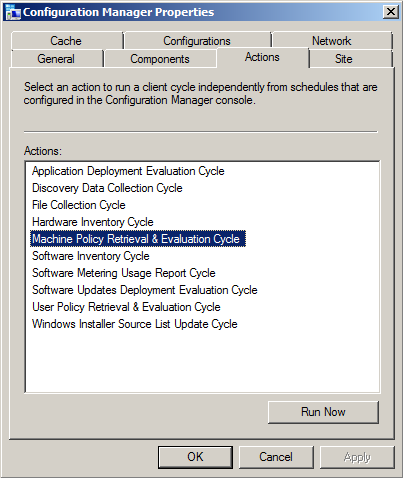
  • ActionName - (required) This is where the specific action name is entered.  I use my own abbreviated codenames to save on space (this log can easily grow very quickly with multiple users!).  For example, I use "MACHINE_POLICY" to indicate "Machine Policy Retrieval and Evaluation", and "HWINV" to indicate "Hardware Inventory Cycle", and so on. (see image below for the list of default available actions for ConfigMgr 2012 clients)
  • Network - (required) This is for storing the AD domain name or the CM site name, the choice is yours and it really doesn't matter, but I made it mandatory so you can modify "NOT NULL" to "NULL" if you prefer.  It's just there to enable filtering on specific environments when needed.
  • Comment - (optional) This is for entering a comment if desired. I had initially intended this to be a [textarea] field on the web form, but decided to skip it to avoid unnecessary data.
  • AddedBy - (required) This stores the username of the person who submitted the request from the web site form.  For this to work, you MUST enable "Windows Authentication" in IIS for the web site or the virtual folder.  If you leave it on "Anonymous" there won't be any way to track who the user was unless you build in forms-based authentication (yuck!)
  • DateAdded - (required) This stores the date and time when the request was submitted
  • DateProcessed - This is initially NULL until the script comes along and processes the request, at which time it enters the date and time it was completed.
  • ResultData - This is also initially NULL until the script updates the row when the request has been processed.
Security

I chose SQL accounts for this setup, but you could use mixed-mode.  I do a lot of things by force of habit, so SQL accounts are pretty common for my work, so I tend to use mixed-mode setups.  In any case, I have two user accounts for this system:
  • amsManager - This account has rights to SELECT, INSERT, UPDATE and DELETE data and rows in the table.  I use this account from within the web application to insert new records, and it's used in the script (discussed later) to update the rows when requests are processed.
  • amsReadOnlyUser - This account only has SELECT rights, and is used for any applications/scripts/processes where someone needs to be able to consume (read) the data but not have the ability to modify or delete anything.

The Script

Now that the database is created, the table created and the permissions applied to the table, the next step is getting a script to work with it to do the heavy-lifting.  You can do this with almost any language, including PowerShell, VBscript, KiXtart, Perl, Python or whatever.  As long as the language you choose can do the following things it should work fine:
  • Open a database connection to query (read) and update data in the rows.
  • Execute shell operations to call external .exe applications (SendSchedule.exe), as well as invoke COM interfaces such as WMI and SWBEM requests.
Again, out of habit, I chose VBScript.  I was going to do it with PowerShell, but I got lazy.  Here's the code, but I have to mention that one key "action" is left out for now, and that's the "Re-Run Advertisement" option.  The reason is that I'm still working on this part and having some challenges.  When I get it working reliably and consistently I will post an update:

'****************************************************************
' Filename..: ams_client_tools.vbs
' Author....: David M. Stein
' Date......: 11/11/2012
' Purpose...: invoke ConfigMgr Agent "client actions" on remote clients
'             using a SQL table and WMI invocation
' SQL.......: DB1\AMS
' Comment...: Beware of line-wrapping!  If I wrap it I used [& _]
'****************************************************************
Dim query, conn, cmd, rs, objShell, scriptPath, recID, objFSO

' controls DebugPrint output
Const verbose = True

' database connection
Const dsn = "DRIVER=SQL Server;SERVER=DB1;database=AMS;UID=amsManager;PWD=P@ssw0rd$123;"

' database table name
Const strTable = "dbo.ClientToolsLog"

'------------------------------------------------------------
scriptPath = Replace(wscript.ScriptFullName, "\" & wscript.ScriptName, "")
'------------------------------------------------------------
' constants used by this script (abridged format)
'------------------------------------------------------------
Const adOpenDynamic = 2 Const adOpenStatic = 3 Const adLockReadOnly = 1 Const adLockPessimistic = 2 Const adLockOptimistic = 3 Const adUseServer = 2 Const adUseClient = 3 Const adCmdText = &H0001 Const adStateClosed = &H00000000 Const adStateOpen = &H00000001 Const ForReading = 1 Const ForWriting = 2 Const ForAppend = 8 Const TristateUseDefault = -2 Const TriStateTrue = -1 Const TriStateFalse = 0 '------------------------------------------------------------ DebugPrint "info: begin processing..." Set objShell = CreateObject("Wscript.Shell") query = "SELECT * FROM " & strTable & _ " WHERE DateProcessed IS NULL ORDER BY ID" Set conn = CreateObject("ADODB.Connection") Set cmd = CreateObject("ADODB.Command") Set rs = CreateObject("ADODB.Recordset") On Error Resume Next conn.ConnectionTimeOut = 5 conn.Open dsn If err.Number <> 0 Then wscript.echo "fail: database connection failed" wscript.quit(err.Number) Else On Error GoTo 0 End If rs.CursorLocation = adUseClient rs.CursorType = adOpenStatic rs.LockType = adLockReadOnly Set cmd.ActiveConnection = conn cmd.CommandType = adCmdText cmd.CommandText = query rs.Open cmd If Not(rs.BOF And rs.EOF) Then xrows = rs.RecordCount counter = 0 Do Until rs.EOF recID = rs.Fields("ID").value compName = rs.Fields("ClientName").value actName = rs.Fields("ActionName").value actCode = ClientActionCode(actName) addBy = rs.Fields("AddedBy").value DebugPrint "record id...... " & rs.Fields("ID").value DebugPrint "client name.... " & compName DebugPrint "action name.... " & actName DebugPrint "action code.... " & actCode DebugPrint "requestor...... " & addBy DebugPrint "request date... " & rs.Fields("DateAdded").value DebugPrint "network........ " & rs.Fields("Network").value If IsOnline(compName) Then retval = ExecAction(compName, actName, actCode, addBy) Else DebugPrint "result......... offline!" retval = 100 End If DebugPrint "result......... " & retval MarkRecord recID, retval DebugPrint "-------------------------------------------" rs.MoveNext Loop DebugPrint "info: " & counter & " processed" Else DebugPrint "info: no records found" End If rs.Close conn.Close Set rs = Nothing Set cmd = Nothing Set conn = Nothing '------------------------------------------------------------ ' function: return datestamp formatted for log file use '------------------------------------------------------------ Function LogTime() LogTime = FormatDateTime(Now, vbShortDate) & " " & _ FormatDateTime(Now, vbLongTime) End Function '------------------------------------------------------------ ' function: return TRUE if computer responds to a PING request
' note: this features can be impacted by firewall settings!
'------------------------------------------------------------

Function IsOnline(strComputer)
  Dim objPing, query, objStatus, retval
  If strComputer <> "" Then
    query = "SELECT * FROM Win32_PingStatus WHERE Address='" & strComputer & "'" 
    Set objPing = GetObject("winmgmts:{impersonationLevel=impersonate}")._
      ExecQuery(query)
    For Each objStatus in objPing
      If Not(IsNull(objStatus.StatusCode)) And objStatus.StatusCode = 0 Then
        IsOnline = True
      End If
    Next
  End If
End Function

'------------------------------------------------------------
' function:
'------------------------------------------------------------

Function ClientActionCode(actionName)
  Select Case actionName
    Case "MACHINE_POLICY":
      ' Machine Policy Retrieval and Evaluation Cycle
      ClientActionCode = "{00000000-0000-0000-0000-000000000021}"
    Case "HWINV":
      ' Hardware Inventory Cycle
      ClientActionCode = "{00000000-0000-0000-0000-000000000001}"
    Case "SWINV":
      ' Software Inventory Cycle
      ClientActionCode = "{00000000-0000-0000-0000-000000000002}"
    Case "DISCOVERY":
      ' Discover Data Collection Cycle
      ClientActionCode = "{00000000-0000-0000-0000-000000000003}"
    Case "RERUN_ADV":
      ' Re-Run Advertisement
      ClientActionCode = "RERUNADV"
    Case "INST_SOURCE":
      ' Windows Installer Source List Update Cycle
      ClientActionCode = "{00000000-0000-0000-0000-000000000032}"
    Case "UPDATE_SCAN":
      ' Software Updates Scan Cycle
      ClientActionCode = "{00000000-0000-0000-0000-000000000113}"
    Case "AMT_PROV":
      ' AMT Auto Provisioning Policy / Out-of-Band Mgt Scheduled Event
      ClientActionCode = "{00000000-0000-0000-0000-000000000120}" 
    Case "BRANCH_DP":
      ' Branch Distribution Point Maintenance Task 
      ClientActionCode = "{00000000-0000-0000-0000-000000000062}"
    Case "UPDATE_DEP":
      ' Software Updates Deployment Evaluation Cycle 
      ClientActionCode = "{00000000-0000-0000-0000-000000000108}"
    Case "SW_METERING":
      ' Software Metering Usage Report Cycle 
      ClientActionCode = "{00000000-0000-0000-0000-000000000031}"
    Case "USER_POLICY":
      ClientActionCode = "{00000000-0000-0000-0000-000000000027}"
    Case Else:
      ClientActionCode = ""
  End Select
 
  ' list of codes for future inclusion...
  '
  '{00000000-0000-0000-0000-000000000010}  File Collection
  '{00000000-0000-0000-0000-000000000021}  Request machine assignments
  '{00000000-0000-0000-0000-000000000023}  Refresh default MP
  '{00000000-0000-0000-0000-000000000024}  Refresh location services
  '{00000000-0000-0000-0000-000000000025}  Request timeout value for tasks
  '{00000000-0000-0000-0000-000000000026}  Request user assignments
  '{00000000-0000-0000-0000-000000000032}  Request software update source
  '{00000000-0000-0000-0000-000000000061}  DP: Peer DP status report
  '{00000000-0000-0000-0000-000000000062}  DP: Peer DP pending status check
  '{00000000-0000-0000-0000-000000000111}  Send unset state messages
  '{00000000-0000-0000-0000-000000000112}  Clean state message cache
  '{00000000-0000-0000-0000-000000000114}  Refresh update status
End Function

'--------------------------------------------------------
' function: 
'--------------------------------------------------------

Function ExecAction(clientName, actionName, actionCode, userID)
  Dim strCmd, result

  DebugPrint "info: executing action request for " & clientName

  If actionCode = "RERUNADV" Then
    ' result = RerunAdv(compName, advID)
    ' [[ I will cover this in part 4 of this article ]]
    result = 200 ' denotes request was ignored (for now)
  Else
    strCmd = scriptPath & "\SendSchedule.exe " & actionCode & " " & clientName
    wscript.echo "info: command = " & strCmd
    result = objShell.Run(strCmd, 1, True)
  End If

  '--------------------------------------------------------

  ExecAction = result

End Function

'------------------------------------------------------------
' function: 
'------------------------------------------------------------

Sub MarkRecord(recID, pVal)
  Dim query, conn, cmd, rs

  wscript.echo "info: marking record completed..."

  DebugPrint "info: id = " & recID & " / result = " & pval

  query = "SELECT * FROM " & strTable & " WHERE id=" & recID
 
  Set conn = CreateObject("ADODB.Connection")
  Set cmd  = CreateObject("ADODB.Command")
  Set rs   = CreateObject("ADODB.Recordset")
 
  On Error Resume Next
  conn.ConnectionTimeOut = 5
  conn.Open dsn
  If err.Number <> 0 Then
    wscript.echo "fail: connection failed"
    wscript.quit(err.Number)
  Else
    On Error GoTo 0
  End If
 
  rs.CursorLocation = adUseClient
  rs.CursorType = adOpenDynamic
  rs.LockType = adLockPessimistic
 
  Set cmd.ActiveConnection = conn
 
  cmd.CommandType = adCmdText
  cmd.CommandText = query
  rs.Open cmd
 
  If Not(rs.BOF And rs.EOF) Then
    rs.Fields("DateProcessed").value = Now
    rs.Fields("ResultData").value = pVal
    rs.Update
  Else
    DebugPrint "error: no records found"
  End If
 
  rs.Close
  conn.Close
  Set rs = Nothing
  Set cmd = Nothing
  Set conn = Nothing

End Sub

'------------------------------------------------------------
' function: verbose echo printing
'------------------------------------------------------------

Sub DebugPrint(s)
  If verbose = True Then
    wscript.echo s
  End If
End Sub

What The Script Does

As I mentioned before, each time the Scheduled Task runs, it calls the script.  The script performs the following actions in the order/sequence listed below:
  • Opens a Connection to the database using ADO (COM) with SQL user permissions
  • Submits a Query for all rows where the DateProcessed value is NULL (indicating the request has not been processed yet).  The results are obtained as an ADO RecordSet object.
  • Iterates the RecordSet rows to gets the remote Computer Name, and ActionName field to determine the specific things that need to be done for the requested action (for example: look up the Action Code GUID)
  • Initiates a WMI (Win32_Ping) request to determine if the remote computer is online.
    • If not online, the ResultData column is updated with a value to indicate the client was offline
    • If online, the Action is processed...
  • Executes the requested Action:
    • If a "Client Action" is requested: Open a Shell session using WScript Shell object (COM) and executes the SendSchedule.exe application with the appropriate GUID for the Action and the name of the remote computer.  Gets the result/exit code from the SendSchedule process.
    • If "Re-Run Advertisement" is requested:  (to be continued)
  • Updates the database table row by entering the appropriate result code (ResultData) and the timestamp of the completion (DateProcessed)
  • Exits
Not really complicated actually.  This is a pretty straightforward and common process for interacting with database tables with ADO.  You could separate the requests and the results into two tables if you prefer, but I'm not shooting for 3NF or 4NF here.  I'm too lazy for that much work.

The Scheduled Task

This is where the Security aspect comes into play.  You need to execute the script under a context which has permissions to invoke the Configuration Manager Agent on remote computers over your network from a WMI interface.  I created a special Domain user account for this and added to the local Administrators group on every desktop and laptop computer using Group Policy and Restricted Groups.

Before setting up the Scheduled Task, I highly recommend testing the script directly.  Open a session (interactive login or use RunAs to open a CMD console) under the credentials of the user account you intend to use for the Scheduled Task.  Test the script until you are satisfied it works correctly.

As a force of habit, I use a simple BAT script to wrap my calls to VBScript to I can pipe the output (wscript.echo or DebugPrint results) to a log file if I want.  Or you can do it from within the VBScript code using basic FileSystemObject (FSO) methods if you prefer.  Either way, it can be helpful to generate a log file to diagnose issues where the database is unavailable for some reason when the scheduled task is executed.

The Schedule you choose is entirely arbitrary.  I run mine at ten (10) minute intervals all day, every day.  It also doesn't matter how you choose to create the Scheduled Task.  You can obviously use the GUI, or do it from the command line using SchTasks.exe, or from a script or whatever.

Summary

All of this I've covered here is essentially the "back-end" of the process.  I hope it you find it useful and helpful.  Let me know by posting a comment below?  In the next part of this article I will delve into the web form and the user interaction aspects.

Tuesday, October 9, 2012

Configuration Manager: Database Exploration, Part 2 - Notes

Before I continue on with this is "theme" that I've started, there are some very important issues I need to discuss.  Rather than boring you with a long introduction, I will just dive in and hit each one as I go.  I'll warn you that this is article is taking a sharp turn into a dark tunnel of seriousness.  No joking around here.  Very unlike my usual goofy stuff, but it's important to cover this before I continue on.

SMS Provider vs. SQL Server

From a "purely technical" aspect, you can interact with, and manage, a Configuration Manager site data store through the SMS Provider interface, or through SQL Server (ADO or ADO.NET, etc.), however, you absolutely NEED to be careful to avoid some easy mistakes.  This is all within the context of building custom applications which interface with your Configuration Manager infrastructure.  This is also regardless of whether you are working with Configuration Manager 2007 or 2012.
  • While you can query (retrieve) information from either interface, the SQL interface is usually much faster to execute. I'm obviously talking about using the ADO or ADO.NET pipeline.  However...
  • NEVER attempt to update anything directly through the SQL Server interface! All operations that involve modifying site resources, collections, or settings (and so on), should be performed through the SMS Provider only.  Some examples include adding a Package to a Distribution Point, or adding a Resource to a direct-membership Collection.  Going around the SMS Provider can cause serious problems for your Configuration Manager site.  I'll spare you the lengthy explanation of how the inboxes and outboxes are spooled and de-spooled in the background, and how it all weaves in and out of the database 
  • Executing intensive queries (or updates, for that matter) against the SMS Provider interface can impact Configuration Manager processing, especially if performed at peak processing times (discovery cycles, software deployments, etc.).  The net result may cause a backlog in data processing and show up in your component status logs as well.  Try to limit such activity to off-peak times or days to avoid impacting Configuration Manager itself.
  • Executing intensive queries directly against the site SQL Server database may also impact performance, and should be carefully monitored by using SQL profiling and performance logs to determine the level and duration of such impact.
  • Use the most efficient tool to handle a specific task:  If you are post-processing query results and spending a lot of code cycles calculating date differences, cost values, or mapping integers to string values - do that instead within the query!!!  SQL is so much faster and more efficient at many common data manipulation tasks than standard 3GL, 4GL programming languages or scripts.
  • Minimize Connections!  If you have code firing off multiple queries, be sure to pay close attention to how you open and close your data connections.  If you can use one connection for all of your queries, do it.  It will save time and reduce the overhead impact on the data store host itself. This is true for using SQL Server or the SMS Provider.

Database Separation and Isolation

Most any DBA with a fair amount of experience will advise you to avoid direct interaction with "mission critical" data stores if you can instead use a replica.  It really boils down to how time-sensitive the information is that you rely upon to accomplish the required task.  If you need to generate inventory reports, and your inventory is only updated every day or week, you probably could do just fine by pointing your queries at a replica database and avoid adding more overhead on your production database.  It's just one more thing to consider if you are worried about performance impact.

The Right Tools

If you haven't used SQL Server Management Studio, or haven't used it much, give it a try.  In fact, if you're testing your queries through your code debugger, STOP.  That's a bad habit and can yield some very skewed results.  As the old saying goes: "Just because you CAN, doesn't mean you SHOULD".  I can't count the number of times I've asked a programmer to minimize their code debugger and run the same queries in the SSMS console, and seen their reaction to how different the performance can be.  It can really highlight where program code is slowing down a conversion or calculation step that could be more efficiently executed within the SQL statement.  

It's not really about SSMS.  Any tool that lets you model and execute T-SQL statements directly against the data store will work fine.  It's when you run the SQL expressions from within the program code that things can get twisted.  Eliminating secondary and tertiary processing layers ensures you get an accurate, honest and clear picture of what's going on.

Safety

Living on the edge is cool, if you get paid to do commercials for Red Bull.  For the rest of us, it helps if we take certain precautions to avoid letting simple mistakes explode into disastrous calamities.  If you have the option of a test environment, use it.  If not, employ test-environment methods to mitigate unintentional impact on production systems.  It's really that simple.

Friday, February 17, 2012

A Missing Link of Software Life-cycle Management, with Fries and a Coke

Software Life-cycle Management.  It's a term most often tossed around by drunk vendor reps at conferences and on the expo floor, when shoving brochures in your drunken face as you stagger through the gauntlet of fellow drunken attendees.


In basic, non-intoxicated terms, it refers to the overall management of a software product from the time it arrives in your mail room (or downloaded onto a storage device), through the preparation phase, testing and deployment phase, through the murky update and patch phase, to the upgrade phase and finally: the retirement phase.  It mirrors the human life cycle in some respects, but then again, anyone who's read a Chinese fortune cookie already knew that.  I'm such as genius.  I'm also on my third beer.  In any case...

There are some rather interesting twists in the cycle that can present challenges to modeling a logistical and procedural assembly line automation approach.  These are primarily focused on the naming aspects.  Rather than try to use a lot of multi-syllabic terms and pretend to be clever, I'll just spew it like a college plebe during rush week...

You get a disk with something called "Fubar 2012" made by "Snafu Corporation".  You dig into it and find out it uses a "setup.exe" bootstrap that runs an embedded .MSI installer package.  You manage to extract the .MSI and are able to ride that bitch like a Iraqi prisoner in Abu Ghraib on a Saturday night in the Summer of 2009.  I'm sorry, is it too early for Abu Ghraib jokes?  No disrespect intended.  Let me get back on the train of thought....   The .MSI is named "fb12.msi" and when you install it, it creates a program entry in the ARP list for "Snafu Fubar Enterprise 2012" version "2.12.01".

You pop open your Configuration Manager console and create a "New Package from Definition" and select the fb12.msi.  It reads the manifest and fills out the properties as follows:

Product: "Fubar Enterprise"
Version: 2.12.01
Publisher: "Snafu Corporation"

You modify the Program properties to suppress notifications and all the other usual mumbo-jumbo, add the first DP server, and it looks good.

Then you create a new Advertisement in Config Manager and name it (manually) "Fubar Enterprise 2012" and assign it to a Collection named "Fubar 2012".  You drop a test computer in the Collection and pull the trigger.

You look at the computer and sure enough, the installation is there, and shows up in the ARP list as "Snafu Fubar Enterprise 2012", version 2.12.01, by publisher "Snafu Corporation".

The Configuration Manager client (agent) runs a software inventory scan and reports back an ARP product named "Fubar Enterprise 2012".  The Software Products table receives the entry for the executable itself as "Fubar Enterprise", version 2.12.01, publisher "Snafu Corporation".

Now.  How does the inventory report intuitively "know" that this discovered product is directly associated with the Advertised Package?

It doesn't.

This is where third-party products step in, or, where developers step in (ok, ok, I'll be honest:  they stagger and stumble in) and create a tertiary associative relationship via some application magic.  This is sometimes referred to as creating a "tenuous link", meaning that it's a arbitrary, coerced relationship that must be manually (humanly) established and maintained.

Why does any of this matter?

That's a great question and I'm glad you asked.  I'm even glad that *I* asked on your behalf, and I'm glad to be glad that you might be glad that I'm glad.  Clear as mud?  Ok then.

The reason usually becomes clear when you work in a large enterprise environment, and you enter into a major project with lots of team players which include Project Managers and bean counters.  These sorts of people like to analyze numbers and costs.  They will see all these Advertisements and say "wow! you guys make a lot of packages!  That's awesome!"   Then they will see the inventory reports and say "wow! You guys deal with a lot of installed applications!" and then after few bong loads they will often ask the following question:

"How do you know how many of all these installed applications are installed by your packages?"

Dum-de-dum-dummmmmmm....

It goes way deeper than this of course.  You might already see where this is going (or could go).  I'm currently in a place where it not only "has gone there" but all the way to the other goal line.  We have to produce detailed metrics to assess package-to-install relationships, licensing aspects, upgrade and cost aspects, and .... AND.... match that up to distribution statistics (DP server status indicators) and directly on to installation metrics (successes, fails, waiting, etc.).  In other words: a Soup to Nuts, end-to-end monitoring and reporting system.

We have that now, all that and web-based.  And it lets us manage the process via the web without having to rely entirely on the MMC console apps.  Yes, it began from the seeds planted by Windows Web Admin, but it's as far evolved and removed from that as today's government is from George Washington's time.  I'm patting myself on the back, and I need to stop.  It's unhealthy to do that.  Hold on... I had to take another sip... ok.

Where was I?  Oh yeah.  It's 2012 and while many aspects of our ever-advancing technical world are evolving at a crazy pace, some smaller aspects are left hidden in the cracks.  And these smaller aspects matter.  They will matter even more as regulatory pressure, cost efficiency, and process automation priorities continue to rise.

Think about what parts of your own procedural environment are left to the thought processes of individual employees.  Think about how many intricate, yet vital, links in your automation workflow are not entirely automated.  Those are actually direct indicators of process inefficiencies.  Those are the things we absolutely have to focus on, double-down, and figure out how to formalize them into a conduit that can be automated.  The means of automation are not important.  The crucial aspect is that the process, and each process step or component, is well-defined, and therefore capable of being automated.

Tying up this small, but important, link in the chain of software management is just one example of many.  Think about all the "what-if's" that can play into this and toss a wrench in to crash it like a broken space shuttle.  What about home-grown applications?  What about proxy applications (remember those?  I discussed those earlier and mention them in my book)?  Those are the applications that really don't exist, but we give them names out of convenience and familiarity.  Humans are great a filling in these missing links with our minds.  But our minds are transient.  Business needs to be non-transient in order to survive.  And I need another beer.   Cheers!

P.S. - by the way, that nifty graphic in the first paragraph was created by me using PowerPoint 2010 in precisely 3 minutes, after consuming three glasses of ice-cold Belgian Tripple Ale.  You can do it too.