Showing posts with label computers. Show all posts

Thursday, August 7, 2014

How to Tell Real IT Pros from the Fakes

This post is aimed at folks that don't work in an office with an IT staff.  Maybe you're at home (working or otherwise) and need some help with your computer, printer, smartphone, Internet or wireless network, and you are concerned about how to find someone you can really trust to help. It's a big, scary world out there, and it's getting tougher to find people you can trust.  Fear not!  Here are some basic tips for separating the real from the fakes.


Tip 1 - Find Them First

Real IT pros don't want to help.  That's right.  Younger, over-eager, inexperienced IT folks are usually quick to take on new challenges.  Older, seasoned pros however are over that crap.  They've been there, done that, got the t-shirt and the antibiotics too.  They're tired of the crap they deal with all day, every day.  Would a carpenter want to come home from work to build another cabinet at home every day?  I rest my case. So, if anyone jumps up to offer to help you with computer issues without hesitation: don't trust them.  A real IT pro will only be persuaded by compensation offerings (see tip 3).

Tip 2 - Attacking the Problem

This one is tricky.  If you already have something and it just needs fixing, that's one thing.  If you don't have it yet, and are looking for help deciding what to buy, that's another.

If you have issues with an existing contraption, the person helping should ask "when did it start happening?", and then continue from there.  If you're looking for help buying something new, they should ask "what is it that you are trying to do, exactly?"

Tip 3 - Compensation

If they insist on money (cash), counteroffer with pizza, beer or power tools.  Real IT pros will work for almost anything they can use to fix their own non-IT problems back home.  Food is usually very high on their list.  If they don't seem impressed with an offer of good food, they're fake.

Tip 4 - Self-Esteem

If you ask "how well do you know networking?" or "are you really good with servers?", and the other person answers with "I'm an expert at..." or "absolutely!", walk away fast!  I real IT pro will never admit to having knowledge about anything unless it's during a job interview.  Any other time, they will deny any and all knowledge about anything containing the letters "i" and "t" in close proximity.

There you have it.  Four easy tips you can remember that will help you identify, and bribe a good IT professional to help you solve your IT problems.

Good luck!

Wednesday, June 11, 2014

Asset Inventory 101 - Myths and Realities

This post is the result of trying to explain IT inventory to multiple people, multiple times, and them still not "getting it".  Rather than wear myself out, which I will probably still do anyway, I plan on pointing them here to read my thoughts on it, and I can then go back to babbling incoherently to myself.  I promised to post a "tech-oriented" article soon, but this is borderline, so nanny-nanny-boo-boo, I'm counting it as tech-oriented.

If you ask me about Inventory, I will ask if you read this article.  If you say "no", I will tell you to read this article and walk away, probably while laughing.  If you say "yes", I will say "go back and read it again", and laugh even louder.

What is Inventory?

Definition...

(noun):  A complete list of the things in a place".

(verb):  the act or process of making a complete list of the things that are in a place : the act or process of making an inventory". - Merriam-Webster's Dictionary

Go back and read that again.  Got it memorized? Okay, let's look at the noun side...

Inventory Science 101

What is "inventory" really?  Basically, it's supposed to be about tracking and reporting what you own, or what you have, and where it's located.  But there's usually a lot more to it than that.  Who's using it.  What it's used for.  Who bought it.  Who pays for it.  How it is configured.  What it's related to, or associated with.

There's also the Manufacturer. Model. Part Number.  Serial Number.  Contract number(s). Department/Division/Sector/Group/Team/Project names and numbers. And let's not forget the abstracts like category, type, family, class, species, and all that.

The goal of inventory, and inventory tracking efforts is, or should be, to confirm existence, disposition and ownership of assets.  The real goal being a financial implication of course.  What do you own?  Where is it?  Who is using it?  What is it used for?  Who's paying for it?  When does it "expire"?

The most common method for gathering and tracking inventory is what is commonly referred to as "input-output differential".  Capture what comes in (purchase order, or birth certificate), what goes out (inventory record audit, or death certificate) and finding the gaps.  The gaps are where the fun really begins.

What happened to it?  Lost? Stolen?  Transgender operation?  Was it really the property of the organization, or was it loaned to them for temporary use?  Was it a demo from a vendor?  The list goes on and on.

Just as a Census tries to verify you're still among the living, breathing creatures, who are paying taxes and adding to landfills... so are the aims of products like Microsoft System Center Configuration Manager, Solarwinds, Tivoli, Kaseya, LabTech, and (cough-cough) several products I've developed in the past as well.

So, in addition to what came in the door, and what is known to have departed, there is now a third status of "what's it doing now?"  Things that can be poked at to verify where and what an asset is, include Active Directory, network monitoring systems, PING, and so on.  An "Asset Manager" job title can often involve a lot of legwork.

What Constitutes "Things" and "Places"?

If we use YOU as a metaphor, then a human being is an inventory asset or item.  The place would be (or could be), your home address.  It could also be your employer's address, or your car (VIN or license plate).

Now, think of all the "things" that pertain to labeling YOU as an entity.  Your birth certificate.  Driver's license.  Voter registration.  Tax bills.  Credit cards.  Bank accounts.  On and on.

Do any of those things GUARANTEE your existence?  No.  Do they confirm you are still among the "living" (I'll leave that for you to decide on the definition)?  No.  They are simply artifacts that help SUPPORT the assertion that you exist.

Metaphorically Speaking:  Computers

Now that we've strolled off into metaphor-land, let's bring it back to the meat-and-potatoes: Computer assets.  Desktops, laptops, tablets, smartphones, appliances, routers, hubs, switches, printers, power supplies, storage units, MODEM's, peripherals of all kinds, you name it.

What is the birth date of a computer?  The date it was purchased?  The vendor warranty start date?  The OS installation date?  The technician-installation date?  If you base it on the OS install date, and you reinstall the operating system, what happens to the birth date then?  Does it fall back to something else?

If you purchase it, and it takes a while to get from the warehouse, to the workbench, to the truck, to the technician to being delivered and setup, which event date are you picking as the "start" or "birth" date of that asset?  Have you consulted your Finance folks about this?  Your attorneys?  You should.

When you record the purchase and deployment of this asset, what then?  Do you track it during the rest of its life?  Do you track the retirement and disposal of it too?  Some places do.  Some don't.  Some are required by law to track some, or all of this.  Which are you required to track?

Just because you "Can", does that mean you "Should"?

If you are an IT person working for someone else (i.e. not self-employed), and you haven't sat down (or consulted with) someone in a legal and/or financial role in your organization, I strongly recommend you do so before embarking on any effort to track and report inventory of any kind.  I cannot stress that enough.

Even if you are self-employed, talk to an accountant or legal advisor about whether you need to track thigns, and what to track.

Some questions to ask:

  • What are the tax implications?  
  • What are the support contract and cost implications?  
  • What are the regulatory compliance implications?  
  • What are the IT support implications?  
Did you notice I put IT last in the list?

From my experiences, most businesses track more than they need to, and ignore things they shouldn't ignore as well.

Ah, Yes:  Software

Just when the folks feel good about their grasp of tangible hardware inventory, we open the gates and let the starving lions and alligators into the arena:  software licensing.

Definition:  Software = "the programs that run on a computer and perform certain functions" - Merriam-Webster's Dictionary

What does that mean?  What is a program?  Is that Microsoft Word?  Is that the Snipping Tool or Narrator feature?  Is that .NET Framework 4.5?  Is that Java Runtime?  Is that a DLL or COM file?  Is it a locally stored App-V or ThinApp reference?  Is that a shortcut to a MED-V or remote VDI resource (desktop or application)?  Is that a URL to a web application?  What is it?

What does that mean?

If you query a computer for what software it has installed, where do you begin?  Does it all exist in the Control "Add or Remove Programs" list?  Usually.  But not always.  How about crawling through that icky Registry?  More stuff, sure, but is it easy to parse and understand?  Hmm.  How about crawling the good old file system and parsing through EVERY SINGLE FILE that is known to have an executable capability?

The answer is yes.

Configuration Manager, and products similar to it, often dissect a computer from many angles.

This includes files, folders, the Registry, and my personal favorite: WMI.  Slithering through the various CIM repository stacks can yield all sorts of juicy bits of data about hardware and software.

But... Is this really what you're after?

So you have a product installed.  Now what?  Does that constitute a 'license'?  What is a license?  What kind of license is it?  Per-machine?  Per-user?  Per-CPU?  Per-network?  Per-domain or site?  Per-company?  Open Source?  What?  And what about FlexLM type licensing, where the node doesn't matter as much as the total, concurrent usage limit?

If you have the option to use floating/network licensing for groups of similar products, I always recommend that option if you can afford it.

Software Licensing Audits

If you've ever witnessed a license audit from an external investigation, it's not fun.  They tend to come in one of two flavors:  Vendor and BSA.  If the vendor audits you, that's good.  They want to keep your business, so they will try to negotiate terms to help avoid losing your business, if possible.  If the BSA, or another third-party entity, comes knocking, swallow whatever pills you have left and take a deep breath.  It may very well be an unpleasant experience, as they are paid by levied penalties and have no need to retain your business.

So, while you can get sloppy about hardware inventory, I would not recommend you take the same light-hearted approach to software inventory.  I've seen "settlements" applied that nearly ended a business due to the costs, but thankfully, in none of those situations was I aware or implicated of the neglect prior to the doors getting kicked down.  Don't be one of those businesses.

Okay, so that covers a bit of hardware and software.

Simple as multivariate Calculus and molecular bonding, and clear as mud.

Are you starting to drink yet?  You will.

Summary

If anyone says there is, or should be, "one inventory source" to answer all of these questions, they are brain damaged or stupid.  The desire is noble.  The reality is clear: a singular source of "authoritative" inventory data is impossible.  It has to be derived and reconciled from multiple angles.

Think about that every time you're walking through CostCo, Sam's Club or BJ's and you see a clerk scanning shelves to do "spot check inventory".  If there was one system to track and verify all of it, that wouldn't be required.

Every time I sit in a meeting where some vendor comes in to pitch some magical product to report all of their inventory without any outside help, I look at my shoes, smile and think about my next alcoholic beverage, saying to myself "here we go again..."


Thursday, September 26, 2013

10 Questions: with David Stein

David M. Stein

Introduction

Really? Is this necessary? If you read my stupidness, then you already know who I "am". If true, you'll probably close this and go back to reading Facebook.  If you don't, well, congratulations: you finally reached the end of the Internet.  My apologies.

Basic bio stuff:  I'm a semi-quasi-successful IT guy working in southeastern Virginia.  I've worked in the CAD/CAM world building weird applications for weird business processes, and moved on to "mainstream" IT stuff, dealing with Windows, Configuration Manager, SQL Server, a bunch of goofy

The Questions

Dave:  First off: what's with the "M" in your name? Do you feel like it adds distinction, like 'Booker T. Washington' or 'Alfred E. Neumann'?

Dave 2:  Alfred was cool. My first cat was named Alfred. Actually, I use my middle initial to differentiate my books on Amazon from another "David Stein", who sells books about Bondage and S/M stuff. No offense intended towards anyone who likes that stuff, but I got tired of being asked if that was me.  The stuff I write about is nowhere near as interesting as that, I'm sure.

Dave 1:  How would you describe what you do for a living?

Dave 2:  Lucky!

Dave 1:  Why?

Dave 2:  I say 'lucky' because I'm a developer by nature, working in roles as analyst/engineer/administrator, but using developer experiences to automate the shit out of anything I can. 

Dave 1:  Can you name some of your favorite musicians or bands?

Some of my favorite musicians would have to include Frank Zappa, Jeff Beck, Pink Floyd, Red Hot Chili Peppers, and U2. But I like a wide range of music, from Miles Davis and Stanley Clark, to Bob Dylan, to Eminem, wherever he is now. That's all mostly due to having once been an aspiring musician. 

Dave 1:  Oh yeah? What instrument did you play? And what particular situation can you recall that was funny or interesting from that time?

Dave 2:  I played drums and percussion. I also took piano lessons, so I dabbled a bit.  Some rock, some pop, some traditional Jazz also. I sat in with a country band once also.

I suppose one of my favorite situations would probably have to be when we were playing 'Hot for Teacher' (Van Halen) in a crowded club one night. Our lead guitarist was coming out of the big solo, doing his scale climb, where the drums follow along, going from a 4/4 thing through a 2/3 or 3/4 segment, whatever... And one of my sticks slipped away and nailed him directly in the back of his head. The spotlight was on him too. Perfect hit.  Talk about playing the wrong note at the wrong time.  Sorry, Clint. No hard feelings dude.

Dave 1:  What drew you away from music and into technology and computers?

Dave 2:  It was the early 80's, and I needed a job. Mostly for gas and beer, at the time. So many priorities back then, you know?  Construction didn't pay enough, nor did dish-washing, lawn-care, retail sales, or painting, so I went into Drafting. After a year doing manual drafting, the whole CAD (computer-aided design) thing came along. At first it was mainframes and workstations, then PC's came along, and then Windows and networking. 

While doing the PC CAD thing, I fell in love with AutoCAD and AutoLISP. It was the first time I was exposed to being able to tweak something to do what I really wanted.  I tried that with my dog, but he wouldn't do anything I asked unless I tossed food at him.  AutoLISP led to years of programming, climbing around on Navy ships, more programming, drinking and traveling, and more programming. But also a lot of drinking. It was the early 80's after all. 

Dave 1:  What kinds of things did you do with AutoLISP and AutoCAD back then?

Dave 2:  Shipbuilding has its own unique drafting standards.  Everyone thinks they are drawn the same way as houses and building or machine parts.  But, it involves its own specific way of doing dimensions, callouts, views, notes, references, and materials lists.  Even the sheet border formats are unique.  It got really annoying having to constantly change everything manually, or copy and edit.  So I wrote some utilities and menus to do it the "shipbuilding way", and that led to a new career path for me.

Dave 1:  So... programming did it? How did you end up doing Windows, AD, SQL and SCCM?

Dave 2:  Hoo-boy! How much time do you have?

(Dave 1: I'm not going anywhere. I am you after all, so, uhhh...)

Ok. Well, you asked, so... (Takes a reeeeeally long inhale)... While working at a particularly large shipyard, I was both their AutoCAD operations, and customizing it all to fit shipbuilding needs. It was a lot of work, but it was fun.  One of the guys in the infrastructure team brought donuts in a lot, so I brought jokes and somehow we got along (and I got fatter too). His name was Brett. He was a really cool guy too. Rest his soul. 

Anyhow, he was rolling out SMS 2.0, which was really new at the time, and he asked if I wanted to work with him to knock out two of the biggest hurdles at the same time: a thousand seats of AutoCAD and a new deployment system. 

Long story short: he got me into thinking about expanding my programming and introduced me to thing like WMI, WBEM, SQL, DCOM, VBscript, and larger perspectives as well. 

Dave 1:  You said, his name "was" Brett.  What happened?  Where is he now?

Dave 2:  About six-feet underground.  Long, sad, depressing story for another time.

Dave 1:  How many questions is that now?

Dave 2:  You're asking me?  Or, ugh, you? I mean... never mind. Continue?

Dave 1: Describe your home life.

Dave 2: A hard-working, creative and loving wife, of 25 years. Three crazy daughters, a wacky son, two weird dogs, and a cat that rules the humans around her. Our kids are ages 14 up to 23. All still at home. Still on my cell plan too, which is why I'm always working and still broke. 

Dave 1:  Do you consider yourself to be a good dad?

Dave 2:  You'd have to ask them that question. 

Dave 1:  Ok, moving along. You said you're broke?  How's that? You have quite a few books on Amazon, a fairly decent blog, and a good job, no?

Dave 2:  Yeah, well. It's complicated. I don't make much on book sales actually.  Maybe I should mix in some kinky S&M crap with my computer topics to pump the sales up?  Who knows.

Dave 1:  What aspects of current technology and the tech industry still excite you?  Which of them do you feel have been a disappointment?

Dave 2:  Ooh! Good questions!

On the good: Open source is still relevant, even with billions being spent to silence it all. Social media. Proliferation of cellular coverage. Mobile devices.  Maturing API stacks.  Faster and cheaper hardware.

On the bad: Social media. The misguided strategies of the big players. Over-hyped rushing to the "cloud". Too many web tech standards. Too many colliding acronyms. 

Dave 1:  Wait a minute. You mention "social media" for both good and bad?

Dave 2: Yep. I did. Good for catching up with long-lost friends, schoolmates, teammates, neighbors, and family. Bad for stirring up drama though. 

Dave 1:  Sheesh. Tell me about it. 

Dave 2:  I just did. 

Dave 1:  Oh, yeah right.  What's with your dislike of the "cloud" trend?

Dave 2:  Same as anything else: Everyone runs to it without stopping to ask why.  It's great for some things, like Microsoft Excel is, but when businesses grab it like it's the cure-all for every problem, they run into problems.  Sometimes that "solution" creates more problems than it solves, and it can be difficult to turn around and "go back" as well.

Dave 1:  If you had absolute control of America long enough to pass a short list of irrevocable laws, what would they be?

Dave 2:  (laughs quietly for almost a full minute...) Ok...

1. Free, High-speed internet to every home, apartment, school and business. 

2. Free, high-speed rail service between every city with at least 400,000 citizens. 

3. Bumperstickers which aren't funny would be punishable by public beatings. 

4. Repeating any rumor, as if it's fact, without passing a cross-examination test to prove you read the actual source facts, would be punishable by slow, painful, death.  For instance, when people blabber on "for" or "against" the so-called "Obama-care" bill, or some spending bill, whatever, but none of them actually read the bill itself.  If you haven't RTFM (ok, RTFB), then STFU, or submit to being electrocuted in the crotch for two hours on live TV while being force-fed liquefied used kitty litter.

5. Everyone would be implanted with an internal electric shock collar and everyone else would get a free remote activator.  That could be pretty interesting indeed.

6. I'm still working on number 6.  Next question?

Dave 1:  So, does that mean you're "for" or "against" the HCRA or so-called "Obama-care" bill?

Dave 2:  Next question?

Dave 1:  Last one.  What would be your ideal epitaph?

Dave 2:   (rubs chin and smiles) "I almost made it!" My second choice would be what my brother suggested, which is "I should have cut the green wire."

Dave 1: Ok, folks. I hope you enjoyed this interview as much as, ummm, "we" did?  For more info, search Dave out on LinkedIn, 4sysops, MyITForum, and Amazon but watch out for that other David Stein. 

Until we meet again: Love. Peace. Namaste, and all that. 


Wednesday, August 21, 2013

10 Questions: with Jeffery Hicks

Jeffery Hicks


Introduction

There are no doubt a lot of computer-related "scripting" languages in the world today, which is only a subset of the "programming" languages that exist.  Among the standouts today are the venerable Windows-platform related names like Batch, KiXtart, VBscript, JavaScript, as well as cross-platform names like Perl, Python, and one the came onto the IT scene relatively late:  PowerShell.

Microsoft may take a few lumps along their way from one success to another, but they've so far managed to earn the trust and respect of the majority of developers, administrators and engineers with PowerShell.  Now in its third version of existence, it has gained quite a lot with regards to both functionality and maturity.

Among the short list of people renown for pushing ahead in this newer realm are names like Jeffrey Snover, Don Jones, and one that I've come to know better in recent years: Jeffery Hicks.

Author, speaker, and an all-around nice guy, Jeff is another example that we don't have to shed our personality in order to master a new technology.  He remains very active on multiple web sites and forums; offering advice and help to both the experienced and the noobs.  One thing I will say is that if you get any PowerShell-related advice from Jeff, you should consider it.

Jeff's Profile (from his web site)

Jeffery Hicks is a Microsoft MVP in Windows PowerShell, Microsoft Certified Trainer and an IT veteran with 20 years of experience, much of it spent as an IT consultant specializing in Microsoft server technologies. He works today as an independent author, trainer and consultant. Jeff writes the popular Prof. PowerShell column for MPCMag.com and is a regular contributor to SMB IT Simplified and the Petri IT Knowledgebase.

Jeff is a regular speaker at conferences such as TechMentor, TechEd and WinConnections, often speaking about PowerShell, Active Directory, Group Policy and anything else than can make IT Pros more efficient and productive.

Jeff's Books include:

If he isn't writing books then he's most likely recording training videos for companies like TrainSignal .

You can keep up with Jeff  at his blog, on Twitter and on Google Plus


The Questions

Dave: Your name is very well known in the circles of PowerShell programming. What other programming languages do you like to work with (if any)?

Jeff:  I started with automation way back in the dark days of DOS 3.3 and batch files. From there it was to VBScript and eventually PowerShell. Back in the day I was a master of WordPerfect 5.1 macros!

Dave:  PowerShell seems to be mix of both powerful features and enough complexity to give some IT folks a bit of pause. What do you feel is the most misunderstood aspect of that language?

Jeff:  People think it is a scripting language like VBScript, or they think the blue console that they see is PowerShell. PowerShell is a management engine that is hosted by applications like CMD.EXE or the PowerShell ISE. It can be experienced interactively or the language can be scripted.

Dave:  If you were put in charge of the architecture and development of PowerShell, both as a language, and the associated tools and services, back in the "early days", would it be: (a) pretty much the same as it looks now, (b) a little bit different, but not radically different, or (c) radically different? If (c): how so?

Jeff:  Jeffrey Snover is famous for saying "to ship is to choose" so I'm not sure what else could have been done differently. Sure, remoting would have been nicer to have early on. The only other thing I might have done differently is not allow cryptic aliases like % and ?. But that's a personal taste issue more than anything. I know people see PowerShell examples using all sorts of cryptic aliases and think that they can never learn it.

Dave:  In the course of your travels, are there any particular places that rank as your "favorite" or those that you'd rather not return to?

Jeff:  Most of my favorite places probably come down to a great food scene like Las Vegas, Seattle and San Francisco. I also like places with great public transport, especially from the airport like Portland, OR. Also a good foodie city. And certainly training in places like Australia have to rank up there as a favorite destination.

Dave:  Where do you see PowerShell in five or ten years from now? Bigger and Fatter (with respect to features and capabilities, not bloat), or more Modular? Are you aware of any "huge" changes or improvements coming in the near future? (you don't have to give details)

Jeff:  I have no personal knowledge of anything that isn't already publicly available in PowerShell 4.0, but one area that I think we'll see a change is the ability to use PowerShell everywhere in the enterprise with the ability to manage more than just Windows servers. We want to be able to manage switches, routers, *nix boxes and more from our Windows 10 desktop using PowerShell vX. This doesn't take into account some new disruptive technology that barely exists now. The "cloud" as we know it today barely existed when PowerShell 1.0 was released.

Dave:  Are you the kind of geek that prefers to write code with music or TV in the background, absolute quiet, or something else?

Jeff:  I can't do TV or anything visual because I'm too easily distracted. But sometimes I'll put music on. I work at home so there are times I need music to mask what else is happening in the rest of the house.

Dave:  If you could merge any other programming or scripting language, or parts of it, into PowerShell, what would it be?

Jeff:  I don't think I have enough developer background to really answer this. PowerShell works just great for managing Windows systems because it is based on technologies, like the .NET Framework, that make Windows work in the first place.

Dave:  If you had never stepped into the world of computers and software, what do you think you would likely be doing for a living today?

Jeff:  Theater directing. Seriously. I have a MFA from Syracuse University but as they say, "Life is what happens while you're busy making other plans."

Dave:  How do you feel the rising interest in "cloud" services will affect or impact the scripting world?

Jeff:  I think there will be more of a demand. If your compute environment is in Azure or your users are locked into Office 365 and you want to manage everything efficiently, you'll need an automation engine like PowerShell. The days of going into the datacenter to logon to a server, or even using a remote desktop connection should be behind us. If they are not, you are most likely working harder than you need to.

Dave:  What do you feel the open source world could learn from the Microsoft world as it pertains to purely technological aspects? What about the reverse??

Jeff:  Again, not having much a developer background I'm not sure what I can add here. I don't think it is a matter of saying that one is better than the other or that one produces superior code. My take on open source is that if there is a problem, or someone wants to innovate, that it can happen much faster.

It also seems to me that many open source projects don't try to be everything to all people and accomodate all situations. Microsoft is often forced, in my opinion, to develop products and code that are backwards compatible. What could Microsoft create if they said, here's the new server and operating systems invented anew with noties to anything that came before.

Conclusion

I hope you enjoyed this second installment of "10 Questions" as much as I did.  If you are interested in learning more about Jeff's offerings, I encourage you to explore the links below.  Thank you!

JDH IT Solutions


Book: PowerShell Deep Dives (Manning Press, 2013)
Book: Windows PowerShell 2.0: TFM (SAPIEN Press 2010)
Book: Advanced VBScript for Windows Administrators  (Microsoft Press 2006)
Book: WSH and VBScript Core: TFM (SAPIEN Press  2007)
Book: Managing Active Directory with Windows PowerShell 2.0: TFM 2nd Ed. (SAPIEN Press 2011)
TrainSignal

Jeff's Blog
Twitter
Google Plus

Tuesday, August 20, 2013

10 Questions: With Johan Arwidmark

Note:  This is (hopefully) the kick-off segment to an ongoing series I want to do on interviewing some of the most influential geeks I've had the honor and luck of meeting or conversing with.  I hope you find these both entertaining and informative.  Thank you!


Introduction

If you work in a place where there are a lot of Windows-based computers, chances are you have an Systems Support Team, or maybe an IT Department, that supports them.  If that team is focused on efficiency, chances are they try to automate as many of the computer and software installations as possible.  If they are *really* focused, chances are they are using Microsoft Deployment Toolkit (MDT), or System Center Configuration Manager "OSD" (operating system deployment) to handle the heavy-lifting. And, if they even know what those tools are, they know the name: Johan Arwidmark.

Johan Arwidmark is the Chief Technical Architect at Knowledge Factory, a consulting firm based in Sweden.  You can find his articles on Microsoft's Channel9, MyITForum, Deployment Research, TrueSec, and probably a dozen other sites. You can also find his daily happenings on Twitter, Facebook, Google Plus, and several other social networking sites.  With his crazy schedule, it makes it hard for anyone else to claim "too busy" as a reason to not post a status once in a while.

While Johan was born and raised in Sweden, his name is known around the world as a trusted, valuable source of useful information for IT professionals.  A renown speaker, author and winner of nine (yes 9) Microsoft MVP awards, it is indeed difficult to search for information on things like MDT, OSD, USMT, WinPE, Config Mgr, or even "Windows Deployment", without seeing his name pop up in the results.  Often seen with his colleague, Mikael Nystrom, these two are great reasons enough to attend Microsoft's TechEd and MMS conferences every year, where they consistently pack the room.

I asked Johan if would be willing to do a ten-question "interview", and he agreed.  This alone is amazing for two main reasons: (1) I'm obviously *not* a famous magazine interviewer, and (2) Johan's schedule is insanely busy.  In any case, I am honored and happy to present this short interview for you to enjoy...


The Questions

Dave: When did you first try to customize or modify a computer? Can you recall what you tried to accomplish?

Johan:  I don't know if it really counts as customization, by I recall adjusting the 1530 tape drive head alignment  Next stop was probably soldering midi-contacts for my Amiga 500.

Dave: What does MDT mean to you from a personal aspect? How has it changed your life?

Johan: MDT drastically changed how I worked with windows deployment, before BDD/MDT I used to develop my own deployment solutions, and after BDD/MDT I have focused in customization rather than building from scratch.

Dave: Where do see MDT in five years?

Johan: Pretty much the same (I fear)…  In a dream scenario, MDT functions would replace OSD in WDS, and be part of core Windows.

Dave: In the course of your world travels, what trends do you see that might surprise most of us who only see our immediate surroundings? In other words: do you feel that IT professionals in the Middle East, or Spain, favor certain products or features than those living and working in Australia, Sweden, Canada, Japan or the US?

Johan: IT Pro’s work pretty much the same all over the world… I don’t see that much difference.

Dave: If you were given absolute control over Microsoft for one year, what changes would you like to insist upon?

Johan: Haha, first I would make MDT and Windows Setup into one single deployment solution, add some serious resources to the team, and remove all other setup solutions except OSD in ConfigMgr.

Dave: You mentioned that Phoenix is one of your favorite places to visit.  What things do you like most about that city and the surrounding area?

Johan: Phoenix? I don’t recall saying that...  My favorite spot right now is New York, for being a place where it appears the entire world has gathered.

(Dave's note: I must have missed my coffee on the question above.  I think I got crossed-up with someone else.  My apologies)

Dave: What's your favorite, or most critical, "freeware", or open-source software utility?

Johan: MDT, no doubt

Dave: Have you read any good books, or seen any particularly good movies this year? If so, which ones?

Johan: Plenty, I’m both a book and movie nerd. My latest favorites are the Game of Throne books and the “Now you see me” movie.

Dave: Which airport is the most pleasant to get through, and which one do you dread thinking about?

Johan: Copenhagen airport is like a second home to me, and always give me a warm and fuzzy feeling. Charles De Gaulle is the probably worst airport, ever….

Dave: If you hadn't gone into the IT world at all, what do you think you would be doing for a living today?


Johan: Yee, that’s a hard one, I have been an IT guy since I was ten year old... I would probably have been a musician (I used to play electric guitar) or a writer of fantasy books.

Conclusion

If you enjoyed this brief interview, or you didn't, I still encourage you to visit the links below to explore more of the things Johan has influenced for the better.  Thank you!

Channel9
Deployment Research
MyITForum
TrueSec
Amazon Books
Vimeo Videos

Friday, February 22, 2013

What's On Your Desktop?

I got into a brief, but interesting discussion about what applications certain IT folks typically have open at ANY given time of day.  More specifically: if you were to guess as to what you'd find if you were to walk up behind various staff members, and see what apps were opened on their desktop(s), how accurate would your prediction be.

Here's what I almost always have open on my dual monitor setup at work:

  • Google Chrome
  • Internet Explorer 9
  • Microsoft Outlook 2010
  • Microsoft System Center Configuration Manager 2007 admin console
  • Microsoft SQL Server 2012 Management Studio
  • Microsoft RSAT: Active Directory Users and Computers
  • VMware Workstation 9
  • AdminStudio 11.5 / InstallShield 2012 (depending upon workload)
  • TextPad 6
  • Paint.NET
  • Several CMD consoles
At home, from my laptop (usually on the couch):
  • Google Chrome
  • Microsoft Word 2010
  • Microsoft PowerPoint 2010
  • Microsoft Outlook 2010
  • VMware Workstation 9
  • PowerShell ISE
  • Several CMD consoles
  • TextPad 9
  • Paint.NET
  • iTunes 11

Sunday, February 17, 2013

How Old is a Computer?

Let's pretend it's exam time, mmmkay?  Goody!  I know you're jumping out of your seat with joy right now, so let's begin.

Scenario:  You're at your office desk on Monday morning, giggling out loud while reading the latest Dilbert strip on the web, when your phone suddenly rings. You normally ignore it, but the LCD (ok, maybe you have Lync alerts enabled) shows "CIO" is calling.  You sip your coffee/RedBull/Monster/hot tea/etc. and swallow before answering.

You: "Systems Engineering.  You stab 'em, we slab 'em.  How can I help you?"

CIO: "I need a report that shows how old each computer in our organization is, sorted by the oldest at top.  How soon can you have that to me?"

You: "Uhhhhhhhhh....."

You pause and realize you have Microsoft System Center Configuration Manager 2012 SP1 installed and everything is working smoothly, including inventory and reporting.  Then you realize that "age" isn't so clear cut of a thing when it comes to computers.  To avoid sounding like an idiot, you respond with your usual clever answer:

"I think I may have what you need, but let me verify anyway and I'll get back to you as soon as possible.  Would that be okay, [sir/ma'am]?"

CIO: "That's fine.  I'll need an answer before the board meeting at noon."

*click*

Question:  What is the most reliable method of determining the "age" of a given physical computer (server, desktop, laptop, tablet, etc.):

1. The install date of the operating system
2. The BIOS firmware date
3. The dateCreated property of the Active Directory account
4. The Purchase Order (PO) date
5. The manufacture's model sticker on the back/underside of the box
6. The CPU version information
7. The motherboard version information

Answer:  __ ?

4. The Purchase Order (PO) date

Unfortunately, options 1, 2, and 3 are easily changed by routine processes in the environment.  Option 5 isn't accessible from a programmatic (e.g. WMI, SNMP, etc.) perspective.  Options 6 and 7 don't necessarily indicate an aggregate "date" on which the computer began "life" (whatever that's defined as being).

That leaves option 4.  If your purchase order and invoicing system is online (rather than paper), and you have the means to tap into its database, you could run some queries and get what the CIO needs.  If the database is linkable to the Configuration Manager site database, you can do some SQL "joins" to leverage the goods on both sides of the aisle.  This makes for an easy CIO-pleasing result.

If your PO system is paper-based, or isn't accessible to running custom reports, well, you may be shit-out-of-luck.  But all is not lost!  If you stop and think about who was responsible for requesting the shitty, inefficient PO system for the organization, and that person is not on your list of friends, it could be an opportunity to play the office politics game and toss out one of those "See! I told ya so!" cards and call for a show of hands.  Then again, you may simply be shit-out-of-luck, in which case, you might want to finish your drink, take a deep, slow, meditative breath, and call the CIO back with the not-so-good news.

It's surprising, to me anyway, how often this situation arises.  A "computer" device isn't as monolithic as a human in some respects, which may sound really strange and ironic. A human has a single "birth date", which can be verified via a birth certificate, passport, military I.D., or driver's license.  A computer starts off with a duality of hardware + software, and even then, some of the hardware isn't so hard-coded (firmware updates).  If only computers had a singular, reliable, consistent "birth certificate".  Imagine what the little inked foot prints might look like. :)

Monday, November 26, 2012

It's Scripting Time Again! AD Server Descriptions

This issue has come up a LOT in my career, but I don't know why.  It seems like something that Microsoft should address with some "feature" or utility or something.  What I'm blabbering about is updating the description for each Active Directory server account to match whatever the local computer description is.  The local computer description is what you see (and can update) from the Computer "Properties" form.

Local Computer Description

Active Directory Computer Description

It came up again tonight when a friend (called asking for help.  I happened to have the pieces of code on my server and glued them together in a few minutes (the mess below).  Every time I do something like this, I see horrifically bad coding habits from years past and do my best to clean them up before sharing them.

Is this Earth-shatteringly unique?  No.  Is it the only script of its kind? No.  Can you find alternatives on the web that will do just as well?  Absolutely.  If I get a little spare time, I will try to post this in PowerShell format (unless you want to submit that and I will post it, giving you full credit).

In any case, I hope this helps someone out there.  Read the WARNING and DISCLAIMER at the bottom!

'****************************************************************
' Filename..: server_descriptions.vbs
' Author....: David M. Stein
' Date......: 11/26/2012
' Purpose...: update AD computer descriptions from local descriptions
' Usage.....: cscript server_descriptions.vbs >output.log
' (note: the above redirect to output.log is optional)
'****************************************************************

Set objRootDSE = GetObject("LDAP://rootDSE")
ldapRoot = objRootDSE.Get("defaultNamingContext")

Const ADS_SCOPE_SUBTREE = 2
Const E_ADS_PROPERTY_NOT_FOUND = &h8000500D

' parse out NetBIOS domain name (e.g. "CONTOSO.COM")
nbDomain = Mid(Split(ldapRoot,",")(0),4)

wscript.echo "info: LDAP root is " & ldapRoot
wscript.echo "info: NetBIOS domain is " & nbDomain

serverlist = GetServerList()

For each strServer in Split(serverlist, ",")
  wscript.echo "server_name...: " & strServer
  strOUpath  = ComputerOU(strServer)
  localDesc  = GetLocalDescription(strServer)
  domainDesc = ADComputerDescription(strOUpath)

  If localDesc = "" Then
    localDesc = "NOT_DEFINED"
  End If

  wscript.echo "ou_path.......: " & strOUPath
  wscript.echo "local_descrip.: " & localDesc
  wscript.echo "domain_descrip: " & domainDesc

  If localDesc <> "NOT_DEFINED" Then
    try = ChangeADDescription(strOUPath, localDesc)
    wscript.echo "desc_updated..: " & try

  End If

  wscript.echo "----------------------------------------"
Next

'----------------------------------------------------------------
' function: get list of servers from domain using OS captions
'----------------------------------------------------------------

Function GetServerList()
  Dim conn, cmd, query, retval : retval = ""
  Dim rs, strOS, strName, counter : counter = 0

  wscript.echo "info: querying server names from active directory..."

  Set cmd = CreateObject("ADODB.Command")
  Set conn = CreateObject("ADODB.Connection")
  conn.Provider = "ADsDSOObject"
  conn.Open "Active Directory Provider"
  cmd.ActiveConnection = conn
  
  query = ";(objectCategory=computer);" & _
    "name,distinguishedName,operatingSystem;subtree"

  cmd.CommandText = query
  cmd.Properties("Page Size") = 100
  cmd.Properties("Timeout") = 30
  cmd.Properties("Cache Results") = False

  Set rs = cmd.Execute

  Do Until rs.EOF
    strOS = rs.Fields("operatingSystem").value
    If InStr(UCase(strOS), "SERVER") > 0 Then   
      strName = rs.Fields("name").value   
      If retval <> "" Then
        If InStr(retval, strName) < 1 Then
          retval = retval & "," & strName
          counter = counter + 1
        End If
      Else
        retval = strName
        counter = counter + 1
      End If
    End If
    rs.MoveNext
  Loop

  rs.Close
  conn.Close
  Set rs = Nothing
  Set cmd = Nothing
  Set conn = Nothing

  wscript.echo "info: " & counter & " servers were found"
  GetServerList = retval

End Function

'----------------------------------------------------------------
' function: get current computer OU from active directory
'----------------------------------------------------------------
 
Function ComputerOU(netBiosName)
  Dim objConnection, objCommand, objRecordSet, strQuery
  Set objConnection = CreateObject("ADODB.Connection")
  Set objCommand = CreateObject("ADODB.Command")
  objConnection.Provider = "ADsDSOObject"
  objConnection.Open "Active Directory Provider"
  Set objCommand.ActiveConnection = objConnection
  objCommand.Properties("Page Size") = 1000
  objCommand.Properties("Searchscope") = ADS_SCOPE_SUBTREE
  strQuery = "Select ADsPath From 'LDAP://" & ldapRoot & _
    "' WHERE objectCategory='computer'" & _
    " AND name='" & netBiosName & "'"
  
  On Error Resume Next
  objCommand.CommandText = strQuery
  Set objRecordSet = objCommand.Execute
  objRecordSet.MoveFirst
  Do Until objRecordSet.EOF
    strResult = objRecordSet.Fields("ADsPath").Value
    objRecordSet.MoveNext
  Loop
  ComputerOU = strResult
End Function

'----------------------------------------------------------------
' description: get local description from remote computer via WMI
'----------------------------------------------------------------

Function GetLocalDescription(strName)
  Dim objWMI, colItems, objItem
  Dim query, retval : retval = ""
  On Error Resume Next
  Set objWMIService = GetObject("winmgmts:\\" & strName & "\root\CIMV2") 
  If err.Number = 0 Then
    query = "SELECT * FROM Win32_OperatingSystem"
    Set colItems = objWMIService.ExecQuery(query,,48) 
    For Each objItem in colItems 
      retval = objItem.Description
    Next
    If IsNull(retval) or Trim(retval) = "" Then
      retval = ""
    End If
  Else
    wscript.echo "error: " & strName & " is offline or inaccessible"
  End If
  GetLocalDescription = retval
End Function

'----------------------------------------------------------------
' function: get AD computer description
'----------------------------------------------------------------

Function ADComputerDescription(strLDAP)
  Dim objComputer, retval, try, ldapstring
  ldapstring = strLDAP
  On Error Resume Next
  Set objComputer = GetObject(ldapstring)
  try = objComputer.Get("description")
  If Err.Number = E_ADS_PROPERTY_NOT_FOUND Then
    retval = ""
    Err.Clear
  Else
    retval = try
  End If
  ADComputerDescription = retval
End Function

'----------------------------------------------------------------
' function: set AD computer description (limit 48 chars)
' refer to: http://msdn.microsoft.com/en-us/library/windows/desktop/aa394239(v=vs.85).aspx
'----------------------------------------------------------------

Function ChangeADDescription(strLdapName, strDesc)
  Dim objPC, retval
  wscript.echo "info: modifying domain description..."
  On Error Resume Next
  Set objPC = GetObject(strLdapName)
  objPC.Description = strDesc
  objPC.SetInfo
  retval = err.Number
  If retval <> 0 Then
    retval = retval & " / " & err.Description
  Else
    retval = "SUCCESS"
  End If
  Set objPC = Nothing
  ChangeADDescription = retval
End Function

Warning

This script example includes MINIMAL error handling.  Always TEST, TEST, TEST, and when you think it works properly, TEST it some more.

Disclaimer

Use this script code AT YOUR OWN RISK.  Always test thoroughly in an isolated "test" or "development" environment to avoid negatively impacting production computers.  The author assumes/accepts NO LIABILITY for any direct or derivative use or consequential damages, however, the author wouldn't mind a little constructive feedback if it helps you in any way.

Wednesday, November 21, 2012

Thanksgiving Special: 7 Easy Computer Performance Tips

While you're taking a break from "work" this week/weekend, you might also take a few minutes to give your Windows-based computer(s) some TLC.  The good news is that all of these tips are "FREE", or almost free, and available to you right now.

Geek Warning: This article is intended for the non-professionals out there.  The non-IT folks.  So if you are an uber computer expert this article will likely bore you to tears.

Final note: Rather than following the typical pattern of most common to least common, I'm ordering this by least-often recommended tips to most-often recommended.  Why? Because the sometimes the least-often recommended things are because people forget to recommend them, not because they're least important.  Okay, on with this...

1. Clean Up!

Desktop computers are notorious dust magnets.  The cooling system relies on one or more fans to circulate air through the case, which draws in hair, dust, dirt, and small alien planets.  This coats the mesh screens, cooling fins, and pretty much everything inside your computer, making it run hotter.  As it runs hotter, the fan has to run more often.  The net result is you draw more electrical current, and help make your electric bill higher and you poorer.

What to Do:  Run down to the Best Buy, Target, Walmart, OfficeMax, Office Depot, Lowe's or Home Depot and buy a can or two of compress air.  Power off your computer (don't just pull the plug out!), then unplug everything from the case, and take it outside (don't do this indoors!) and spray every opening with the compressed air to blow out the dust and dirt.  This is the only item on my list that potentially costs money.

2. Fight the Clutter

One more way to keep your computer clean and running cooler is keep away piles of junk from around your computer.  Stacks of paper, books, bags, food containers, cups, crackpipes, and used condoms, can obstruct the cooling efficiency, and may be helping channel additional dust into your computer.

What to Do: Keep your desktop clear!  If you have your computer case on the floor, vacuum the rug or carpet around it, and keep the floor around it clear as well.

3. Clean Out The Garbage

This needs to be done before you do step 4 (below).  As you use your computer, it opens and modifies files, registry settings, and downloads TONS of junk in the background to supposedly "speed up" your computing experience.  The problem is that a lot of that junk never gets cleaned out.  As it builds up, it fills up precious disk space on your hard drive, making the performance slower over time.

What to Do:  Run the Disk Cleanup utility.  Click on the Start button, click All Programs / Accessories / System Tools / Disk Cleanup.  Run it at least once every month, maybe even weekly (if you use your computer every day)

4. Defrag Your Hard Drive

As you use your computer, it opens and closes files, reads and saves settings and all of that requires reading and writing information to the hard drive.  Over time, this information gets scattered around the disk platters inside the hard drive, making the "head" (the little part that does the reading and writing) have to fly all over the place to find all the pieces each time it needs a particular chunk of information.  This scattering is called "fragmentation".  The more fragmented the disk becomes, the more the head has to spaz out flying around to find things, making your computer run slower and slower.

What to Do:  If you have a Windows XP computer, click the Start button, go to All Programs / Accessories / System Tools and click on Disk Defragmenter.  Run the Analyze feature and then run Defrag.  You can schedule it to run automatically, which many computers already have configured.  But if your computer doesn't have it scheduled, it might be a good idea to set it to run at least weekly.

5. Uninstall the Bullshit

Chances are good that you bought your computer from a retailer or from a vendor online.  These sellers often load their own piles of doggy poo on everything they sell.  Chances are also good that you will NEVER use 90 percent of it, ever.  Even worse: Many of their so-called "performance utilities" actually do a poorer job of things than the tools that already come built into Windows 7 (or Windows 8).  Disk and Memory "cleaners", anti-virus and anti-malware products, browser plug-ins, tutorial apps, and so on.  If you received a disk with your computer which contains all that crap, you can always reinstall it later if you need to.

What to Do:  In this case, it really depends on your computer savvy level.  If you feel confident about what you do and don't need, by all means go for it.  Otherwise, enlist the help of the nearest teenage computer nerd or a computer-savvy family relative, and be sure to bribe them lavishly (beer, food, all work well).

6. Backup and Archive

There's a good chance you have a lot of important files stored on your computer.  There's also a good chance you haven't backed them up somewhere recently (or ever).  Ask yourself if your house burned down while you were at work tomorrow, what would you lose on your computer that you could never get back?  It's a very real question to consider.

Even worse: Maybe you backed up your stuff to an external hard drive or a USB thumb drive.  That's good. But where do those items actually sit?  If they're still inside your house, that's not really much of a backup plan.  Have you considered online backups?  There are plenty of options available, both free and paid, which can help you safely backup your files. Most vendors offer a limited amount of storage space for free, and offer paid features as you go up in space requirements.

What to Do:  Check out Mozy, Carbonite, iCloud, Google Drive, Microsoft SkyDrive, and compare their offerings and pricing.  Also, be SURE to read their usage terms so you fully understand what "rights" they have with your files.

7. Enjoy Your Thanksgiving!

Monday, August 20, 2012

Windows 8 on TechNet: Not so Great for TechEd folks


If you attended Microsft Tech-Ed North America 2012, in Orlando, Florida, you got a nice gift: A free, one-year subscription of TechNet Professional.  However, what you might not have realized is that there are quite a few "flavors" of TechNet Professional.  The one given out at Tech-Ed NA is "TechNet Professional (NFR)", or "not for resale".  This version, or "flavor" (my own term), doesn't allow access to the same downloads as many other "TechNet Professional" flavors.  For example...

Windows 8 and Windows 8 Enterprise is available for download to the following subscription levels:

TechNet for Action Pack
TechNet for Microsoft Competency Partners
TechNet for Microsoft Competency Partners (VL)
TechNet Plus Consumer Service Professional Pilot
TechNet Professional (Certified Partner)
TechNet Professional (NFR Bundle)
TechNet Professional (NFR FTE)
TechNet Professional (NFR MCT)
TechNet Professional (NFR MVP)
TechNet Professional (NFR)
TechNet Professional (Retail)
TechNet Professional (SA)
TechNet Professional (VL)
TechNet Professional with Media (Retail)
TechNet Professional with Media (VL)
TechNet Standard (Retail)
TechNet Standard (VL)

Windows 8 Pro is only available for download to the following subscription levels:

TechNet Professional (SA)
TechNet Professional (VL)
TechNet Professional with Media (VL)
TechNet Standard (VL)

The net result is that if you happen to be running Windows 7 Ultimate, and you'd like to try out the much-touted and improved "upgrade" for Windows 8, well, you can't.  Windows 7 Ultimate can only be "upgraded" to Windows 8 Professional, which is not available on your "NFR" subscription level.  So, your only options are:

  • Do a full install of Windows 8 or Windows 8 Enterprise, and reinstall everything again
  • Wait and buy the "Pro" version upgrade when it's available
  • Upgrade your TechNet subscription level (for a nominal fee, of course)
  • Stick with Windows 7 Ultimate

Bummer.

Tuesday, June 5, 2012

Random Rants and Idle Idiocy

I'm way overdue for posting something, and since I don't have any cohesive ideas for concisively focused monologue to share, it's going to be a crap shoot.  Here goes...

Social Media Disintegration

I'm seeing more and more use of social media outlets to essentially ensnare readers into alternative targets.  For example, posting on Twitter to read a blog post, but also posting it on Google+ and Facebook.  That's not new however.  What is different lately is the manner in which these secondary posts are constructed.  They're more often fabricated to appear like an original post that begs for a response.  Only the problem is that the poster has no intention of responding to any responses except for those on the desired target location.  So the poster says "what would you prefer between ___ and ___?", followed by a URL to their blog or web forum, and paste it on Google+, Twitter, Facebook, and LinkedIn (ok, nobody really reads LinkedIn, but I thought I'd include them so they didn't feel left out).  Readers on these outlets post responses on those outlets.  The poster never replies.  I call this neo-bullshit.  If you post with a question, you should expect responses where you posted the question, and respond to them accordingly.  Anything short of that is either lazy or disingenuous.

Why Facebook Mail can't work

Remember a few years back when the media when batshit crazy about Facebook's supposed "GMail killer"?  I remember it well.  The problem is that 99.9999% of people online do not use the same social/business/community/casual circles of friends/colleagues/neighbors/relatives/classmates/coworkers/business-contacts as they do on Facebook, Twitter, Google+, LinkedIn, FourSquare, GoWalla, whatever.  So, in effect, that kills any idea of unifying a single messaging system when the circle of contacts isn't going to be unified.  Sure, that may not hold true for 10-16 year olds, but once they hit 18 their circles begin to fragment and coalesce into pools based on subjective interaction.  Big words, yes.  However, the fact that even many 10-16 yr olds have multiple Facebook accounts (to thwart mommy and daddy snoopery) just goes to prove that.

Sucky Challenges

Redirect network computer clients to a new FLEXlm license server for various software products, across a WAN, in phased blocks by physical location or by functional role (department/division).  Yes, it's doable.  No, it's not fun.

Good Challenges

Standing up a new FLEXlm license server within Microsoft Hyper-V / System Center VMM and testing with a Windows 7 64-bit client, running VMware Workstation.  Nothing really Earth-shattering about any of that, but to think of doing that only ten years ago, it just gives me pause as to how far we've come in such a short time.  Ok, less than ten years, but still...

Windows 8

Consumer play.  Businesses will ignore it for the most part.  What a shame too, since there are some nice business-oriented improvements buried under all that bullshit tablet interface spewage.  I wish Microsoft would stop chasing shiny objects.  They did it with Apple, and Google, and Sun, and VMware, and, and, and... they're still doing it.  I'm not the only one to say this.  There are quite a few of their own employees expressing the same view.  Dear Microsoft:  Put back a Windows 7 desktop theme for the business folks and it will go a LONG way towards soothing their fears of pushing beyond a recent Windows 7 migration effort to yet another new version, albeit: sans another user training nightmare.

Book Projects

I started a new book project, then put it on hold because I ran out of excitement for it.  I really have to get bitten by the excitement bug in order to write.  When it gets hold of me, I work endlessly until I'm done.  That means a lot of sleepless nights, weekends, holidays, pretty much 24x7 until I'm satisfied with the results.  That hasn't happened in a while now.  I'm kind of sitting idle until I can think of a project that gets my attention.  I thought about updating the VisualLISP Developer's Bible or Network Administrator's Bible, for the 2013 product line, but there's really not enough to justify a new book for either of those as compared with 2011 or 2012 features.

I'm not talking about general "features", but those which are specific to Visual LISP or Network Deployments.  Not that the Network Deployment management features haven't improved in 2013, they have indeed, but just not enough to warrant a whole new book.  I hate pushing a book with a sub-title of "Enhanced for 2013!!" because that usually means a spit-polish of the previous book and I don't feel good asking people to pay for a whole new book with only a chapter or two added or modified.

If anyone has any ideas of what I might focus on for the next project, post a reply on this blog and share your thoughts?

Microsoft Tech-Ed 2012.  The North America Edition!

I fly out this coming weekend to Orlando, for the week-long conference.  I'm looking forward to it.  I'm signed up for sessions with all my favorite presenters from Johan Arwidmark, Michael Niehaus, and Wally Mead to Mark Russinovich, Mark Minasi and Jeremy Moskowitz, and plenty more.  My head will probably bust open by the end of the week.  I'll try to post some follow-up when I get back.

Back to work, family, traffic, and hopefully a little sleep.

Tuesday, May 8, 2012

Tech Support 101: Recovering Windows 7

A friend texted me a few days ago, asking for help when his windows laptop wouldn't boot. His IT guy insisted he drop the laptop off so he could "reload it" and that would "fix it", or so he said.  My friend decided to call me for a second opinion.

I asked: "Well, what's the problem with it?"

He replied: "Since installing a particular update, I can no longer connect to my home wireless network."

Wow.  I mean: Wow!  For that, his IT guy felt it necessary to "reload" the laptop from scratch.  Losing all sorts of valuable data, files, etc.

I suggested a System Restore from the day prior to when the update was installed.  (for the record, it was NOT a Microsoft update, but rather a third-party trashware crapplication update).

I explained over the phone how to power it back up, and when to start frantically and hysterically smacking the F8 function key like a Tourette's patient with an IV drip of Red Bull and a bottle of caffeine pills in his stomach.  Then choose the option to restore the laptop to a previous system state.  After the restore finished and rebooted, I advised him to remove that particular piece of crapware entirely and life would be good.  Oh, and to also take a few minutes to back up all his valuable files from his laptop in case something bad ever happens again (laptops often have bad things happen to them).

Needless to say, that worked perfectly and he was thankful enough to ignore everything else his IT guru would ever suggest to him ever again.  We also drank a few celebratory beers.

Lesson: Wiping your computer to recover from a mishap should never be option 1, or "plan A".  It should be way down your list of options to try.  That is, unless you really don't care about saving anything off of it before you wipe it out.

Thursday, December 1, 2011

10 Nerds You Should Be Thankful For

I decided it was time to give thanks to the lords of nerdism.  Those who bravely paved the way for you to sit on your lazy ass all day and bitch online about things you have absolutely no control over.  Those who made it possible for your to share your expert opinion of politics, economics, religion, fashion, movies, music, food, and TV shows, even though you are quite likely technically unqualified to even speak about any of those subjects.  Those who made it possible for you to tweet with one hand, with a drink in the left hand, while driving 60 MPH with your knee on the steering wheel.  Those who made it possible for every member of your family to immerse themselves into their own isolated worlds of game consoles, smartphones, media players, tablets and computers, rather than sitting together in one place and having a real conversation.  Those who made it possible for you to spend half your life's savings on music and movies you will never actually own.   You know:  all the good stuff technology has brought us.  Here they are...

1 - Grace Hopper

What this nerd did

Grace was an American computer scientist and United States Navy officer. A pioneer in the field, she was one of the first programmers of the Harvard Mark I computer, and developed the first compiler for a computer programming language.  She also coined the term "debugging", and was credited for having said "it's easier to ask for forgiveness than it is to get permission".

What you got for it

Modern programming languages, which are what all of your current time-destroying toys are built with.  Yes, kids, without C++ you wouldn't have Windows, OSX, iOS, Android, Linux, UNIX or any modern computers, tablets, phones, game consoles, and nifty digital dashboards in your nifty little cars.  Yes, even your dumbass "Sync" in your Ford car, and your OnStar GM crap are the recipients of compiled programming.  Thank you Grace!  You kicked ass like a rock star!

2 - Tim Berners-Lee

What this nerd did

That's actually "Sir Tim", as he was knighted.  A British computer scientist and MIT professor, he invented the "World Wide Web" and co-invented the HyperText Transfer Protocol, aka "HTTP", upon which "the Web" is possible.

What you got for it

Unlimited access to 10% useful information, and 90% useless information, mixed with advertisements, porn, games, gambling, medication, and more porn.  You also got Amazon, online banking and bill payments, Hulu, Facebook, Google, Twitter, Yelp, FourSquare, UrbanSpoon, Pandora, Spotify, YouTube, and of course: thousands of porn sites.


3 - Jonathan Ive

What this nerd did

Jonny is Senior Vice President of Industrial Design at Apple.  He is the person who was able to articulate the ideas of Steve Jobs into award-winning, industry-leading, technologically revolutionary product designs.

What you got for it

The iMac, titanium and aluminum PowerBook G4, G4 Cube, MacBook, unibody MacBook Pro, MacBook Air, iPod, iPhone, and iPad.  Did I mention the iPhone?  Oh yeah, you know, that phone that everyone either loves or hates, but without which there WOULD NOT be a touch screen phone market at all.  You'd have Nokia and Blackberry clones piled up on every store shelf.


4 - John Walker

What this nerd did

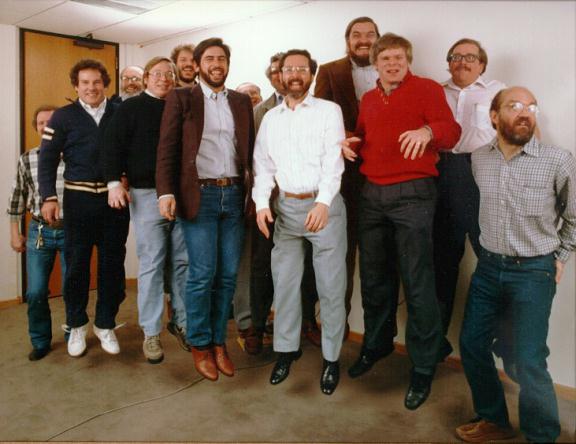
Founded Autodesk in 1982.  Was the primary person behind the push to incorporate an extensible programming platform within the product to allow customers to enhance the product to suit their needs.  The language he chose was LISP and the specialized version built into their flagship AutoCAD product was AutoLISP. (he's pictured in center)

What you got for it

The first significant move from ridiculously expensive mainframe and workstation Computer Aided Design (CAD) products to much more affordable IBM/PC capability.  The result was an explosion of personal computer design products, modeling and simulation products, visualization and animation products, all of which were previously only available on expensive UNIX hardware at very expensive prices, and without much end-user customization capabilities.  Now you have a robust PC market that includes AutoCAD, Revit, Inventor, 3DS Max, Integraph, MicroStation, Maya, NX-CAD, CATIA (used to only be on UNIX), NASTRAN (same), SolidWorks, ANSYS, ALGOR, and much more.

5 - Vint Cerf

What this nerd did

Help create the "Internet" from DARPANET.

What you got for it

Need I say more?   You're welcome.  Now, just try to not f*** it up, mmmkay?


6 - Marc Andreeson

What this nerd did

Marc Andreessen is an American entrepreneur, investor, software engineer, and multi-millionaire best known as co-author of the NCSA Mosaic, the first widely-used web browser, and co-founder of Netscape Communications Corporation.

What you got for it

Lul Cats, YouTube, Reddit, LiveLeaks, Google, Yahoo!, IMDb, YouPorn, Netscape, Internet Explorer, Opera, Webkit (Safari, Chrome), IRS.gov, and of course: ComedyCentral.com.  Anyone remember Lynx?  How about WAIS, Veronica, Gopher, Telnet and archie?  Good times.  Not really.  Thank God for Marc's work and for giving us the web browser.

7 - John Von Neumann

What this nerd did

Devised the "Von Neumann architecture" model, on which all modern computer systems are based.

What you got for it

You're reading this on a device that wouldn't exist without it.  I would rank John up their with Grace actually, but he didn't exert the same flair for personality that she did.  Nonetheless, awesome.


8 - Dennis Ritchie

What this nerd did

Dennis was an American computer scientist who "helped shape the digital era."[1] He created the C programming language and, with long-time colleague Ken Thompson, the UNIX operating system.[1] Ritchie and Thompson received the Turing Award from the ACM in 1983, the Hamming Medal from the IEEE in 1990 and the National Medal of Technology from President Clinton in 1999

What you got for it

The basis of most modern programming languages, from C++ to Java and .NET.  For that you got operating systems, software, firmware (still a lot of it done in ANSI C), mobile device software, automotive software, aircraft software, satellite communications software, oh yeah: and all the games you waste most of your day playing.  RIP Dennis.

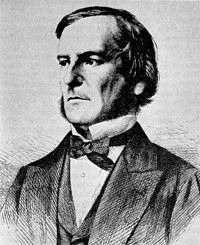
9 - George Boole

What this nerd did

Boole formalized Boolean algebra, the basis for digital logic and computer science.  You know: AND, OR, NOT, etc.

What you got for it

Every single programming language known to mankind depends on Boolean logic.  Dare I say, you're stupid beer-stained flat-panel TV couldn't exist, much less be turned on, were it not for his efforts.  Now, say it with me: "Boole Rules!"


10 - John McCarthy

What this nerd did


McCarthy was an American computer scientist and cognitive scientist. He coined the term "artificial intelligence" (AI), invented the Lisp programming language and was highly influential in the early development of AI.  McCarthy also influenced other areas of computing such as time sharing systems. He received the Turing Award for his major contributions to the field of AI, and many other accolades and honors, including the United States National Medal of Science.

What you got for it

I wouldn't be writing this if it weren't for him.  My first programming language involvement was with Common LISP and then AutoLISP.  Thanks to John Walker (see above), for making combining McCarthy's work with the graphical design aspect.  That was the bug that bit me in the ass (ok, my brain, same thing) and hooked me into programming.  Beyond that, his efforts to explore the world of "AI" have led to all sorts of derivative technologies from voice recognition, to traffic management systems, to language parsing, to encryption methods, to statistical analysis.  RIP.

Sources:

Yeah, I used a lot of web sites, but most of them were nearly identical with Wikipedia, at least as far as the basic stuff I was looking for, and it had the others linked as well, so, whatever...

  1. http://en.wikipedia.org/wiki/Grace_Hopper
  2. http://en.wikipedia.org/wiki/Tim_berners-lee
  3. http://en.wikipedia.org/wiki/Jonathan_Ive
  4. http://en.wikipedia.org/wiki/John_Walker_(programmer)  http://en.wikipedia.org/wiki/Autodesk
  5. http://en.wikipedia.org/wiki/Vint_Cerf
  6. http://www.ibiblio.org/pioneers/andreesen.html
  7. http://en.wikipedia.org/wiki/John_von_Neumann 
  8. http://en.wikipedia.org/wiki/Dennis_Ritchie
  9. http://en.wikipedia.org/wiki/George_Boole
  10. http://en.wikipedia.org/wiki/John_McCarthy_(computer_scientist)