Showing posts with label ubuntu. Show all posts
Showing posts with label ubuntu. Show all posts
Sunday, November 11, 2012
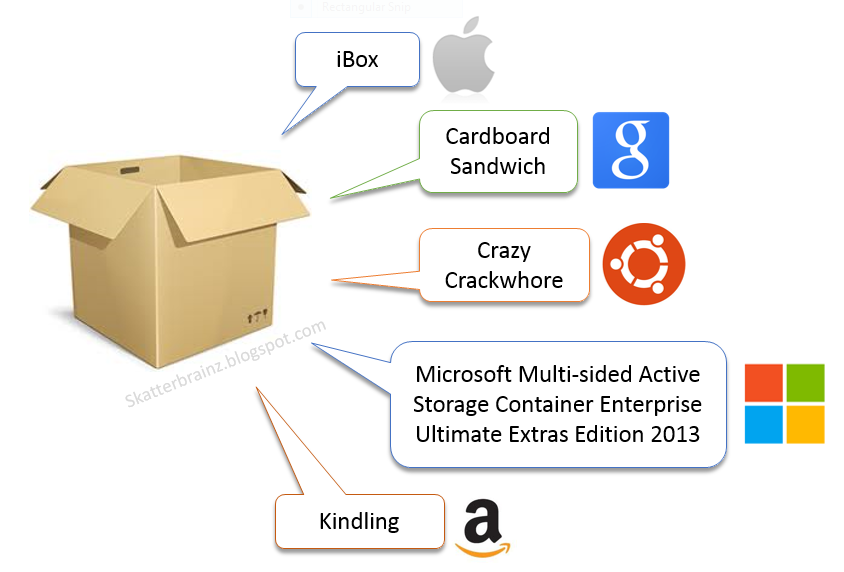
A Little Humor for Monday morning
I dusted this off from the original I did in 2003. I updated the logos and added Amazon, but otherwise it's pretty relevant to today I think...


Saturday, November 14, 2009
FAQ – Operating Systems
Here’s my dysfunctional professional response to the most commonly asked questions about operating systems.
- Q: Which operating is the best?
- A: It depends
- Q: Which operating system would you recommend?
- A: It depends
- Q: Why won’t you answer the question?
- A: Because anyone that answers either of those questions with a knee-jerk answer is a complete dumbass, or they are lying or ignorant or are delusional from too much crack and cocaine use, or all four. :)
- Q: I’m a graphic artist, musician, or audio engineer. Which OS should I go with?
- A: OSX
- Q: I run a corporate network with 1000 users. Which OS should I go with?
- A: Windows 7
- Q: I do movie-quality animation with 3DS Max and Lightwave. Which OS should I go with?
- A: Windows 7
- Q: I’m a web designer (not web app developer). Which OS should I go with?
- A: It doesn’t matter: OSX or Windows 7
- Q: I’m a web applications developer. Which OS should I go with?
- A: It depends. If you’re working with ASP or ASP.NET or on a Windows web server environment, go with a Windows client OS. If you’re working with PHP, Ruby or Flash, you can go with OSX. If you’re only working with PHP or Ruby, you can go with Linux. Otherwise, go with whatever floats your boat.
- Q: I bought a Netbook and want to load the best OS on it.
- A: Whatever floats your boat.
- Q: I’m a movie producer/TV producer/advertising producer. Which OS should I go with?
- A: OSX
- Q: I run a data center with several Oracle instances and are kind of tight on the budget side (aside from Oracle licenses and hardware). Which OS should I use?
- A: It depends
- Q: …on what?
- A: On whether you or your staff have any experience with Linux or Windows. Whether you have time and budget for training. Whether you have budget to hire more staff.
- Q: …so then what?
- A: Go with what fits your environment and staff capabilities, then worry about budget. Because the first two will absolutely destroy your budget if the “solution” doesn’t fit.
- Q: I just bought a Macbook/Macbook Pro and want to load it up with Linux or BSD and dual boot with OSX. Is that cool or what?
- A: No. It’s not cool. If you can make that setup do something like cure cancer, end world hunger or bring peace to the world, then it would be cool. Otherwise it’s just another reason to not get laid.
- Q: My CIO/CTO just returned from a conference and now wants to change all of our desktops and servers to a different OS. What should I do?
- A: Smack them as hard as you can on the side of their head with an open hand. That should distract them long enough to make a clean getaway.
- Q: I have no budget at all. Just a pile of hand-me-down computers with no OS installed. What should I do?
- A: Either install Ubuntu 9.10 on them, buy some books and surf a bunch of web sites to bone-up on Ubuntu administration, or find another job working for someone with a budget.
- Q: My friend says “<insert-name-here>” is the best OS. Is that true?
- A: Your friend is a complete fucking idiot.
- Q: My friend says Windows is a virus magnent. Is that true?
- A: Where do I start…. hmmm… ok… is this the same friend that said <productname> is the best OS? He’s still a fucking idiot. Seriously though, viruses rarely come from “nowhere”. They come from going to the wrong places, downloading the wrong things, plugging in the wrong devices (thumbdrives from other people) and generally doing stupid-ass things you shouldn’t do. Getting a virus is like walking into the “wrong” part of town. If you keep walking into the wrong part of town, you can claim (legally) that the town is unsafe and a mugging magnet. Use your brain, or what’s left of it, and practice some common sense. I’ve never had a virus on my home computers. Never. Not with Windows 3.11, 95, 98, NT4, 2000, XP, Vista or 7. Never. They have always been connected to the Internet and configured properly and I treat them with common sense. You should too.
- Q: My friend says OSX has no viruses and cannot be hacked.
- A: Dump this friend already? Nothing is “hack-proof”. Nothing. People make this stuff and people are flawed. Period.
- Q: My friend says Linux is hack-proof and has no viruses.
- A: You need new friends. Do we need to keep saying this?
- Q: My friend says I can run OSX and run AutoCAD and Inventor in VMware Fusion or Parallels. Is that true?
- A: Good luck with that. Let me know when you meet Elvis.
- Q: Can Windows be made hack-proof?
- A: I’m not talking to you anymore. You are trying to upset my Feng Shui.
- Q: I bought a Linksys/D-Link/NetGear/etc. wireless router and plugged it in at work. Is this ok?
- A: OMG. Did you do any configuration changes to tighten it down? :(
Why I’m Done with Linux as a Desktop OS
Linux was cool for a long time. I started with Slackware distros back in 1998, no X windowing, just CLI. That was fine because, at that time, it handled mutli-tasking pretty well and it ran on old hardware with meager resources.
But times have changed. Gnome and KDE have evolved to chase OSX and Windows with respect to piling on the GUI features, which is understandable. But the aims of Linux have fallen off the wagon. The argument used to be unified: It’s stable and requires few resources. But then they got into the Kool Aid and began trying to copy OSX and Windows. The “me too” stuff grew into repeated publication claims that it would “soon” replace Windows on the desktops of the world. It never came close. In fact, it has declined in that segment.
The only place Linux makes sense anymore is on server platforms and in small embedded devices (mobile devices, set-top boxes, appliances, industrial controls and monitoring for example). The only segment that I would even consider it on for true “desktop” use is in non-profit environments that simply don’t have the budget for Windows or OSX. Even then, I don’t see nearly as many non-profits hunting for hand-me-down hardware as I used to. Most are getting new systems with Windows pre-loaded, or 2nd-hand hardware that also has Windows installed.
I don’t even fire up Linux distros in VMware anymore. I used to feel an eagerness to stay up to date on Suse, Mandriva, Ubuntu, Fedora, and several others. Not anymore. My time has become more and more limited (and precious) and, risking the sound of a PR minion: Windows 7 does everything I need and I really like the UI and automation/CLI changes. Did they move closer to a CLI manageability state with Linux? Yes. Did they move closer to a UI cleanliness state of OSX? Yes. Did they do that intentionally? Who knows. Who cares. When the patient gets up from the the table and begins to run, you don’t ask how or why.
Is Windows 7 perfect? No. Technically speaking, it is superior to any previous versions of Windows ever produced. But technically I’m happy with what it brings to the table. What I’m not happy with is the licensing and cost aspects. They missed the mark there, and that made Windows 7 fall short of being a truly “perfect” solution for my needs. But I’ll stick with it regardless.
Saturday, August 16, 2008
Edubuntu is Really Cool

My neighbor with two kids who asked about where to find a computer for her kids for cheap. I rememberd that I had an old Dell Optiplex laying around the garage. I thought about it for a minute and rather than telling her she would have to go buy a copy of Windows Vista (because XP isn't available at Best Buy anymore, AND, because this GX-240 won't even run Vista very well), I decided to put Ubuntu and Edubuntu on it and see how it would work for them.
Up until Ubuntu 7.10 you could download a single ISO image for Edubuntu and install it in one shot. Beginning with Ubuntu 8.04 however, Edubuntu is now provided as the "Education" add-on for Ubuntu. So you install Ubuntu 8.04 first, then install the add-on and it makes it into Edubuntu (sort of, still calls itself Ubuntu on the welcome screen).
It works fantastic!
All the hardware was recognized and configured instantly, almost Mac-ishly (how's that for an adjective?) The included games, educational apps and so forth are very good and there's a lot to choose from. The interface (theme, icons, styles) are really nice for kids and make it fun to use. Compared to looking at XP or Vista, which are aimed at older folks (teens at the youngest end of the scale, and that's a stretch), the Ubuntu Education interface is aimed directly at kids 12 and under. It's well designed and darn-near foolproof in that respect.
So, if you have kids and they aren't hooked up to the heroin IV drip line of Windows or Mac, you might want to consider Ubuntu 8.04 and the Education add-on pack. Very cool indeed.
Up until Ubuntu 7.10 you could download a single ISO image for Edubuntu and install it in one shot. Beginning with Ubuntu 8.04 however, Edubuntu is now provided as the "Education" add-on for Ubuntu. So you install Ubuntu 8.04 first, then install the add-on and it makes it into Edubuntu (sort of, still calls itself Ubuntu on the welcome screen).
It works fantastic!
All the hardware was recognized and configured instantly, almost Mac-ishly (how's that for an adjective?) The included games, educational apps and so forth are very good and there's a lot to choose from. The interface (theme, icons, styles) are really nice for kids and make it fun to use. Compared to looking at XP or Vista, which are aimed at older folks (teens at the youngest end of the scale, and that's a stretch), the Ubuntu Education interface is aimed directly at kids 12 and under. It's well designed and darn-near foolproof in that respect.
So, if you have kids and they aren't hooked up to the heroin IV drip line of Windows or Mac, you might want to consider Ubuntu 8.04 and the Education add-on pack. Very cool indeed.
Saturday, July 19, 2008
Let's Ask Mr. Owl: Ubuntu or Vista?
How many licks does it take to determine which operating system has more updates posted (on average)? There's absolutely NO QUESTION as far as my experiences go: Ubuntu.
That's correctomundo.
Every month I open all of my virtual machines in VMware and apply updates to each to ensure they're in good shape. I have an Ubuntu 8.04 VM running as a Gnome desktop (not a server), a couple of Windows Server 2008 and Windows XP instances, and two Windows Vista instances. This month alone there were 154 updates waiting to be installed on my Ubuntu 8.04 client.
So for all the folks who've emailed me over the last year about my rants on Linux, I'm really sorry. Does that mean Ubuntu is "worse" than Vista (whatever that would mean), no. It just proves my relentless points about software being "soft" and therefore in a state of flux.
That's correctomundo.
Every month I open all of my virtual machines in VMware and apply updates to each to ensure they're in good shape. I have an Ubuntu 8.04 VM running as a Gnome desktop (not a server), a couple of Windows Server 2008 and Windows XP instances, and two Windows Vista instances. This month alone there were 154 updates waiting to be installed on my Ubuntu 8.04 client.
So for all the folks who've emailed me over the last year about my rants on Linux, I'm really sorry. Does that mean Ubuntu is "worse" than Vista (whatever that would mean), no. It just proves my relentless points about software being "soft" and therefore in a state of flux.
Subscribe to:
Posts (Atom)