Showing posts with label programming. Show all posts

Tuesday, August 26, 2014

The Missing SCCM Database View

For most interfaces I've worked on over the past ten years, which involve poking a stick at System Center Configuration Manager 2007 or 2012, this is one database view (or stored proc) that I'm usually building for myself.  It basically tosses about eight built-in Views and Tables into a blender, with a dash or two of stupid sauce and provides a fairly good picture of each computer in your site database.


It spews out the computer name, client info, site code, manufacturer, model, memory, Windows flavor, chassis type (I didn't cross-join that to produce names, but you can do that, I'm too lazy right now), BIOS info and serial number, CPU, AD stuff, install date, and of course, my personal favorite: the SCCM distribution point reference.  Note that I've provided a fall-back DP name for those which are not explicitly mapped via a site boundary, so they come back home to an MP usually (not always).  I used "DP0001" but you should stuff your own name in place of that.


[begincode]

SELECT DISTINCT
v_R_System.Name0,
v_R_System.ResourceID,
v_R_System.Client0 AS ClientInstalled,
v_R_System.Client_Version0 AS ClientVersion,
v_R_System.Creation_Date0 AS ClientDate,
v_RA_System_SMSAssignedSites.SMS_Assigned_Sites0 AS SiteCode,
v_GS_COMPUTER_SYSTEM.Manufacturer0 AS Manufacturer,
v_GS_COMPUTER_SYSTEM.Model0 AS ModelName,
v_GS_COMPUTER_SYSTEM.SystemType0 AS SystemType,
v_GS_OPERATING_SYSTEM.Caption0 AS OSName,
v_GS_OPERATING_SYSTEM.CSDVersion0 AS ServicePack,
v_GS_X86_PC_MEMORY.TotalPhysicalMemory0 AS Memory,
v_GS_SYSTEM_ENCLOSURE.ChassisTypes0 AS ChassisType,
v_GS_SYSTEM_ENCLOSURE.SerialNumber0 AS SerialNumber,
v_GS_PC_BIOS.Manufacturer0 AS BIOSvendor,
v_GS_PC_BIOS.SMBIOSBIOSVersion0 AS BIOSversion,
v_GS_PC_BIOS.ReleaseDate0 AS BIOSdate,
v_GS_PROCESSOR.Name0 AS CPU,
v_R_System.AD_Site_Name0 AS ADSiteName,
v_GS_COMPUTER_SYSTEM.UserName0 AS ADUserName,
v_GS_COMPUTER_SYSTEM.Domain0 AS ADDomain,
v_GS_OPERATING_SYSTEM.InstallDate0 AS OSInstallDate,
v_BoundaryInfo.BoundaryID,
COALESCE (ProtectedSiteSystem_ARR.ServerName, 'DP0001') AS DPServer
FROM dbo.ProtectedSiteSystem_ARR AS ProtectedSiteSystem_ARR
INNER JOIN
dbo.v_BoundaryInfo AS v_BoundaryInfo
ON ProtectedSiteSystem_ARR.BoundaryID = v_BoundaryInfo.BoundaryID
RIGHT OUTER JOIN
dbo.v_R_System AS v_R_System INNER JOIN
dbo.v_GS_PROCESSOR AS v_GS_PROCESSOR
ON v_R_System.ResourceID = v_GS_PROCESSOR.ResourceID
INNER JOIN
dbo.v_GS_COMPUTER_SYSTEM AS v_GS_COMPUTER_SYSTEM
ON v_R_System.ResourceID = v_GS_COMPUTER_SYSTEM.ResourceID
INNER JOIN
dbo.v_GS_SYSTEM_ENCLOSURE AS v_GS_SYSTEM_ENCLOSURE
ON v_R_System.ResourceID = v_GS_SYSTEM_ENCLOSURE.ResourceID
INNER JOIN
dbo.v_GS_X86_PC_MEMORY AS v_GS_X86_PC_MEMORY
ON v_R_System.ResourceID = v_GS_X86_PC_MEMORY.ResourceID
INNER JOIN
dbo.v_GS_OPERATING_SYSTEM AS v_GS_OPERATING_SYSTEM
ON v_R_System.ResourceID = v_GS_OPERATING_SYSTEM.ResourceID
INNER JOIN
dbo.v_GS_PC_BIOS AS v_GS_PC_BIOS ON v_R_System.ResourceID = v_GS_PC_BIOS.ResourceID
INNER JOIN
dbo.v_RA_System_SMSAssignedSites AS v_RA_System_SMSAssignedSites
ON v_R_System.ResourceID = v_RA_System_SMSAssignedSites.ResourceID
ON v_BoundaryInfo.Value = v_R_System.AD_Site_Name0
ORDER BY v_R_System.Name0
[endcode]

To test this out, open your SQL Management Studio.  Connect to your site database server and site database instance.  Then click "New Query" and paste the code in and press F5 to run it.  Add a splash of your favorite alcoholic beverage, some Barry White music, dim the lights, and enjoy the vibe.  Peace.

Tuesday, May 13, 2014

The Blurry World between IT Infrastructure and App Dev

For decades (that sounds really depressing at my age, just saying), the field of Information Technology has been somewhat divided between a world of servers, networks, storage, virtualization, load balancers, firewalls, certificate services, agents and deduplication stuff, and... aaaaaannnndddd, another world of coding, compiling, source control, protocols, algorythms, user-interface design, web standards, mobile apps and lot's and lot's and looooooottttt's of sugary caffeinated stuff with too little sleep.

In simpler terms:  It's been a division between those that build the roadways, and those that build the contraptions that traverse them.

Out of this soup of techno-stuff comes things like Facebook, Google, Angry Birds, Netflix, Windows, iOS, Grooveshark, Twitter, Instagram, AutoCAD, 3DS Max, LinkedIn, World of Warcraft, VPN access to your office, home security cameras that you can watch from your smartphone, XBox and PS4, and, well, whatever it is you're reading this useless crap on.

Stick with me, there's a point to be made, eventually, trust me...

Both sides of this divide have their own logical infrastructure (pardon the pun), from conferences to certification credentials, to college degrees, and user groups and so on.

But more often, "engineers" are stuck between these two worlds.  Remember that old Twilite Zone episode (or was it The Outer Limits?) where the futuristic solder is caught in a spot where half of his body is in a war zone from the 1800's while the other half is being shot at in a war zone from the 2100's?  Okay, I told you I'm pretty old, so just pretend you remember that one. I've found myself in that situation more times than not, between 1996 and today.

These should be familiar job descriptions / titles to you:

  • Server Admin
  • Backups and Storage
  • Network Engineer
  • Firewall Services Engineer
  • Web Developer
  • Software Developer
  • Mobile App Developer
  • Scripter

But, do any of these sound familiar?

  • Software Packaging
  • Software Repackaging and/or Sequencing
  • Application Virtualization
  • Horizontal Services Integrator
  • Data Mining and Aggregation (kind of hinges off Horizontal Services)
  • Desktop Deployment Specialist (think MDT/WDS/ADK/OSD, etc.)
  • Patching Automation
  • Web Applications Layering over Server Infrastructure Operations
  • Inventory Control
Sure, you can pick these apart and point at certs that address those pieces, but the sum of each bullet (e.g. Inventory Control) doesn't fall so neatly into a single book, classroom or online course, or even a user group.

As a side note, one role that has always made my head tilt sideways is Group Policy modeling.  If ever there were a job that involves everything EXCEPT what the people who almost always perform it are comfortable doing, it's that one.  Logical analysis of software services, layering, Boolean operations, context filtering, decision trees, and "what if" analysis.  Standing at the doorstep of programming, holding a cardboard rose in hand, waiting for the door to open and there's a hot MCSE date ready to go.  Talk about juxtaposed worlds.

Another "for instance", and this is one I'm really familiar with:  Repackaging software.  Desperately trying to shoehorn some poorly-written crap into an environment, using tools like AdminStudio or App-V or ThinApp.  Then wrapping that into Configuration Manager deployments, or deploying into VDI environments.  That bizarre world of making it possible for two application bundles to coexist on a single host without killing each other, or killing other things, through the use of painful customization contortions.  Usually done in the name of making a customer happy, and avoiding the cost of a license upgrade (you know, the new version that was actually MADE to work on the OS version they're trying to make the unsupported version work on).

The point (I told you there was one somewhere in here) is that delving into these murky waters is becoming more and more commonplace.  Particularly where the intersection of custom applications and distribution and management procedures occur.  Once it was Batch, VBscript, KiXtart, Perl and whatnot, now it's PowerShell, and .NET services, and databases, and web services and XML, blah blah.

This "shift" isn't some prediction, it's already begun.  Look at the ways many server admins and engineers are working with scripts across various vertical services stacks. Anytime you are handed tools that allow you to bend and shape the out-of-box toolset to do things which the base product simply cannot do alone, you are stepping into that world.  

How do you put a certification track on that?  How do you quantify the value or potential of that?  How do you quantify the level of expertise in that?   You don't.  You can't.  Because it rolls back around to human interaction and knowing what your colleagues do, and can do, with those tools.  You can try.  Even if you concoct some elaborate exam test to derive a score of how well someone knows a particular coding or scripting language, or even a battery of command utilities.  What would that really produce for you?  If I know ever noun/verb phrase, every method and event, every exit code, does that make me a fantastic problem solver?  Does it mean the solutions I would provide would be better than another person's, who scored lower?

Eventually, this divide will be bridged in a more tangible and meaningful way.  Until then, it exists as a voodoo art, rarely discussed in depth and relegated to a bunch of web sites with narrow focus on the pieces of a blurry whole.

Wine is a good thing.  And so is sleep.  Enjoy!

Hmmm..

Wednesday, April 23, 2014

These are a Few of My Favorite Views (SQL with Fries and a Pepsi)

If you use System Center Configuration Manager 2007 or 2012, and you like to drink beer and play with firearms and flammable substances, and things like SQL Server Management Studio, well, I have no clue what you're thinking about.  Just kidding.  There are three places I can promise you I can spend a lot of time, calmly perusing the landscape:

  • A Lowe's or Home Depot store (preferrably on a slow, week night)
  • The beer section of a store like Total Wine
  • SQL Server Management Studio and a System Center Configuration Manager site database
The first two are not at all surprising.  Almost any guy that lives near a big hardware store or beer store is in the same boat (apologies to any recovering alcoholics out there).  But the third is my personal weakness.  In days long past, it would have been supplanted by a good Lego kit, a stack of Marvel comic books, or a pile of Revell model kits or Estes rocket kits.  These days, crossing the 50 year milestone, it's become more geeky.  Sure, I love me some good woodworking projects (I just finished a badass bench swing in my backyard, all done by hand, no power tools. p-shaaaa!)

My favorite database views?
  • v_Advertisement
  • v_Collection
  • v_Package
  • v_GS_Computer_System
  • v_R_System
  • v_GS_Installed_Software_Categorized
  • v_GS_System_Enclosure
  • Any of the v_CM_COLL_XXXXXXXX collection views
Of course, I really dig poking around the site-related views, boundaries, discoveries, metering, etc.  As well as the operating system views, x86 memory stuff, collected files, software products and so on.

The saddest part of this?  I rattled those off from my pointy head, without being anywhere near access to the tables or views.  That's how deep they've become ingrained in my squishy skull.

If you're as twisted as I am, open SQL Management Studio, right-click on the Views section and create a new View.  Drag in some of the ones named above and link on ResourceID (or MachineID for some), and start exploring what kinds of cool things you can build on your own.  Data is like Lego's to me now.

Friday, April 11, 2014

Code Catasrophies

Dave's top five (5) reasons your code will crash and burn:

1. You didn't close a string value in matching quotes.

2. You didn't close a block of code in matching curly braces or parenthesis.

3. You forgot a comma somewhere.

4. You got your variable names crossed up somewhere.

5. You lost sight of the end game and became engulfed in one chunk of code.


Monday, March 31, 2014

RoboCopy RoboCopy Where For Art Thou RoboCopy

Comparing exit codes with exit codes...

[vbscript: windows 8.1 64-bit]

Set objShell = CreateObject("Wscript.Shell")

cmdstr = "robocopy \\server1\d$\path1 /xo /s \\server2\f$\path1 /xf *.db *.bak"

result = objShell.Run(cmdstr, 1, True)
exitcode = err.Number

wscript.echo "result is " & result
wscript.echo "exit code is " & exitcode 

[/vbscript]

If the [source] or [target] path are bogus (e.g. do not exist), it makes result = 16, but if both are valid, result = 2.  In every case, exitcode = 0.

Why fix something when you can easily order a battalion of coders to just move on to build a new fort?

Tuesday, March 25, 2014

Factors of Refactoring

Even if you've never written a line of program or script code in your life, you know what refactoring is.  You may not have known it, but you knew it.  Confused yet?  Let me help.

Refactoring is basically "refinement" or "optimization" or "streamlining".

Let's try this analogy on:

You build a book case from scraps of wood and some hand tools in your garage.  After the first shelf, you decide you want to build another one.  But this time you modify the design to change some of the parts and how they're joined together.  Maybe you change it so there are fewer parts overall.  The first one was assembled from eight (8) pieces of wood, and sixty-four (64) screws.  The second one from six (6) pieces, and thirty-two (32) screws.  After a few more, you realize you can rearrange the cut patterns on a sheet of raw plywood to get more parts from each sheet with less wasted scraps.  Eventually, you have a sturdier product, requiring less material and lower cost to build each one.

Or how about this:

You cook meals and find that you tend to make mostly Italian recipes.  After several dinners you realize that by reorganizing the pantry and spice rack you can more easily get the ingredients to the stove top in less time and with less confusion.  As time goes on, you move things around: pot racks, islands, roller carts, etc.  After a month of "trial and error" you now have the most streamlined kitchen setup imaginable.  Everything from the cookware, cooking area and ingredients to the paths you traverse moving from one station to another is now as good as it can be.  Eventually, you realize you've reduced the time and effort required to cook most meals by 50% and lowered your costs as well.

Or how about this:

You wrote a script, and it does a lot of separate, but sequentially-dependent tasks in order to arrive at a desired result.  The first draft contains 12 distinct custom function blocks, and repeated "for" or "while" loops on the same of data.  The second draft contains 10 distinct custom function blocks and the repeated iteration blocks are now calls to one of the custom functions.  By the third draft, the total number of code lines has been reduced from 1034 to 811 and down to 643.

Going back to look for ways to accomplish the same task in fewer steps.  With better quality results.  Improved reliability, predictability, dependability.  All those other -ilities.  Reusing things instead of making new ones all the time.  Getting more out of same effort than you did before.

This is refactoring.

Case in Point:  Program Files Example 101

Phase 1 - two files, one does option "A" and the other option "B"
Phase 2 - files are combined and use input parameter (i.e. "switches") to drive the code workflow.
Phase 3 - instead of distinct blocks of code, sections are combined into calls to one function with input params.
Phase 4 - instead of forked code paths in each function, the function now passes the input params through to drive external interfaces via concatenated references (e.g. you call one SQL view or another by passing in the param as the view name itself)
Phase 5 - SQL view is replaced with a stored procedure or db function that builds expression with input param directly.
Phase 6 - your work day now goes from 6 hours of keyboard banging and eating at your desk, to 4 hours of enjoyable keystrokes and going out for lunch.

For those of you who already knew this and are staring at this page like you're witnessing a cat eating a pig, whole, I apologize for your agony.


Tuesday, February 11, 2014

Plugging Your VBScript Brain into PowerShell

It started with diapers and bottles of milk and soft food.  Then cereal and TV dinners in frotn of a real TV.  Then it was on to C, then C++, then I moved into LISP and Scheme, and AutoLISP and Visual Basic.  Then T-SQL and Batch/Cmd scripting.  Then coffee, and on to Javascript and KiXtart and Perl, and after mor coffee: VBscript.  And after the coffee ran out, it was beer and then PowerShell.  Quick tips, based on my self-conversion efforts thus far:

  1. Start naming your Sub and Function items using PowerShell syntax, but keeping in mind to glue the Noun/Verb scheme using an underscore ("_"), since you cannot use a hyphen for such things in VBScript.  Example:

    Function ComputerModel()
        ...
    End Function


    ...renamed...

    Function Get_ComputerModel()
        ...
    End Function
  2. Use consistent commenting throughout your code.  If you do that, you can more-easily "port" your code between languages (any language, actually).  It also allows for automated self-documentation.  While that may seem like an impressive phrase to toss around at parties (it is, by the say, haw haw, cough cough...) when you starting stacking up code into more complex "solutions", it will pay off handsomely when the suits come knocking for professional-looking docs.
  3. Eat. Drink. Sleep. Find a reason to laugh.

Thursday, February 6, 2014

TextPad Tip O-The Day: Adding a PowerShell Tool Link

I loves me some TextPad!  I'm fully aware that code editors are near to religion in terms of sincerity and defensiveness on the part of programmers (those of whom that are of spiritual or religious leaning, that is).  Maybe it would be better to compare/relate it to caffeine sources?  Anyhow, onward...

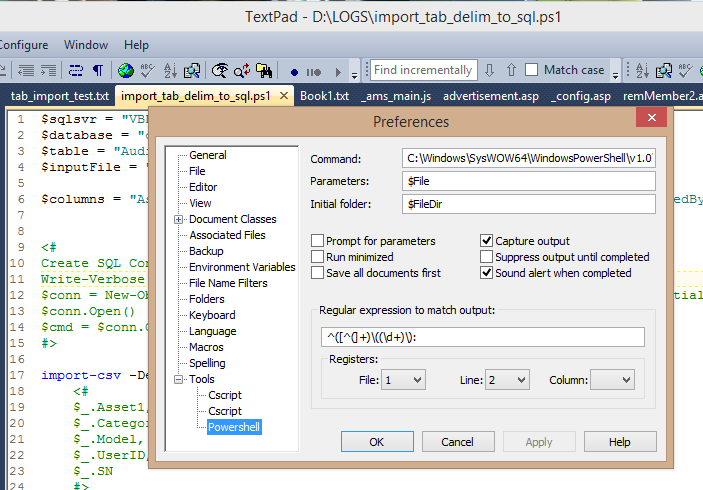
One of the many nice aspects of TextPad 7 is the extensible "Tools" feature.  This is where you can add links to invoke external tools to execute your code.  So if you like working with VBScript, you can create a Tool that points to %windir%\System32\cscript.exe.  If you like KiXtart, you can point it to wherever Kix32.exe resides (the one biggest and coolest feature of age-old Kix is that it is one of the few *truly* portable script engines alive today).  But, what about PowerShell?

On a typical Windows 8 or 8.1 computer, there may be two (2) distinct PowerShell environments you can use: 32-bit and 64-bit.  They are separate and live in separate houses with their own separate dinner times and kitchens.  You heard right.  One of my frustrations is that I have to configure "Set-ExecutionPolicy" for each of two separately in order to invoke them as I wish.  In my case, I set them both to Unrestricted.  I live on the edge.


My favorite part is the wonderfully-formatted warning message you see when setting the execution policy to Unrestricted...


(Word-wrap wasn't yet invented I suppose.)

Anyhow, to set up a new "Tool" for each PowerShell executable, do the following:

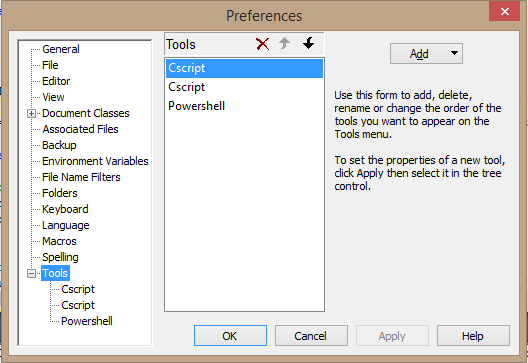
  1. Select the "Configure" menu option, and click "Preferences"
  2. Scroll down and expand "Tools"
  3. Click the 'Add" button, and select "Program..."
  4. In the "Command" box, past in the path to whichever PowerShell.exe you wish to map (I provide the paths for each below.
  5. Click OK
You may want to rename the Tool after saving it (it doesn't offer the option to name it, oddly).  To do so, click directly on the "Tools" link, so the individual tools are shown in the middle selection box. Click on a Tool to rename it (e.g. "PowerShell 32" or "PowerShell 64", and so on).

You can edit the Tool preferences afterwards as well. So you can check options for "Prompt for parameters" and "Suppress output until completed", and so on.  The defaults usually work well enough for most nerds (like myself).


Paths:
32-bit - %WINDIR%\System32\WindowsPowerShell\v1.0\powershell.exe
64-bit - %WINDIR%\SysWow64\WindowsPowerShell\v1.0\powershell.exe

(note that the ISE flavors for each are in these same respective folder locations).

Disclaimer: I receive no compensation from Helios (makers of TextPad) whatsoever.  I just enjoy using their flagship product for all the wacky coding I do, from HTML to LISP to PHP, to ASP and VBScript, to Javascript, XHTML T-SQL, Batch, and now PowerShell.

You can download the trialware from http://www.textpad.com and a license is only $27 (USD).  A bargain.

Tuesday, February 4, 2014

BPA. The Other White Meat

I bet you expected a Chemical Engineering monologue about Bisphenol A.  Ha!  Fooled you.  Maybe you thought it was going to be about Business Process Analysis.  Nope.  I'm talking about the other BPA: Business Process Automation.

But: What is Business Process Automation?

Figure 1 - Standard BPA Results


If Business Process Analysis is the Systems Analyst of the MBA world, then Business Process Automation would be the Systems Engineer of the IT world.  I know that makes almost no sense whatsoever.

Some folks might say it (the latter of the two) is the practice of applying technology to execute tasks which normally require direct human involvement.

Some folks might say it is the practice of identifying which human-oriented processes can be handled by suitable application of technology.

Some folks might say it is the practice of applying technology to replace human labor to enable laying off human employees.

Other folks might say it's the culmination of hours and hours of studying to acquire yet another mysterious certification which nobody cares about besides them.

They are all correct.  Ding!  And they win what?  I will tell you what: hours and hours and hours of work.

How is a BPA expert made? What are the necessary ingredients?

  1. Familiarity with the business on an operational level, from the bottom-most level to the top.
  2. Familiarity with the business culture, at all levels
  3. Common sense (okay. I'm just kidding)
  4. A keen sense of humor (I'm serious about that too)
  5. A healthy appreciation for caffeine and alcohol
  6. Solid skills using Microsoft Word, Excel, Outlook, PowerPoint and a web browser
  7. And, last but not least: an undying desire to stop any meeting, no matter how intense, and no matter who is in attendance, to ask "what the F**K are we doing here?!" (followed by an immediate return to playing with your phone)
You might think I'm joking.  I'm not.

Most BPA efforts go off the rails and directly through an orphanage house within a few days of starting the engine.  Why? Because they almost always focus on the HOW before the WHY. The WHAT before the WHEN and WHO before the WHERE.  Okay, I made those last two up out of thin air.  I couldn't mention just two of the W's (or a W and an H, or ughh, never mind).

BPA is really just a 2-stop process:

Step 1 - Analyze the living shit out of the process itself.  Do NOT... I repeat DO NOT, start working on the HOW part before you exhaust every angle of making sure the WHY is covered.  Is the process sound?  Is it as efficient and reliable as it could be?

Step 2 - Go back to step 1.  If in the efforts to refine step 1, you do not already trip over the optimal solution to the challenge, you didn't do step 1 properly.

Seriously: Of the last two dozen or so BPA-related projects I've been involved with, or was witness to in the past thirty years, I would say three of them actually followed this rule.  This covers everything from small private businesses to municipal, state and federal governments, to multi-billion dollar corporate conglomerates.  I've seen projects blow $50 million USD in the first three months before asking if the goals were really correct.  That's not an exaggeration.  In fact, the one person that did ask, was fired for asking. (no, it wasn't me, which is shocking, I know).


IT professionals are as vulnerable to this tendency as anyone else.  Mainly because we are creatures of toy fascination.  We like toys.  Program code, gadgets, appliances, algorithms, encryption schemes, formulas, you name it.  If it involves tinkering and refining, we're all in.  A bag of crappy food and some sort of liquified stimulant and we're game-on.  But that too often leads directly into the dreaded trap:

A new tool in search of a project.  Walking around with a hammer, anxiously seeking out a screw or cotter pin to use it on.

Tools are awesome.  But only as awesome as they fit with the task they're being used on.

Coming Soon - BPA Stupidity Part II - the Electric Boogaloo.

Tuesday, January 28, 2014

Why PowerShell is a Big Deal (In my own feeble words)


If you've followed my blog for a while (my apologies, of course) you're probably wondering just what the **** I'm aiming for.  That's a fair question, because, to be honest: I really don't know.  It's a venting machine for me, I suppose.

For a long time I ranted on about Autodesk products and AutoCAD customization, then it turned into Autodesk product installation and licensing management, and networks, and then I had an unplanned career change dropped on me from nowhere. I had to make a shift into the "mainstream" IT world and learn Microsoft tools and things entirely different than I was accustomed to. Since then, my professional and personal life has been a blender, tossed into a woodchipper and fed into a meat grinder.  Messy, yes.  A disaster?  That depends on how you define the word.  Blah blah blah, yes, I'm aiming for a point here somewhere, please be patient?  Your call is important to us...

I started playing with program code back in 1986, while working as a drafter in the Marine Engineering field.  That's fancy terminology for designing things that go on ships.  In my case: U.S. Navy ships.  Big. Heavy. Gray.  Smelling like oil. And usually parked in some rather unappealing locations in the worst kinds of weather.  We would go aboard, sketch up stuff, go back to our hotel, eat and drink (okay, mostly drink) and then return to the office and formalize a set of design drawings to accomplish a "retrofit" of something.  A "retrofit" is basically replacing something to improve some aspect of the ship (performance, capability, living conditions, etc.)

After CAD took hold among the DoD world, it took much longer for the mainframe and workstation era to pass and open the door to the PC world, than it did in other industries (i.e. AEC).  It wasn't until around 1987 that the Naval Shipyards would even "allow" the use of AutoCAD for any official drawing contracts.  At first it was only allowed for title sheets, materials lists and anything "non detail design".  Eventually, they gave in and began replacing all the old DEC, Sun and IBM crap with shiny new IBM-PC boxes and much cheaper software.  In all, it saved them enough on budget to buy a small country (they probably did just that).

I got my first taste of "real" programming in 1987 from reading a book on AutoCAD R10 and learning AutoLISP and a little ADS later on. AutoLISP was it.  Even while going to college for my IS degree, and soaking up C/C++, and all that, I couldn't ignore the flexibility and dynamic personality of LISP.  At the time, it was like trying to remain focused on a mail delivery truck while I kept my eyes on the '67 Camaro SS parked on the side.  Not much competition in my mind.  But alas, marketing won and LISP began a slow decline from the 1990's into the mid 2000's.  Microsoft's unstoppable licensing machine eventually mowed down the momentum behind anything besides Visual-This and That.  I can't pick at the technological appeal either, so I'm just whining I suppose.

Soon after the mid 1980's I picked up BAT and KiXtart on the PC side, and Bash/Korn and Perl on the UNIX side (mostly at school).  Then I ran into the database world and began mashing AutoLISP with AutoCAD CAO and ObjectDBX, which dropped me into a rat hole called Visual Basic.  It was fun and lasted me through the mid 1990's very nicely.

Long story short:  I gradually became jaded by every new programming language coming out.  It seemed like yet another attempt to get the junkies hooked on a newer drug and keep the marketing departments employed.  Tech conferences kept shoving one new language or toolset after another and spending tons on spiffy ads and graphics.

I thought PowerShell was just that.

I was dead wrong.

For years, my colleagues would roll their eyes at me, when I'd start pontificating about "Microsoft should __", following my third cup of coffee.  As if anyone in Redmond gives a shit about some annoying guy named Dave out in the redneck state of Virginia.  My usual rants involved the lack of cohesion and consistency among the various command tools.  Things like NETSTAT, NET this-or-that, IPCONFIG, NTDSUTIL, DSGET/whatever, DIR, and then CMD and BAT scripting weirdness.  I kept saying "they need to clean this shit up!" and then I would fade off into a muffled blubbering of incoherent words and slurping coffee (cold and stale, usually).

Even after I jumped on the Monad open preview bandwagon, I didn't get it.

I read articles and still didn't get it.

I bought books and still didn't get it.

I went to Microsoft TechEd 2011 and 2012 and didn't get it. (I did get a few t-shirts though)

Then I read a few blog posts by Jeffrey Hick, Jeffrey Snover, and Don Jones and a few others.  And then after studying for some MCITP/MCSA exams, it hit me like a train:  THIS is what I was begging for.  Granted: It hasn't reached the goal line yet, but damn if it hasn't made it a long way down the field.  In fact, from my poking and inspecting, I would dare to say it's in the Red Zone and there's still plenty of time on the clock. (sorry to all non-Football fans, I feel you - but I couldn't think of a better analogy this late at night).

I've been dragging ASP, BATch, VBscript and COM around like a two-year old child with a dead pet on the other end of a worn leash.  Thinking it was still alive and wanting to go play outside.  Now I know what that smell was.

I'm in.  My focus from here on out will be to deprecate my use of anything besides PowerShell and ASP.NET.  If your eyes are rolling in pity right now, I apologize.  I'm really late to the party, so I have a lot of drinking to catch up on.

Namaste.

Friday, January 24, 2014

A Kindergarten Way of Looking at Code Refactoring

I've read and heard a million different definitions, explanations, rationalizations, gyrations and procastinations about "code refactoring".  The term sounds impressive.  It has a lot of cool syllables and stuff too.  Non-coders (aka "noobs", etc.) seem to light up when it's mentioned, especially in situations were alcohol is being consumed.

I thought I'd dissect this frog using a Popsicle stick and a fork.

Let's say you want to display a list of names which are always going to be the same.  We call this a "static list".  Examples can range from product names, categories, days of the week, and so on.  Let's go with the days-of-the-week example.  It's easy enough and it leads to the weekend, which is usually a pretty good end-goal.

[vbscript]

wscript.echo "Sunday"
wscript.echo "Monday"
wscript.echo "Tuesday"
wscript.echo "Wednesday"
wscript.echo "Thursday"
wscript.echo "Friday"
wscript.echo "Saturday"

[/vbscript]

Simple enough.  But let's dice this up one more time...

[vbscript]

strDaysList = "Sunday,Monday,Tuesday,Wednesday,Thursday,Friday,Saturday"

For each d in Split(strDaysList, ",")
    wscript.echo d
Next

[/vbscript]

Let's dice it up once more.  There are two simple functions/methods in VBscript to help with Dates, Days and so on:  Weekday and WeekdayName.  Case is not important with VBscript, so you can use weekday and WEEKDAY or WeekDay, but I try to be consistent regardless.

For this example, I'm more interested in WeekdayName, so forget Weekday for the moment.  Weekday returns the integer value of a week day as 1 to 7, with 1 being Sunday and 7 being Saturday.  But this is for pulling the day out of a date.  So Weekday(Now) would return the integer for the day of the current day (right now).  I'm writing this on a Friday night (yes, I have no life whatsoever), so it would return 6.

But getting back to WeekdayName:  This function returns the string-value name of a given week day based on the integer number.  So WeekdayName(6) would return "Friday" (it returns the proper capitalization by default).

Let's turn it around and shove a range of integers through that function and have it spit out the week day names for us.

[vbscript]

For i = 1 to 7
    wscript.echo WeekdayName(i)
Next

[/vbscript]

Summary

If you can't already tell by now:  Refactoring is the process of refining your code to achieve the same (or better) results with less coding.  And now, you can graduate to first grade.  Have a good weekend!

Wednesday, August 21, 2013

10 Questions: with Jeffery Hicks

Jeffery Hicks


Introduction

There are no doubt a lot of computer-related "scripting" languages in the world today, which is only a subset of the "programming" languages that exist.  Among the standouts today are the venerable Windows-platform related names like Batch, KiXtart, VBscript, JavaScript, as well as cross-platform names like Perl, Python, and one the came onto the IT scene relatively late:  PowerShell.

Microsoft may take a few lumps along their way from one success to another, but they've so far managed to earn the trust and respect of the majority of developers, administrators and engineers with PowerShell.  Now in its third version of existence, it has gained quite a lot with regards to both functionality and maturity.

Among the short list of people renown for pushing ahead in this newer realm are names like Jeffrey Snover, Don Jones, and one that I've come to know better in recent years: Jeffery Hicks.

Author, speaker, and an all-around nice guy, Jeff is another example that we don't have to shed our personality in order to master a new technology.  He remains very active on multiple web sites and forums; offering advice and help to both the experienced and the noobs.  One thing I will say is that if you get any PowerShell-related advice from Jeff, you should consider it.

Jeff's Profile (from his web site)

Jeffery Hicks is a Microsoft MVP in Windows PowerShell, Microsoft Certified Trainer and an IT veteran with 20 years of experience, much of it spent as an IT consultant specializing in Microsoft server technologies. He works today as an independent author, trainer and consultant. Jeff writes the popular Prof. PowerShell column for MPCMag.com and is a regular contributor to SMB IT Simplified and the Petri IT Knowledgebase.

Jeff is a regular speaker at conferences such as TechMentor, TechEd and WinConnections, often speaking about PowerShell, Active Directory, Group Policy and anything else than can make IT Pros more efficient and productive.

Jeff's Books include:

If he isn't writing books then he's most likely recording training videos for companies like TrainSignal .

You can keep up with Jeff  at his blog, on Twitter and on Google Plus


The Questions

Dave: Your name is very well known in the circles of PowerShell programming. What other programming languages do you like to work with (if any)?

Jeff:  I started with automation way back in the dark days of DOS 3.3 and batch files. From there it was to VBScript and eventually PowerShell. Back in the day I was a master of WordPerfect 5.1 macros!

Dave:  PowerShell seems to be mix of both powerful features and enough complexity to give some IT folks a bit of pause. What do you feel is the most misunderstood aspect of that language?

Jeff:  People think it is a scripting language like VBScript, or they think the blue console that they see is PowerShell. PowerShell is a management engine that is hosted by applications like CMD.EXE or the PowerShell ISE. It can be experienced interactively or the language can be scripted.

Dave:  If you were put in charge of the architecture and development of PowerShell, both as a language, and the associated tools and services, back in the "early days", would it be: (a) pretty much the same as it looks now, (b) a little bit different, but not radically different, or (c) radically different? If (c): how so?

Jeff:  Jeffrey Snover is famous for saying "to ship is to choose" so I'm not sure what else could have been done differently. Sure, remoting would have been nicer to have early on. The only other thing I might have done differently is not allow cryptic aliases like % and ?. But that's a personal taste issue more than anything. I know people see PowerShell examples using all sorts of cryptic aliases and think that they can never learn it.

Dave:  In the course of your travels, are there any particular places that rank as your "favorite" or those that you'd rather not return to?

Jeff:  Most of my favorite places probably come down to a great food scene like Las Vegas, Seattle and San Francisco. I also like places with great public transport, especially from the airport like Portland, OR. Also a good foodie city. And certainly training in places like Australia have to rank up there as a favorite destination.

Dave:  Where do you see PowerShell in five or ten years from now? Bigger and Fatter (with respect to features and capabilities, not bloat), or more Modular? Are you aware of any "huge" changes or improvements coming in the near future? (you don't have to give details)

Jeff:  I have no personal knowledge of anything that isn't already publicly available in PowerShell 4.0, but one area that I think we'll see a change is the ability to use PowerShell everywhere in the enterprise with the ability to manage more than just Windows servers. We want to be able to manage switches, routers, *nix boxes and more from our Windows 10 desktop using PowerShell vX. This doesn't take into account some new disruptive technology that barely exists now. The "cloud" as we know it today barely existed when PowerShell 1.0 was released.

Dave:  Are you the kind of geek that prefers to write code with music or TV in the background, absolute quiet, or something else?

Jeff:  I can't do TV or anything visual because I'm too easily distracted. But sometimes I'll put music on. I work at home so there are times I need music to mask what else is happening in the rest of the house.

Dave:  If you could merge any other programming or scripting language, or parts of it, into PowerShell, what would it be?

Jeff:  I don't think I have enough developer background to really answer this. PowerShell works just great for managing Windows systems because it is based on technologies, like the .NET Framework, that make Windows work in the first place.

Dave:  If you had never stepped into the world of computers and software, what do you think you would likely be doing for a living today?

Jeff:  Theater directing. Seriously. I have a MFA from Syracuse University but as they say, "Life is what happens while you're busy making other plans."

Dave:  How do you feel the rising interest in "cloud" services will affect or impact the scripting world?

Jeff:  I think there will be more of a demand. If your compute environment is in Azure or your users are locked into Office 365 and you want to manage everything efficiently, you'll need an automation engine like PowerShell. The days of going into the datacenter to logon to a server, or even using a remote desktop connection should be behind us. If they are not, you are most likely working harder than you need to.

Dave:  What do you feel the open source world could learn from the Microsoft world as it pertains to purely technological aspects? What about the reverse??

Jeff:  Again, not having much a developer background I'm not sure what I can add here. I don't think it is a matter of saying that one is better than the other or that one produces superior code. My take on open source is that if there is a problem, or someone wants to innovate, that it can happen much faster.

It also seems to me that many open source projects don't try to be everything to all people and accomodate all situations. Microsoft is often forced, in my opinion, to develop products and code that are backwards compatible. What could Microsoft create if they said, here's the new server and operating systems invented anew with noties to anything that came before.

Conclusion

I hope you enjoyed this second installment of "10 Questions" as much as I did.  If you are interested in learning more about Jeff's offerings, I encourage you to explore the links below.  Thank you!

JDH IT Solutions


Book: PowerShell Deep Dives (Manning Press, 2013)
Book: Windows PowerShell 2.0: TFM (SAPIEN Press 2010)
Book: Advanced VBScript for Windows Administrators  (Microsoft Press 2006)
Book: WSH and VBScript Core: TFM (SAPIEN Press  2007)
Book: Managing Active Directory with Windows PowerShell 2.0: TFM 2nd Ed. (SAPIEN Press 2011)
TrainSignal

Jeff's Blog
Twitter
Google Plus

Wednesday, July 24, 2013

Big News! E-Book Price Reductions!

If you have ever stayed awake long enough to read through any of my books: THANK YOU!

If you've read one or two of them, and wondered if any of the others are any good, well.... now is your chance to explore.


Big News...
Major Pricing Discounts on my E-Books!


Major Discounts will be applied starting this week.  Amazon has to process the price changes, so they may not be posted for another 24-48 hours (from today: July 24, 2013).

If you still see the "Old Price" posted on the Amazon product page, refresh the web page or come back to it until you see the updated prices.

The new prices are shown below.  Read the Q & A below for more information...


Amazon Kindle Publication Old Price (USD) New Price (USD) Discount

Grinding Gears: The Art of Software Repackaging and Deployment

Packaging, Testing, Deploying, Uninstalling and Upgrading Software Applications on the Windows platform.  Also covers Configuration Manager, Scripting, Group Policy, and more!
$6.99 $5.99 15%

Why Your Next IT Project Will Fail (and What You Can Do to Avoid It)

Why do Projects fail? More specifically: Why do IT Projects fail? Is there a common thread or pattern that exists among failed IT Projects? Is it predominantly a failure of technology; of people; or a failure of both? Are there warning signs that make it easy to spot the causes before they become problems, with sufficient time to correct them? Are there steps that can be taken to correct the problem once it's begun? Are there strategies that can help prevent these potential issues from occurring again?
$4.99 $2.99 40%

The Visual LISP Developer's Bible: 2011 Edition

Developing, Testing and Compiling VLISP code for AutoCAD 2011.  VLIDE options as well as tips and tricks.
$7.99 $5.99 25%

The Visual LISP Developer's Bible: 1st Edition

The Original. The e-book that started it all for me. 
$4.99 $2.99 40%

The AutoCAD Network Administrator's Bible: 2013 Edition

Setting up FlexLM and network licensing. Building, Testing and Deploying Autodesk 2013 products (aka "Deployments"), logs, option files, troubleshooting and more.
$9.99 $7.99 20%

The AutoCAD Network Administrator's Bible: 2012 Edition

Setting up FlexLM and network licensing. Building, Testing and Deploying Autodesk 2012 products (aka "Deployments"), logs, option files, troubleshooting and more.
$6.99 $4.99 30%

The AutoCAD Network Administrator's Bible: 2011 Edition

Setting up FlexLM and network licensing. Building, Testing and Deploying Autodesk 2011 products (aka "Deployments"), logs, option files, troubleshooting and more.
$3.99 $2.99 25%

In addition: Some of my e-Books which were not enrolled in the Amazon KDP Select program, are now enrolled! 


Q & A (Questions and Answers)

How Long will this Discount Offer Last?  These prices will remain in effect until August 10, 2013, or roughly 16 days from when the new prices go into effect.  After that, they will be returned to their previous prices.

Do you need a Kindle to read these?  NO.  You can download a FREE Kindle Reader App for almost any mobile device.  You can also read them in almost any web browser using the Amazon Kindle Cloud Reader.

You can read these, using a FREE reader app, on your iPhone, iTablet, iPod, Blackberry, Android device, Windows device, and more.

What Locations will see these Discounts?  The new prices will go into effect in all markets in which Amazon applies international currency conversions.  If you live or reside in a location which is not handled by their automated currency conversion process,  you will see whatever discount is applied as a derived translation of the U.S. Dollar value, as best as I can figure out. 

The markets which are covered by their automatic conversion process, as of now,  include: The United States, United Kingdom, France, Germany, Spain, Italy, India, Japan, Brazil, and Canada.  For more information, visit the Amazon web site and be sure to drink plenty of caffeine.

What does this "KDP Select" stuff mean?  It means Amazon Prime members can LEND and BORROW those e-books for FREE.  Yes.  For Free!  Ok, well, becoming an Amazon Prime member isn't really "free", but it does give you some pretty darn amazing discounts and cool features you can't get otherwise.

How Many of my e-Books are enrolled in this "KDP Select" program for Amazon Prime members to benefit from?  All of them.  If you find any that are not available for lending and borrowing on Amazon Prime as of July 26, 2013, please post a comment here and let me know!

How do I know which books are written by this same "David M. Stein"?  I've been told there are other "David Stein" authors out there, some with rather interesting tastes in book topics.  Rest assured that I have only written the books you see listed on my Kindle Author's page

Why am I doing this?  It's simple:  I have four kids still living at home, and my car is pretty darn old.  So you can rest assured that while you save money, and stuff your brain with new information, you're also helping a good cause.

Friday, May 17, 2013

Shiny New AutoCAD, Same Old VLISP

I'm beyond the point of crying over the demise of Visual LISP.  A once-mighty development platform with an impressive following (and one-time unrivaled volume-king of content), now relegated to bleeding out on the scrap heap of soon-to-be forgotten languages.

When John Walker chose LISP as the core extensible language for AutoCAD, he did so on the basis of its inherent dynamic polymorphic nature.  Recursion and chameleon-like characteristics made it as fluid and flexible as a the T2 walking through the mental hospital metal bar gate (without the pistol, of course).

What Autodesk is ignoring is potential. There is and always has been potential within the Visual LISP world to grow the language as a standalone platform. It could be used for so much more than CAD purposes. Even DCL could join in on the ride beyond the walls of Fort AutoCAD.

Once unfamiliar programmers got used to working with lists and functions like mapcar, apply and lambda, who knows where it could lead?

Wednesday, April 10, 2013

How to Not Suck at Scripting, Part 1

I hear this ALL OF THE TIME from IT guys who have somehow not caught the script-writing bug: "I wish I knew how to write scripts". Usually it's followed by a deep breath, a sigh, and staring off either up into the ether, or down at the ground.  I'm here to tell you how you can find that bug, and make it bite you in the ass. This is Part 1 of a 2-part article.  This part will focus on the "why" aspects.  Part 2 will focus on the "what" and "how" aspects.

The Basic Basics

First off, before I get into the enumerated list, I have to explain what is this thing we call "script-writing" or "scripting".  A "program" or "application" generally implies, or denotes, program code that has been compiled into a new binary file that can be executed by the operating system, or by another (aka "host") application.  A "script", on the other hand, is generally *not* compiled into a new (i.e. binary, hex, octal, whatever) file, but left "as-is" in the original "source code".

Source Code is the stuff you type with your own sweaty, trembling Red Bull-infused hands.  If you use something like Windows Notepad to open a program file, and you can actually spot words or phrases in your native language (e.g. English, German, etc.) it's probably either source code or script code.  If you open it in Notepad and it looks like the following crap, it's probably compiled code.

MZ
(*&(#*$)@&)#($*@&#$*&^(000011100-11)!00*!&^0010010101100011100(*&@#][}{}\?<>??::^!@~&^%&^0111011010101001]]]

The simplest giveaway is the file name extension.  I'm not going to back to 101 level stuff here, but you should have a clue that .EXE files are programs or applications, while .BAT, .VBS, .JS, .PS1 and .PY are usually script files.

One important thing to remember is that while there are many scripting languages, they are all basically serving a common purpose:  providing a low-cost, low-complication resource for system admins to automate tedious or repetitive tasks.  Sure, some languages offer more robust features for certain tasks than others, but in the end, it's a matter of matching up the tools for the jobs.

This discussion dovetails a bit with my recent post titled "Why Every SysAdmin Should Learn to Write a Script", however, this one will go in the direction of establishing a few basic technical ground rules.  Stay tuned for more... :)

Sunday, March 24, 2013

Why Every SysAdmin Should Learn to Write a Script

I'm a bit overdue for a perceptual conceptual brain-twisting deep-dive article, and caffeine seems to always push me in that direction, so it was time.  And besides, I've been torquing my brain to the limits working a huge article series for 4Sysops on Troubleshooting Configuration Manager clients.  On top of that I'm in the final throws of my next book, and no shortage of "real" work at the office to contend with, and trying to maintain sanity with four kids still at home, and well, it'll be worth the wait, but I may need a stiff drink when it's wrapped up.

So, without further adieu...


Why the Title?

There's no shortage of articles, blogs and whatnot that tout the "benefits of scripting and coding" for anyone who spends time on a computer.  Okay, maybe they're mostly aimed at those who earn a paycheck spending time on a computer, but that's okay too.  Most of the articles I've read however seem to focus on the benefits of automating common tasks, as well as extremely difficult or complex tasks.  That's fine also, but there's more to it than that.  Much more.  To me they're kind of missing the main point:

Writing a script teaches you a particular way of thinking.

Sure, automating tasks pays pretty well, but there's more to be gained by an everyday computer technician from learning to write even the most basic script. One of the main reasons, indeed THE reason, that I chose the title for this article has nothing to do with automating tasks at all. Let us drink the Kool Aid of digression and digress with me for a bit, mmkay?...

A Different Kind of Thinking

Writing software code, whether it's to be compiled or interpreted, involves a process of thought.  Granted, there are some variations of the thought process as it pertains to a particular programming language, as well writing functional, procedural or object-oriented code, but the process itself; the process of telling the computer to perform certain actions, remains.  It's a logic process.

If This is True: Do That  /  Otherwise: Do something else...

Disregarding semantics for a moment, the flow of logic is roughly the same whether you work with C++, JavaScript, LISP, Python, Ruby or whatever.  Picture the following example scenario:

Task: Instruct a Robot to retrieve a box of cereal from a cabinet on the other side of the room.

That sounds easy, right? "Hey, robot.  Get me the box of cereal."

But the robot doesn't move.  It needs to be told:
  • where to go
  • how to get there
  • what exactly to retrieve
  • how to actually retreive it
  • where exactly to go next
  • how to go to the next location
  • when to perform each step
The only basic questions it doesn't absolutely need to ask are the who and why aspects. For now, anyway.  Let's ignore the possibility that it's a super-advanced robot that understands these things. Let's instead go with a robot that was just born and has to be taught like a baby human would.  These steps come with a few qualifying pieces as well:
  • where to go: relative to current location
  • how to get there: walk, roll, crawl / turns, ascentions (climbs),descentions, and distances
  • what exactly to retrieve: which object(s), means for identifying or locating
  • how to actually retreive it: grasp, slide, push, pull, tip, scoop / carry, store, clutch
  • where exactly to go next: relative to current location
  • how to go to the next location: walk, roll, crawl / turns, ascentions (climbs),descentions, and distances
  • when to perform each step: now/immediate, x minutes/seconds from now/from previous step

It should make you pause for a moment and begin breaking down the sequence of tasks in detail:
  1. Turn [n] degrees to your [right/left]
  2. Move forward approximately [x] feet and stop
  3. Turn [n] degrees to your [right/left]
  4. Move forward approximately [x] feet and stop
  5. Raise arm upward to [x] degrees from default position
  6. Extend arm forward [x] inches
  7. Grasp cabinet handle
  8. Pull grasped handle, swing arc to [left/right] until door is opened [x] degrees from starting position
  9. Release handle
  10. ...
You get the idea.  Those of you that have actually programmed machines like this already know that I'm glossing over a lot of detailed steps in between.  This is actually the basis for how a programming language is developed: step by step, nouns and verbs. Then come the adjectives (gently, loud, etc.), until the language is matured enough to accomplish the general class of tasks it was intended to address.
Side Note: When asked "what is the best programming language?" the answer is: "There is no such thing as a 'best programming language'".  Every language is better at some particular tasks than others.  A programming language is a tool.  A tool is a means for accomplishing one or more tasks. Each tool is conceived and built to address a particular set of tasks.   
Contextually, some languages are "better" to master with regards to job opportunities or specific projects.  From a technical point of view, the concept of "better" depends on specific comparisons of individual features as they align with a set of specific tasks which are to be accomplished.  The more general or multi-purpose capability a particular tool becomes, the less specialized it becomes at the same time. 
That was a lot of mumbo-jumbo, sheesh.
You may start letting your mind wander into additional challenges, like navigating stairs, odd angles, and so on.  Hopefully another thought crossed your mind: How much we, as human beings, take for granted this little stuff.  Imagine what someone fighting through physical therapy has to deal with as they learn to walk or speak again following a major injury.

In most respects, this way of thinking forces you to shoehorn your intentions into the mouth of the beast we call a computer. The point is that when you're forced to structure your thinking in someone else's terms, it also forces you to think more clearly about what it is you're trying accomplish.

In many respects, it forces you into a serialized or sequential mode, even if your goal requires solving parallel processes.  You have a Start and a Finish.  A beginning and an end.  Initialization and termination. An Alpha and an Omega (for you religious folks, a little humor, pardon me). Regardless of having to contend with seemingly random or asynchronous sub-tasks, the overall context has (or should have) a defined start and end.  If you're looking to run a program that just goes off and does a bunch of unrelated things; does a lot of unrelated and undefined things, and never ends, that's been done already: It's called politics.

Let's put this into somewhat of a "real world scenario" for a  moment. A

Example: Finding all Files in a Folder that Contain a Particular Text Value or Numeric Pattern

This is a very common task indeed.  Whether it's finding documents that contain a reference to a particular contract number, or data files that contain a numeric pattern, or sales records with a particular date, log files that include a specific name or code, the logic for pursuing the answer is pretty much the same.  What differs is the trivial stuff like formats, locations, and the periphery like environment and concurrency limitations.  I say "trivial" in the sense that those are relatively less important than the primary goal being sought.  I'm fully aware that in many cases those so-called "trivial" extraneous things can become the biggest headache to deal with.  Okay, enough blabbering from me.  Let's dissect this creature...

What are we trying to accomplish here?
  1. We need to identify what we are looking for: ____
  2. We need to identify where to look for it: ____
  3. We need to identify what to do when we find it: ____
There are millions of other things we can do, and may need to do, in addition to these basic questions, but in most cases these are the three most important questions to answer.  You could boil them down into two primary categories: Target and Action.  What is the target and What action do we take on it (or because of it)?

For this example, we'll keep it simple and go with the following parameters:

Find all instances of the text value "CNX-10114025" within all of the documents contained in the Folders located on server FPS0025 under the shared folder root of "Contracts".  The target UNC path then becomes "\\FPS0025\Contracts".  Maybe a quick inspection of the folder structure reveals that there are nested folders which will need to be scanned, as well finding that there are an assortment of file formats to be found:

  • Microsoft Word, Excel, of various versions (.doc, .xls, .docx, .xlsx, etc.)
  • ASCII Text (.txt)
  • XML files
  • HTML source files
  • PowerShell scripts (.ps1)
You probably stared at that list and immediately began to think through the process for opening, reading, and parsing each file type.  You're already staring at the trees, let's get back to the forest.

Here's what you should have thought:
  1. Access the root folder
  2. Look for files in the root folder
  3. Check each sub-folder
  4. Look for files in each sub-folder
  5. Check for the next level of sub-folders
  6. Look for files in each sub-folder
  7. Wash. Rinse. Repeat
An average programmer or scripter (script-writer? script-kiddie? I can never figure out what the proper term is anymore) would get to step 4 and immediately blurt out "Recursion, bitches!" and then quiet down after realizing they just upset everyone else in the library.  I happen to be sitting at a table in our "central" public library actually, so that's why I made that connection.  I haven't blurted out anything yet though.

Forget recursion for the moment; stay focused on the forest.  The trees will come later.  And, yes, I know that the preceding sentence is completely illogical, let's keep moving along...

Are you seeing the process yet?  If you're following along with my mindless rambling, you're probably nodding in confirmation of understanding that you have to think it through in an orderly fashion.  The key here is "orderly" (i.e. sequential.  serialized.  linear).

Side Note: Yes, I know that there are non-linear, amorphous, parallel and even polymorphic/non-linear/parallel problems to be solved, but this is Dave 101 and that course isn't until next semester (if ever).  Context is everything.  The context here is: how does writing a script benefit a systems administrator who's never considered writing a script before now.

Pseudo-Code to the Rescue

Most programmers will have likely put there head into both hands and moaned at reading that line above.  The prevailing view of pseudo-code is that it's for beginners.  Noobs.  Training-wheels.  And in some respects that's true, but it works. No reasonable programmer or scripter can argue that writing pseudo-code is detrimental to anything besides (A) their ego and (B) their time.  I've seen it used by some of the best and brightest programmers when conditions were sufficiently warranted.  What did that mean?  I mean that when faced with an incredibly complex task to accomplish, pseudo-code can help map out the primary steps and it can bring clarity to the major components of the impending code to be written.

What is Pseudo-Code Anyway?

Rather than explain it, I'll just show it:  First, here's a chunk of actual program code...

If Not amx_InstallRegKeyExists ( regKey3 ) Then
   dPrint "info", 0, "AMX is not installed. Proceeding with install sequence."
   If Not amx_PreReqsFound ( arrReqIDs ) Then
      dPrint "info", 0, "Installing AMX prerequisite components..."
      p1 = amx_InstallMissingPrereqs ( arrReqIDs, False, vbMinimized )
   Else
      p1 = True
      If amx_InstallSequence ( arrAppIDs, False, vbMinimized ) = True Then
         p2 = amx_InitRebootSequence()
      Else
         dPrint "error", Err.Number, Err.Description
      End If
   End If
Else
   dPrint "info", 0, "AMX is already installed. No action required."
End If

Now, let's write that in pseudo-code:
  1. If application "AMX" is NOT already installed (then...)
    1. install prerequisite software items
    2. install AMX application
    3. check that everything installed properly
    4. reboot the computer
  2. Otherwise (else...)
    1. nothing to do, exit cleanly
That's it.  Pure and simple. Now, the question you may ask is "Hey, dumbass: where do I buy a book on this 'pseudo-code' programming language?".  You don't.  You can't.  There's no such official programming language by that name.  It's a term used to describe the writing of program instructions in human-readable terms. It's like a "faux diamond", "pleather jacket", or an "honest politician". It's "fake". The word "pseudo" means "not actually, but having the appearance of...", or fake, so you get the picture.

Master or Commander?

Am I saying that you need to spend a lot of time mastering the art of writing scripts?  No.  I'm only suggesting that learning how to write even one script successfully will help you in the long run.  It's sort of like walking a mile in the computer's shoes.  I'm not going to trick you and deny that writing scripts isn't both addictive and lucrative.  The more you write the more tasks you'll think of to use them on.

Pointers

Some of the sites I look to for help and inspiration when working on new scripts (if I don't have code laying around from twenty years of tinkering with it):

Friday, February 15, 2013

Red Alerts for Bad Programming - Part 1

Even now in 2013, it often seems like certain aspects of our "civilized world" haven't evolved very much, if at all. I'm still amazed at what non-technical folks are willing to put up with from so-called (usually self-proclaimed) "technical professional" people. So, in order to help the non-technical peeps a little bit, I thought I'd offer a list of things to watch out for when dealing with the geeks that want their money.  This is going to have to be a multi-part series, so this is "Part 1" to kick things off.

Part 1 - Wading Into the Cesspool of Contracting-Out Work


Knowing What You Want

If you don't know what you're looking to hire someone for, holy cow, you are in for a dangerous ride!  Don't let that sinking, helpless feeling consume you and sway you into thinking/believing that you can trust the person you plan to hire to help you find what you really want.  And please don't confuse this with the scenario where you've been working with someone long enough already to have some trust and faith in what they recommend.  I'm not talking about that situation.  I'm talking about the initial engagement, your first meeting or first encounter, with the person(s) you are considering to pay to solve one of your business challenges.

Even if you know next-to-nothing about applications, software, web development, web design or any of the techno-babble-mumbo-jumbo, you have Google.  You have Bing! and Yahoo! and a bazillion web sites available to you to help you find what you want.  There are millions of articles, blogs and eBooks to help you educate yourself on everything from the most general aspects, down to the insanely granular minutiae  and everything in between.  There's no excuse in this age of the Internet to remain ignorant about something you're about to shell out hard-earned money for.

Basically, the more you become familiar about the things you are looking to have done for you, the more likely you are to be able to:

  1. Ask intelligent questions and get meaningful, understandable answers
  2. Communicate your ideas within the context of the limitations of the technologies involved
  3. Be better-prepared to thwart bullshit schemes and scams
  4. Intuitively relate certain aspects of the project with complexity and cost impacts
  5. Impress others at social gatherings
If you don't know what HTML or XML are, good places to start are W3Schools (www.w3schools.com), or About.com, or but those are just two out of a million useful web sites that offer free, yet incredibly helpful information and examples. If your business challenge is worth paying your hard-earned money to solve, it's worth you investing a little time to become intelligent about the ways that challenge can be solved. (for the record, I have no relationship of any kind with any of the links mentioned above, nor do I reap any benefit from you going to their sites, other than that awesome, glowing feeling of knowing that I possibly helped another person learn something new).

Communicating What You Want

Check this out.  This is a scenario I personally witnessed more than a dozen times in the past five (5) years alone:  Customer sits down with a web developer to discuss building a new web site.  Customer lists the following "requirements" for the developer to accommodate:

  1. Must be able to update content to add "News", "Events" and photos.
  2. Must have a catchy, eye-grabbing animated graphic on the main "home" page.
  3. Must have their official company logo in the banner on every page.
  4. Must have a link to "Contact Us"
Developer nods in agreement, slides the SOW across the table, then the contract.  Both parties sign off and the developer heads off to code away.

A few weeks later the developer says "All done!  Here's your new web site!"  It looks all spiffy and has the official company logo and name on the banner.  It has the catchy, Flash-enabled animated graphic on the home page.  There are links to "News", "Events" and "Images", and it has a "contact us" link.

The customer starts poking around, smiles and strokes the final check payment (or clicks the PayPal invoice link, etc.).  After a few days of continued poking, the customer discovers that they can't seem to find a way to enter or upload "News" items, "Events" or upload photos.  And the "Contact Us" link simply opens a "mailto://" link, rather than a web form with some additional options to help categorize the nature of the contact request.  The customer feels somewhat frustrated and contacts the developer.

The developer reiterates the list of "requirements", and categorically insists each was satisfied according to the wording. The customer then realizes they never included details about "WHO" could upload content, or "HOW".  Nor were there any specifics provided about the contact request feature.  Now the developer insists that, since the original terms were met, and paid for, subsequent requests to update content would constitute additional work (service requests), and additional fees would apply.  The customer is dismayed and pissed off.

Who's to blame?

You can blame the developer for not asking more thorough questions during the requirements discussion.  You could also blame the customer for not stating their requirements more accurately and concisely.  You would be correct on both, actually.


You might think this is a fictional scenario, but I have met so many clients that have had this EXACT same situation occur, that it's become part of my standard requirements interview topics.  Additional questions to ask (and, this is by no means an exhaustive or complete list) could include:

  • Who exactly (individual names) will need permissions to change things on the site?
  • What specific things/features/content should each person have permission to modify?
  • On your contact request form, what kinds of information do you want to request from the submitter?
  • Do most of your customers surf the web from a computer or from a phone or tablet?
  • What is the target demographic or your intended audience?
The list I use is actually around thirty questions, but it varies by the nature of each engagement. Other topics include search features, SEO, advertisements, visitor tracking, types of content, mapping and charting, multimedia and streaming, and more.  The point isn't that you try to ask every possible question, but to ask every possible RELEVANT question pertaining to the task or project at hand.


Too Quick/Eager to Start Working

You might think this is a good thing, but in the context of providing a quality, comprehensive service to customers, a good professional will be patient (or, as patient as YOU are anyway).  The most important step in the initial phase of a new engagement is gathering requirements.  You might think that's boring or unimportant, but oh boy.

Let me put this into a different context: A PRE-OP visit with a surgeon.  You say something like "I want to lose weight.  Quickly!".  The doc says "No problem, I'll sedate you and get eighty pounds off of you in an hour.".  You jump up and scream "Holy shit!  When do we start!?".  He grabs the scalpel and gas mask and asks you to lay back on the table.  If you did that, you might wake up with both your legs amputated.  Yes, you may have discarded eighty pounds, but that probably would NOT be what you had in mind.

You can smirk and think "yeah, well, that's a medical scenario, not a computer scenario."  Here's what I'd say to that: If you woke up and found half of your business-critical systems no longer worked because you accepted a quick offer without reviewing the details and signing off on every single line item, well, how do you think you'd feel then?  Somewhat like having your business legs amputated, probably.  But, how would your boss feel about that?  If you're self-employed it could be a catastrophic mistake.  Yeah, you got your shiny new web application, but oops?  Entering information from the new app seems to be wiping out information in your business-critical CRM database, and your most recent backup is missing a lot of recent changes.  Dang!

Be specific.  Be nit-picky.  Be detailed and meticulous about what you want, and what you need (and do not ever confuse those two!).  If you want rounded, magenta, 4px wide corners on the top banner of your application / web site, then spell it out.  Better yet: provide an example.  Draw it up in PowerPoint or draw it on paper and take a picture of it.  Whatever. If you don't document exactly what you want, don't expect to get exactly what you want. Which brings us back to the part about Knowing What You Want.

Coming Soon...

Seven Warning Signs of Highly Dysfunctional Programming.  Don't worry, it's not going to be repeat/rip-off of this ancient post.  Check back soon!  It should be a fun read! :-)