In this article I'm going to expand on the part of the process which involves the database back-end and the script that runs on a schedule to query, process and update the database table.
The Database Table
To bring all of the processing into one central "hub", I chose to use a Microsoft SQL Server database, and create a table to capture the incoming requests from the portal. My database server is named "DB1" and is running on SQL Server 2012, but it doesn't matter what version you use really. I've tested this setup on 2005, 2008 and 2008 R2 with equal results. The name of my database is "AMS" (for Asset Management Services), but you can call it whatever you want, just modify the names below to suit your needs. The table I created is named "ClientToolsLog", but again, that's not required, so you could name it "DogPoo" and it won't matter.USE [AMS]
SET ANSI_NULLS ON
GO
SET QUOTED_IDENTIFIER ON
GO
SET ANSI_PADDING ON
GO
CREATE TABLE [dbo].[ClientToolsLog](
[ID] [int] IDENTITY(1,1) NOT NULL,
[ActionName] [varchar](50) NOT NULL,
[Network] [varchar](50) NOT NULL,
[Comment] [varchar](255) NULL,
[AddedBy] [varchar](50) NOT NULL,
[DateAdded] [smalldatetime] NOT NULL,
[DateProcessed] [smalldatetime] NULL,
[ResultData] [varchar] (50) NULL,
)
GO
GRANT SELECT, INSERT, UPDATE, DELETE on ClientToolsLog TO amsManager
GO
GRANT SELECT on ClientToolsLog TO amsReadOnlyUser
GO
The Table Structure
Each of the columns has a purpose, so I'll explain them each below:- ID - This is used to identify the specific row in the table. Because it's an integer value, and auto-incremented by 1, you don't specify a value for this field when inserting a new row. You only need it if you want to query, modify, or delete a specific row.
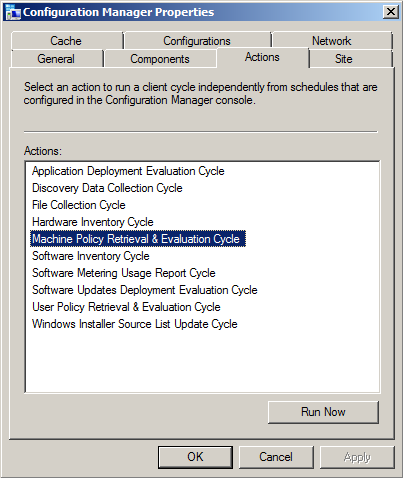
- ActionName - (required) This is where the specific action name is entered. I use my own abbreviated codenames to save on space (this log can easily grow very quickly with multiple users!). For example, I use "MACHINE_POLICY" to indicate "Machine Policy Retrieval and Evaluation", and "HWINV" to indicate "Hardware Inventory Cycle", and so on. (see image below for the list of default available actions for ConfigMgr 2012 clients)
- Network - (required) This is for storing the AD domain name or the CM site name, the choice is yours and it really doesn't matter, but I made it mandatory so you can modify "NOT NULL" to "NULL" if you prefer. It's just there to enable filtering on specific environments when needed.
- Comment - (optional) This is for entering a comment if desired. I had initially intended this to be a [textarea] field on the web form, but decided to skip it to avoid unnecessary data.
- AddedBy - (required) This stores the username of the person who submitted the request from the web site form. For this to work, you MUST enable "Windows Authentication" in IIS for the web site or the virtual folder. If you leave it on "Anonymous" there won't be any way to track who the user was unless you build in forms-based authentication (yuck!)
- DateAdded - (required) This stores the date and time when the request was submitted
- DateProcessed - This is initially NULL until the script comes along and processes the request, at which time it enters the date and time it was completed.
- ResultData - This is also initially NULL until the script updates the row when the request has been processed.
Security
I chose SQL accounts for this setup, but you could use mixed-mode. I do a lot of things by force of habit, so SQL accounts are pretty common for my work, so I tend to use mixed-mode setups. In any case, I have two user accounts for this system:
- amsManager - This account has rights to SELECT, INSERT, UPDATE and DELETE data and rows in the table. I use this account from within the web application to insert new records, and it's used in the script (discussed later) to update the rows when requests are processed.
- amsReadOnlyUser - This account only has SELECT rights, and is used for any applications/scripts/processes where someone needs to be able to consume (read) the data but not have the ability to modify or delete anything.
The Script
Now that the database is created, the table created and the permissions applied to the table, the next step is getting a script to work with it to do the heavy-lifting. You can do this with almost any language, including PowerShell, VBscript, KiXtart, Perl, Python or whatever. As long as the language you choose can do the following things it should work fine:- Open a database connection to query (read) and update data in the rows.
- Execute shell operations to call external .exe applications (SendSchedule.exe), as well as invoke COM interfaces such as WMI and SWBEM requests.
Again, out of habit, I chose VBScript. I was going to do it with PowerShell, but I got lazy. Here's the code, but I have to mention that one key "action" is left out for now, and that's the "Re-Run Advertisement" option. The reason is that I'm still working on this part and having some challenges. When I get it working reliably and consistently I will post an update:
'****************************************************************
' Filename..: ams_client_tools.vbs
' Author....: David M. Stein
' Date......: 11/11/2012
' Purpose...: invoke ConfigMgr Agent "client actions" on remote clients
'             using a SQL table and WMI invocation
' SQL.......: DB1\AMS
' Comment...: Beware of line-wrapping!  If I wrap it I used [& _]
'****************************************************************
Dim query, conn, cmd, rs, objShell, scriptPath, recID, objFSO
' controls DebugPrint output
Const verbose = True
' database connection
Const dsn = "DRIVER=SQL Server;SERVER=DB1;database=AMS;UID=amsManager;PWD=P@ssw0rd$123;"
' database table name
Const strTable = "dbo.ClientToolsLog"
'------------------------------------------------------------

scriptPath = Replace(wscript.ScriptFullName, "\" & wscript.ScriptName, "")
'------------------------------------------------------------' constants used by this script (abridged format)'------------------------------------------------------------Const adOpenDynamic = 2 Const adOpenStatic = 3 Const adLockReadOnly = 1 Const adLockPessimistic = 2 Const adLockOptimistic = 3 Const adUseServer = 2 Const adUseClient = 3 Const adCmdText = &H0001 Const adStateClosed = &H00000000 Const adStateOpen = &H00000001 Const ForReading = 1 Const ForWriting = 2 Const ForAppend = 8 Const TristateUseDefault = -2 Const TriStateTrue = -1 Const TriStateFalse = 0 '------------------------------------------------------------ DebugPrint "info: begin processing..." Set objShell = CreateObject("Wscript.Shell") query = "SELECT * FROM " & strTable & _ " WHERE DateProcessed IS NULL ORDER BY ID" Set conn = CreateObject("ADODB.Connection") Set cmd = CreateObject("ADODB.Command") Set rs = CreateObject("ADODB.Recordset") On Error Resume Next conn.ConnectionTimeOut = 5 conn.Open dsn If err.Number <> 0 Then wscript.echo "fail: database connection failed" wscript.quit(err.Number) Else On Error GoTo 0 End If rs.CursorLocation = adUseClient rs.CursorType = adOpenStatic rs.LockType = adLockReadOnly Set cmd.ActiveConnection = conn cmd.CommandType = adCmdText cmd.CommandText = query rs.Open cmd If Not(rs.BOF And rs.EOF) Then xrows = rs.RecordCount counter = 0 Do Until rs.EOF recID = rs.Fields("ID").value compName = rs.Fields("ClientName").value actName = rs.Fields("ActionName").value actCode = ClientActionCode(actName) addBy = rs.Fields("AddedBy").value DebugPrint "record id...... " & rs.Fields("ID").value DebugPrint "client name.... " & compName DebugPrint "action name.... " & actName DebugPrint "action code.... " & actCode DebugPrint "requestor...... " & addBy DebugPrint "request date... " & rs.Fields("DateAdded").value DebugPrint "network........ " & rs.Fields("Network").value If IsOnline(compName) Then retval = ExecAction(compName, actName, actCode, addBy) Else DebugPrint "result......... offline!" retval = 100 End If DebugPrint "result......... " & retval MarkRecord recID, retval DebugPrint "-------------------------------------------" rs.MoveNext Loop DebugPrint "info: " & counter & " processed" Else DebugPrint "info: no records found" End If rs.Close conn.Close Set rs = Nothing Set cmd = Nothing Set conn = Nothing '------------------------------------------------------------ ' function: return datestamp formatted for log file use '------------------------------------------------------------ Function LogTime() LogTime = FormatDateTime(Now, vbShortDate) & " " & _ FormatDateTime(Now, vbLongTime) End Function '------------------------------------------------------------ ' function: return TRUE if computer responds to a PING request
' note: this features can be impacted by firewall settings!
'------------------------------------------------------------

Function IsOnline(strComputer)
  Dim objPing, query, objStatus, retval
  If strComputer <> "" Then
    query = "SELECT * FROM Win32_PingStatus WHERE Address='" & strComputer & "'"
    Set objPing = GetObject("winmgmts:{impersonationLevel=impersonate}")._
      ExecQuery(query)
    For Each objStatus in objPing
      If Not(IsNull(objStatus.StatusCode)) And objStatus.StatusCode = 0 Then
        IsOnline = True
      End If
    Next
  End If
End Function

'------------------------------------------------------------
' function:
'------------------------------------------------------------

Function ClientActionCode(actionName)
  Select Case actionName
    Case "MACHINE_POLICY":
      ' Machine Policy Retrieval and Evaluation Cycle
      ClientActionCode = "{00000000-0000-0000-0000-000000000021}"
    Case "HWINV":
      ' Hardware Inventory Cycle
      ClientActionCode = "{00000000-0000-0000-0000-000000000001}"
    Case "SWINV":
      ' Software Inventory Cycle
      ClientActionCode = "{00000000-0000-0000-0000-000000000002}"
    Case "DISCOVERY":
      ' Discover Data Collection Cycle
      ClientActionCode = "{00000000-0000-0000-0000-000000000003}"
    Case "RERUN_ADV":
      ' Re-Run Advertisement
      ClientActionCode = "RERUNADV"
    Case "INST_SOURCE":
      ' Windows Installer Source List Update Cycle
      ClientActionCode = "{00000000-0000-0000-0000-000000000032}"
    Case "UPDATE_SCAN":
      ' Software Updates Scan Cycle
      ClientActionCode = "{00000000-0000-0000-0000-000000000113}"
    Case "AMT_PROV":
      ' AMT Auto Provisioning Policy / Out-of-Band Mgt Scheduled Event
      ClientActionCode = "{00000000-0000-0000-0000-000000000120}"
    Case "BRANCH_DP":
      ' Branch Distribution Point Maintenance Task
      ClientActionCode = "{00000000-0000-0000-0000-000000000062}"
    Case "UPDATE_DEP":
      ' Software Updates Deployment Evaluation Cycle
      ClientActionCode = "{00000000-0000-0000-0000-000000000108}"
    Case "SW_METERING":
      ' Software Metering Usage Report Cycle
      ClientActionCode = "{00000000-0000-0000-0000-000000000031}"
    Case "USER_POLICY":
      ClientActionCode = "{00000000-0000-0000-0000-000000000027}"
    Case Else:
      ClientActionCode = ""
  End Select

  ' list of codes for future inclusion...
  '
  '{00000000-0000-0000-0000-000000000010}  File Collection
  '{00000000-0000-0000-0000-000000000021}  Request machine assignments
  '{00000000-0000-0000-0000-000000000023}  Refresh default MP
  '{00000000-0000-0000-0000-000000000024}  Refresh location services
  '{00000000-0000-0000-0000-000000000025}  Request timeout value for tasks
  '{00000000-0000-0000-0000-000000000026}  Request user assignments
  '{00000000-0000-0000-0000-000000000032}  Request software update source
  '{00000000-0000-0000-0000-000000000061}  DP: Peer DP status report
  '{00000000-0000-0000-0000-000000000062}  DP: Peer DP pending status check
  '{00000000-0000-0000-0000-000000000111}  Send unset state messages
  '{00000000-0000-0000-0000-000000000112}  Clean state message cache
  '{00000000-0000-0000-0000-000000000114}  Refresh update status
End Function

'--------------------------------------------------------
' function:
'--------------------------------------------------------

Function ExecAction(clientName, actionName, actionCode, userID)
  Dim strCmd, result

  DebugPrint "info: executing action request for " & clientName

  If actionCode = "RERUNADV" Then
    ' result = RerunAdv(compName, advID)
' [[ I will cover this in part 4 of this article ]]
    result = 200 ' denotes request was ignored (for now)
  Else
    strCmd = scriptPath & "\SendSchedule.exe " & actionCode & " " & clientName
    wscript.echo "info: command = " & strCmd
    result = objShell.Run(strCmd, 1, True)
  End If

  '--------------------------------------------------------

  ExecAction = result

End Function

'------------------------------------------------------------
' function:
'------------------------------------------------------------

Sub MarkRecord(recID, pVal)
  Dim query, conn, cmd, rs

  wscript.echo "info: marking record completed..."

  DebugPrint "info: id = " & recID & " / result = " & pval

  query = "SELECT * FROM " & strTable & " WHERE id=" & recID

  Set conn = CreateObject("ADODB.Connection")
  Set cmd  = CreateObject("ADODB.Command")
  Set rs   = CreateObject("ADODB.Recordset")

  On Error Resume Next
  conn.ConnectionTimeOut = 5
  conn.Open dsn
  If err.Number <> 0 Then
    wscript.echo "fail: connection failed"
    wscript.quit(err.Number)
  Else
    On Error GoTo 0
  End If

  rs.CursorLocation = adUseClient
  rs.CursorType = adOpenDynamic
  rs.LockType = adLockPessimistic

  Set cmd.ActiveConnection = conn

  cmd.CommandType = adCmdText
  cmd.CommandText = query
  rs.Open cmd

  If Not(rs.BOF And rs.EOF) Then
    rs.Fields("DateProcessed").value = Now
    rs.Fields("ResultData").value = pVal
    rs.Update
  Else
    DebugPrint "error: no records found"
  End If

  rs.Close
  conn.Close
  Set rs = Nothing
  Set cmd = Nothing
  Set conn = Nothing

End Sub

'------------------------------------------------------------
' function: verbose echo printing
'------------------------------------------------------------

Sub DebugPrint(s)
  If verbose = True Then
    wscript.echo s
  End If
End Sub
What The Script Does
As I mentioned before, each time the Scheduled Task runs, it calls the script. The script performs the following actions in the order/sequence listed below:- Opens a Connection to the database using ADO (COM) with SQL user permissions
- Submits a Query for all rows where the DateProcessed value is NULL (indicating the request has not been processed yet). The results are obtained as an ADO RecordSet object.
- Iterates the RecordSet rows to gets the remote Computer Name, and ActionName field to determine the specific things that need to be done for the requested action (for example: look up the Action Code GUID)
- Initiates a WMI (Win32_Ping) request to determine if the remote computer is online.
- If not online, the ResultData column is updated with a value to indicate the client was offline
- If online, the Action is processed...
- Executes the requested Action:
- If a "Client Action" is requested: Open a Shell session using WScript Shell object (COM) and executes the SendSchedule.exe application with the appropriate GUID for the Action and the name of the remote computer. Gets the result/exit code from the SendSchedule process.
- If "Re-Run Advertisement" is requested: (to be continued)
- Updates the database table row by entering the appropriate result code (ResultData) and the timestamp of the completion (DateProcessed)
- Exits
The Scheduled Task
This is where the Security aspect comes into play. You need to execute the script under a context which has permissions to invoke the Configuration Manager Agent on remote computers over your network from a WMI interface. I created a special Domain user account for this and added to the local Administrators group on every desktop and laptop computer using Group Policy and Restricted Groups.Before setting up the Scheduled Task, I highly recommend testing the script directly. Open a session (interactive login or use RunAs to open a CMD console) under the credentials of the user account you intend to use for the Scheduled Task. Test the script until you are satisfied it works correctly.
As a force of habit, I use a simple BAT script to wrap my calls to VBScript to I can pipe the output (wscript.echo or DebugPrint results) to a log file if I want. Or you can do it from within the VBScript code using basic FileSystemObject (FSO) methods if you prefer. Either way, it can be helpful to generate a log file to diagnose issues where the database is unavailable for some reason when the scheduled task is executed.
The Schedule you choose is entirely arbitrary. I run mine at ten (10) minute intervals all day, every day. It also doesn't matter how you choose to create the Scheduled Task. You can obviously use the GUI, or do it from the command line using SchTasks.exe, or from a script or whatever.


