Showing posts with label windows server. Show all posts

Thursday, November 7, 2013

If I Were In Charge of Microsoft Right Now...

Yes.  This is extremely "pie-in-the-sky" stuff, but I need a mental break from working two jobs every day.  I'm sure you can poke a million holes in these suggestions, but whatever... enjoy!


  1. Stop all work on the Windows OS and call a big-ass meeting to do a massive "reset" on that 400-headed beast.  Consolidate and streamline EVERY command utility, API, etc.  A common syntax for everything.  Eliminate overlaps and redundancy.  Retool for true 64-bit (or 128?) rather than the dragging on the current 32/64 band-aid stupidity.  Tell partners/vendors "f-u" if you don't comply with the new platform specs.  No more backwards compatibility work.
  2. Redesign the interface so it adapts to the devices, rather than forcing you to use a tablet interface for a keyboard and mouse work environment.
  3. Give away App-V for free (like MDT and WSUS are handled)
  4. Get rid of MDOP as a product and make the rest of it (sans App-V) part of the Windows platform.
  5. Get some fresh faces in the System Center group to retool Configuration Manager to be easier and simpler to (A) install and configure and (B) manage.
  6. Revisit the "Essentials" idea.
  7. Deploy physical "Microsoft Store" facilities, like Apple did.  Online shopping is cool but tinkering with shit in your physical hands shouldn't be ignored.  Oh, and include those nifty-ass Starbucks automated barista machines they have at their own campuses.  Those things kick ass.
  8. Make ads that are funny.  If it doesn't make me laugh and cough my beer through my nose, then it needs to go back to the production room and get some more work.

Thursday, August 29, 2013

10 Questions: with Chad Post

Chad Post

Introduction

(Dave here) Back in the Fall of 2007, I left a company after nearly eight years, as they were being sold-off and split apart in somewhat of a messy process.  I was then briefly employed by a small consulting firm in Norfolk, Virginia.  Our team consisted of myself: a Windows Server support engineer, Bill: a Cisco Network Engineer, Rob: an AD/Exchange Engineer, Jamie: our Project/Sales Manager, and a Desktop Support Technician named Chad Post.

The five of us were trying to grow business for our tiny office, and worked hard to satisfy our customers.  Each of us, for the most part, worked independently of the other, so we didn't really stay in touch as much as one might expect for a small office.  This was also when the U.S. economy began to contract, so everyone felt the stress and concerns equally.

In March of 2008, we were all called up to the home office, in Richmond (Virginia), to be fed, watered and spoken to about how "great" things were going.  The CEO walked up to each of us from the Norfolk office, offered words of encouragement and support, and promised to support our fledgling office "no matter what".  Within three weeks of that event, our office was shut-down and most of us were laid-off.  Only one of the engineers remained with the home office in Richmond, while the rest of us scattered to the four winds.

Four of us remained in our relative "comfort" zones of geography, but Chad chose a path most of the rest of us didn't anticipate: overseas IT contracting.  In the years since, I have tried to stay in touch with Chad and the others, because, as you get older, you also get somewhat more sentimental about staying in touch with people.

I felt it was a fantastic opportunity to interview Chad since he's probably doing the most unusual and relatively "extreme" type of work of anyone I've personally known.  I recently asked him if he would be willing to share his experiences and thoughts gained from his work abroad.


The Questions

Dave: How would you describe what you are currently doing for a living?

Chad: Right now, I’m basically an Active Directory paramedic. I’m out here in Afghanistan in case things go wrong, more or less. Should something break or fail, then I jump into action. Otherwise, it is a whole lot of checking on servers and reading tech articles.

Dave: You've been to some interesting places since leaving Virginia: Afghanistan, Kuwait, Cuba.  What other work locations have you been to, and what other places would you to go?  Any that you'd like to go back to?

Chad: I don’t tend to revisit places once I've worked there, unless the position offers a new spin on things. The few times I've revisited places, I've found that the novelty of being back wears thin quickly. Having said that, I would not mind revisiting Cuba… as a tourist on Guantanamo!

Dave: What's the most interesting or surprising thing (or event) you've experienced, either personally or professionally, while working abroad (OCONUS)?

Chad: I mean, you can’t go wrong with the surprise of your first insurgent attack. ;-)

Dave: If a young American IT worker approached you about working overseas, and asked you what they should pack in their luggage for a year-long opportunity in some remote place, such as Afghanistan or Guantanamo Bay, what top (5) items would you recommend?

Chad: The secret of working with the military is that you can get most things delivered via USPS in 2-3 weeks. Having said that, I tend not to travel without a laptop, universal outlet converters, electronic copies of my documents, a spare set of clothing, and enough local currency to escape my intermediate stops should something go wrong.

Dave: What aspect of American culture do you feel is most misunderstood by other cultures?  What aspect of other cultures (those that you've experienced, at least), do you feel is most misunderstood by Americans?

Chad: Many citizens of Middle Eastern nations assume that American policy reflects the opinion of all Americans. Because they’re used to their governments controlling the dialogue, they assume the same is true of us. That’s why you have people protesting America over films instead of directing their ire at the producers of those films, for example.

On the flip side, Americans tend to view the Middle East as a land of burkas and angry men. That’s definitely true of some places, but when you’re in Bahrain or the UAE, you’re just as likely to see a hip Middle Eastern woman in skinny jeans and Prada sunglasses.

Dave: What types of IT-related skills seem to be in most demand (outside of America) these days?  Are they more in-common among various locations or are they more specific to industry or culture for each location?

Chad: On the contracting side, your big names certs are what will sell you. Microsoft, Cisco, the CISSP, and CompTIA are the most requested certifications. It bears noting that most jobs will require Security+, though.   Additionally, SharePoint, SCCM, and anything security will get you in the door.  More important is getting that security clearance, though!

Dave: Is it as "dangerous" as most Americans believe to do IT contracting work in places like Afghanistan, Qatar, UAE, or Kuwait?

Chad: See, those places are all different. You can’t compare a Kuwait or a Qatar with an Afghanistan. Afghanistan is clearly more dangerous, but the actual level of danger varies based on your location. Arguably, I am statistically safer here than I would be wandering around Norfolk at night. Bahrain and Kuwait are almost ridiculously safe at night. I was never worried walking around alone at one in the morning.

Dave: You've mentioned that there can often be enough "down-time" in remote locations to focus on education pursuits and obtaining certifications.  Since you've been working overseas, what goals have you achieved in that regard?  Which goals are still in your cross-hairs right now?

Chad: It can be indeed. In Iraq, I completed my MCSA, MCSE, MCITP: SA, EA (and both desktop certs,) ITILv3, and CCENT. I also managed to finish up a semester of college. In Bahrain, I had less time… that was more of a real job… but I still found time enough to finish my undergraduate degree. In addition to being on watch 10 hours a day, 7 days a week in Afghanistan, I've been attending Arizona State full time.
As far as what’s next? Well, law school is pending for 2014. I shall be leaving an IT expatriate spot open for the taking, come mid-2014.

Dave: Have you read any books that impressed you lately? What titles or authors?

Chad: I've read something like 87 books this year… but I recommend Sam Kean's Disappearing Spoon & Violinist’s Thumb.

Dave: What would make your "perfect" breakfast, as far as food and drink items are concerned?

Chad: I’m partial to savory crepes and a hot chocolate… that’s my Washington DC breakfast of choice.

Conclusion

There's not much I could add to what's been said above. That said, Chad exists on the internet in quite a few places. Facebook, Google Plus, LinkedIn.

Namaste.

Monday, November 26, 2012

It's Scripting Time Again! AD Server Descriptions

This issue has come up a LOT in my career, but I don't know why.  It seems like something that Microsoft should address with some "feature" or utility or something.  What I'm blabbering about is updating the description for each Active Directory server account to match whatever the local computer description is.  The local computer description is what you see (and can update) from the Computer "Properties" form.

Local Computer Description

Active Directory Computer Description

It came up again tonight when a friend (called asking for help.  I happened to have the pieces of code on my server and glued them together in a few minutes (the mess below).  Every time I do something like this, I see horrifically bad coding habits from years past and do my best to clean them up before sharing them.

Is this Earth-shatteringly unique?  No.  Is it the only script of its kind? No.  Can you find alternatives on the web that will do just as well?  Absolutely.  If I get a little spare time, I will try to post this in PowerShell format (unless you want to submit that and I will post it, giving you full credit).

In any case, I hope this helps someone out there.  Read the WARNING and DISCLAIMER at the bottom!

'****************************************************************
' Filename..: server_descriptions.vbs
' Author....: David M. Stein
' Date......: 11/26/2012
' Purpose...: update AD computer descriptions from local descriptions
' Usage.....: cscript server_descriptions.vbs >output.log
' (note: the above redirect to output.log is optional)
'****************************************************************

Set objRootDSE = GetObject("LDAP://rootDSE")
ldapRoot = objRootDSE.Get("defaultNamingContext")

Const ADS_SCOPE_SUBTREE = 2
Const E_ADS_PROPERTY_NOT_FOUND = &h8000500D

' parse out NetBIOS domain name (e.g. "CONTOSO.COM")
nbDomain = Mid(Split(ldapRoot,",")(0),4)

wscript.echo "info: LDAP root is " & ldapRoot
wscript.echo "info: NetBIOS domain is " & nbDomain

serverlist = GetServerList()

For each strServer in Split(serverlist, ",")
  wscript.echo "server_name...: " & strServer
  strOUpath  = ComputerOU(strServer)
  localDesc  = GetLocalDescription(strServer)
  domainDesc = ADComputerDescription(strOUpath)

  If localDesc = "" Then
    localDesc = "NOT_DEFINED"
  End If

  wscript.echo "ou_path.......: " & strOUPath
  wscript.echo "local_descrip.: " & localDesc
  wscript.echo "domain_descrip: " & domainDesc

  If localDesc <> "NOT_DEFINED" Then
    try = ChangeADDescription(strOUPath, localDesc)
    wscript.echo "desc_updated..: " & try

  End If

  wscript.echo "----------------------------------------"
Next

'----------------------------------------------------------------
' function: get list of servers from domain using OS captions
'----------------------------------------------------------------

Function GetServerList()
  Dim conn, cmd, query, retval : retval = ""
  Dim rs, strOS, strName, counter : counter = 0

  wscript.echo "info: querying server names from active directory..."

  Set cmd = CreateObject("ADODB.Command")
  Set conn = CreateObject("ADODB.Connection")
  conn.Provider = "ADsDSOObject"
  conn.Open "Active Directory Provider"
  cmd.ActiveConnection = conn
  
  query = ";(objectCategory=computer);" & _
    "name,distinguishedName,operatingSystem;subtree"

  cmd.CommandText = query
  cmd.Properties("Page Size") = 100
  cmd.Properties("Timeout") = 30
  cmd.Properties("Cache Results") = False

  Set rs = cmd.Execute

  Do Until rs.EOF
    strOS = rs.Fields("operatingSystem").value
    If InStr(UCase(strOS), "SERVER") > 0 Then   
      strName = rs.Fields("name").value   
      If retval <> "" Then
        If InStr(retval, strName) < 1 Then
          retval = retval & "," & strName
          counter = counter + 1
        End If
      Else
        retval = strName
        counter = counter + 1
      End If
    End If
    rs.MoveNext
  Loop

  rs.Close
  conn.Close
  Set rs = Nothing
  Set cmd = Nothing
  Set conn = Nothing

  wscript.echo "info: " & counter & " servers were found"
  GetServerList = retval

End Function

'----------------------------------------------------------------
' function: get current computer OU from active directory
'----------------------------------------------------------------
 
Function ComputerOU(netBiosName)
  Dim objConnection, objCommand, objRecordSet, strQuery
  Set objConnection = CreateObject("ADODB.Connection")
  Set objCommand = CreateObject("ADODB.Command")
  objConnection.Provider = "ADsDSOObject"
  objConnection.Open "Active Directory Provider"
  Set objCommand.ActiveConnection = objConnection
  objCommand.Properties("Page Size") = 1000
  objCommand.Properties("Searchscope") = ADS_SCOPE_SUBTREE
  strQuery = "Select ADsPath From 'LDAP://" & ldapRoot & _
    "' WHERE objectCategory='computer'" & _
    " AND name='" & netBiosName & "'"
  
  On Error Resume Next
  objCommand.CommandText = strQuery
  Set objRecordSet = objCommand.Execute
  objRecordSet.MoveFirst
  Do Until objRecordSet.EOF
    strResult = objRecordSet.Fields("ADsPath").Value
    objRecordSet.MoveNext
  Loop
  ComputerOU = strResult
End Function

'----------------------------------------------------------------
' description: get local description from remote computer via WMI
'----------------------------------------------------------------

Function GetLocalDescription(strName)
  Dim objWMI, colItems, objItem
  Dim query, retval : retval = ""
  On Error Resume Next
  Set objWMIService = GetObject("winmgmts:\\" & strName & "\root\CIMV2") 
  If err.Number = 0 Then
    query = "SELECT * FROM Win32_OperatingSystem"
    Set colItems = objWMIService.ExecQuery(query,,48) 
    For Each objItem in colItems 
      retval = objItem.Description
    Next
    If IsNull(retval) or Trim(retval) = "" Then
      retval = ""
    End If
  Else
    wscript.echo "error: " & strName & " is offline or inaccessible"
  End If
  GetLocalDescription = retval
End Function

'----------------------------------------------------------------
' function: get AD computer description
'----------------------------------------------------------------

Function ADComputerDescription(strLDAP)
  Dim objComputer, retval, try, ldapstring
  ldapstring = strLDAP
  On Error Resume Next
  Set objComputer = GetObject(ldapstring)
  try = objComputer.Get("description")
  If Err.Number = E_ADS_PROPERTY_NOT_FOUND Then
    retval = ""
    Err.Clear
  Else
    retval = try
  End If
  ADComputerDescription = retval
End Function

'----------------------------------------------------------------
' function: set AD computer description (limit 48 chars)
' refer to: http://msdn.microsoft.com/en-us/library/windows/desktop/aa394239(v=vs.85).aspx
'----------------------------------------------------------------

Function ChangeADDescription(strLdapName, strDesc)
  Dim objPC, retval
  wscript.echo "info: modifying domain description..."
  On Error Resume Next
  Set objPC = GetObject(strLdapName)
  objPC.Description = strDesc
  objPC.SetInfo
  retval = err.Number
  If retval <> 0 Then
    retval = retval & " / " & err.Description
  Else
    retval = "SUCCESS"
  End If
  Set objPC = Nothing
  ChangeADDescription = retval
End Function

Warning

This script example includes MINIMAL error handling.  Always TEST, TEST, TEST, and when you think it works properly, TEST it some more.

Disclaimer

Use this script code AT YOUR OWN RISK.  Always test thoroughly in an isolated "test" or "development" environment to avoid negatively impacting production computers.  The author assumes/accepts NO LIABILITY for any direct or derivative use or consequential damages, however, the author wouldn't mind a little constructive feedback if it helps you in any way.

Saturday, September 22, 2012

Notes from the Lab: Migrating to Windows 8 / Windows Server 2012

My home lab is a Windows Server 2008 R2 Active Directory domain with a few Windows 7 clients.  The domain is hosted entirely on one domain controller, which also hosts quite a few other roles and features.  Windows 7 clients are all Service Pack 1 with the latest updates installed.  The server was also on the latest Service Pack and latest updates.  All computers are physical hardware.  None were/are virtual machines.  The "server" is a Dell Precision 390 workstation.  The desktops are a mixture of various Dell Inspiron and OptiPlex models.
(not really my lab, but I wish it was this sophisticated and cool looking!)

Preparation

I captured full System backups of my primary desktop and my domain controller server prior to embarking on this adventure.

Migrating the Desktops

I started by running the in-place upgrade on one of my Windows 7 64-bit clients to Windows 8.  The Windows 8 setup checker warned that I had to uninstall a few apps before it would allow me to continue, due to reported compatibility issues.  Namely, ATI Catalyst Install Manager, and the WSUS Admin Console, but it also warned I need to de-authorize my computer within iTunes.

After doing this, I had to reboot, and then kick off the Windows 8 setup again.  It ran through just fine and everything appeared to be in good shape on the other end.  Total time: about 1 hour.  Media: USB thumbdrive.

The applications I had installed and working fine on Windows 7:

  • Office 2010
  • iTunes 10.7.0.21
  • Adobe Reader X  10.1.4
  • Google Chrome 21.0.1180.89
  • Google Picasa 3.8
  • Paint.NET 3.5.10
  • TextPad 6.1.3
  • VMware Workstation 8.0.4
  • LogMeIn (free version)
  • Citrix Receiver
  • 7-Zip 9.20
  • WMI Code Creator (WMICC)
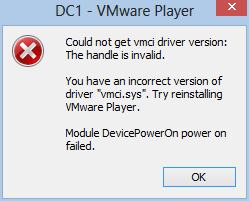
VMware Workstation 8.0.4, and VMware Player 4.0.4 both had issues when I tried to launch my guest virtual machines.  The error said I have an incorrect version of vmci.sys. (see image below).  So I re-ran the latest installer package for 8.0.4, which uninstalls the current setup and then installs it all again.  After doing this, both VMware Workstation and VMware Player worked just fine and were able to power on and support my guest VM's. (note: I know that the vendor says 9.0 supports Windows 8 as a key feature, but I wanted to see how 8.x would work out).


Migrating the Server

Next, I ran the Windows Server 2012 (Standard Edition) upgrade on my 2008 R2 domain controller.  I did this via RDP with a different USB thumbdrive.  It's worth noting that this is a workhorse server and hosts quite a few roles and features, which pretty much violate "best practices" guidelines, but hey, I know for a fact I'm not alone when it comes to having to "make do" with limited hardware budgets.  This server hosts:

  • Active Directory Domain Services (domain controller)
  • Internet Information Server (IIS) for both WSUS and software development
  • File and Print shares
  • WSUS 3.0 for managing patches and updates
  • Automation Server: scripts and scheduled tasks for managing all sorts of daily/nightly chores
  • Backup Services: backups from clients and the server to an external drive

Again, the Windows Server 2012 setup checker ran through and checked my system for potential issues prior to letting do the actual upgrade.  It warned me to uninstall WSUS 3.0 and verify "third-party applications compatibility", but didn't explicitly name any.  The only thing I could figure was my APC "PowerChute" UPS software, but I left it as-is.

It also said I had to run ADPREP /FORESTPREP and then ADPREP /DOMAINPREP before continuing.  You can find ADPREP.exe on the installation media under \support\adprep.  After uninstalling WSUS (content, logs and database) I rebooted, and started Windows Server 2012 setup process again.  After it warned me about the "third-party" issues, it allowed me to continue, so I took a deep breathe and pushed the button.  Total time: about 1 hour 20 minutes.

Afterwards, I went into the Server Manager console, went into Roles and Features, and added the Windows Server Update Server role.  Then I ran the post-install configuration tasks to setup the options to function as my domain WSUS server.

Interesting Notes

Some things I found that needed to be resolved after the server was migrated, some were quick and easy, some took a little digging around:

Group Policy Objects

I have a GPO named "Drive Mappings" that has drive letters mapped to shares on my server for user documents, photos, videos, and software utilities.  Each of them are configured via Group Policy Preferences, and each drive is mapped via "Replace" and the "Reconnect" option was checked.  This DID NOT WORK on ANY of my Windows 8 clients.  But after researching this a bit (see link1 and link2), I found it was due to two things:
  • I was logging on with an account that has local Administrator rights (this reportedly does not occur with users who do not have local administrative rights, but I didn't have time to test this yet)
  • The "Reconnect" option was checked
After, un-checking the "Reconnect" option, the drives began mapping correctly.

WSUS

After letting WSUS bake-in for 30 minutes or so, I was concerned about not seeing any computers reporting in.  I ran GPUDPATE /FORCE on several of the clients, as well as WUAUCLT /DETECTNOW, but still none were reporting in to the WSUS server.  After reading through the WSUS configuration notes for 2012, I discovered that it had reconfigured the web service to respond on port 8530 (HTTP) and/or 8531 (HTTPS), but I was only using HTTP.

So, I went into my GPO settings, and edited the setting "Specify intranet Microsoft update service location" to append ":8530" onto the existing URL entry.  The setting is found under Computer Configuration / Policies / Administrative Templates / Windows Components / Windows Update.
After saving the changes, I went back to some clients and ran GPUPDATE /FORCE, and then WUAUCLT /DETECTNOW.  Within two minutes the clients started appearing in the WSUS console.

The Dreaded Start Screen

I tried REALLY REALLY hard to warm up to the Windows 8 Start Screen, but I can't do it.  It makes sense for a tablet (e.g. touch-screen) interface, but for a mouse and keyboard I cannot find ANY rationale that it can be "as" efficient to use the Metro tiles rather than the traditional Desktop.

My friend and co-worker Chris DeCarlo pointed me to the ClassicShell application on SourceForge, which suppresses the Start Screen and installs a Windows 7-ish Start Menu.  With that in place I find Windows 8 to be pretty nice, but I still am forcing myself to try the tile interface as often as I can just to give it a fair trial. ClassicShell is impressively built, and has a lot of attention to detail.  However, I doesn't seem to show a "Computer" link on the right-hand side, nor does it apply the "Pin to Start Menu" feature consistently (trying to pin Internet Explorer to the Start Menu only adds repeated shortcuts on the "Programs" fly-out menu).  All in all, however, it's a gotta-have for my needs and I really like it.

Miscellaneous

If I were asked to rank the applications I use most often, on a typical day, it would probably look like this...
  1. Internet Explorer and Google Chrome (a tie)
  2. SQL Server Management Studio
  3. TextPad
  4. Microsoft Outlook
  5. WMI Code Creator
  6. Windows PowerShell ISE
  7. Snipping Tool
  8. Paint.NET
One that might be easily overlooked is number 5 (WMIC).  But I live in that application quite often as I do a fair amount of work with WMI and WBEM scripting.  One thing I noticed immediately as that the CIM namespaces list continues to grow with each major Windows version release.  In fact, it took about a full minute for the list to fully populate the first time I opened the application. Not a huge deal obviously, but something I found interesting (and nice!)


Windows.old

As with previous Windows version "in-place" upgrades, the original environment is backed up into the "Windows.old" folder located in the root of the system drive.  If you try to delete this folder, you will be smacked in the face with a cold, wet, dish rag that has the phrase "Access Denied!" embroidered across it.  That's true whether you try to delete it as an Administrator account, opening a CMD console using "Run as Administrator" or by running a script under an elevated user context.

The solution is to run the Disk Cleanup utility provided with Windows 8.  Be sure to click the "Clean up system files" button, otherwise you won't see the option to check "Previous Windows Installations".


Conclusion

The only thing I really miss right now is not having a CPU that supports SLAT, so I can't run HyperV 3.0.  At work I have a computer that does, and it runs HyperV 3.0.  I'd really like to expand my horizons and learn more about the Microsoft side of virtualization and "now" seems like the right time to do so.  For now, I'm using VMware Player and it seems to work very well on Windows 8.

As for "Metro" (or whatever Microsoft decides to call the Windows 8 UI/UX), I like it.  I've always like the flat, spaceous, simplified look over the Aero or XP motif.  What some people don't realize is that Google was actually putting a "metro"-ish UI on much of their web applications like Gmail, Docs, and so on.  I'm talking about the now-familiar 2D motif, fat-border outlined regions and tables, padded flat buttons, and ample use of white space to achieve a simplified look. As to who came up with that concept first is anyone's guess.  I assume it was "invented" years ago and simply rediscovered, as is often true with many "new" things these days.

In any case, Windows 8 is growing on me and I intend on keeping up with it.  Not simply because I work in the IT field, but because I kind of like shiny new things.

Thursday, June 28, 2012

Jobs. Jobs. Jobs. IT Jobs

My employer, Endurance IT Services, located in Virginia Beach, Virginia, is hiring.  Yes!


(2) Engineer (Tier II) - Windows/VMware/Exchange (Hampton Roads)


Looking for Systems Engineer with a minimum of 7+ years of hands on experience with diverse network environments.  This position is for a full time opening on our engineering team. This team is responsible for the design, installation and support of networks for numerous clients in Hampton Roads.  The typical environments include Microsoft Windows 2003/2008 Servers, Exchange 2003/2007/2010, Cisco routers/switches/firewalls and other 3rd party applications.  Bachelor degree preferred. Ability to assess and formally document client environments a must.


Key Skills include all the items below:

  • Microsoft Exchange 2007 / 2010
  • Windows Server 2008 / 2008 R2
  • Active Directory
  • Networking with various products


(2) Senior Engineer (Tier III) - Windows/VMware/Exchange (Hampton Roads)


Senior Systems Engineer with a minimum of 15+ years of hands on experience with diverse network environments.  This position is for a full time opening on our engineering team. This team is responsible for the design, installation and support of networks for numerous clients in Hampton Roads.  The typical environments include Microsoft Windows 2003/2008 Servers, Exchange 2003/2007/2010, VMware Vsphere, SANs, Cisco routers/switches/firewalls and other 3rd party applications.  Bachelor degree preferred.  Ability to assess and formally document client environments a must.


Key Skills include all the items below:

  • VMware in HA environments
  • Microsoft Exchange 2007 / 2010
  • Windows Server 2008 / 2008 R2
  • Networking with various products

We are looking for strong candidates with technical support skills and great interpersonal skills.


We are a fast growing company that is strongly focused on customer service and satisfaction. We are building a corporate culture which supports learning, growth and advancement in the Network Services career field. Our focus is solely network services.  We offer competitive salaries, a comprehensive benefits package, and a great place to work.

(A LOT of employers say the above mumbo-jumbo, but I will concur 110% that it is indeed a great place to work for.)


If you live within the Hampton Roads area, and are both qualified and interested in one of these available positions - contact me for more information at ds0934 (at) gmail (dot) com.

Friday, June 15, 2012

Microsoft TechEd 2012 - The Experience in Review

I'm not a professional writer, well, actually, that's not true.  I have written a few (e)books for sale on Amazon, so I guess that makes me a professional, even though I don't earn enough to make a car payment from that, it still helps.  However, I did spend a week in Orlando (thank you to my company president for sending me!  very much appreciated!), attending the Microsoft TechEd 2012 conference.

Key Take-aways for me:


  • My skills are getting dated
  • The changes coming with the 2012 products are vast and diverse
  • Microsoft is changing their direction in some very surprising ways
  • My skills are getting dated, but so are everyone else's now
Like many attendees, I flew in on Sunday, got to my hotel and immediately went on a hunt for food and beer.  It was HOT and HUMID, as is expected in Florida in June.  I walked a mile to meet up with my team mates at their hotel (we were booked in separate places due to timing), and I lost about 10 lbs from sweat along the way.  
Hotel Room - Day 1
Just for the record: The Wyndham Orlando Resort hotel is not a place I'd recommend you stay.  The staff is very nice and helpful, but the facilities are falling apart.  My door lock was busted and took a few hours to get fixed.  Then my phone went out.  They have no free breakfast, or Wi-Fi access, so you have to plug into the phones to go wired, and they never worked the entire time I was there.  The door didn't shut tight either.  At least the air conditioning worked well enough.

I rehydrated at Miller's Ale House on International Drive, where I enjoyed the Ossobuco dinner special, and was left speechless at how damn good it was.
(Ossobuco, already half-eaten)
Afterwards, I had to grab a taxi back to my hotel because I didn't feel like walking another mile-and-a-half in 95 F heat and sticky humidity.  The $5 fare was worth it.

Day 1 - Registration, Breakfast, Keynote, Sessions, Lunch, Sessions and Beer

First stop was registration.  Sign in.  Pick up my badge and backpack.  Stuff my things into the backpack and head for breakfast.  Twenty or so lines were opened up with a cheering staff (I'm not kidding) pointing us to the shortest lines to pile up eggs, bacon, sausage, fruit, pastries, juices, milk and so on.  Then we fan out to one of a hundred or so group tables to chow down.  Afterwards, it was comparing schedules with colleagues and new friends, coffee and heading over to the keynote session.

Registration (not yet full, but would be full soon after)

The Keynote

It was a lot of emphasis on Azure cloud services, new scalable features in Windows Server 2012, and new capabilities in Visual Studio 2012.  Lot's of comparison's of the new Hyper-V features against "the competition" as well.
Keynote session

WCL327 - Maximizing Windows 7 Performance: Troubleshooting Tips - Johan Arwidmark

What can I say? Any session Johan presents is going to be good, and worth attending.  It was.  I learned a ton and enjoyed quite a few laughs.

Lunch - (chomp chomp, slurp, mumble, burp, repeat...)

Lunch (or Breakfast)

WCL309 - What's New in Microsoft Deployment Toolkit 2012 (MDT) - Michael Niehaus

While a lot was said about Windows 8 deployment support, MDT 2012 packs a ton of improvements and features to help with Windows 7 deployments as well.  Michael always does a fantastic job of presenting.

WCL302 - Alphabet Soup Deployment: From AIK to ZTI - Migrating from Windows XP to Windows 7 Using Nothing But Free Tools - Stephen Rose

This was more of a broad overview of the options available to replace legacy deployment tools like Symantec Ghost, with AIK (ADK), MDT, DISM, and WDS.  Not really technically deep in any one technology, but just enough to provide a reason to consider dumping your legacy (costly) products to at least try out the free alternatives Microsoft provides.

After the last session ended at 6:00 PM, the expo floor opened up.  That means vendor frenzy.  Free food, drinks.  Swag and goodies to fill up your backpack.
Beer!


Day 2 - Breakfast, Vitamins, Water, Sessions, More Food and Beer

Another Keynote?  Nope.  I went to the Hands-On Labs area to work with App-V 5.0.  Even though it's still "beta" and a little rough, it's a huge improvement over 4.x from what I saw.  The customer I work with now is looking to implement App-V and I'm glad they never deployed 4.x since that means no need to co-exist or migrate.

WCL303 - Microsoft Desktop Virtualization: The Right Technology for Your Business Scenario - Karri Alexion-Tiernan and Skand Mittal

This was also more of a high-level scope coverage of App-V, UE-V, MED-V (very little on that however), RemoteApp, and VDI.  Most of the demos were on App-V, UE-V and RemoteApp.  They also spent quite a bit of time demoing the VDI features in Windows Server 2012, which look really nice (and powerfully simple too).

Lunch - I'm a sloppy eater.  I will spare you the details.

WCL382 - Deploying Windows 8 with the Microsoft Deployment Toolkit - Michael Niehaus

The name says it all.  It was a very good session.  Michael also discussed upcoming changes in "Update 1" for MDT 2012 and future "wishlist" features as well.

SIA312 - What's New in Active Directory in Windows Server 2012 - Dean Wells

Dean reminds me so much of Ricky Gervais, more in speaking, tone, humor and body movement than physical looks, that I had to keep reminding myself it wasn't Ricky doing the presentation.  Thankful he was funny, because this was a very deep dive into AD and LDAP, Kerberos, bug fixes, RID services, FSMO management, and much more.  The room was packed and it was one of the larger rooms.  I put Dean on my list of favorite presenters to follow in the future.

SIA311 - Sysinternals Primer: Gems - Aaron Margosis

Great slice of Sysinternals tools which are often overlooked.  Aaron is a funny guy and does a fantastic job in front of a large audience.  Bonus: Mark Russinovich dropped in and sat directly in front of me. I still need to pick up the Sysinternals Toolkit book they both co-authored.

Expo Floor.  Food.  Beer.  Vendor Party at Ice Bar.  Interesting place made (almost) entirely of ice.  The bar, the walls, the seats and decor.  Even the drink glasses are ice.  One free (tiny) drink.  Meh.


I dropped my backpack off at the hotel where my colleagues were staying (because it was closer to the party location).  Afterwards, I couldn't find a cab, so I walked the 1.5 mile stretch along International Drive to my hotel.  I think I worked off the beer and food.

Day 3 - Breakfast, Sessions, Lunch, Sessions, Expo, Food, Beer again

SIA402 - How to (un)Destroy Your Active Directory - Ralf Wigand

Ralf is surprising. A renown MVP, he has a classic German accent, but he's very soft spoken.  That soft-spoken demeanor delivers some seriously powerful information.  He's also very funny.  If you get a chance to attend one of his presentations, do it.  I learned a lot about common errors and some not-so-common errors that can screw up an otherwise functional AD environment.  Even better, he focused on 2008 R2 AD, rather than all 2012, so it was information everyone could put to use "now".

SIA316 - Windows Server 2012 Dynamic Access Control Best Practices and Cast Study Deployments in Microsoft IT - Brian Puhl

This was surprising for me for a few reasons:
  • Brian was very candidate about the challenges inside of managing Microsoft's internal IT operations
  • DAC is not a cure for all security management needs
  • DAC is not a replacement for security groups
  • DAC is a good enhancement to using security groups by extending a policy-driven approach to implementing template-based access management with delegation.
I really had a weak understanding of DAC before this because I had only read up on the capabilities alone.  I had not seen any documented results of actual usage in production environments.  This was an eye-opener for sure.

Lunch (you know the rest)

WCL404 - Turn PowerShell Commands into Reusable CLI and GUI Tools - Don Jones

Wow! Don is such a fantastic speaker and presenter.  This was only my second time seeing him at TechEd, and I saw him again in a later session (read later).  Don covered a lot of aspects of PowerShell, what it is, what it isn't, and provided some great demos of building out a reusable function cmdlet, and then provided a brief overview of creating GUI forms using either WPF or Windows Forms.

BOF11-ITP - Windows PowerShell Best Practices - Ed Wilson and Don Jones

This session was packed into a very small room, which was kind of dumb planning on the logistics side. Not the fault of Ed or Don though.  This was essentially a free-for-all, stand-up, un-scripted (pardon the pun) session where the speakers interacted with the audience to share ideas, challenges, methods, tips and resources among each other.  The session was also broadcast live on Channel 9 (and other outlets?).  I was in the back of the room, leaning on the door next to Jeffrey Hicks.

I was going to attend a session at this point but ran over to the HOL area instead, to play with App-V 5.0 some more.

Day 4 - Final Day - Breakfast, Sessions, Lunch, more Sessions, Closing Party

WCL325 - Raiders of the Elevated Token: Understanding User Account Control and Session Isolation - Raymond Comvalius

I really didn't expect to learn a lot from this session because I foolishly believed I already had a firm grasp of how UAC and sessions work in Windows 7.  I was wrong.  Raymond gave a very good presentation with demos and explanations of how each piece of the process works.  It was well worth sitting in on this one. Raymond has a soft voice and a Dutch accent that fools you into thinking he's going to go easy on the crowd.
Lunch

WCL290 - Microsoft Application Virtualization 5.0: Introduction - Andy Cerat

This session covered some gaps from the WCL303, but in all, they each fit together to provide a fairly good picture of App-V 5.0.  Andy ran through several demos to show how the new web-based management interface works, how to create and import packages, apply access controls, publish and unpublish packages, and refreshing clients.  He also demonstrated Connections and Extensions and how they work to make a more integrated and cohesive experience for users.  I'm looking forward to App-V 5.0 projects.

Lunch - More obscene sloppiness and lost fingers

Hands-On Labs

WCL301 - Case of the Unexplained 2012: Windows Troubleshooting with Mark Russinovich

Anyone who's been to TechEd knows Mark's "Case of..." session is the biggest attendee draw of the week. It was packed.  They should have booked this in the main keynote hall rather than the regular "large" room they used.  I can't do this justice in my own words, so just trust me that if you haven't been to one of his sessions, and you get the chance to go to one in the future, do it.

Mark Russinovich at TechEd 2012


I was planning on attending WCL402 (App Compat for Nerds, Chris Jackson), but I was so burned out from walking and being squished in the room during Mark's session, that I had to take a breather and get ready for the closing party...

Closing Party: Universal Studios Theme Park

They closed the park to everyone else except TechEd attendees from 7:00 pm until roughly midnight.  I started off with pizza, and a Coke, then moved on to beer, and roamed the park.  This is a fairly large park and you can wander for a long time.  It's an interesting place.  I've been to Busch Gardens, Williamsburg, Disney World, and Universal Studios Theme Park in Los Angeles, as well as Elitch Gardens in Denver.  This park has some very new attractions which were fantastic:  The Harry Potter Adventure and The Hulk.  I also ran through the Amazing Spiderman
Hogwarts - Harry Potter Adventure

The Hulk (part of it)

Getting on The Hulk

Leaving the park was a sad moment, but it also meant I was closer to getting back home to my family and my dog Lucky.

Today, my colleagues and I boarded our Southwest flight back home to Norfolk airport and on to Virginia Beach.  The picture below is from the Orlando airport food court near gate 102.  It's a very nicely designed airport and the birds flying around the inside are a nice touch (none of them bombed us, as far as I could tell).

Conclusion

It was a good year this time.  I think the Orange County Convention Center worked out better than the Georgia World Congress Center (Atlanta, 2011) did.  It made it much easier getting around from one session to the next, and the single central hall works better for sharing an expo, food and lab space with plenty of room to spare.

The buses all ran on time and I never had a problem getting to or from the event and my hotel or Universal's park.  The closing party was fantastic as well.  I met some interesting and impressive people throughout the week.  In all, if you haven't been to TechEd before, and you work with Microsoft products, services or technologies, or even if you are just curious about them, I highly recommend it.  It's just such an overwhelming deluge of useful information, demos and perspectives that your head will hurt after the first few days.

Cheers!

Monday, April 23, 2012

Metro on Windows 8 vs Windows Server 2012

I posted this on my Google+ page today and it got me thinking about "why?"

First off, the Metro implementation on Server is not the same as it is on Desktop (aka "Client" version).  Not that the theme or platform services are different, but that they support a different set of features layered on top of them.  Namely, the applets or utilities that are provided for configuring, troubleshooting and maintaining a "server" as opposed to a "client". In my opinion, for the scope of features provided within the "server" paradigm on top of the Metro UX, it is a MUCH better fit.  This almost certainly sounds absurd to say (and for you to read it, I'm sure).  "A Metro interface on a 'Server' operating system?"  Yes!  It actually works.  But here's the irony...

Metro is a better fit on "server" than on "Windows 8" by a factor of a Gazillion-Trillion-Billion to One.

I'm sorry to Windows 8 fans, but on the standard "desktop" configuration, I'm not a fan of Metro.  If I had a tablet on which to put it through some meaningful paces, I might have a very different opinion of it.  But on a traditional desktop or laptop, I still believe that the tile concept is *NOT* the most efficient UX construct for using a mouse and keyboard.  It is more efficient for hand and finger gestures.  The tiles are scaled on a factor that more ideally matches the scale and topography for direct hand movements.  A mouse is an intermediary instrument that re-scales movement and articulation such that large tiles are actually inversely proportionate to the scale of movement.  In English: From a purely engineering perspective: it is not efficient.

I relate this to comparing the handling of sugar cubes with chop sticks as opposed to using them to handle grapefruit or softballs.  At some point, the relative size ratio, and weight, make it more efficient, and convenient to use bare hands.

Those are my own words.


Wednesday, March 14, 2012

State of the Tech Industry: Sort Of.

Here's my two-cent predictions:  Keep in mind that I don't own stock or any vested interest in any tech company.  My employer is a partner of Microsoft, VMware, Cisco, HP, NetApp, and others.  We work on all major platforms, and my personal role is in the area of software deployment automation and business systems automation.  We don't sell hardware or software.  We sell services.  Ok, enough of the disclaimer crap...

Regardless of the blabbering from all of the Android tablet vendors, Apple will remain comfortably in the lead of the tablet market for at least the next two years (out to 2014 at least).  Android tablets won't even match it in terms of sales or market share (for similar form factors).  iPad will remain on top of the market for a long time to come.  This isn't just my view.  It's also the view of most major tech industry analysts.

Microsoft will make major gains in server virtualization when Windows 8 Server Hyper-V ships, which will cause EMC/VMware to cut prices and shift their pawns on the board to avoid losing customers.  Cost alone will be a huge weapon, especially when reviews start pouring in about Hyper-V's improved features, scalability, reliability and uptake.

Microsoft will make smaller, but noticeable, gains in market-share against Oracle with SQL Server 2012.  The new features and capabilities, combined with the much cheaper cost, will be hard for cost-conscious customers to ignore.  It will be slow gains at first though.

Flexera Software will continue to prosper from the looming death of Wise Package Studio and the ignorant stupidity of Symantec.  There is now an effective monopoly in the software packaging and repackaging market, but it's under the RADAR of almost everyone, so they will slide through comfortably to a nice profit margin.  More businesses are adopting FlexLM and FlexNet Manager products as well, so support revenues will continue to grow at modest rates.

Windows 8 uptake will be slow but respectable in the consumer market.  In the business/enterprise market however, it will be negligible.  Not because it's a bad product or anything like that.  Here's why:  Most businesses are JUST NOW ramping up to migrated to Windows 7, which has bumped up budgets for hardware replacements, additional memory, hard drives, and other bandaids.  Most of them are in a position in 2012 where they're either far enough into Windows 7, that it makes no sense to shift into Windows 8 within the next year at the soonest.  Add to that those that are still on XP who see what Windows 8 CP reviews are shaping up to be.  It's being perceived as a pure consumer play.  Tablets.  Not for business desktops or laptops.  Some will buy it, but nowhere near has significantly as Windows 7 has seen.

Now, Windows 8 Server will be a different ball game entirely.  I see that making significant gains in late 2012 and early 2013.  Mainly because (A) a lot of customers have stayed on Windows Server 2008 and waited out R2, and (B) the new features in Windows Server 8 will woo a lot of them to skip R2 entirely, which wouldn't be a bad move.  There's nothing wrong with R2, but let's face it: There are few, if any, "gotta have" features in it for most businesses as it relates to the upgrade cost.  Windows Server 8, on the other hand, packs a pretty big punch.  The bang for the buck is on the side of Windows Server 8:
  • Hyper-V 3.0 (with concurrent Live Migration, VHDX, etc.)
  • Disk Data Dedupe
  • AD integrated KMS activation
  • DHCP redundancy
  • Improved Clustering and Cluster Shared Volumes
  • Claims Based Authentication
  • SMB 2.2
  • AD DC cloning
  • Improved Branch Cache
  • NIC Teaming
  • Enhanced PowerShell 3.0 features (web interface, Intelli-Sense, etc.)  In fact, the entire OS is written CMD shell first, and GUI afterwards.  Sound familiar?
  • A newer, leaner Core edition
  • Trevor Pott does a good job of itemizing Windows Server 8.  Check it out.
Bing will continue to lose money for Microsoft, but they'll play a shuffle game with other OSD projects and roll in Xbox, Ad services, and Metro and make it confusing to isolate which hole is sucking the most revenue.

Someone will buy RIM, kill off the product line (Blackberry) and rape the IP treasure chest.  There's no future value in the products themselves anymore, but the patents are worth a ton.  Wouldn't it be poetically ironic if NTP were to acquire RIM?

Symantec and McAfee will soon begin the long, slow, depressing march to their deaths.  With Microsoft rolling ForeFront and Security Essentials evermore tightly into their products, at little or no cost to consumers, those one-trick ponies will be searching for new revenue streams, probably stepping into the Linux services market like Novell tried.  Look how well that worked for them.

We'll either keep Obama or get a new president, but nothing will change for any of us regular working folks. It never does.  It never will either.  Just keep watching your favorite TV show or sports games, that will keep you distracted and happy.

We'll continue to hear about Iran in the news for a long time to come, but the U.S. will do nothing militarily against them directly.  It will be another year of lip service.

Someone will find, capture or kill Kony.  Another Kony-clone will pop up within 15 minutes to replace him.

Gas prices will continue to fluctuate, but gradually rise through the Summer.  We will all bitch and moan like babies, but swipe our credit cards and fill up like good sheep.  Congress will pretend to "haul" the oil company executives in front of "panels" on TV, to act like they're slapping them around, only to appeal to voters and win another term.  Ultimately, nothing will happen to the oil companies and we will be happy to give them more of our money like good sheep do.

It's March 14, 2012.  Check back on this March 14, 2013 and see how well I predicted this mess.


Thursday, July 28, 2011

Group Policy Loopback Processing: Replace vs Merge

Recommended reading:

http://feeds.4sysops.com/~r/4sysops/~3/1zE6FrBmHj0/

This is a great "part 2" article on Group Policy Loopback processing by Kyle Beckman at 4SysOps.  The entire article set is a great resource for anyone who works with Active Directory Group Policy, even if you don't bother with loopback processing.

The best way to summarize loopback processing to someone that has no idea what Group Policy is, would be to say it's like an election ballot where the question reads: "Vote NO to not allow the disallowance of none of the nothings nobody never not wanted"  It can be pretty twisted if you don't pace yourself on the way in.  The best advice I can give anyone (if I'm permitted to give any advice of any kind) is that you shouldn't touch any Group Policy feature without first [A] reading up on it from as many sources as you can find, and [B] testing the behavior in a lab that mimicks your actual production environment.

I cannot stress [B] enough.  Having a lab that is "sort of" like the production environment is fine for testing applications, Windows deployments, SCCM, SCOM, SQL, LDAP and so on, but for Group Policy testing it is not going to work.  There is way too much involved with layering, merging, blocking, inheritance, WMI filtering, user vs computer, loopback processing, and so on.  One small difference can change the course of the entire test.  And with "tattooing" you can end up with a mistake that is very difficult to undo or reconfigure.  A minimalist approach is the absolute best approach to implementing Group Policy.

With all this in mind, this article is a fantastic resource for wrapping your mind around one of the more terse aspects of Group Policy: loopback processing.  Enjoy!

Friday, June 10, 2011

Mapping Out Windows 7 Automation Options

This is another one of those projects I’ve had swimming around in the back of my puny brain for a long time.  Think of it like an ant rollerskating around the inside of a vacant Walmart building.  Yeah.  Kind of like that.

The idea was to map out various “common” IT chores against the four most common methods for automating them and checking which ones work best and which are the “easiest” to implement.  Is it perfect?  Ha!  If you know anything about me you’ll know it’s at least sincere and fairly thorough, but I cannot claim 100% accuracy.  It is a living document since I’m using one of Google’s coolest and most flexible tools: Google Sites List Page template.  It lets you define your own list structures, including data types per column (text, date, URL, checkbox, drop-down, etc.) and specify the default sorting options. 

I plan on adding to this and updating it as time permits and as something new comes up.  I welcome any input and corrections, so chime in and I will be sure to post credit for submissions/corrections on the page.  I hope it helps system admins to more quickly pick an option to solve an automation challenge using one of the many built-in features of Windows 7 and Windows Server 2008 R2.

https://sites.google.com/site/skatterbrainz/automation

Please check it out and let me know what you think?  Thank you!

Group Policy vs Scripting. Version 2011

I know I repeat myself quite a bit.  My kids tell me that.  My wife tells me.  My dog tells me as well.  That’s ok.  Sometimes things need repeating.

I’ve worked with scripting and programming, in various languages and on various platforms, for about 22 years now.  I still do a lot of scripting and code development for servers, desktops, web applications, infrastructure, and just for the hell of it.  Ok, at times it’s a lot of for-the-hell-of-it, but that’s ok, since I have no life whatsoever it makes me forget that while I curse and swear at my screen.

So why does it freak out my colleagues when I respond to most questions involving automation with “have you looked at using Group Policy?” ?  Or when someone says “I need to push out this registry/file/shortcut/scheduled task/drive mapping/printer mapping/environment variable (or whatever) to 50,000 computers by tomorrow!” and I say “Group Policy Preferences” and slurp the bottom of my cup through the straw loudly without blinking.

Yes.  Group Policy, and the newer Group Policy Preferences extensions, are better, easier and quicker to use for solving most sys-admin problems than scripting.  There are exceptions of course (hey, EVERY rule has exceptions), but they are rare.  To sum it up in the simplest “general rule”:

- If you need deploy or push a configuration change “outward”, use GPO or GPP

- If you need to collect something or some things from desktops and servers, use scripting (or System Center Configuration Manager 2007)

Does that make sense?  Again: this is a general rule, and it applies mostly to environments with Windows Vista or Windows 7 and Windows Server 2008 or 2008 R2.  However, there are extensions for GPP to run on Windows XP and Windows Server 2003 (eeew!).  I say “mostly” because even though GPP is applicable to XP/2003 and newer versions, there are hundreds of base-level Group Policy Object settings which are only applicable to Vista/2008 and newer versions.  Since nothing works in a vacuum, it really takes a comprehensive approach to judiciously leverage GPO settings with GPP to accomplish real automation results.

So, whenever you are facing a task involving the deployment of a configuration change to your environment, always, ALWAYS, consider Group Policy and Group Policy Preferences FIRST.

Thursday, April 7, 2011

RSAT for Windows 7 SP1

Finally!!!

http://www.microsoft.com/downloads/en/details.aspx?FamilyID=7d2f6ad7-656b-4313-a005-4e344e43997d

For those of you that manage Windows Server systems from a Windows 7 client, and who ran into the annoying problem of having installed Service Pack 1 on your Windows 7 client BEFORE trying to install RSAT, and found that didn't work so well, well…. the solution has finally come around.

Friday, March 25, 2011

RIP Windows XP

I haven't mentioned that I've been a very busy boy lately.  I'm probably over busy, if that's a legit phrase.  In between work, family, side work, and kids sports, I'm once again working on a book.  After the third pass through it I realized something that I need to define, declare and document:  I am no longer going to talk about Windows XP.  It's done.  It will soon (not soon enough) be relegated to the history books.  Add to that the fact that I absolutely hate Vista and I completely love Windows 7 (and Windows Server 2008 R2, by the way), and here it is:

While I have to support Windows XP for some of my clients by day, I will no longer discuss Windows XP or Vista in my blogging or book writing endeavors.  It's all Windows 7 or Windows Server 2008 or 2008 R2 from here on out.

I'm shooting for an April 1 book release date.  Fingers are crossed.  No sleep ahead.

Saturday, March 19, 2011

I'm Not Kidding. I really have no life

Anyone who really knows would nod in total agreement and understanding at this title without hesitation.  While most people arrive at each Friday with the hope and excitement of a weekend and promises of something exciting, or even mildly interesting, to look forward to… I see Monday on the horizon.  I don't go on vacations.  I don't have any serious hobbies, well, besides an occassional jog or bike ride.  Other than that, I sit and read or write program code.

So, here it is on a Saturday night.  Clear skies and stars beginning to pop out.  And I'm building a VM to prepare for swapping out a flaky AD domain controller.  It's the only DC for my network, which although violates my own strong convictions about redundancy and failover planning, it is what it is: a single point of failure.  What's worse is that I broke it.

It works from a AD services standpoint.  And SP1 seems to have fixed that annoying problem I've had to deal with in the Server Manger console that puked up an error every time I tried to access "Roles" or "Features".  Feh.  All the fixes I'd tried before that worked for a few hours at most, then the problem would return.  SP1 seems to have been the real fix.

But what I "broke" was WSUS.  You see, when you configure WSUS to maintain a local updates cache, and you swap out the drive which contained that cache without doing proper due diligence and preparation, well, it leaves WS08 R2 unable to do ANYTHING with it.  I had a 500 GB IDE drive stuffed in the server and it was running out of space, so I bought a 1TB SATA drive and swapped it out.  Then I tried to get WSUS to use it.  Ha ha ha ha …. so unfunny.  You can't even uninstall it after that happens.  Well, you can (by using the vice grip approach with MSICUU), but it still won't allow you to reinstall it.  Take my advice, and don't do that kind of transplant surgery without doing it right.

So, my hair-brained plan is to stand up and join a new DC, transfer the FSMO roles, reload the original DC and switch it all back.  Maybe.  I'm still dealing with how to address some technical issues with DNS, and GPO settings, but whatever.  It's not like I have anything else going on. 

So, if you're sitting at a friend's house, or at a bar, movie theater, pub or eatery, and even the slightest whisp of thought passes your brain suggesting you lead a boring life… think again.

Saturday, March 12, 2011

Change of Direction: SCCM Web Admin to Web Admin?

It dawned on me as I've been working feverishly to develop this project that I'm using as many Active Directory features as I am SCCM features.  Users, Groups, Printers, Shares, Servers, and most of the usual suspects that end up getting added into "Saved Queries" for most seasoned Sys-Admins.  I'm hoping to make this thing a useful tool to view and manage some of the most common aspects of an Active Directory network environment, as well as a System Center Configuration Manager 2007 environment.

And most importantly: it will be FREE.  In fact, it will be offered under Creative Commons 3.0 licensing (attribution, non-commercial, share-alike), for anyone to use, private or business, with very few restrictions.

If you'd like to be involved in shaping this thing to your needs, just let me know.  I prefer developing with some constraints, rather than wandering in an open field.  While some view the word "constraints" as a negative concept, I don't.  A constraint is simply a defined parameter.  A boundary you have to work within.  There are constraints everywhere in life.  Every second of every minute of every life in ever part of the world, we live with, and depend on, constraints.  They are the edges of the road on which we drive our lives.  Whoa!  That was almost deep!  See what happens when I consume a triple-venti Latte?  Dangerous.  I need to stop that.

Back to the story…

So, I'm going to rename this project to something else.  I don't know if I want to step into a trademark quagmire at this point, so it will probably be something fairly utilitarian and blandly techno-oriented, but I don't know yet.  I'm anal about picking software product and project names.  I've been known to spend weeks deciding on a name.

Aside from the name and somewhat-expanded scope of this, I'm also going to make it so you can toggle the SCCM and AD features independently.  So if you want to use it for only AD management and not SCCM, that'll work fine, and the same will hold true for the opposite.  Does that sound about right?  Let me know.

Tuesday, March 8, 2011

Three Days without my Server

Reunions are so sweet.  Today I turned 47.  For my birthday, my wife got me a new Western Digital, Caviar Black 1 TB SATA hard drive.  I opened the box and went into a dream state.  All the new space to fill just makes me smile and sigh.  After a few minutes of that daze, I snapped out of it and got to work.  I powered down my server, disconnected everything, and opened the case.  That was it.  Apparently, the motherboard decided it was time to join the afterlife.

I huddled with one of my friends who happens to be pretty damn good with server hardware.  He and I poked at it for a few hours, scratching our heads (our own, not each others, thank you), and saying things like "hmmmm" and "Hmmmmmm" a lot.  I swapped power supplies, video cards, RAM chips, cooling fans, cables and hard drives.  Nothing.  Just a benign blinking power light and nothing behind the wheel.  The patient was dead.  So plan "C" was to swap out the motherboard.  Bingo!  That worked.

Nice thing was that the server is running 2008 R2 and while it took a bit longer to wake up with the new hardware, it recalibrated and awoke with a smile.  I'm good. It's funny how a domain behaves when your only domain controller is offline for several days.  Yes, I know that violates my "best practice" advice (and Microsoft's) to have more than one domain controller, but budgets are tight, so I have to work with what I have.  The important thing is that it's back and I'm back and things are much better now.  Cheers!

Wednesday, February 23, 2011

Upgrades and Downgrades

I was having a rather interesting chat with someone about our experiences and views about upgrading software.  In particular, the feelings and views we've had about both the approach to an upgrade as well as the aftermath.

On the approach, it's really a philosophical aspect.  Some people like the idea of keeping up with the current goings-on.  Some like the bleeding edge (that would be me).  Some avoid it like a root canal and prefer to stay on the old stuff because "it just works" or "if it ain't broke, don't fix it".  I can understand those sentiments very well, but for myself, personally, I prefer to see what's around the corner rather than wait for it to run me over.  There are also more diverse views within that area, such as rationale for "staying ahead", but I'll leave that stuff for Dr. Phill.

The "afterwards" part was most interesting.  The question was/is this:

Of all the upgrades you've been involved with, which were the most rewarding and which were the most painful?

Rewarding:

  • Windows NT 4.0 to Windows 2000 (workstation and server)
  • Microsoft SQL 7.0 to SQL 2000
  • AutoCAD R13 to R14
  • Windows XP to Windows 7 (and Server 2008 R2)
  • Novell to Active Directory

Painful:

  • Windows 95 to 98
  • Windows XP to Vista
  • AutoCAD R14 to 2000 (mainly the plot feature changes)
  • Novell to Active Directory

Notice any repeats?

Thursday, February 10, 2011

Out of the Box and Free

Vendors and Kool Aid drinkers love to tell you that everything can be solved with off-the-shelf products and services.  To me that's no different than saying every known disease can be cured by a visit to the drug store.  Thankfully, we aren't all Kool Aid drinkers.  And thankfully we have Microsoft's myriad platform technologies, which happen to be FREE. 

Paul Thurrott has said many times that Microsoft isn't really a product builder, they're a platforms creator.  They are indeed the king (or queen, if you prefer) of platforms.

Without going into a lot of messy detail, I will just say that you can do some pretty damn interesting things with a mixture of WMI/WBEM scripting, Windows Search scripting, System Center Configuration Manager and Group Policy.  I'm not just tossing names out.  These can indeed be combined into a cohesive solution to a complex problem.

Another recipe might involve SQL Server, ADSI/LDAP interfaces, WMI, scripting, SCCM, ASP and Task Scheduler.  I'm almost done with a project that broils all these in the oven at once to make a very tasty dish.

Another recipe might involve Gmail or Live Mail, a smartphone, Active Directory, SQL Server, EVENTTRIGGERS, ASP and a six-pack of Belgian Trappist Ale in a ice cooler, relaxing on a sunny beach.  That was a fun project indeed.

The coolest part is that all of these ingredients are FREE and come bundled neatly inside every installation of Windows 7 and Windows Server 2008 R2.  Even cooler? These barely scratch the surface.  There are hundreds of little building block platform resources tucked inside your Windows boxes.  Unleash them.

Tuesday, October 5, 2010

A Little Studying Goes a Long Way

It’s been one of those weeks again, and it’s only Tuesday.  Ooh boy.  One of the interesting patterns I’m seeing is an uptick in people hitting me up for help with various AD things.  I need help also, but I will get to that later.  One question was from a former colleagues trying to introduce a new 2008 R2 domain controller into his 2003 AD forest.  I had to help walk him through getting his ingredients in order before putting the pans in the oven. 

Here’s a tip on that end: don’t rush it!  When you bump your functional levels to native mode, give it a little time to settle out before bumping more things around.  In this case, he was running in 2000 mode, so he needed to get to 2003 native mode first.  Then run ADPREP /forestprep and then /domainprep and /gpprep, blah blah.  But whatever you do, don’t run ADPREP within a few seconds after having raised the functional forest and domain levels.  Not a good idea.  Thankfully he held off.  But if he hadn’t reached me by phone first, he likely would have.

Another issue was helping another acquaintance move FSMO roles around to avoid potential hardware failure impacts on older servers, while paying special care to put them on servers in well-connected sites to avoid replication problems.

Another issue, for yet another former colleague (I try to be careful with “friend” since most people I know are colleagues and acquaintances rather than true “friends”, but that’s not a bad thing) who was running some domain controllers on physical machines and others in virtual machines.  That can be interesting if you don’t read up on what to watch out for.

I suppose the case in point is that Google can be your friend.  Or it can be your biggest frustration.  But regardless of web searches (Bing, Yahoo! or whatever you prefer) having some books around can be a big help.  One of these days I’m buying a Kindle or some other decent (and affordable) book reader.  It’s MUCH easier to search through ebooks than a physical book shelf.

An interesting side note, and one I’ve commented on before, is the unique contrast between how much need there is for Active Directory troubleshooting knowledge, against the almost zero job potential for that skillset.  If you bundle it with Exchange, SharePoint and maybe IIS, it becomes marketable. But all the focused AD knowledge and experience in the world isn’t very marketable in and of itself.  It’s becoming a tier 1 skillset: Something tied more to sys-admins than to system engineers or systems architects, etc.  Even more ironic is that the vast majority of problems I’ve seen with AD environments can be nailed directly onto the foreheads of systems architects and systems engineers.  They often downplay the importance of AD in a logical, topological sense.  Especially as it relates to sites, site links and the modeling of security boundaries for policy-based management.

That’s where books are best suited.  Don’t buy just one.  I’ve never seen a single book cover enough of a given technology subject to really be helpful.  At least two or three on the same subject (by different authors) is what I recommend.  My wife hates that, of course, because my book shelf is a mess.  Hence the desire for a Kindle.  Maybe when I catch up on bills that’ll happen.  Oh wait a minute, I just told a joke?  Catching up on bills?!  Ha ha ha hahha aah oweor wefijoelkfjlfksdlksowierjwo…hrmph..uh.. (cough cough, gasp…)  Ok, I’m back.

Now, for the issue [I] need help with (anyone?):  One of my 2008 R2 domain controllers fails to display Roles and Features in the Server Manager console.  The MMC console opens and it says it’s “collecting data…” and it pauses forever, then says “error” and it can’t display them…

image

The event log shows the following error information…

Source: ServerManager
EventID: 1601
Level: Error
OpCode: Info
Log Name: Microsoft-Windows-ServerManager/Operational

General:

Could not discover the state of the system. An unexpected exception was found:
System.Runtime.InteropServices.COMException (0x800706BE): The remote procedure call failed. (Exception from HRESULT: 0x800706BE)
   at System.Runtime.InteropServices.Marshal.ThrowExceptionForHRInternal(Int32 errorCode, IntPtr errorInfo)
   at Microsoft.Windows.ServerManager.ComponentInstaller.CreateSessionAndPackage(IntPtr& session, IntPtr& package)
   at Microsoft.Windows.ServerManager.ComponentInstaller.InitializeUpdateInfo()
   at Microsoft.Windows.ServerManager.ComponentInstaller.Initialize()
   at Microsoft.Windows.ServerManager.Common.Provider.RefreshDiscovery()
   at Microsoft.Windows.ServerManager.LocalResult.PerformDiscovery()
   at Microsoft.Windows.ServerManager.ServerManagerModel.CreateLocalResult(RefreshType refreshType)
   at Microsoft.Windows.ServerManager.ServerManagerModel.InternalRefreshModelResult(Object state)

Clicking the Event Lookup link (TechNet) shows no help at all.  I’ve tried most of the suggestions I found from web searches, but nothing seems to help.  This one looked like it was close (http://social.technet.microsoft.com/Forums/en-US/winservermanager/thread/ae211676-4858-4b03-9360-280ab3dacd6f) but it didn’t help either.

However, this led me down another rat hole…

To replace in-process service packages you have to run the request in the SYSTEM context.  One of the age-old ways to insert yourself into the SYSTEM context is (or was) to use the AT command (example: at HH:MM /interactive cmd.exe) but this doesn’t work on 2008 R2.  You get this…

C:\Windows\servicing\Packages>at 20:42 /Interactive cmd.exe
Warning: Due to security enhancements, this task will run at the time expected but not interactively.
Use schtasks.exe utility if interactive task is required ('schtasks /?' for details).
Added a new job with job ID = 1

Bummer #1.  So I used SCHTASKS instead and…

schtasks /create /tn “CmdShell” /tr cmd.exe /ru “SYSTEM” /st 20:49 /sc ONCE

Bummer #2 = This will not open interactively on 2008 R2. 

Then came the suggestion to make a new service using the sc.exe command…

sc create cmdshell type= own type= interact binpath= “cmd.exe /k”

It prompts you to “View” the program’s message.  When you click that it opens a secure desktop shell and hides the previous desktop entirely.  You can interact through that, but oh man is that a pain.

Bummer #3

Which, as my blog’s name eludes to, reminded me to ask this question: Why the **** doesn’t Microsoft just stop and take a few weeks to clean up their command syntax structures?  Forget PowerShell.  I’m not running through a bunch of PowerShell to do things that utilities like SCHTASKS do very well as-is.  But note the spaces after the “=” in the SC command.  They matter!  Is this not retarded?!

Where was I?  Oh yeah, my stupid Server Manager console on this one DC refuses to be nice and help with roles and features.  I’m close to nuking the ****ing thing and replacing it.  I’m so frustrated, that I’m ready to just outright NUKE it, use ntdsutil to seize its roles and blow it out of the partition with adsiedit.  Yep.  I’m that pissed.  It’s annoying the crap out of me.  Any suggestions are welcome (besides Xanax and sleep).