Showing posts with label events. Show all posts

Sunday, December 16, 2012

Who is Ralph Grabowski? And Why CAD Pro's Should Read His Stuff

Ralph Grabowski has been writing about the world of engineering-related and design-related software for quite a long time.  And that world has continued to grow and evolve without slowing down.

When I started working in the "design" field, it was 1984.  The predominant technology of the time was a wooden board covered with a plastic-film graph paper, a cable-mounted "drafting machine", and a stack of stencils and templates.  The medium was one of the following:  Tracing paper, Sepia, or Mylar.  The instrumentation was usually a mechanical pencil with either an H-series graphite lead, or (more often) plastic "lead" of either E0, or E1 grade.

In 1985 that relatively arcane world started to fade away at a steady pace, and a new breed of computers and software began taking its place.  First were the mainframe systems, like Autotrol and CADAM.  Then came a few more, like Computervision, UniGraphics, Pro/Engineer, and Intergraph.  Then wallets started to evaporate.  The cost for mainframe, and later the more compact "workstation" packages, was astronomical. As in: you'd need an observatory telescope to see the end of the price tag.  It was scary.

Renegade companies, with dreams of producing cheaper alternatives on the newer (and more affordable) MS-DOS PC-platform, started springing up, with names like GenericCAD, DesignCAD, Autodesk, FastCAD, Drafix, This-CAD and That-CAD, and too many others to recall now.  Some survived for a while, some died out, and a few remained and exist to this day.  And through a big portion of this timeline, most of it actually, there have been a few journalists who've tried to get a handle on just what this "CAD/CAM" and "CAD/CAM/CAE" stuff was all about, and more importantly: Where it was all going.

One of them has been, and still is, Ralph Grabowski.  His newsletter, upFront.eZine, has been cranking out in-depth reviews, interviews, news, and events for as long as I can remember.  A mix of web-content and e-mailed content, it is an enormously valuable resource for engineers, designers, managers, software developers, start-up visionaries, and anyone just plain curious about this unique segment of the technology world.

Although my personal and professional involvement with the design world somewhat ended a few years back, I'm still tied to parts of it by way of my role as an IT consultant.  I still package and deploy CAD products for various environments, and I still get called in to consult and work with FlexLM and FlexNet implementations.  For that reason alone, I still read the upFront.eZine newsletter to stay current with what's going on.

For continuing to push forward and keep us all clued-in:  Thank you Ralph!


Tuesday, September 27, 2011

5 Ways to Read Windows Event Logs

  1. Event Viewer application (eventvwr.msc or eventvwr.exe)
  2. Command Line: wevutil.exe
  3. WMI/COM Scripting: VBscript, KiXtart, Javascript, Perl, etc.
  4. .NET Scripting: PowerShell
  5. Collectors and Forwarders: wecutil.exe

Saturday, September 17, 2011

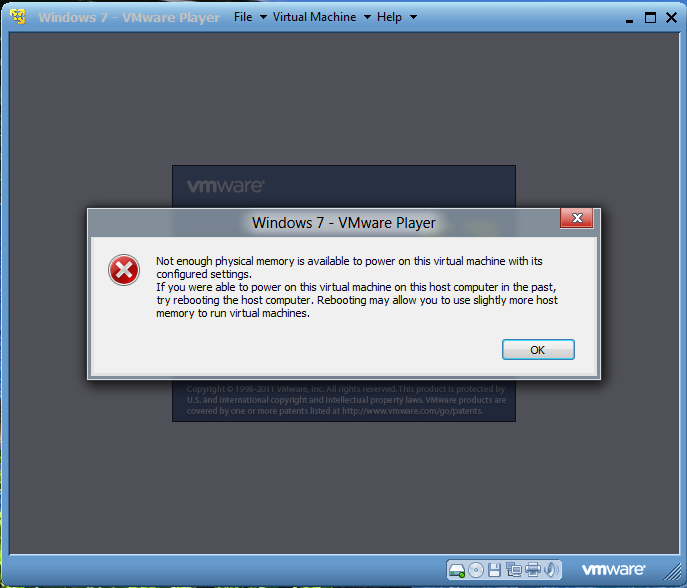
Windows 8 Dev Prev - VMware Player Error

This is a bit interesting.  Apparently something changed with respect to how applications query for available memory on the physical host.  At least, as far as how VMware products query for it.  I created a rather mundane Windows 7 32-bit guest machine and tried to launch it, but it won't launch.  Even though I have 8 GB of physical memory on the host, assigning 1 GB to the guest blows its mind.

Tuesday, October 26, 2010

A Worthwhile Idea?

I had an idea that I need to vett in public to know if it’s worth pursuing.

Challenge:

The Hampton Roads area of Virginia has been neglected by technology vendors for years.  Few ever bother to show up and demonstrate their products, provide presentations or collaborative sessions.  Folks here that want that sort of thing have to drive to Washington, D.C. usually, if lucky maybe Richmond.  Most employers can’t afford to send their tech staff to conferences in NY, Chicago, Los Angeles, Las Vegas, Orlando, etc.  So we’re left to view web sites, videos, and maybe books.  Sharing ideas is a matter of personal connections, blogs, web forums, and that’s about it.  This is the Siberia of technology-related community.

Proposal:

Gather technology folks from various idioms to present topics at one place, maybe once per year, at some place like the VB Convention Center and charge local visitors nothing more than cans of food for the local Food Bank.  Topics could range from “how-to” sessions on popular products like Photoshop, iMovie, Visual Studio, to operating systems and enterprise topics like Windows Server, MDT deployments, System Center products, SQL Server, Sharepoint, scripting and so on.

Get folks together to share ideas, learn, grow.  Maybe give vendors something to show up for and pitch in as well.  And all of it for a good cause.

So far I haven’t had much luck getting any interest.  If you, or someone you know, lives near the area**, let me know if you think this is a good idea.  Whether you’d be interested from the aspect of being a presenter, or an attendee.  I’d like to know if this is a feasible idea.

(Hampton Roads is a colloquial name that refers to the southeastern corner of Virginia and includes the cities of Hampton, Newport News, Yorktown, Williamsburg, Norfolk, Chesapeake, Portsmouth, Suffolk and Virginia Beach)

Tuesday, October 5, 2010

A Little Studying Goes a Long Way

It’s been one of those weeks again, and it’s only Tuesday.  Ooh boy.  One of the interesting patterns I’m seeing is an uptick in people hitting me up for help with various AD things.  I need help also, but I will get to that later.  One question was from a former colleagues trying to introduce a new 2008 R2 domain controller into his 2003 AD forest.  I had to help walk him through getting his ingredients in order before putting the pans in the oven. 

Here’s a tip on that end: don’t rush it!  When you bump your functional levels to native mode, give it a little time to settle out before bumping more things around.  In this case, he was running in 2000 mode, so he needed to get to 2003 native mode first.  Then run ADPREP /forestprep and then /domainprep and /gpprep, blah blah.  But whatever you do, don’t run ADPREP within a few seconds after having raised the functional forest and domain levels.  Not a good idea.  Thankfully he held off.  But if he hadn’t reached me by phone first, he likely would have.

Another issue was helping another acquaintance move FSMO roles around to avoid potential hardware failure impacts on older servers, while paying special care to put them on servers in well-connected sites to avoid replication problems.

Another issue, for yet another former colleague (I try to be careful with “friend” since most people I know are colleagues and acquaintances rather than true “friends”, but that’s not a bad thing) who was running some domain controllers on physical machines and others in virtual machines.  That can be interesting if you don’t read up on what to watch out for.

I suppose the case in point is that Google can be your friend.  Or it can be your biggest frustration.  But regardless of web searches (Bing, Yahoo! or whatever you prefer) having some books around can be a big help.  One of these days I’m buying a Kindle or some other decent (and affordable) book reader.  It’s MUCH easier to search through ebooks than a physical book shelf.

An interesting side note, and one I’ve commented on before, is the unique contrast between how much need there is for Active Directory troubleshooting knowledge, against the almost zero job potential for that skillset.  If you bundle it with Exchange, SharePoint and maybe IIS, it becomes marketable. But all the focused AD knowledge and experience in the world isn’t very marketable in and of itself.  It’s becoming a tier 1 skillset: Something tied more to sys-admins than to system engineers or systems architects, etc.  Even more ironic is that the vast majority of problems I’ve seen with AD environments can be nailed directly onto the foreheads of systems architects and systems engineers.  They often downplay the importance of AD in a logical, topological sense.  Especially as it relates to sites, site links and the modeling of security boundaries for policy-based management.

That’s where books are best suited.  Don’t buy just one.  I’ve never seen a single book cover enough of a given technology subject to really be helpful.  At least two or three on the same subject (by different authors) is what I recommend.  My wife hates that, of course, because my book shelf is a mess.  Hence the desire for a Kindle.  Maybe when I catch up on bills that’ll happen.  Oh wait a minute, I just told a joke?  Catching up on bills?!  Ha ha ha hahha aah oweor wefijoelkfjlfksdlksowierjwo…hrmph..uh.. (cough cough, gasp…)  Ok, I’m back.

Now, for the issue [I] need help with (anyone?):  One of my 2008 R2 domain controllers fails to display Roles and Features in the Server Manager console.  The MMC console opens and it says it’s “collecting data…” and it pauses forever, then says “error” and it can’t display them…

image

The event log shows the following error information…

Source: ServerManager
EventID: 1601
Level: Error
OpCode: Info
Log Name: Microsoft-Windows-ServerManager/Operational

General:

Could not discover the state of the system. An unexpected exception was found:
System.Runtime.InteropServices.COMException (0x800706BE): The remote procedure call failed. (Exception from HRESULT: 0x800706BE)
   at System.Runtime.InteropServices.Marshal.ThrowExceptionForHRInternal(Int32 errorCode, IntPtr errorInfo)
   at Microsoft.Windows.ServerManager.ComponentInstaller.CreateSessionAndPackage(IntPtr& session, IntPtr& package)
   at Microsoft.Windows.ServerManager.ComponentInstaller.InitializeUpdateInfo()
   at Microsoft.Windows.ServerManager.ComponentInstaller.Initialize()
   at Microsoft.Windows.ServerManager.Common.Provider.RefreshDiscovery()
   at Microsoft.Windows.ServerManager.LocalResult.PerformDiscovery()
   at Microsoft.Windows.ServerManager.ServerManagerModel.CreateLocalResult(RefreshType refreshType)
   at Microsoft.Windows.ServerManager.ServerManagerModel.InternalRefreshModelResult(Object state)

Clicking the Event Lookup link (TechNet) shows no help at all.  I’ve tried most of the suggestions I found from web searches, but nothing seems to help.  This one looked like it was close (http://social.technet.microsoft.com/Forums/en-US/winservermanager/thread/ae211676-4858-4b03-9360-280ab3dacd6f) but it didn’t help either.

However, this led me down another rat hole…

To replace in-process service packages you have to run the request in the SYSTEM context.  One of the age-old ways to insert yourself into the SYSTEM context is (or was) to use the AT command (example: at HH:MM /interactive cmd.exe) but this doesn’t work on 2008 R2.  You get this…

C:\Windows\servicing\Packages>at 20:42 /Interactive cmd.exe
Warning: Due to security enhancements, this task will run at the time expected but not interactively.
Use schtasks.exe utility if interactive task is required ('schtasks /?' for details).
Added a new job with job ID = 1

Bummer #1.  So I used SCHTASKS instead and…

schtasks /create /tn “CmdShell” /tr cmd.exe /ru “SYSTEM” /st 20:49 /sc ONCE

Bummer #2 = This will not open interactively on 2008 R2. 

Then came the suggestion to make a new service using the sc.exe command…

sc create cmdshell type= own type= interact binpath= “cmd.exe /k”

It prompts you to “View” the program’s message.  When you click that it opens a secure desktop shell and hides the previous desktop entirely.  You can interact through that, but oh man is that a pain.

Bummer #3

Which, as my blog’s name eludes to, reminded me to ask this question: Why the **** doesn’t Microsoft just stop and take a few weeks to clean up their command syntax structures?  Forget PowerShell.  I’m not running through a bunch of PowerShell to do things that utilities like SCHTASKS do very well as-is.  But note the spaces after the “=” in the SC command.  They matter!  Is this not retarded?!

Where was I?  Oh yeah, my stupid Server Manager console on this one DC refuses to be nice and help with roles and features.  I’m close to nuking the ****ing thing and replacing it.  I’m so frustrated, that I’m ready to just outright NUKE it, use ntdsutil to seize its roles and blow it out of the partition with adsiedit.  Yep.  I’m that pissed.  It’s annoying the crap out of me.  Any suggestions are welcome (besides Xanax and sleep).

Saturday, October 17, 2009

Twitter and Windows Automation Contemplation

I decided to break out the coffee on a cold, gray, rainy Saturday, and post a couple of tutorials on using Twitter as a means for communicating with your computer from afar.  First post is on getting your computer to send to Twitter.  The next post will be on controlling your computer from Twitter.  It’s really not that difficult, if you really want to do this.  It’s all a matter of how much you want to do this.  In fact, if you can control a computer, you can control almost anything.  That’s because you can already rig your surroundings to your computer, so…    Anyway, I hope this helps spark some imagination gyration out there.  Have fun!

Thursday, September 10, 2009

iTunes 9.... That's It?! RIP

I can't believe they dragged Little Stevie Jobs from his dialysis den to make an appearance on stage to announce.... iTunes 9?! And an incremental update for iPhone and iPods? That's it?!?!! WTF?! For that much effort, why couldn't they drum up something even marginally more exciting? Maybe deliver one of those vaporware rumored pieces of crap that get hyped before every upcoming event: Tablets, HD iPods, new home media devices, an iTunes that automatically makes playlists (wow! whooda thunk it!?)

I'm over it. I'm so sick of the free pass Apple gets from the loyal goons that drank that iKoolAid. Same goes for Google. These are tough times. They ALL have to prove their worth all over again. Laurels are so passe. Even Microsoft gets that. Of all people. Even Dell? Wow. What planet is this?

I've been poking around iTunes 9 to see what's new. OMFG talk about lame. Same lame ass codebase, which isn't Windows compliant ("compatible": yes. "compliant": no). And for you Apple nutsacklickers: Since iTunes is installed on WAYTHEFUCK more Windows boxes than Mac boxes, there's no excuse on Earth for Apple to treat it like a Somali heroin addict laying in a Mogadishu saloon gutter. Hmm... I have an idea. Why doesn't Microsoft take a page from the Apple-vs-Palm playbook and make it so iTunes won't work on Windows? I would LOVE IT. The problem is, Apple can do that and everyone starts beating off with a gym sock, but if Microsoft did that, the DOJ, FBI, SEC, EU and Chinese embassy would send ninjas to deliver subpoenas within seconds.

Thursday, August 20, 2009

Creating Windows Event Log Entries with Scripting

KixTart: LOGEVENT

LOGEVENT (type, ID, message, target, source)

Examples:

$=LogEvent(4, 1, “This is just a user-defined event”, “”, “CustomEvent”)

$=LogEvent(1, 1, “Login script failed on client @wksta”, @LSERVER, “KixTart”)

Limitations:  You can only write to the Application log.
Advantages: You can invoke this without having elevated permissions.  You can submit events to remote computers (if permissions allow)

Windows Vista/7: EVENTCREATE

EVENTCREATE [/S system [/U username [/P [password]]]] /ID eventid
            [/L logname] [/SO srcname] /T type /D description

Examples:

EVENTCREATE /T ERROR /ID 100  /L APPLICATION /D "This is just a user-defined event"

EVENTCREATE /S Server123 /T ERROR /L APPLICATION /D “This is a custom event”

Limitations: It must be invoked with administrative permissions.  It requires the command shell, which is minimal overhead.
Advantages: Can write to all of the event logs (System, Application, etc.).  It can write to local and remote event logs (if permissions allow)

VBScript: LOGEVENT

object.LogEvent(intType, strMessage [,strTarget])

Examples:

Set objShell = CreateObject(“Wscript.Shell”)
cn = objShell.ExpandEnvironmentStrings(“%computername%”)
objShell.LogEvent 1, “This is a custom ERROR message”
objShell.LogEvent 1, “Error on computer “ & cn, “MyServer”

Limitations: It can only write to the Application log
Advantages: Compared to the other options available: none.

PowerShell: WriteEntry

$evtLog = New-Object –type System.Diagnostics.Eventlog –argumentlist Application
$evtLog.Source = “Custom Event”
$evtLog.WriteEntry(“This is a custom Error even”, “Error”)

$cn = [environment]::GetEnvironmentVariable(“computername”)
$evtLog = New-Object –type System.Diagnostics.Eventlog –argumentlist Application, MyServer
$evtLog.Source = $cn
$evtLog.WriteEntry(“Error occurred on $cn”, “Error”)

Wednesday, August 19, 2009

Querying Active Directory vs SQL Server

Warning: This is a meandering rant.  Drink plenty of caffeine to avoid crashing into a guard rail.

I’ve had a few friends/co-workers hit me up about this subject recently.  For what reason – I don’t know.  Why me?  I’m only guessing it’s something to do with my extensive work gluing together web services and web apps using SQL Server, Active Directory and plumbing in things like WMI/SWBEM/WQL and so on.  My background is more in software development than in systems engineering, so I look at something like Active Directory and immediately want to take it apart and see what makes it tick.  Kerberos, KCC topology, links and replication processes, DFSR, events and logs, WMI and ADSI, and LDP.  Everything in the software world looks like Legos to me.  Microsoft really doesn’t get the credit they deserve for, as Paul Thurrott says: building a business of building platforms.  They are the king of platforms.  And nobody goes to the extent they do to document their numerous platforms.

Where was I?  Oh yeah, sorry.  I was blabbering about myself, as if anyone cares.

So, the issue is what are the concerns and what are the trade-offs between querying Active Directory directly as opposed to using SQL Server as a middle man (between the data and the consuming service or application).  The answer is (drum roll please):  it depends.

For most general information gathering, it’s fine to query AD directly.  The AD schema and various tentacles into it are actually tuned more for read/fetch operations than for write/modify operations.  That’s because the nature of AD is authentication and look-up.  Both of those chores involve far more reading than writing.  Don’t believe me?  Just think about how often you logon to you network as opposed to how often you change your password or some property within your user account.  Think about how often you boot up a computer as opposed to how often you join it to the domain.  That’s one of the reasons Microsoft didn’t push harder to move the AD partition suite into a relational database.  Some argued for doing that, but really, the cost factor just doesn’t offset the gains in performance or capability.

That said (yes, all of that… phew!) there are times when it makes sense to introduce a data store in the middle.  This can be XML, SQL, or just about anything.  Why?  Because maybe you want to maintain a faster performing cache with a subset of the overall data store.  You can dynamically filter LDAP, WMI, and so on, sure.  But sometimes it helps to at least tape things together a bit.  An example?  Ok.  One project I worked on involved pulling aggregate information about employees from several data stores, including AD.  The end result needed to be able to instantly display employee data, as well as AD and Exchange data, and things about the computer that employee uses.  Rather than having the web app reach out and query all of the domain controllers (to get the last logon data, for example), I used a SQL process to fetch and update that periodically and that allowed the web application to fetch the end result much quicker and with more reliability.

A relational database is also great for storing historical information in ways that are often cumbersome to do with native platform APIs.  One example is monitoring AD replication status.  A project I worked on involved running REPADMIN, NETDIAG and DCDIAG, on each of the clients domain controllers and feeding parsed results into a SQL database on a recurring schedule.  This is very similar to what MOM/SCOM does obviously, but you can do much of the same yourself with a little elbow grease (and much cheaper).  The EVENTTRIGGERS command also helps in this regard.  When collected into one data store like this, it is much more efficient to analyze it, query it and run secondary processes from it (alerts, reports, automated diagnostics and repair, etc.).

As I said, this article is really a frame of thought about how to approach these two avenues, more than giving discrete examples.  I may post some real examples if anyone is interested.  Some of them might take some serious prep work to shoehorn into a blog post.

Monday, August 10, 2009

Setting up EventTriggers to send alerts via Twitter DM

I mentioned in a previous post how you can send Direct Messages on Twitter using VBScript or KiXtart scripting.  Prior to that, I described how you can setup a twitter account for your server(s) to use so you can pass confidential messages between you and your server(s).  That opens up a TON of possibilities for monitoring as well as sending control requests to the remote computer(s) using a locked-down Twitter account.  As with everything like this, exercise extreme caution and perform a lot of testing before sitting back and getting too comfortable.  There are risks involved you cannot ignore, but they can be mitigated.

One way to employ Twitter for remote systems management is to have your servers/computers use the built-in EVENTTRIGGERS command.  This command is available with various Windows platforms and version and allows you to respond to specific events.  One of those is to have the action call on a script. That script can do anything you want to do, including sending Twitter messages.  I recommend a Direct Message, rather than a general timeline status update.  You probably don’t want to share your system events with your followers, and I’m pretty sure they wouldn’t want to read them anyway.

The syntax for EVENTTRIGGERS is documented on Microsoft TechNet.  An example for creating an event trigger to respond to a “low disk space” warning event is as follows:

eventtriggers /create /s Server1 /u domain\userid /p password /tr "Low Disk Space" /eid 4133 /t warning /tk \\server2\scripts\tweet.vbs


In this example, the server being monitored is Server1.  The event id is 4133 and the event type is “warning”.  The action being taken is to call a script, “tweet.vbs” which is a vbscript file.  You can call any script you like, but if there is no default script engine handler (e.g. wscript.exe) then you would probably want to put the execution statement into a .BAT file and call the .BAT file instead.  So, in this example, if I wanted to invoke cscript.exe…


@echo off
cscript.exe /nologo \\server2\scripts\tweet.vbs "low disk space on server1"

The net result would be something like this...

eventtriggers /create /s Server1 /u domain\userid /p password /tr "Low Disk Space" /eid 4133 /t warning /tk \\server2\scripts\tweetalert.bat


This would call the .BAT file, which would invoke cscript.exe and execute tweet.vbs. This also makes it easier and cleaner to add optional arguments to your script execution to give you more flexibility while keeping your EVENTTRIGGERS setup less cluttered.


Now, before you start scoffing at this whole preposterous concept, I will admit this isn’t foolproof.  It’s just an example of something you COULD do.  As an old mentor often said to me years ago: “never confuse COULD and SHOULD”.  The most likely weak spot in this idea is the availability aspect (let’s face it: Twitter is very unreliable at times).  It is possible to respond to an error result from the Twitter API by entering a timed-loop until the response indicates success, but that’s cumbersome and also unreliable.  The takeaway here is that you COULD do this.  I’m not saying you SHOULD.  Charlie would be proud of me.

Tuesday, April 21, 2009

Self-Reporting Reports that Report on their Reporting

I love stupid titles. Maybe because I'm stoopid too. America loves stupid, after all. I was thinking about how I typically weave start/stop times into my scripts. I usually do it to help with diagnosing things in the log files they leave behind. For example, you may notice that I often use a dedicated Sub() to echo status and use a constant variable to toggle it on/off.


Sub DebugPrint(s)
If Verbosity = True Then
Wscript.Echo Now & vbTab & s
End If
End Sub


Well, it's pretty basic obviously, but it can be useful. But what about overall start and stop times?


t1 = Now
'...
' do a bunch of time-consuming junk here...
'...
t2 = Now
Wscript.Echo Abs(DateDiff("s", t2, t1)) & " seconds elapsed"


Taking this a little further, you can easily extend this to define another constant variable to specify the expected elapsed runtime for your script to complete all processing. That way, if the script takes too long, or finishes too quick, you can take action to report that if desired.


' define expected runtime in seconds
Const runtime = 30000

'...
If Abs(DateDiff("s", t2, t1)) > runtime Then
' do something to notify or log the overrun
End If


You could also wrap the runtime variable with a multiplier to pad it with some preferred margin of error. Something like this...


If Abs(DateDiff("s", t2, t1)) > (runtime * 1.50) Then
' do something to notify or log the overrun
End If


The action you take could be sending an e-mail alert, writing and event log entry, writing a log file, running another script, or whatever you can dream up.

The advantages of this approach are that you don't have to employ a separate solution to monitor when scripts take too long. They can handle the notifications themselves. This also makes them more "event-driven" rather than batch-processed, since they will report as the event occurs, rather than waiting to be reported on by another service later. I'm sure that there are drawbacks to this, after all, nothing is a panacea. But this might prove useful for you in some situations. Enjoy!

Tuesday, January 20, 2009

Where Were You?

When the inauguration was going down, will you remember where you were and what you were doing?  Like September 11, 2001.  Or when the Challenger or Columbia disintegrated. 

I was at work, answering one of fifty support requests.  Reinstalling software and talking to customers and telling tired jokes to diffuse their frustration.

Some didn't have it so lucky.  Others had it real good.  Some felt a little pressure.  Some were doing business as usual.  Some were protesting small things in big ways.  Others celebrated big things in small ways.

In the end, it was really just another day.  Another smooth transition from one leader to another.  A continuation of our government and social stability, which is rare in the world today.  Tomorrow will be another day at work, or at school, or in the hospital, or in Iraq or Afghanistan, or sleeping under a box on the street, or making phone calls, or going to the store.  Tomorrow will be the day after all this stuff happening today.  Where are you now?  Where will you be tomorrow?

Friday, August 22, 2008

SK8R Bash Skateboard Expo at Mount Trashmore Park (Virginia Beach)

The annual SK8R Bash expo will be held at the Mount Trashmore skateboard park on Saturday, Sept. 6 from 10 A.M. to 5 P.M. For more information click here. I posted this because this park is walking distance from my house and my kids and I spend a LOT of time there.

AUGI is Coming to Virginia Beach in October

AUGI, that's the AutoCAD User's Group International, not the cartoon dog from the 1970's, is going to hold one of their CAD Camp conferences here in Virginia Beach! Very cool! It's nice to see our shiney Convention Center (designed by none other than Skimore, Owings and Merrill LLC) put to some good use.

If you work with Autodesk products like AutoCAD, Mechanical Desktop, Revit, Inventor, Raster Design, Electrical, Autodesk Map, Alias Studio, 3D Studio Max or Impression, you need to check this out. Very cheap registration fees for a conference like this also. Register before Sept. 18 for the "Early Bird" pricing discounts.

Edit: I mistakenly posted that the VBCC was designed by I.M. Pei, but it was actually designed by Skidmore, Owings and Merrill (SOM). Oddly enough, I almost took a job at SOM in their Chicago office back in the early 90's. Small world.