Showing posts with label powershell. Show all posts

Tuesday, May 20, 2014

SCCM Lab Setup Laziness with PowerShell and Duct Tape

I've been dusting off my pointy little head with another round of "lets play set up with Configuration Manager!" and, well, I hate using GUI tools or command line stuff if a script will save me time.  The time invested in smacking the keyboard and making grunting noises and laughing hysterically is recouped later with spare change and coffee spilling, so it pays off.

Disclaimer:  I really don't have any duct tape right now, so you'll have to go without on this one.

Anyhow, I've been following along with a template procedure my buddy and trusted ass-kicking extraordinaire colleague and uber-technowunderkind: Chris DeCarlo compiled.  One part of this procedure has me creating a bunch of AD user accounts to tie to various things.  Some are for SQL services, others for AD tasks, and obviously some are for SCCM itself.  (btw- Chris, you did an outstanding job on this document. Kudos!)

Here's the accounts (sorry man, but I modified a few names out of brain-damaged habit).  The short names on the left are the sAMAccountName values, and to the right are their descriptions / explanations.

  • SCCMRS - SQL Reporting Services publishing account
  • SCCMNA - SCCM network access account
  • SCCMInstall - SCCM site server install account
  • SCCMDomJoin - SCCM domain joining account
  • SCCMClient - SCCM client push account
  • SCCMSQLSvc - SCCM SQL Server service account
  • SCCMSQLAgent - SCCM SQL Agent service account
  • SCCMOSD - SCCM OSD deploy and capture account
You may or may not need (or want) to create all of these, but I have the keyboard so this plane is going into the mountain and I'm the captain... so hold on.

In addition to this, I'm lazy.  Yes, I know that's a shock.  I'll wait as you pick your jaw off the floor.  (tap tap tap tap - eyes on phone,...) ok.  Rather than doing this the "right way", I do it (for lab purposes only) the "easy unrecommended way", which is to stuff all of these accounts into the "Domain Admins" group and then laugh as loud as possible.

You need two files (okay, you don't really NEED two files, but for this example it works):
  • A Comma-Separated Values file (.csv)
  • A PowerShell script (v3 or v4)
Assumptions
  1. Domain is "fubar.local"
  2. OU is created at root of the domain as "ServiceAccounts"
  3. You are logged onto the server/desktop in the LAB as a Domain Admin user
  4. You have faith in what I'm telling you (rotfl! okay, just kidding)
I built and tested this cardboard thing using Windows Server 2012 R2 with PowerShell v4 and some coffee, chewing gum and a few chicken drumsticks my wife just cooked (damn good too).

[CrappyCode]

$inputFile = Import-CSV  "useraccounts.csv"
$strPwd = "Tarfu123"
$ouPath = "OU=ServiceAccounts,DC=fubar,DC=local"

foreach($strLine in $inputFile) {
$cn = $strLine.cn
$samid = $strLine.sAMAccountName
$ln = $strLine.sn
$fn = $strLine.givenname
$dn = $strLine.displayname
$desc = $strLine.description
$upn = $strLine.UserPrincipalName

New-ADUser -SamAccountName $samid -Name "$cn" -UserPrincipalName $upn -AccountPassword (ConvertTo-SecureString -AsPlainText "$strPwd" -Force) -Enabled $true -PasswordNeverExpires $true -Path "$ouPath" -Description "$desc"
}

$inputFile | % {Add-ADGroupMember -Identity "Domain Admins" -Member $_.sAMAccountName } 
[/CrappyCode]

If you're not familiar with PowerShell, or scripting in general, you don't need to copy the [CrappyCode]. and [/CrappyCode] end tags.  Those are just for entertainment.  You will want to edit the domain names to protect the innocent, and whatever else you feel like modifying to suit your environmental needs.  The items in red are likely the items you will want to change for your needs.  

Also, the last line redirects the CSV piped content through a PowerShell pipeline into Add-ADGroupMember to stuff the new accounts into the Domain Admins group.  So easy, and cheap too.  Be careful of the line-wrapping headaches that come with copying from web browser windows. :)

The next piece is the CSV file (below).  Note that the first line contains the logical column headings, while the remaining lines are the actual data.  As long as the values are in the same relative order from left-to-right, it should work fine.  If you have values that contain apostrophes or commas be careful to "escape" them properly so they don't choke out the code like a backyard wrestling match gone wrong.

[CSV]
cn,givenname,sn,sAMAccountName,displayname,UserPrincipalName,description
SCCMRS,,,sccmrs,SCCM Reporting Services,sccmrs@fubar.local,SCCM SQL Reporting Services Account
SCCMNA,,,sccmna,SCCM Network Access,sccmna@fubar.local,SCCM Network Access Account
SCCM Install,,,sccminstall,SCCM Install,sccminstall@fubar.local,SCCM Server Installation Account
SCCMDomJoin,,,sccmdomjoin,SCCM Dom Join,sccmdomjoin@fubar.local,SCCM Domain Join Account
SCCMClient,,,sccmclient,SCCM Client Push,sccmclient@fubar.local,SCCM Client Push Account
SCCMSqlSvc,,,sccmsqlsvc,SCCM SQL Service,sccmsqlsvc@fubar.local,SCCM SQL Server Account
SCCMSqlAgent,,,sccmsqlagent,SCCM SQL Agent,sccmsqlagent@fubar.local,SCCM SQL Agent Account
SCCMOSD,,,sccmosd,SCCM OSD,sccmosd@fubar.local,SCCM OSD Deploy and Capture Account
[/CSV] 

Then, in your LAB environment (do not do this in production unless you like spending a lot of time in a courtroom with ugly people in suits), log on as a Domain Admin user, open the PowerShell console (right-click and select "Run as administrator"), and CD (change directory) to the path where you saved both of these files.

Then type in "powershell.exe -ExecutionPolicy Unrestricted -File useraccounts.csv

If you see a bunch of red text, you screwed up (probably as a result of believing what I tell you), but don't freak, go into the code and verify everything is neat and clean and the quotes are matched, etc.  Standard scripting/programming drudgery stuff.

When you're done, and assuming it works as intended (it did for me), you should see those accounts in the designated OU and each is a member of the "Domain Admins" group.

Cheers!

Tuesday, February 11, 2014

Plugging Your VBScript Brain into PowerShell

It started with diapers and bottles of milk and soft food.  Then cereal and TV dinners in frotn of a real TV.  Then it was on to C, then C++, then I moved into LISP and Scheme, and AutoLISP and Visual Basic.  Then T-SQL and Batch/Cmd scripting.  Then coffee, and on to Javascript and KiXtart and Perl, and after mor coffee: VBscript.  And after the coffee ran out, it was beer and then PowerShell.  Quick tips, based on my self-conversion efforts thus far:

  1. Start naming your Sub and Function items using PowerShell syntax, but keeping in mind to glue the Noun/Verb scheme using an underscore ("_"), since you cannot use a hyphen for such things in VBScript.  Example:

    Function ComputerModel()
        ...
    End Function


    ...renamed...

    Function Get_ComputerModel()
        ...
    End Function
  2. Use consistent commenting throughout your code.  If you do that, you can more-easily "port" your code between languages (any language, actually).  It also allows for automated self-documentation.  While that may seem like an impressive phrase to toss around at parties (it is, by the say, haw haw, cough cough...) when you starting stacking up code into more complex "solutions", it will pay off handsomely when the suits come knocking for professional-looking docs.
  3. Eat. Drink. Sleep. Find a reason to laugh.

Thursday, February 6, 2014

TextPad Tip O-The Day: Adding a PowerShell Tool Link

I loves me some TextPad!  I'm fully aware that code editors are near to religion in terms of sincerity and defensiveness on the part of programmers (those of whom that are of spiritual or religious leaning, that is).  Maybe it would be better to compare/relate it to caffeine sources?  Anyhow, onward...

One of the many nice aspects of TextPad 7 is the extensible "Tools" feature.  This is where you can add links to invoke external tools to execute your code.  So if you like working with VBScript, you can create a Tool that points to %windir%\System32\cscript.exe.  If you like KiXtart, you can point it to wherever Kix32.exe resides (the one biggest and coolest feature of age-old Kix is that it is one of the few *truly* portable script engines alive today).  But, what about PowerShell?

On a typical Windows 8 or 8.1 computer, there may be two (2) distinct PowerShell environments you can use: 32-bit and 64-bit.  They are separate and live in separate houses with their own separate dinner times and kitchens.  You heard right.  One of my frustrations is that I have to configure "Set-ExecutionPolicy" for each of two separately in order to invoke them as I wish.  In my case, I set them both to Unrestricted.  I live on the edge.


My favorite part is the wonderfully-formatted warning message you see when setting the execution policy to Unrestricted...


(Word-wrap wasn't yet invented I suppose.)

Anyhow, to set up a new "Tool" for each PowerShell executable, do the following:

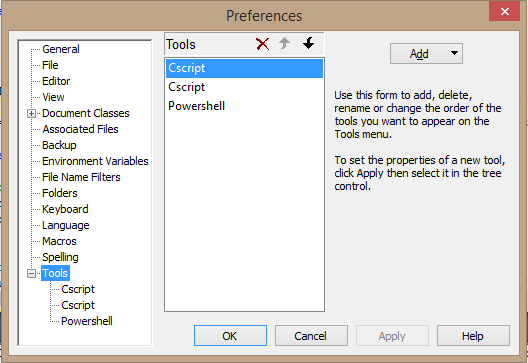
  1. Select the "Configure" menu option, and click "Preferences"
  2. Scroll down and expand "Tools"
  3. Click the 'Add" button, and select "Program..."
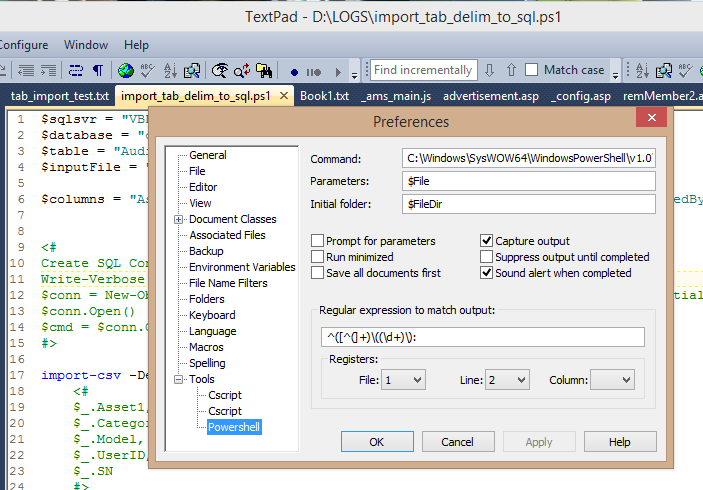
  4. In the "Command" box, past in the path to whichever PowerShell.exe you wish to map (I provide the paths for each below.
  5. Click OK
You may want to rename the Tool after saving it (it doesn't offer the option to name it, oddly).  To do so, click directly on the "Tools" link, so the individual tools are shown in the middle selection box. Click on a Tool to rename it (e.g. "PowerShell 32" or "PowerShell 64", and so on).

You can edit the Tool preferences afterwards as well. So you can check options for "Prompt for parameters" and "Suppress output until completed", and so on.  The defaults usually work well enough for most nerds (like myself).


Paths:
32-bit - %WINDIR%\System32\WindowsPowerShell\v1.0\powershell.exe
64-bit - %WINDIR%\SysWow64\WindowsPowerShell\v1.0\powershell.exe

(note that the ISE flavors for each are in these same respective folder locations).

Disclaimer: I receive no compensation from Helios (makers of TextPad) whatsoever.  I just enjoy using their flagship product for all the wacky coding I do, from HTML to LISP to PHP, to ASP and VBScript, to Javascript, XHTML T-SQL, Batch, and now PowerShell.

You can download the trialware from http://www.textpad.com and a license is only $27 (USD).  A bargain.

Tuesday, January 28, 2014

Why PowerShell is a Big Deal (In my own feeble words)


If you've followed my blog for a while (my apologies, of course) you're probably wondering just what the **** I'm aiming for.  That's a fair question, because, to be honest: I really don't know.  It's a venting machine for me, I suppose.

For a long time I ranted on about Autodesk products and AutoCAD customization, then it turned into Autodesk product installation and licensing management, and networks, and then I had an unplanned career change dropped on me from nowhere. I had to make a shift into the "mainstream" IT world and learn Microsoft tools and things entirely different than I was accustomed to. Since then, my professional and personal life has been a blender, tossed into a woodchipper and fed into a meat grinder.  Messy, yes.  A disaster?  That depends on how you define the word.  Blah blah blah, yes, I'm aiming for a point here somewhere, please be patient?  Your call is important to us...

I started playing with program code back in 1986, while working as a drafter in the Marine Engineering field.  That's fancy terminology for designing things that go on ships.  In my case: U.S. Navy ships.  Big. Heavy. Gray.  Smelling like oil. And usually parked in some rather unappealing locations in the worst kinds of weather.  We would go aboard, sketch up stuff, go back to our hotel, eat and drink (okay, mostly drink) and then return to the office and formalize a set of design drawings to accomplish a "retrofit" of something.  A "retrofit" is basically replacing something to improve some aspect of the ship (performance, capability, living conditions, etc.)

After CAD took hold among the DoD world, it took much longer for the mainframe and workstation era to pass and open the door to the PC world, than it did in other industries (i.e. AEC).  It wasn't until around 1987 that the Naval Shipyards would even "allow" the use of AutoCAD for any official drawing contracts.  At first it was only allowed for title sheets, materials lists and anything "non detail design".  Eventually, they gave in and began replacing all the old DEC, Sun and IBM crap with shiny new IBM-PC boxes and much cheaper software.  In all, it saved them enough on budget to buy a small country (they probably did just that).

I got my first taste of "real" programming in 1987 from reading a book on AutoCAD R10 and learning AutoLISP and a little ADS later on. AutoLISP was it.  Even while going to college for my IS degree, and soaking up C/C++, and all that, I couldn't ignore the flexibility and dynamic personality of LISP.  At the time, it was like trying to remain focused on a mail delivery truck while I kept my eyes on the '67 Camaro SS parked on the side.  Not much competition in my mind.  But alas, marketing won and LISP began a slow decline from the 1990's into the mid 2000's.  Microsoft's unstoppable licensing machine eventually mowed down the momentum behind anything besides Visual-This and That.  I can't pick at the technological appeal either, so I'm just whining I suppose.

Soon after the mid 1980's I picked up BAT and KiXtart on the PC side, and Bash/Korn and Perl on the UNIX side (mostly at school).  Then I ran into the database world and began mashing AutoLISP with AutoCAD CAO and ObjectDBX, which dropped me into a rat hole called Visual Basic.  It was fun and lasted me through the mid 1990's very nicely.

Long story short:  I gradually became jaded by every new programming language coming out.  It seemed like yet another attempt to get the junkies hooked on a newer drug and keep the marketing departments employed.  Tech conferences kept shoving one new language or toolset after another and spending tons on spiffy ads and graphics.

I thought PowerShell was just that.

I was dead wrong.

For years, my colleagues would roll their eyes at me, when I'd start pontificating about "Microsoft should __", following my third cup of coffee.  As if anyone in Redmond gives a shit about some annoying guy named Dave out in the redneck state of Virginia.  My usual rants involved the lack of cohesion and consistency among the various command tools.  Things like NETSTAT, NET this-or-that, IPCONFIG, NTDSUTIL, DSGET/whatever, DIR, and then CMD and BAT scripting weirdness.  I kept saying "they need to clean this shit up!" and then I would fade off into a muffled blubbering of incoherent words and slurping coffee (cold and stale, usually).

Even after I jumped on the Monad open preview bandwagon, I didn't get it.

I read articles and still didn't get it.

I bought books and still didn't get it.

I went to Microsoft TechEd 2011 and 2012 and didn't get it. (I did get a few t-shirts though)

Then I read a few blog posts by Jeffrey Hick, Jeffrey Snover, and Don Jones and a few others.  And then after studying for some MCITP/MCSA exams, it hit me like a train:  THIS is what I was begging for.  Granted: It hasn't reached the goal line yet, but damn if it hasn't made it a long way down the field.  In fact, from my poking and inspecting, I would dare to say it's in the Red Zone and there's still plenty of time on the clock. (sorry to all non-Football fans, I feel you - but I couldn't think of a better analogy this late at night).

I've been dragging ASP, BATch, VBscript and COM around like a two-year old child with a dead pet on the other end of a worn leash.  Thinking it was still alive and wanting to go play outside.  Now I know what that smell was.

I'm in.  My focus from here on out will be to deprecate my use of anything besides PowerShell and ASP.NET.  If your eyes are rolling in pity right now, I apologize.  I'm really late to the party, so I have a lot of drinking to catch up on.

Namaste.

Monday, January 27, 2014

Dastardly Dissections: PowerShell and Software Deployment Dabbling

I was turned onto PowerShell several years ago, but like most music that I've held onto, it took awhile to grow on me.  Until I had one of those "a-HA!" moments, which was just this past week.  I have to give a double-extra "thank you!" to folks like Jeffery Hicks and Don Jones (among many others), as well as all the folks who patiently help others on sites like StackOverflow and Microsoft TechNet.  If I had that much patience I'd be a therapist.


The Meat and Potatoes

I wanted to find a balance between efficiency and reusable code structures.  Ever since I was forged in the fires of LISP programming by an incredible guru named Brad Hamilton, I've sought to make my code as refactoringly refined and reusable as possible.  It should work like a Lego block, as he once mentioned to me.  Another word he used was "organic".  It should work and feel like it grew out of nature, not like a 7-legged cat trying to climb an ice mountain.

Much of what you will see below (and soon-after stab your own eyes out with a plastic fork, out of the sheer horror of it all) is my own personal seasoning.  I like to put a nerdy block-style heading at the top, followed by a group of related custom variable assignments, and then start to work destroying any sense of productivity soon after.

In a nutshell: I define some variables to identify the product, the installer file, the source path, the target path that the installer creates on a typical client, and then move on.

The next part checks if the file is already present, indicating a previous installation was already completed and then exit if that's the case.  If not found, go ahead and run the installation and return the exit code.

(Updated 1/28/2014: line in red below replaces the line just above it.  Ensures script calls installer from the same location / path)

[powershell-begin-ugly-code]

#------------------------------------------------------------
# filename...: install-orca.ps1
# author.....: David M. Stein
# date.......: 01/27/2014
# purpose....: install Microsoft Orca using PowerShell 3
#------------------------------------------------------------

# comment: define variables and assignments

$appName = "Microsoft Orca"
$msifile = "orca.msi"
# $srcPath = "\\appserver3\utils\microsoft"
$srcPath = Split-Path -Parent $PSCommandPath
$path32  = "C:\Program Files (x86)\Orca\orca.exe"
$path64  = ""

$f1 = get-location

write-host "info: searching for existing installation of $appName..."
if (test-path -Path $path32) {
  write-host "info: $appName is already installed (aborting install)"
  $retval = 5000
} else {
  write-host "info: installing $msiFile....."
  set-location $srcPath
  write-host "info: working path is $srcPath"

# comment: the following line may wrap incorrectly in a browser...
  $retval = (start-process msiexec.exe -ArgumentList "/i $msifile /qn" -Wait -PassThru).ExitCode

  switch ($retval) { 
    0    {write-host "info: success"} 
    3010 {write-host "info: success (reboot pending)"} 
    1603 {write-host "fail: I hate 1603. A useless error code!"}
    1605 {write-host "skip: target application was not found (uninstall abort)"} 
    default {write-host "fail: uh-oh? exit code is $retval"}
  }
 
  set-location $f1
  write-host "info: installation complete."
}
exit $retval

[powershell-end-ugly-code]


Why exit with code number 5000?  Good question. I wanted to be able to filter in on that via System Center Configuration Manager, especially through direct T-SQL queries and BI reporting.  I tend to "live" in the SQL Server environment more than anywhere else for some reason.  It feels like wandering around a big-volume hardware store on a quiet night.

If I treated an existing install as a "failure" or exception, I would have to assign a non-zero result code.  I could consider it a "success" and return 0 (zero) as well, but then I wouldn't be able to query for unnecessary attempts in my production environments.  Artificial flavoring has its uses.

To invoke this from an non-Powershell state, I fire off the command string as follows...

powershell -File install-orca.ps1

Then I can fetch the result implicitly via the command pipeline or explicitly by interrogating %errorlevel% via the CMD shell interface.

Ripping It Out Again

So, what about the Uninstall flip-side of this?  Let's try this out...

[powershell-begin-stupid-code]

#------------------------------------------------------------
# filename...: uninstall-orca.ps1
# author.....: David M. Stein
# date.......: 01/27/2014
# purpose....: uninstall Microsoft Orca using PowerShell 3
#------------------------------------------------------------

# comment: define variables and assignments

$appName = "Microsoft Orca"
$guid    = "{85F4CBCB-9BBC-4B50-A7D8-E1106771498D}"
$path32  = "C:\Program Files (x86)\Orca\orca.exe"
$path64  = ""

$f1 = get-location

if (test-path -Path $path32) {
  write-host "info: $appName is installed.  Uninstall it now..."

  # comment: the following line may wrap incorrectly in a browser also...

  $retval = (start-process msiexec.exe -ArgumentList "/x ""$guid"" /qn" -Wait -PassThru).ExitCode

  switch ($retval) { 
    0 {
        write-host "info: uninstallation was successful."
        write-host "info: removing leftover files and folders..."
        Remove-Item $path32 -Recurse
      }
   3010 {write-host "info: success (reboot pending)"} 
   1605 {write-host "info: target application was not found (uninstall abort)"} 
        default {write-host "fail: exit code is $retval"}
  }
 
} else {
  $retval = 0
  write-host "info: $appName was not found on this computer (abort uninstall)"
}
write-host "info: completed"
exit $retval

[powershell-end-stupid-code]


A few notes on the example above:

  1. First, you may notice the additional code to remove leftover files and folders.  That's because it's not uncommon to find leftover files and folders after a "successful" uninstall.  The reasons are many, but in short: just clean them up if needed.  
  2. Second, if the installation was not found, I force a 0 return value here.  I could have also forced something like 5001 or 6000 or 227001 or whatever (as long as it's not in conflict with known result codes used by other apps or processes).  I chose 0 because I'm tired and sitting in a realllllllly comfortable chair right now.  Too lazy to use a longer value.
  3. I could have used Test-Path to find the Registry Key instead of a folder and file.  That would work as well, and the example would look instead something like the following...

Test-Path "HKLM:\Software\Wow6432Node\Microsoft\Windows\CurrentVersion\Uninstall\{85F4CBCB-9BBC-4B50-A7D8-E1106771498D}"

(note that I had to wrap the path in matching double quotes; otherwise it tries to evaluate the { and } as code).

If you're not familiar with Windows Installer methods (e.g. msiexec syntax), that's okay.  That means you're probably "normal".  I'm not.  You can invoke an uninstall using "/x" and provide a specific .msi package file, or you can locate the associated application GUID from the Registry (see HKLM\Software\Microsoft\Windows\CurrentVersion\Uninstall, or for 32-bit apps on a 64-bit client, like Orca, refer to HKLM\Software\Wow6432Node\Microsoft\Windows\CurrentVersion\Uninstall) and use that as well.  Below is a screen capture of REGEDIT showing the key and value on my cheap laptop...


Find the "UninstallString" value and grab a copy to inspect.  The irony is the "/I" prefix, which denotes "Install", but you can ignore that.  Almost every product entry will have an "UninstallString" value and it will almost always contain "Msiexec /I{blahblahblah}".  For an uninstall operation, you replace "/I" with "/X" (upper or lower case, doesn't matter), and move on.  It's the rest of that string that matters.  That's the GUID, and it is usually pretty reliable for use with msiexec to uninstall a known product entry.

More Mindless Notes:
  • You may encounter cases where you do NOT want to delete leftover files and folders (I didn't even mention leftover Registry keys and value, did I?).  Just comment that line and you're good to go.
  • You may need to stop services in order to perform some tasks.  You can use the Get-Service cmdlet or Stop-Service.  To remove a service, you can use the ancient SC.EXE command (under \Windows\System32) to invoke the Delete method.  Just don't forget that it may require a reboot.
  • Be careful to validate every exit code before assuming anything other than 0 (zero) is "bad".  3010 for example is good.  In some contexts (is that proper English?), the exit code 1605 could be considered "good" as well.
  • I'm NOT a PowerShell expert.  I'm still learning and very possibly farther behind on this stuff than you (in which case you're probably not reading sentence because you already left this page to find what you are really looking for).  I hope I'm not the smartest guy in the room.  That's a boring proposition to consider.  I'd rather be learning.
Namaste.

Wednesday, August 21, 2013

10 Questions: with Jeffery Hicks

Jeffery Hicks


Introduction

There are no doubt a lot of computer-related "scripting" languages in the world today, which is only a subset of the "programming" languages that exist.  Among the standouts today are the venerable Windows-platform related names like Batch, KiXtart, VBscript, JavaScript, as well as cross-platform names like Perl, Python, and one the came onto the IT scene relatively late:  PowerShell.

Microsoft may take a few lumps along their way from one success to another, but they've so far managed to earn the trust and respect of the majority of developers, administrators and engineers with PowerShell.  Now in its third version of existence, it has gained quite a lot with regards to both functionality and maturity.

Among the short list of people renown for pushing ahead in this newer realm are names like Jeffrey Snover, Don Jones, and one that I've come to know better in recent years: Jeffery Hicks.

Author, speaker, and an all-around nice guy, Jeff is another example that we don't have to shed our personality in order to master a new technology.  He remains very active on multiple web sites and forums; offering advice and help to both the experienced and the noobs.  One thing I will say is that if you get any PowerShell-related advice from Jeff, you should consider it.

Jeff's Profile (from his web site)

Jeffery Hicks is a Microsoft MVP in Windows PowerShell, Microsoft Certified Trainer and an IT veteran with 20 years of experience, much of it spent as an IT consultant specializing in Microsoft server technologies. He works today as an independent author, trainer and consultant. Jeff writes the popular Prof. PowerShell column for MPCMag.com and is a regular contributor to SMB IT Simplified and the Petri IT Knowledgebase.

Jeff is a regular speaker at conferences such as TechMentor, TechEd and WinConnections, often speaking about PowerShell, Active Directory, Group Policy and anything else than can make IT Pros more efficient and productive.

Jeff's Books include:

If he isn't writing books then he's most likely recording training videos for companies like TrainSignal .

You can keep up with Jeff  at his blog, on Twitter and on Google Plus


The Questions

Dave: Your name is very well known in the circles of PowerShell programming. What other programming languages do you like to work with (if any)?

Jeff:  I started with automation way back in the dark days of DOS 3.3 and batch files. From there it was to VBScript and eventually PowerShell. Back in the day I was a master of WordPerfect 5.1 macros!

Dave:  PowerShell seems to be mix of both powerful features and enough complexity to give some IT folks a bit of pause. What do you feel is the most misunderstood aspect of that language?

Jeff:  People think it is a scripting language like VBScript, or they think the blue console that they see is PowerShell. PowerShell is a management engine that is hosted by applications like CMD.EXE or the PowerShell ISE. It can be experienced interactively or the language can be scripted.

Dave:  If you were put in charge of the architecture and development of PowerShell, both as a language, and the associated tools and services, back in the "early days", would it be: (a) pretty much the same as it looks now, (b) a little bit different, but not radically different, or (c) radically different? If (c): how so?

Jeff:  Jeffrey Snover is famous for saying "to ship is to choose" so I'm not sure what else could have been done differently. Sure, remoting would have been nicer to have early on. The only other thing I might have done differently is not allow cryptic aliases like % and ?. But that's a personal taste issue more than anything. I know people see PowerShell examples using all sorts of cryptic aliases and think that they can never learn it.

Dave:  In the course of your travels, are there any particular places that rank as your "favorite" or those that you'd rather not return to?

Jeff:  Most of my favorite places probably come down to a great food scene like Las Vegas, Seattle and San Francisco. I also like places with great public transport, especially from the airport like Portland, OR. Also a good foodie city. And certainly training in places like Australia have to rank up there as a favorite destination.

Dave:  Where do you see PowerShell in five or ten years from now? Bigger and Fatter (with respect to features and capabilities, not bloat), or more Modular? Are you aware of any "huge" changes or improvements coming in the near future? (you don't have to give details)

Jeff:  I have no personal knowledge of anything that isn't already publicly available in PowerShell 4.0, but one area that I think we'll see a change is the ability to use PowerShell everywhere in the enterprise with the ability to manage more than just Windows servers. We want to be able to manage switches, routers, *nix boxes and more from our Windows 10 desktop using PowerShell vX. This doesn't take into account some new disruptive technology that barely exists now. The "cloud" as we know it today barely existed when PowerShell 1.0 was released.

Dave:  Are you the kind of geek that prefers to write code with music or TV in the background, absolute quiet, or something else?

Jeff:  I can't do TV or anything visual because I'm too easily distracted. But sometimes I'll put music on. I work at home so there are times I need music to mask what else is happening in the rest of the house.

Dave:  If you could merge any other programming or scripting language, or parts of it, into PowerShell, what would it be?

Jeff:  I don't think I have enough developer background to really answer this. PowerShell works just great for managing Windows systems because it is based on technologies, like the .NET Framework, that make Windows work in the first place.

Dave:  If you had never stepped into the world of computers and software, what do you think you would likely be doing for a living today?

Jeff:  Theater directing. Seriously. I have a MFA from Syracuse University but as they say, "Life is what happens while you're busy making other plans."

Dave:  How do you feel the rising interest in "cloud" services will affect or impact the scripting world?

Jeff:  I think there will be more of a demand. If your compute environment is in Azure or your users are locked into Office 365 and you want to manage everything efficiently, you'll need an automation engine like PowerShell. The days of going into the datacenter to logon to a server, or even using a remote desktop connection should be behind us. If they are not, you are most likely working harder than you need to.

Dave:  What do you feel the open source world could learn from the Microsoft world as it pertains to purely technological aspects? What about the reverse??

Jeff:  Again, not having much a developer background I'm not sure what I can add here. I don't think it is a matter of saying that one is better than the other or that one produces superior code. My take on open source is that if there is a problem, or someone wants to innovate, that it can happen much faster.

It also seems to me that many open source projects don't try to be everything to all people and accomodate all situations. Microsoft is often forced, in my opinion, to develop products and code that are backwards compatible. What could Microsoft create if they said, here's the new server and operating systems invented anew with noties to anything that came before.

Conclusion

I hope you enjoyed this second installment of "10 Questions" as much as I did.  If you are interested in learning more about Jeff's offerings, I encourage you to explore the links below.  Thank you!

JDH IT Solutions


Book: PowerShell Deep Dives (Manning Press, 2013)
Book: Windows PowerShell 2.0: TFM (SAPIEN Press 2010)
Book: Advanced VBScript for Windows Administrators  (Microsoft Press 2006)
Book: WSH and VBScript Core: TFM (SAPIEN Press  2007)
Book: Managing Active Directory with Windows PowerShell 2.0: TFM 2nd Ed. (SAPIEN Press 2011)
TrainSignal

Jeff's Blog
Twitter
Google Plus

Sunday, November 4, 2012

Why I'm Still Not 100% on PowerShell

In the past, I have been somewhat critical of PowerShell.  Not because it is somehow technically inferior to alternatives, but because of environmental ramifications.  I was an early adopter actually, having joined up in the Monad testing program, and I was very excited about the potential it offered.  Today, I use PowerShell more than I ever have, but there are still many types of tasks that I don't use it for:

  • Deploying / Installing Software to Remote Computers
  • Maintaining Legacy Script Files
  • Heterogeneous Windows Versions and .NET versions
The main reason I don't use it for software deployments is the slower execution time.  Compared with basic Batch/CMD scripts, or even VBscript, it just takes longer to "spin-up" the .NET and PowerShell foundation goodies before it even parses the script code.  Multiply that by multiple installs per remote computer, and hundreds of remote computers, and the aggregate time difference can be significant.  This is especially true on older hardware and older operating systems, which brings up the point of "pervasiveness" of PowerShell in a mixed environment:  

Many environments I walk into (I'm a consultant after all) are not homogeneous when it comes to operating systems versions, or even "common applications".  It's not unusual to find multiple configurations of .NET, Java Runtime, DirectX, MSXML, Oracle client, and SQL Native Client installations.  One thing I rarely have to contend with is inconsistent support for Windows Scripting Host, let alone the ever-present CMD shell.  I can't say the same for PowerShell.  I wish it were as consistent and pervasive but it's just not.  I'm sure that it will be someday, but we all know how long it takes customers to upgrade to newer operating systems.

To be fair, the same was true for Windows Scripting Host back in the early days of Windows NT.  Microsoft cranked out several versions, until they finally stopped on 5.8 and let it sink in.  That had a nice impact on most shops since they were no longer worried that as soon as they deployed WSH they would have to follow up with another upgrade.  PowerShell is still evolving, so many IT managers aren't over-eager to deploy 3.0 when they seem to expect a 3.1 to come out any day.

I know it's not exactly logical to expect that PowerShell and .NET could be somehow combined and made to be more cohesive (for more streamlined deployment), it would help.  The size of such a deployment package would be excessive for many shops to deal with, and might be tough to deploy on legacy hardware when local disk storage is almost maxed out.  No, it seems Microsoft is betting on customers upgrading to Windows 8 and that would take care of everything as it pertains to achieving a ubiquitous PowerShell presence.  I don't think that's going to happen anytime soon however, for a variety of reasons.  So, for now, while I continue to expand my PowerShell scope, I am still dependent on VBScript and Batch scripts for many tasks.

I'm sure there are some of you out there that will shake your head in disbelief at all this, and that's fine.  I welcome constructive feedback.  So if you have some insights or ideas about how this can be managed more effectively, please let me know?

Tuesday, February 28, 2012

Making a Poor Man's Web Service

A "true" web service uses a robust and sophisticated structure.  Combining XML with SOAP and other goodies, you can unleash the power of the gods and melt down the entire Universe (or maybe just max out your NIC channel).  In any case, you can still achieve the same basic (repeat: Basic) capabilities using things like the old XmlHTTP object, or the .NET WebRequest object.


What for?

If you write scripts or do any programming, you may run into a situation where you would like to be able to pass a request to a web site via URL and get something back, without ever opening a web browser.

The old way, the "brute force" or "knuckle-dragging" way, was to open up the firehose and collect everything, the entire web page, into a bucket and sift through it. That is commonly called "screen scraping", but it's really just basic text or stream parsing.

With VBScript or KiXtart you can use the Microsoft.XmlHTTP object like this...

URL = "http://intranet.contoso.local/mypage.aspx"
Set objXmlHttp = CreateObject("Microsoft.XmlHttp")
objXmlHttp.Open "GET", URL, FALSE
objXmlHttp.Send ""
$result = objXmlHttp.ResponseText
Set objXmlHttp = Nothing

With PowerShell and .NET you can use the System.Net.WebClient object to do this.  Here is just one example...

$url = "http://intranet.contoso.local/mypage.aspx"
$wc = new-object System.Net.WebClient
$result = $wc.DownloadString($url)

Why bother?

The older you get, and the longer you work with programming, you eventually realize that you can leverage the power of existing structures without reinventing the wheel.  Let's say your best friend works in the web team and has a ASP, PHP, or ASP.NET web site that interacts with a database somewhere, maybe several.  Now let's say you're having lunch with this friend and you ask "hey, don't you have access to the hardware inventory system database?" and he puts down his sandwich and can of Red Bull and says "yes, why?"  "Oh nothing, it's just that I'd like to be able to query some information from it, but I can't wait for access approval from the DBA team."  After some more discussion you determine that the information you want isn't sensitive, but you don't really need to have the DBA folks setup a new DSN for you when your friend already has one for his apps.

Now your brain starts churning.  You think about all the pieces and what you can assemble.  What if your script, running on a remote desktop computer, could submit a query URL to a web page and get back some useful information for your script to continue on with?

What if you could fetch the computer name, or BIOS serial number, and pass that in like "http://intranet.local/computer.aspx?sn=ABC12345" and get back the Purchase Order (PO) number, and information about the warranty dates, service contract number, original owner, etc.?  Maybe your script could grab that, determine if the machine is still under contract support coverage, and go ahead and process an internal support request, or send an alert, based on some condition, all without ever popping up a form asking for user input?

$sn = "ABC12345"
$url = "http://intranet.contoso.local/computer.aspx?sn="+$sn
$filename = "c:\temp\filename.txt"
$wc = new-object System.Net.WebClient
$result = $wc.DownloadString($url)
# parse the contents of $result and do amazing things...

Get the picture?   Is this making sense yet?

You PowerShell nuts out there will obviously see where the above chunk of code can be refactored into a simpler form, but the point is what you can do with it.

This is ONLY ONE example.  Do not run with this and think I'm suggesting this is all it's good for.  There really is absolutely NO limit to where you can go with this.

As I say often:  Technological API's are like Lego building kits.  The more you have, the more you can do.

Ain't it awesome?

Tuesday, September 27, 2011

10 Ways to Manage Windows Services

  1. Services Console (services.msc)
  2. Command Line: sc.exe
  3. WMI / COM Script: VBscript, KiXtart, Javascript, Perl, etc.
  4. .NET Script: PowerShell
  5. WMI Class Provider: Win32_Service
  6. Group Policy Object
  7. Group Policy Preferences
  8. Utilities: PSService.exe (Sysinternals/Microsoft)
  9. .MSI installer
  10. .EXE application or installer

5 Ways to Read Windows Event Logs

  1. Event Viewer application (eventvwr.msc or eventvwr.exe)
  2. Command Line: wevutil.exe
  3. WMI/COM Scripting: VBscript, KiXtart, Javascript, Perl, etc.
  4. .NET Scripting: PowerShell
  5. Collectors and Forwarders: wecutil.exe

Monday, August 29, 2011

PowerShell vs VBscript: Part 2

I was asked an interesting question regarding my blog post on the tests that compared ADO and ADO.NET from VBscript and PowerShell:  Was it using native PowerShell ISE or "cold start" execution?

The answer:  Native shell execution

I ran the VBscript code in a standard CMD shell.  I ran both of the PowerShell code examples in the PowerShell ISE shell.

When I ran each script using a "cold start" process, it added a half-second to VBscript and 1.5 seconds to the PowerShell tests.  That tells me that the PowerShell "engine" is slower to initialize from a cold launch request, which could be a combination of many factors from .exe size, thread starts, API requests, and so on.

Thursday, August 18, 2011

Which PowerShell?

Confused?  Good.  You're not alone.  Microsoft is a bit confused as well. 

If you happen to be running Windows 7 64-bit and you haven't looked at PowerShell yet, you may be a little surprised to see there are two sets of shortcuts on the "Start" menu.  One set for x86 and the other for x64 (unlabeled).  So, what's the difference?  Aside from how each is managed in the Windows memory and process stack environments, they do behave differently.  I haven't begun to map out all of the possible deviations betwixt the two (I never get to use the word "betwixt", but now I can!  moo-ha-ha-haaaa!), however, I have run into one in-the-face obvious difference:

ENVIRONMENT variables on 64-bit Windows

If you open each console (yes, you can run them both at the same time), and type the following statement in and hit Enter, you may notice the output results are not the same:

get-childitem env:

Here's a screen shot of each:

ps1

ps2

I highlighted the key differences in red for the visually and mentally impaired (like me).  Can you spot them?  Have you played "Where's Waldo?"  I have to pause for a second to say that "x86" is a stupid-ass name.  Why not "x32"?  The "x64" is still based in large part on the "x86" architecture, so maybe they should be "x86/32" and "x86/64"?  Whatever.  I'm on my third beer, so I really don't care.  It's all stupid.  And making two versions of the same script interpretor on the same operating system is also stupid as shit and makes no sense at all.  Why even make a 32-bit version on a 64-bit machine?  Is there a 64-bit version of VBScript?  CMD?  Explorer?  Feh.

So, basically, if you're writing PowerShell scripts that will run on 64-bit clients, be careful to test the differences before unleashing it in production.

Wednesday, August 17, 2011

Semi-Showdown: VBscript, PowerShell / ADO, ADO.NET

Ok, so I got REALLY REALLY REALLY bored one day and had to settle a nagging question in my head (I have another nagging question involving the medical/scientific analysis of whether the metabolic rate change incurred by the caffeine in a cup of strong coffee burns off enough calories to offset a tablespoon of sugar in the coffee itself, but that's for another day). 

I posted an article on this subject a long time ago, but without any analysis, just a question about why 99.9 percent of all the PowerShell "database" examples on the Internet use ADO (via COM InterOp) rather than pure/native ADO.NET.  Since then however, the ratio of PowerShell+ADO.NET examples has grown significantly, which is a good thing.  Nothing like trying to impress a consumer with a spiffy new sports car than by showing you how well it can sit idle in a traffic jam.

The Goal:

  • Measure the performance variations between VBscript+ADO, PowerShell+ADO, and PowerShell+ADO.NET.

The Setup:

  • Query a remote SQL Server database table, for one column only
  • Query: Select one column, of type VARCHAR(255), from approximately 5,300 rows
  • The column being queried is indexed
  • The table contains four columns, of types: INT, SMALLDATETIME, VARCHAR(255) and VARCHAR(50)

The Server:

  • Hyper-V 2008 R2 SP1 guest:
    • Windows Server 2008 SP2
    • 20 GB RAM
    • 4 CPUs
    • SQL Server 2008 R2
  • Client:
    • HP 7900 Desktop
    • Windows 7 SP1, 64-bit
    • 12 GB RAM
    • Dual Core CPU

The Code:

[VBSCRIPT]
query = "SELECT ProductName FROM SoftwareExclusion ORDER BY ProductName"
Set conn = CreateObject("ADODB.Connection")
Set cmd = CreateObject("ADODB.Command")
Set rs = CreateObject("ADODB.Recordset")
conn.Open sqlConnectionString
rs.CursorLocation = adUseClient
rs.CursorType = adOpenStatic
rs.LockType = adLockReadOnly
Set cmd.ActiveConnection = conn
cmd.CommandType = adCmdText
cmd.CommandText = query
rs.Open cmd
If Not(rs.BOF And rs.EOF) Then
Do Until rs.EOF
wscript.echo rs.Fields("ProductName").Value
rs.MoveNext
Loop
Else
wscript.echo "error: no records found"
End If

rs.Close
conn.Close
Set rs = Nothing
Set cmd = Nothing
Set conn = Nothing

wscript.echo Timer-t1 & " seconds"
[/VBSCRIPT]


[PS_ADO]
$t1 = Get-Date

$query = "SELECT ProductName FROM SoftwareExclusion ORDER BY ProductName"

$adoOpenStatic = 3
$adoLockOptimistic = 3

$adoConnection = New-Object -ComObject ADODB.Connection
$adoRecordset = New-Object -ComObject ADODB.Recordset

$adoConnection.Open($sqlConnectionString)
$adoRecordset.Open($query, $adoConnection, $adoOpenStatic, $adoLockOptimistic)
$adoRecordset.MoveFirst()
$rows = $adoRecordset.RecordCount

do {
write-host $adoRecordset.Fields.Item("ProductName").Value
$adoRecordset.MoveNext()
} until ($adoRecordset.EOF -eq $TRUE)

$adoRecordset.Close()
$adoConnection.Close()

$runtime = New-TimeSpan $t1 $(Get-Date)
write-host "Runtime: "$runtime.Seconds" seconds"
[/PS_ADO]


[PS_ADONET]
$t1 = Get-Date

$SqlQuery = "SELECT ProductName FROM SoftwareExclusion ORDER BY ProductName"

$SqlConnection = New-Object System.Data.SqlClient.SqlConnection
$SqlConnection.ConnectionString = $SqlConnectionString

$SqlCmd = New-Object System.Data.SqlClient.SqlCommand
$SqlCmd.CommandText = $SqlQuery
$SqlCmd.Connection = $SqlConnection

$SqlAdapter = New-Object System.Data.SqlClient.SqlDataAdapter
$SqlAdapter.SelectCommand = $SqlCmd

$DataSet = New-Object System.Data.DataSet
$SqlAdapter.Fill($DataSet)
$SqlConnection.Close()

#output the data
$DataSet.Tables[0]

$runtime = New-TimeSpan $t1 $(Get-Date)
write-host "Runtime: "$runtime.Seconds" seconds"
[/PS_ADONET]


The Results:


  • 10 successive execution runs each


  • Average Run Times:


    • Test 1 = 1.6 seconds


    • Test 2 = 22.21 seconds


    • Test 3 = 3.9 seconds


An Official Apology about my comments on VBscript and PowerShell

Over the past year or so, I've posted several times that there is a "bug" in VBScript and PowerShell that affects how the code interprets the Windows environment variable %PROGRAMFILES% on x64 clients.  This is incorrect.  The root cause of this statement was derived from my use of a particular code editor, TextPad, which appears to have a small, but troublesome, bug.  However, regardless of that, I should have verified my findings outside of the code editor interpreter, which I failed to do.

For my shortcomings in that area:

I apologize to the folks that work on, or have worked on, VBscript, Windows Scripting Host, and PowerShell (among any others I may have blamed).

Here's a post of what I'm talking about: http://forums.textpad.com/viewtopic.php?p=37715#37715

Tuesday, July 19, 2011

KixTart+VBscript+BAT+PowerShell=zzzzzzzz

Boredom is the sugar-daddy of invention.  Necessity may be the mother, but boredom is the Yang to that Yin.  For example, while sitting around pondering the endless string of bad decisions I've made in life, I decided to build a mouse trap of script code.

KiXtart calls VBscript calls BAT calls PowerShell

You can take this and do whatever you like or ignore it and roll your eyes.  I got the inspiration from a recent discussion with a long-time colleague about a former colleague from back in the 1980's who wrote some insanity for MIT that used LISP to write C code and compiled and ran it based on environment condition tests.  In other words: it wrote the code it needed to suit the environment at that moment.  I really miss working with LISP, eh, ughg, whatever... ok, so there you have it.  Oh, each of the scripts is named "hello.xxx" where "xxx" is the appropriate extension for the language (.kix, .vbs, .bat, .ps1)... fa la la la laaaaaaa...

[CODE]

rem hello.cmd
@echo off
kix32.exe "%~dp0hello.kix"

;; hello.kix
@break on
shell "cscript.exe /nologo hello.vbs"

' hello.vbs
Set objShell = CreateObject("Wscript.Shell")
result = objShell.Run("%comspec% /c hello.bat", 1, True)

rem hello.bat
@echo off
powershell -ExecutionPolicy Unrestricted -File "%~dp0hello.ps1"

## hello.ps1
$a = new-object -comobject wscript.shell
$b = $a.popup("Hello world!",5,"Wasting Time",1)

[/CODE]

Tuesday, June 14, 2011

Barriers to Change in the IT Department

If you listen to vendors and book authors, you'll quickly come to believe that everyone working in the IT world on this planet is moving ahead of you and you are falling behind.  That is: UNLESS you adopt the newest, latest, greatest, coolest, neatest, most awesome increditastical technology/product (the one they are pushing in your face).

Don't buy that storyline.

Think you're the only person still using VBScript and not moving into PowerShell?  Wrong.
Think you're the only person not building web sites with ASP.NET?  Dead wrong.
Think you're the only person not entirely done migrating your data center to virtual services?  Nope.

The problem isn't that IT folks resist change.  Ok, well, a lot of them do (ironic, isn't it?).  It's really a pretty simple story:

Time and Budget.

Especially so in the current stinky economy, where many IT departments are understaffed, underbudgeted, and overstretched on things to do.  There's simply no time to stop and regroup on a new thing.  Sure, some will argue the infamous sales-pitch line: "You can't afford NOT to".  Logically, that is the most illogical dumbass statement ever invented by sales people sitting around a lap dance couchset in a Vegas strip club.  They sure get a lot of mileage from it though.  We'd all love to be 100% on par with the current trends.  We've been beat over the head again and again with a tube sock filled with the wood screws of technology vendor demos and presentations.  We get it.  The new stuff is awesome.

But right now, I can't get my CIO/CFO/CTO/CxO to buy me some slack (and time) to learn new things in my un-budgeted lab, and my wife/husband/significant-other will soon start looking for a new significant other if I continue to carve out personal time for the benefit of my employer.  I've heard this story so many times I can lip synch it to the tune of anything by Lady Gaga.  We're overstretched.

Now, let me spew some disclaimers: I'm a consultant.  I don't necessarily fit into this particular scenario, BUT I see it and experience it all the time through contact with customers and emails and phone calls.  The IT world is busy.  Too busy to rewrite all their scripts in PowerShell.  Too busy to move all their databases from SQL 2005 to 2008 R2 (and soon Denali).  Too busy to get the last two servers virtualized.  Too busy to finish migrating all the desktops, laptops and tablets to Windows 7.  But they're trying.  They are trying in between answering phone calls from absolute dumbass users with stupid questions, gripes and requests about things like Little Kitty screensavers, dancing flower mouse cursors and how to print their grandkids photos.  They're busy fixing the printer that someone keeps jamming.  Emptying mailboxes for users that refuse to and wonder why it's causing problems.  Busy trying to test all the patches every month AND get all the machines patched, including the ones that users like to turn off every night.

Busy Busy Busy.

So, if you're starting to feel panicky about falling behind: don't.  Relax.  There will be time to catch up.  Fit it in when you can.  When you get some precious time at the office, take advantage of it.  Keep your personal time for your personal life.  DO NOT sacrifice your personal life for technology.  That's a short term gain for a long term loss.

Cheers!

Friday, May 27, 2011

Stupid Geek Tricks: PowerShell, VBscript, Jscript

When I’m bored on a Friday night and none of my twitter followers are bored enough to suggest something for me to do, I do stupid crap like this:

PowerShell script that calls Cscript and a VBS script, which invokes Javascript and returns the result up the pipeline back to PowerShell.  Enjoy.

PowerShell code (test1.ps1):

$answer = cscript.exe /nologo .\test1.vbs
"Cosine of 33 is $answer"


VBscript code (test1.vbs):


Function Cosine(numValue)
Set sc = CreateObject("ScriptControl")
sc.Language = "jscript"
result = sc.Eval("Math.cos(" & numValue & ")")
sc = 0
Cosine = result
End Function

x = Cosine(33)
wscript.echo x


Drop both files in the same folder and run the PowerShell script to spank the VBscript into submission.  Yes, I know it's not passing object handles around, but rather just passing strings around but who cares. It's Friday and I'm bored out of my skull. I have no life. I hope you do.

Tuesday, May 10, 2011

AutoCAD Profiles

What is a Profile?

An AutoCAD "profile" is a named collection of configuration settings.  A Profile may include options that control display, modeling, user interaction, printing and plotting, saving, importing and exporting, units of measurement, and so on.  There are essentially two types of "Preferences" in the AutoCAD environment: Application and Database.  "Database" is another word for "Drawing" in this context, so "Database Preferences" translates into "Drawing Preferences" or configuration settings that are drawing level or drawing-specific.

How are they stored?

They are actually stored as Windows Registry keys under the path: HKEY_CURRENT_USER\Software\Autodesk\AutoCAD\R18.2\ACAD-A001:409\Profiles\

The first profile created by default is the "<<Unnamed Profile>>" but as you create new profiles they will be added under the \Profiles\ path as well.

How are Profiles accessed and controlled?

There are several ways to get at profiles.

  • From the OPTIONS dialog forms within AutoCAD
  • From the Windows Registry
  • From exported .ARG files
  • From programmatic interfaces like COM and .NET

The first method is pretty simple and self-explanatory. So let's dig into the others.

The Windows Registry is where profiles are stored and maintained.  When you create a new Profile within the OPTIONS dialog, it creates a new sub-tree with the corresponding name and populates it with all the pertinent keys and values to store the profile configuration.

If you export the profile from within the OPTIONS dialog, it creates an .ARG file.  This is actually a .REG file (a Windows Registry export file format), so you can very easily rename a .ARG to .REG and use it like any other Registry data file (import, export, archive, etc.)

The programmatic interfaces for accessing and manipulating profile data are most often via .NET or the older COM interfaces.  Because they are stored in the Windows Registry, ANY other programmatic interfaces that can manipulate the registry can be used as well.  When it comes to leveraging .NET interfaces, you can pretty much narrow that down to Visual Studio tools like VB.NET, C#.NET, PowerShell, as well as ObjectARX®   When it comes to COM interfaces, you can use anything that talks COM.  Some examples include VBscript, Javascript, KiXtart, PowerShell.

Programmatic Access to Preferences

VB.NET

Dim acPrefComObj As AcadPreferences = Application.Preferences

C#

AcadPreferences acPrefComObj = (AcadPreferences)Application.Preferences;

VBA

Dim acadPref As AcadPreferences
Set acadPref = ThisDrawing.Application.Preferences

Visual LISP

(setq objAcad (vlax-get-acad-object))
(setq objAcadPrefs (vla-get-Preferences objAcad))

Windows Scripting Host - VBScript

Because VBScript is external to the AutoCAD application environment, it must first obtain an object instance of the AcadApplication class in order to begin drilling into the internal objects, properties, methods and so on.

Dim objAcad, objAcadPrefs
Set objAcad = CreateObject("AutoCAD.Application")
Set objAcadPrefs = objAcad.Preferences

Programmatic Access to Profiles

VB.NET

Dim acadApp As AcadApplication = CType(Application.AcadApplication, AcadApplication)
acadApp.Preferences.Profiles.ExportProfile("PROFILE_NAME", "C:\test.arg")

This is one way to get at Profiles from within an AutoCAD session environment.

Visual LISP

This is (or these are) another example of getting at Profiles from within AutoCAD.

example: linear expression…

(setq objActProfile (vla-get-ActiveProfile (vla-get-Profiles (vla-get-Preferences (vlax-get-Acad-Object)))))

example: unfactored collection of expressions

(setq objAcadApp (vlax-get-Acad-Object))
(setq objAcadPrefs (vla-get-Preferences objAcad))
(setq objProfiles (vla-get-Profiles objAcadPrefs))
(setq objActProfile (vla-get-ActiveProfile objProfiles))
(vla-ExportProfile objProfiles "Fubar" "c:\fubar.arg")

Windows Scripting Host - VBScript

This is an example of getting at profiles from outside of AutoCAD.

The downside to accessing the Profile collection via a non-object interface is that you don't get the nice object-oriented methods and syntax that make it kind of neat-o to use.  So instead of crawling the object tree, as it were, you have to fetch each entity as a distinct data value.

setq objShell = CreateObject("Wscript.Shell")
path = objShell.RegRead("HKCU\Software\Autodesk\AutoCAD\R18.2\ACAD-A001:409\Profiles\MyProfile\ACAD")
For each folderName in Split(path, ";")
    wscript.echo folderName
Next

Keep in mind that the Wscript.Shell RegRead() method is only useful on the local computer.  But this isn't really an obstacle since you don't really want to access HKCU on a remote computer (you have to first map the user SID to obtain the HKEY_USERS path because HKCU is a pseudo registry hive that exists only under the local user context).  So… you can do it, but you have to ask yourself if it's really the best approach to getting at things on a remote computer.  Why not invoke the interface under the local user context?

PowerShell

$a = get-item HKCU:\Software\Autodesk\AutoCAD\R18.2\ACAD-A001:409\Profiles
$a.SubKeyCount <-- returns the number of profile trees beneath the Profiles path
$a.GetSubKeyNames() <-- enumerates the profile names

The upside to using PowerShell over VBscript is that you can invoke object programming techniques.  This is because $a (in this example) is actually an object instance.  There are other ways to employ PowerShell, so don't think this is the only possible approach (it's barely scratching the surface).

Group Policy Preferences

That's right.  As astounding as it may be, I have long ago recommended Windows admins explore the use of Group Policy Preferences for managing and manipulating computer settings with less effort than scripting typically requires.

But you say "Dave?! How can you suggest we leave scripting out in the cold, starving and dying of neglect?!  How cruel!"

Fair enough.  But once you see how easy it is to create, modify and delete registry keys and values on a bazillion computers, you will look at your old login and startup scripts like the old girlfriend you dumped years ago (and never regretted).

Possibilities

They are almost endless.  For example, using the available tools and technologies, you can rig up a way to automatically reset profiles for classroom settings (if you don't use virtual machines to handle state management).  You can deploy and update a standard profile for specific business groups, locations or for the entire operation.  If a path reference is set in a default profile, but later needs to be changed (and you didn't map it to a DFS target) you can push out a fix using scripts or even a Windows Group Policy Preferences object setting.

Conclusion / Summary / Mumbo-Jumbo Ay Carumbo!

I have no intention of trying to create an ebook expose to exhause every conceivable way you can get at Profiles, create, rename, modify, delete, import or export them.  I also did not intend to cover every programming language or programmatic option available or possible.  The goal here is to simply show the following:

  1. The Preferences and Profiles items are structured and fairly well-defined
  2. They are accessible from a lot of different angles using a lot of different tools
  3. You have choices and options at your disposal

That said: go forth and hack away.  Just don't call me if you break anything.

Tuesday, May 3, 2011

VBScript Bulk Import for MDT 2010

Michael Niehaus had posted a nice blog article on using PowerShell to perform bulk import of computers into MDT 2010.  My near-term project pipeline has me working more with VBscript and ASP than PowerShell, so I needed to figure out a way to port at least a basic portion of Michael's efforts to help with what I was working on.  I didn't go as far into building out a mini-API like he did, but I did manage to get the bare minimum working: bulk computer import.  The script is only built for reading a simple CSV format text file right now, but it could easily be modified to read from XML or Excel or pretty much any FSO or ADO data source.  The script is posted on my download page at https://sites.google.com/site/skatterbrainz/downloads/mdt2010.vbs.txt?attredirects=0&d=1   Read the comments in the heading (including the snooze-fest disclaimer stuff) and kick the tires. Let me know if it works for you or not?

ok, actually, the path that led me to Michael's article was like this:  I downloaded MDT Web Frontend from Codeplex and played around with it.  I emailed Maik Koster about how to make it capable of bulk/batch computer import and he pointed me to Mitch Tulloch's tutorials on MDT 2010 and the one (part 22 actually) on using Michael Niehaus' bulk import PowerShell script.  Phew!  See what happens when you fall down a slippery slope?  Amazing things happen.

Saturday, February 19, 2011

The %ProgramFiles% Bug, Part 2 / Distrust & Uncertainty

So I already mentioned the bug with VBscript reading the "ProgramFiles" environment variable from Windows Vista and Windows 7 (and corresponding server platforms as well).  Well, I've done some more tinkering and found that it is due to WSH reading environment properties from a different place than CMD, PowerShell and KiXtart read from.  This is still pertaining to 64-bit operating system versions, not 32-bit.  This is very odd and very concerning for anyone still working with VBscript.  After all: If this is looking in the wrong place, what else is?

Examples?

In PowerShell, try both of the following and observe the output…

> dir env:"ProgramFiles"

> dir env:"ProgramFiles(x86)"

In a CMD console, try both and observe the output…

> echo %programfiles%

> echo %programfiles(x86)%

Then create a .VBS script file and drop the following code in and run it…

Set objShell = CreateObject("Wscript.Shell")
wscript.echo objShell.ExpandEnvironmentStrings("%programfiles(x86)%")
wscript.echo objShell.ExpandEnvironmentStrings("%programfiles%")

Yep - this is f***ed up.  Microsoft should release a patch to correct this, but I doubt they will.  Asking everyone to stop what they're doing and convert all of their legacy scripts to PowerShell is not only a bong-smoking delusion, it's also like drinking the bong water and then eating the bong!  I can see this causing a silent havoc on lots of systems around the world that use that environent variable in path resolution and path concatenation operations.  As I said earlier: something this esoteric and fundamental belies a worrisome distrust for VBscript in general.  How could you trust flying in an aircraft if you learn one of the key instruments has a known malfunction but is never going to be fixed?

Given that PowerShell is still not suitable for login scripting, and is still TOO DAMN SLOW to initialize, I will probably start shifting back towards KiXtart for the time being until this is either resolved (not likely) or until Microsoft beats PowerShell into a leaner, meaner execution machine.  (as an aside: my guess is that due to the significant .NET stack that has to be awoken each time the shell is initialized, their "solution" will be to autorun it in the background like so many bloatware vendors do already).

The results of this unchecked bug could be very bad.

uncertainty