Showing posts with label vbscript. Show all posts

Monday, March 31, 2014

RoboCopy RoboCopy Where For Art Thou RoboCopy

Comparing exit codes with exit codes...

[vbscript: windows 8.1 64-bit]

Set objShell = CreateObject("Wscript.Shell")

cmdstr = "robocopy \\server1\d$\path1 /xo /s \\server2\f$\path1 /xf *.db *.bak"

result = objShell.Run(cmdstr, 1, True)
exitcode = err.Number

wscript.echo "result is " & result
wscript.echo "exit code is " & exitcode 

[/vbscript]

If the [source] or [target] path are bogus (e.g. do not exist), it makes result = 16, but if both are valid, result = 2.  In every case, exitcode = 0.

Why fix something when you can easily order a battalion of coders to just move on to build a new fort?

Friday, January 24, 2014

A Kindergarten Way of Looking at Code Refactoring

I've read and heard a million different definitions, explanations, rationalizations, gyrations and procastinations about "code refactoring".  The term sounds impressive.  It has a lot of cool syllables and stuff too.  Non-coders (aka "noobs", etc.) seem to light up when it's mentioned, especially in situations were alcohol is being consumed.

I thought I'd dissect this frog using a Popsicle stick and a fork.

Let's say you want to display a list of names which are always going to be the same.  We call this a "static list".  Examples can range from product names, categories, days of the week, and so on.  Let's go with the days-of-the-week example.  It's easy enough and it leads to the weekend, which is usually a pretty good end-goal.

[vbscript]

wscript.echo "Sunday"
wscript.echo "Monday"
wscript.echo "Tuesday"
wscript.echo "Wednesday"
wscript.echo "Thursday"
wscript.echo "Friday"
wscript.echo "Saturday"

[/vbscript]

Simple enough.  But let's dice this up one more time...

[vbscript]

strDaysList = "Sunday,Monday,Tuesday,Wednesday,Thursday,Friday,Saturday"

For each d in Split(strDaysList, ",")
    wscript.echo d
Next

[/vbscript]

Let's dice it up once more.  There are two simple functions/methods in VBscript to help with Dates, Days and so on:  Weekday and WeekdayName.  Case is not important with VBscript, so you can use weekday and WEEKDAY or WeekDay, but I try to be consistent regardless.

For this example, I'm more interested in WeekdayName, so forget Weekday for the moment.  Weekday returns the integer value of a week day as 1 to 7, with 1 being Sunday and 7 being Saturday.  But this is for pulling the day out of a date.  So Weekday(Now) would return the integer for the day of the current day (right now).  I'm writing this on a Friday night (yes, I have no life whatsoever), so it would return 6.

But getting back to WeekdayName:  This function returns the string-value name of a given week day based on the integer number.  So WeekdayName(6) would return "Friday" (it returns the proper capitalization by default).

Let's turn it around and shove a range of integers through that function and have it spit out the week day names for us.

[vbscript]

For i = 1 to 7
    wscript.echo WeekdayName(i)
Next

[/vbscript]

Summary

If you can't already tell by now:  Refactoring is the process of refining your code to achieve the same (or better) results with less coding.  And now, you can graduate to first grade.  Have a good weekend!

Wednesday, July 24, 2013

Big News! E-Book Price Reductions!

If you have ever stayed awake long enough to read through any of my books: THANK YOU!

If you've read one or two of them, and wondered if any of the others are any good, well.... now is your chance to explore.


Big News...
Major Pricing Discounts on my E-Books!


Major Discounts will be applied starting this week.  Amazon has to process the price changes, so they may not be posted for another 24-48 hours (from today: July 24, 2013).

If you still see the "Old Price" posted on the Amazon product page, refresh the web page or come back to it until you see the updated prices.

The new prices are shown below.  Read the Q & A below for more information...


Amazon Kindle Publication Old Price (USD) New Price (USD) Discount

Grinding Gears: The Art of Software Repackaging and Deployment

Packaging, Testing, Deploying, Uninstalling and Upgrading Software Applications on the Windows platform.  Also covers Configuration Manager, Scripting, Group Policy, and more!
$6.99 $5.99 15%

Why Your Next IT Project Will Fail (and What You Can Do to Avoid It)

Why do Projects fail? More specifically: Why do IT Projects fail? Is there a common thread or pattern that exists among failed IT Projects? Is it predominantly a failure of technology; of people; or a failure of both? Are there warning signs that make it easy to spot the causes before they become problems, with sufficient time to correct them? Are there steps that can be taken to correct the problem once it's begun? Are there strategies that can help prevent these potential issues from occurring again?
$4.99 $2.99 40%

The Visual LISP Developer's Bible: 2011 Edition

Developing, Testing and Compiling VLISP code for AutoCAD 2011.  VLIDE options as well as tips and tricks.
$7.99 $5.99 25%

The Visual LISP Developer's Bible: 1st Edition

The Original. The e-book that started it all for me. 
$4.99 $2.99 40%

The AutoCAD Network Administrator's Bible: 2013 Edition

Setting up FlexLM and network licensing. Building, Testing and Deploying Autodesk 2013 products (aka "Deployments"), logs, option files, troubleshooting and more.
$9.99 $7.99 20%

The AutoCAD Network Administrator's Bible: 2012 Edition

Setting up FlexLM and network licensing. Building, Testing and Deploying Autodesk 2012 products (aka "Deployments"), logs, option files, troubleshooting and more.
$6.99 $4.99 30%

The AutoCAD Network Administrator's Bible: 2011 Edition

Setting up FlexLM and network licensing. Building, Testing and Deploying Autodesk 2011 products (aka "Deployments"), logs, option files, troubleshooting and more.
$3.99 $2.99 25%

In addition: Some of my e-Books which were not enrolled in the Amazon KDP Select program, are now enrolled! 


Q & A (Questions and Answers)

How Long will this Discount Offer Last?  These prices will remain in effect until August 10, 2013, or roughly 16 days from when the new prices go into effect.  After that, they will be returned to their previous prices.

Do you need a Kindle to read these?  NO.  You can download a FREE Kindle Reader App for almost any mobile device.  You can also read them in almost any web browser using the Amazon Kindle Cloud Reader.

You can read these, using a FREE reader app, on your iPhone, iTablet, iPod, Blackberry, Android device, Windows device, and more.

What Locations will see these Discounts?  The new prices will go into effect in all markets in which Amazon applies international currency conversions.  If you live or reside in a location which is not handled by their automated currency conversion process,  you will see whatever discount is applied as a derived translation of the U.S. Dollar value, as best as I can figure out. 

The markets which are covered by their automatic conversion process, as of now,  include: The United States, United Kingdom, France, Germany, Spain, Italy, India, Japan, Brazil, and Canada.  For more information, visit the Amazon web site and be sure to drink plenty of caffeine.

What does this "KDP Select" stuff mean?  It means Amazon Prime members can LEND and BORROW those e-books for FREE.  Yes.  For Free!  Ok, well, becoming an Amazon Prime member isn't really "free", but it does give you some pretty darn amazing discounts and cool features you can't get otherwise.

How Many of my e-Books are enrolled in this "KDP Select" program for Amazon Prime members to benefit from?  All of them.  If you find any that are not available for lending and borrowing on Amazon Prime as of July 26, 2013, please post a comment here and let me know!

How do I know which books are written by this same "David M. Stein"?  I've been told there are other "David Stein" authors out there, some with rather interesting tastes in book topics.  Rest assured that I have only written the books you see listed on my Kindle Author's page

Why am I doing this?  It's simple:  I have four kids still living at home, and my car is pretty darn old.  So you can rest assured that while you save money, and stuff your brain with new information, you're also helping a good cause.

Monday, November 26, 2012

It's Scripting Time Again! AD Server Descriptions

This issue has come up a LOT in my career, but I don't know why.  It seems like something that Microsoft should address with some "feature" or utility or something.  What I'm blabbering about is updating the description for each Active Directory server account to match whatever the local computer description is.  The local computer description is what you see (and can update) from the Computer "Properties" form.

Local Computer Description

Active Directory Computer Description

It came up again tonight when a friend (called asking for help.  I happened to have the pieces of code on my server and glued them together in a few minutes (the mess below).  Every time I do something like this, I see horrifically bad coding habits from years past and do my best to clean them up before sharing them.

Is this Earth-shatteringly unique?  No.  Is it the only script of its kind? No.  Can you find alternatives on the web that will do just as well?  Absolutely.  If I get a little spare time, I will try to post this in PowerShell format (unless you want to submit that and I will post it, giving you full credit).

In any case, I hope this helps someone out there.  Read the WARNING and DISCLAIMER at the bottom!

'****************************************************************
' Filename..: server_descriptions.vbs
' Author....: David M. Stein
' Date......: 11/26/2012
' Purpose...: update AD computer descriptions from local descriptions
' Usage.....: cscript server_descriptions.vbs >output.log
' (note: the above redirect to output.log is optional)
'****************************************************************

Set objRootDSE = GetObject("LDAP://rootDSE")
ldapRoot = objRootDSE.Get("defaultNamingContext")

Const ADS_SCOPE_SUBTREE = 2
Const E_ADS_PROPERTY_NOT_FOUND = &h8000500D

' parse out NetBIOS domain name (e.g. "CONTOSO.COM")
nbDomain = Mid(Split(ldapRoot,",")(0),4)

wscript.echo "info: LDAP root is " & ldapRoot
wscript.echo "info: NetBIOS domain is " & nbDomain

serverlist = GetServerList()

For each strServer in Split(serverlist, ",")
  wscript.echo "server_name...: " & strServer
  strOUpath  = ComputerOU(strServer)
  localDesc  = GetLocalDescription(strServer)
  domainDesc = ADComputerDescription(strOUpath)

  If localDesc = "" Then
    localDesc = "NOT_DEFINED"
  End If

  wscript.echo "ou_path.......: " & strOUPath
  wscript.echo "local_descrip.: " & localDesc
  wscript.echo "domain_descrip: " & domainDesc

  If localDesc <> "NOT_DEFINED" Then
    try = ChangeADDescription(strOUPath, localDesc)
    wscript.echo "desc_updated..: " & try

  End If

  wscript.echo "----------------------------------------"
Next

'----------------------------------------------------------------
' function: get list of servers from domain using OS captions
'----------------------------------------------------------------

Function GetServerList()
  Dim conn, cmd, query, retval : retval = ""
  Dim rs, strOS, strName, counter : counter = 0

  wscript.echo "info: querying server names from active directory..."

  Set cmd = CreateObject("ADODB.Command")
  Set conn = CreateObject("ADODB.Connection")
  conn.Provider = "ADsDSOObject"
  conn.Open "Active Directory Provider"
  cmd.ActiveConnection = conn
  
  query = ";(objectCategory=computer);" & _
    "name,distinguishedName,operatingSystem;subtree"

  cmd.CommandText = query
  cmd.Properties("Page Size") = 100
  cmd.Properties("Timeout") = 30
  cmd.Properties("Cache Results") = False

  Set rs = cmd.Execute

  Do Until rs.EOF
    strOS = rs.Fields("operatingSystem").value
    If InStr(UCase(strOS), "SERVER") > 0 Then   
      strName = rs.Fields("name").value   
      If retval <> "" Then
        If InStr(retval, strName) < 1 Then
          retval = retval & "," & strName
          counter = counter + 1
        End If
      Else
        retval = strName
        counter = counter + 1
      End If
    End If
    rs.MoveNext
  Loop

  rs.Close
  conn.Close
  Set rs = Nothing
  Set cmd = Nothing
  Set conn = Nothing

  wscript.echo "info: " & counter & " servers were found"
  GetServerList = retval

End Function

'----------------------------------------------------------------
' function: get current computer OU from active directory
'----------------------------------------------------------------
 
Function ComputerOU(netBiosName)
  Dim objConnection, objCommand, objRecordSet, strQuery
  Set objConnection = CreateObject("ADODB.Connection")
  Set objCommand = CreateObject("ADODB.Command")
  objConnection.Provider = "ADsDSOObject"
  objConnection.Open "Active Directory Provider"
  Set objCommand.ActiveConnection = objConnection
  objCommand.Properties("Page Size") = 1000
  objCommand.Properties("Searchscope") = ADS_SCOPE_SUBTREE
  strQuery = "Select ADsPath From 'LDAP://" & ldapRoot & _
    "' WHERE objectCategory='computer'" & _
    " AND name='" & netBiosName & "'"
  
  On Error Resume Next
  objCommand.CommandText = strQuery
  Set objRecordSet = objCommand.Execute
  objRecordSet.MoveFirst
  Do Until objRecordSet.EOF
    strResult = objRecordSet.Fields("ADsPath").Value
    objRecordSet.MoveNext
  Loop
  ComputerOU = strResult
End Function

'----------------------------------------------------------------
' description: get local description from remote computer via WMI
'----------------------------------------------------------------

Function GetLocalDescription(strName)
  Dim objWMI, colItems, objItem
  Dim query, retval : retval = ""
  On Error Resume Next
  Set objWMIService = GetObject("winmgmts:\\" & strName & "\root\CIMV2") 
  If err.Number = 0 Then
    query = "SELECT * FROM Win32_OperatingSystem"
    Set colItems = objWMIService.ExecQuery(query,,48) 
    For Each objItem in colItems 
      retval = objItem.Description
    Next
    If IsNull(retval) or Trim(retval) = "" Then
      retval = ""
    End If
  Else
    wscript.echo "error: " & strName & " is offline or inaccessible"
  End If
  GetLocalDescription = retval
End Function

'----------------------------------------------------------------
' function: get AD computer description
'----------------------------------------------------------------

Function ADComputerDescription(strLDAP)
  Dim objComputer, retval, try, ldapstring
  ldapstring = strLDAP
  On Error Resume Next
  Set objComputer = GetObject(ldapstring)
  try = objComputer.Get("description")
  If Err.Number = E_ADS_PROPERTY_NOT_FOUND Then
    retval = ""
    Err.Clear
  Else
    retval = try
  End If
  ADComputerDescription = retval
End Function

'----------------------------------------------------------------
' function: set AD computer description (limit 48 chars)
' refer to: http://msdn.microsoft.com/en-us/library/windows/desktop/aa394239(v=vs.85).aspx
'----------------------------------------------------------------

Function ChangeADDescription(strLdapName, strDesc)
  Dim objPC, retval
  wscript.echo "info: modifying domain description..."
  On Error Resume Next
  Set objPC = GetObject(strLdapName)
  objPC.Description = strDesc
  objPC.SetInfo
  retval = err.Number
  If retval <> 0 Then
    retval = retval & " / " & err.Description
  Else
    retval = "SUCCESS"
  End If
  Set objPC = Nothing
  ChangeADDescription = retval
End Function

Warning

This script example includes MINIMAL error handling.  Always TEST, TEST, TEST, and when you think it works properly, TEST it some more.

Disclaimer

Use this script code AT YOUR OWN RISK.  Always test thoroughly in an isolated "test" or "development" environment to avoid negatively impacting production computers.  The author assumes/accepts NO LIABILITY for any direct or derivative use or consequential damages, however, the author wouldn't mind a little constructive feedback if it helps you in any way.

Sunday, November 11, 2012

Crude But Effective: Part 2, the Electric Boogaloo

In my previous article I described a system for replicating some of the functionality of the ConfigMgr Right-Click Tools (aka "SCCM Right-Click Tools"), through a web interface (intranet web portal application) using a combination of HTML, ASP, and a database back-end   What I planned to do was provide a little more detail of each of the pieces in follow-on articles.  This way, if you really cared enough, you could build your own setup (and probably do a better job of it than I have).

In this article I'm going to expand on the part of the process which involves the database back-end  and the script that runs on a schedule to query, process and update the database table.

The Database Table

To bring all of the processing into one central "hub", I chose to use a Microsoft SQL Server database, and create a table to capture the incoming requests from the portal.   My database server is named "DB1" and is running on SQL Server 2012, but it doesn't matter what version you use really.  I've tested this setup on 2005, 2008 and 2008 R2 with equal results.  The name of my database is "AMS" (for Asset Management Services), but you can call it whatever you want, just modify the names below to suit your needs.  The table I created is named "ClientToolsLog", but again, that's not required, so you could name it "DogPoo" and it won't matter.

USE [AMS]

SET ANSI_NULLS ON
GO

SET QUOTED_IDENTIFIER ON
GO

SET ANSI_PADDING ON
GO

CREATE TABLE [dbo].[ClientToolsLog](
 [ID] [int] IDENTITY(1,1) NOT NULL,
 [ActionName] [varchar](50) NOT NULL,
 [Network] [varchar](50) NOT NULL,
 [Comment] [varchar](255) NULL,
 [AddedBy] [varchar](50) NOT NULL,
 [DateAdded] [smalldatetime] NOT NULL,
 [DateProcessed] [smalldatetime] NULL,
 [ResultData] [varchar] (50) NULL,
)
GO

GRANT SELECT, INSERT, UPDATE, DELETE on ClientToolsLog TO amsManager
GO
 
GRANT SELECT on ClientToolsLog TO amsReadOnlyUser
GO

The Table Structure

Each of the columns has a purpose, so I'll explain them each below:
  • ID - This is used to identify the specific row in the table.  Because it's an integer value, and auto-incremented by 1, you don't specify a value for this field when inserting a new row. You only need it if you want to query, modify, or delete a specific row.
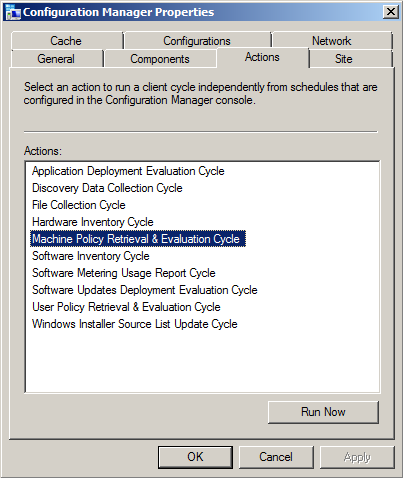
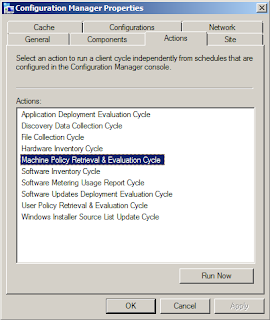
  • ActionName - (required) This is where the specific action name is entered.  I use my own abbreviated codenames to save on space (this log can easily grow very quickly with multiple users!).  For example, I use "MACHINE_POLICY" to indicate "Machine Policy Retrieval and Evaluation", and "HWINV" to indicate "Hardware Inventory Cycle", and so on. (see image below for the list of default available actions for ConfigMgr 2012 clients)
  • Network - (required) This is for storing the AD domain name or the CM site name, the choice is yours and it really doesn't matter, but I made it mandatory so you can modify "NOT NULL" to "NULL" if you prefer.  It's just there to enable filtering on specific environments when needed.
  • Comment - (optional) This is for entering a comment if desired. I had initially intended this to be a [textarea] field on the web form, but decided to skip it to avoid unnecessary data.
  • AddedBy - (required) This stores the username of the person who submitted the request from the web site form.  For this to work, you MUST enable "Windows Authentication" in IIS for the web site or the virtual folder.  If you leave it on "Anonymous" there won't be any way to track who the user was unless you build in forms-based authentication (yuck!)
  • DateAdded - (required) This stores the date and time when the request was submitted
  • DateProcessed - This is initially NULL until the script comes along and processes the request, at which time it enters the date and time it was completed.
  • ResultData - This is also initially NULL until the script updates the row when the request has been processed.
Security

I chose SQL accounts for this setup, but you could use mixed-mode.  I do a lot of things by force of habit, so SQL accounts are pretty common for my work, so I tend to use mixed-mode setups.  In any case, I have two user accounts for this system:
  • amsManager - This account has rights to SELECT, INSERT, UPDATE and DELETE data and rows in the table.  I use this account from within the web application to insert new records, and it's used in the script (discussed later) to update the rows when requests are processed.
  • amsReadOnlyUser - This account only has SELECT rights, and is used for any applications/scripts/processes where someone needs to be able to consume (read) the data but not have the ability to modify or delete anything.

The Script

Now that the database is created, the table created and the permissions applied to the table, the next step is getting a script to work with it to do the heavy-lifting.  You can do this with almost any language, including PowerShell, VBscript, KiXtart, Perl, Python or whatever.  As long as the language you choose can do the following things it should work fine:
  • Open a database connection to query (read) and update data in the rows.
  • Execute shell operations to call external .exe applications (SendSchedule.exe), as well as invoke COM interfaces such as WMI and SWBEM requests.
Again, out of habit, I chose VBScript.  I was going to do it with PowerShell, but I got lazy.  Here's the code, but I have to mention that one key "action" is left out for now, and that's the "Re-Run Advertisement" option.  The reason is that I'm still working on this part and having some challenges.  When I get it working reliably and consistently I will post an update:

'****************************************************************
' Filename..: ams_client_tools.vbs
' Author....: David M. Stein
' Date......: 11/11/2012
' Purpose...: invoke ConfigMgr Agent "client actions" on remote clients
'             using a SQL table and WMI invocation
' SQL.......: DB1\AMS
' Comment...: Beware of line-wrapping!  If I wrap it I used [& _]
'****************************************************************
Dim query, conn, cmd, rs, objShell, scriptPath, recID, objFSO

' controls DebugPrint output
Const verbose = True

' database connection
Const dsn = "DRIVER=SQL Server;SERVER=DB1;database=AMS;UID=amsManager;PWD=P@ssw0rd$123;"

' database table name
Const strTable = "dbo.ClientToolsLog"

'------------------------------------------------------------
scriptPath = Replace(wscript.ScriptFullName, "\" & wscript.ScriptName, "")
'------------------------------------------------------------
' constants used by this script (abridged format)
'------------------------------------------------------------
Const adOpenDynamic = 2 Const adOpenStatic = 3 Const adLockReadOnly = 1 Const adLockPessimistic = 2 Const adLockOptimistic = 3 Const adUseServer = 2 Const adUseClient = 3 Const adCmdText = &H0001 Const adStateClosed = &H00000000 Const adStateOpen = &H00000001 Const ForReading = 1 Const ForWriting = 2 Const ForAppend = 8 Const TristateUseDefault = -2 Const TriStateTrue = -1 Const TriStateFalse = 0 '------------------------------------------------------------ DebugPrint "info: begin processing..." Set objShell = CreateObject("Wscript.Shell") query = "SELECT * FROM " & strTable & _ " WHERE DateProcessed IS NULL ORDER BY ID" Set conn = CreateObject("ADODB.Connection") Set cmd = CreateObject("ADODB.Command") Set rs = CreateObject("ADODB.Recordset") On Error Resume Next conn.ConnectionTimeOut = 5 conn.Open dsn If err.Number <> 0 Then wscript.echo "fail: database connection failed" wscript.quit(err.Number) Else On Error GoTo 0 End If rs.CursorLocation = adUseClient rs.CursorType = adOpenStatic rs.LockType = adLockReadOnly Set cmd.ActiveConnection = conn cmd.CommandType = adCmdText cmd.CommandText = query rs.Open cmd If Not(rs.BOF And rs.EOF) Then xrows = rs.RecordCount counter = 0 Do Until rs.EOF recID = rs.Fields("ID").value compName = rs.Fields("ClientName").value actName = rs.Fields("ActionName").value actCode = ClientActionCode(actName) addBy = rs.Fields("AddedBy").value DebugPrint "record id...... " & rs.Fields("ID").value DebugPrint "client name.... " & compName DebugPrint "action name.... " & actName DebugPrint "action code.... " & actCode DebugPrint "requestor...... " & addBy DebugPrint "request date... " & rs.Fields("DateAdded").value DebugPrint "network........ " & rs.Fields("Network").value If IsOnline(compName) Then retval = ExecAction(compName, actName, actCode, addBy) Else DebugPrint "result......... offline!" retval = 100 End If DebugPrint "result......... " & retval MarkRecord recID, retval DebugPrint "-------------------------------------------" rs.MoveNext Loop DebugPrint "info: " & counter & " processed" Else DebugPrint "info: no records found" End If rs.Close conn.Close Set rs = Nothing Set cmd = Nothing Set conn = Nothing '------------------------------------------------------------ ' function: return datestamp formatted for log file use '------------------------------------------------------------ Function LogTime() LogTime = FormatDateTime(Now, vbShortDate) & " " & _ FormatDateTime(Now, vbLongTime) End Function '------------------------------------------------------------ ' function: return TRUE if computer responds to a PING request
' note: this features can be impacted by firewall settings!
'------------------------------------------------------------

Function IsOnline(strComputer)
  Dim objPing, query, objStatus, retval
  If strComputer <> "" Then
    query = "SELECT * FROM Win32_PingStatus WHERE Address='" & strComputer & "'" 
    Set objPing = GetObject("winmgmts:{impersonationLevel=impersonate}")._
      ExecQuery(query)
    For Each objStatus in objPing
      If Not(IsNull(objStatus.StatusCode)) And objStatus.StatusCode = 0 Then
        IsOnline = True
      End If
    Next
  End If
End Function

'------------------------------------------------------------
' function:
'------------------------------------------------------------

Function ClientActionCode(actionName)
  Select Case actionName
    Case "MACHINE_POLICY":
      ' Machine Policy Retrieval and Evaluation Cycle
      ClientActionCode = "{00000000-0000-0000-0000-000000000021}"
    Case "HWINV":
      ' Hardware Inventory Cycle
      ClientActionCode = "{00000000-0000-0000-0000-000000000001}"
    Case "SWINV":
      ' Software Inventory Cycle
      ClientActionCode = "{00000000-0000-0000-0000-000000000002}"
    Case "DISCOVERY":
      ' Discover Data Collection Cycle
      ClientActionCode = "{00000000-0000-0000-0000-000000000003}"
    Case "RERUN_ADV":
      ' Re-Run Advertisement
      ClientActionCode = "RERUNADV"
    Case "INST_SOURCE":
      ' Windows Installer Source List Update Cycle
      ClientActionCode = "{00000000-0000-0000-0000-000000000032}"
    Case "UPDATE_SCAN":
      ' Software Updates Scan Cycle
      ClientActionCode = "{00000000-0000-0000-0000-000000000113}"
    Case "AMT_PROV":
      ' AMT Auto Provisioning Policy / Out-of-Band Mgt Scheduled Event
      ClientActionCode = "{00000000-0000-0000-0000-000000000120}" 
    Case "BRANCH_DP":
      ' Branch Distribution Point Maintenance Task 
      ClientActionCode = "{00000000-0000-0000-0000-000000000062}"
    Case "UPDATE_DEP":
      ' Software Updates Deployment Evaluation Cycle 
      ClientActionCode = "{00000000-0000-0000-0000-000000000108}"
    Case "SW_METERING":
      ' Software Metering Usage Report Cycle 
      ClientActionCode = "{00000000-0000-0000-0000-000000000031}"
    Case "USER_POLICY":
      ClientActionCode = "{00000000-0000-0000-0000-000000000027}"
    Case Else:
      ClientActionCode = ""
  End Select
 
  ' list of codes for future inclusion...
  '
  '{00000000-0000-0000-0000-000000000010}  File Collection
  '{00000000-0000-0000-0000-000000000021}  Request machine assignments
  '{00000000-0000-0000-0000-000000000023}  Refresh default MP
  '{00000000-0000-0000-0000-000000000024}  Refresh location services
  '{00000000-0000-0000-0000-000000000025}  Request timeout value for tasks
  '{00000000-0000-0000-0000-000000000026}  Request user assignments
  '{00000000-0000-0000-0000-000000000032}  Request software update source
  '{00000000-0000-0000-0000-000000000061}  DP: Peer DP status report
  '{00000000-0000-0000-0000-000000000062}  DP: Peer DP pending status check
  '{00000000-0000-0000-0000-000000000111}  Send unset state messages
  '{00000000-0000-0000-0000-000000000112}  Clean state message cache
  '{00000000-0000-0000-0000-000000000114}  Refresh update status
End Function

'--------------------------------------------------------
' function: 
'--------------------------------------------------------

Function ExecAction(clientName, actionName, actionCode, userID)
  Dim strCmd, result

  DebugPrint "info: executing action request for " & clientName

  If actionCode = "RERUNADV" Then
    ' result = RerunAdv(compName, advID)
    ' [[ I will cover this in part 4 of this article ]]
    result = 200 ' denotes request was ignored (for now)
  Else
    strCmd = scriptPath & "\SendSchedule.exe " & actionCode & " " & clientName
    wscript.echo "info: command = " & strCmd
    result = objShell.Run(strCmd, 1, True)
  End If

  '--------------------------------------------------------

  ExecAction = result

End Function

'------------------------------------------------------------
' function: 
'------------------------------------------------------------

Sub MarkRecord(recID, pVal)
  Dim query, conn, cmd, rs

  wscript.echo "info: marking record completed..."

  DebugPrint "info: id = " & recID & " / result = " & pval

  query = "SELECT * FROM " & strTable & " WHERE id=" & recID
 
  Set conn = CreateObject("ADODB.Connection")
  Set cmd  = CreateObject("ADODB.Command")
  Set rs   = CreateObject("ADODB.Recordset")
 
  On Error Resume Next
  conn.ConnectionTimeOut = 5
  conn.Open dsn
  If err.Number <> 0 Then
    wscript.echo "fail: connection failed"
    wscript.quit(err.Number)
  Else
    On Error GoTo 0
  End If
 
  rs.CursorLocation = adUseClient
  rs.CursorType = adOpenDynamic
  rs.LockType = adLockPessimistic
 
  Set cmd.ActiveConnection = conn
 
  cmd.CommandType = adCmdText
  cmd.CommandText = query
  rs.Open cmd
 
  If Not(rs.BOF And rs.EOF) Then
    rs.Fields("DateProcessed").value = Now
    rs.Fields("ResultData").value = pVal
    rs.Update
  Else
    DebugPrint "error: no records found"
  End If
 
  rs.Close
  conn.Close
  Set rs = Nothing
  Set cmd = Nothing
  Set conn = Nothing

End Sub

'------------------------------------------------------------
' function: verbose echo printing
'------------------------------------------------------------

Sub DebugPrint(s)
  If verbose = True Then
    wscript.echo s
  End If
End Sub

What The Script Does

As I mentioned before, each time the Scheduled Task runs, it calls the script.  The script performs the following actions in the order/sequence listed below:
  • Opens a Connection to the database using ADO (COM) with SQL user permissions
  • Submits a Query for all rows where the DateProcessed value is NULL (indicating the request has not been processed yet).  The results are obtained as an ADO RecordSet object.
  • Iterates the RecordSet rows to gets the remote Computer Name, and ActionName field to determine the specific things that need to be done for the requested action (for example: look up the Action Code GUID)
  • Initiates a WMI (Win32_Ping) request to determine if the remote computer is online.
    • If not online, the ResultData column is updated with a value to indicate the client was offline
    • If online, the Action is processed...
  • Executes the requested Action:
    • If a "Client Action" is requested: Open a Shell session using WScript Shell object (COM) and executes the SendSchedule.exe application with the appropriate GUID for the Action and the name of the remote computer.  Gets the result/exit code from the SendSchedule process.
    • If "Re-Run Advertisement" is requested:  (to be continued)
  • Updates the database table row by entering the appropriate result code (ResultData) and the timestamp of the completion (DateProcessed)
  • Exits
Not really complicated actually.  This is a pretty straightforward and common process for interacting with database tables with ADO.  You could separate the requests and the results into two tables if you prefer, but I'm not shooting for 3NF or 4NF here.  I'm too lazy for that much work.

The Scheduled Task

This is where the Security aspect comes into play.  You need to execute the script under a context which has permissions to invoke the Configuration Manager Agent on remote computers over your network from a WMI interface.  I created a special Domain user account for this and added to the local Administrators group on every desktop and laptop computer using Group Policy and Restricted Groups.

Before setting up the Scheduled Task, I highly recommend testing the script directly.  Open a session (interactive login or use RunAs to open a CMD console) under the credentials of the user account you intend to use for the Scheduled Task.  Test the script until you are satisfied it works correctly.

As a force of habit, I use a simple BAT script to wrap my calls to VBScript to I can pipe the output (wscript.echo or DebugPrint results) to a log file if I want.  Or you can do it from within the VBScript code using basic FileSystemObject (FSO) methods if you prefer.  Either way, it can be helpful to generate a log file to diagnose issues where the database is unavailable for some reason when the scheduled task is executed.

The Schedule you choose is entirely arbitrary.  I run mine at ten (10) minute intervals all day, every day.  It also doesn't matter how you choose to create the Scheduled Task.  You can obviously use the GUI, or do it from the command line using SchTasks.exe, or from a script or whatever.

Summary

All of this I've covered here is essentially the "back-end" of the process.  I hope it you find it useful and helpful.  Let me know by posting a comment below?  In the next part of this article I will delve into the web form and the user interaction aspects.

Sunday, November 4, 2012

Why I'm Still Not 100% on PowerShell

In the past, I have been somewhat critical of PowerShell.  Not because it is somehow technically inferior to alternatives, but because of environmental ramifications.  I was an early adopter actually, having joined up in the Monad testing program, and I was very excited about the potential it offered.  Today, I use PowerShell more than I ever have, but there are still many types of tasks that I don't use it for:

  • Deploying / Installing Software to Remote Computers
  • Maintaining Legacy Script Files
  • Heterogeneous Windows Versions and .NET versions
The main reason I don't use it for software deployments is the slower execution time.  Compared with basic Batch/CMD scripts, or even VBscript, it just takes longer to "spin-up" the .NET and PowerShell foundation goodies before it even parses the script code.  Multiply that by multiple installs per remote computer, and hundreds of remote computers, and the aggregate time difference can be significant.  This is especially true on older hardware and older operating systems, which brings up the point of "pervasiveness" of PowerShell in a mixed environment:  

Many environments I walk into (I'm a consultant after all) are not homogeneous when it comes to operating systems versions, or even "common applications".  It's not unusual to find multiple configurations of .NET, Java Runtime, DirectX, MSXML, Oracle client, and SQL Native Client installations.  One thing I rarely have to contend with is inconsistent support for Windows Scripting Host, let alone the ever-present CMD shell.  I can't say the same for PowerShell.  I wish it were as consistent and pervasive but it's just not.  I'm sure that it will be someday, but we all know how long it takes customers to upgrade to newer operating systems.

To be fair, the same was true for Windows Scripting Host back in the early days of Windows NT.  Microsoft cranked out several versions, until they finally stopped on 5.8 and let it sink in.  That had a nice impact on most shops since they were no longer worried that as soon as they deployed WSH they would have to follow up with another upgrade.  PowerShell is still evolving, so many IT managers aren't over-eager to deploy 3.0 when they seem to expect a 3.1 to come out any day.

I know it's not exactly logical to expect that PowerShell and .NET could be somehow combined and made to be more cohesive (for more streamlined deployment), it would help.  The size of such a deployment package would be excessive for many shops to deal with, and might be tough to deploy on legacy hardware when local disk storage is almost maxed out.  No, it seems Microsoft is betting on customers upgrading to Windows 8 and that would take care of everything as it pertains to achieving a ubiquitous PowerShell presence.  I don't think that's going to happen anytime soon however, for a variety of reasons.  So, for now, while I continue to expand my PowerShell scope, I am still dependent on VBScript and Batch scripts for many tasks.

I'm sure there are some of you out there that will shake your head in disbelief at all this, and that's fine.  I welcome constructive feedback.  So if you have some insights or ideas about how this can be managed more effectively, please let me know?

Monday, September 17, 2012

Windows Scripting Host Sucks on 64-bit Windows

Here's an example of something I've known about for years, but somehow forgot, and at the most inconvenient time: Windows Scripting Host SUCKS on 64-bit Windows.  I'm almost ready to dump VBScript for good and move on with PowerShell after this.  There is a workaround for this, but it's stupid.  It's beyond stupid.  It's pathetic.

The code below looks for the Uninstall key value named "DisplayName" for 7-zip 9.20 on a Windows 7 64-bit computer.  The first key path returns "null".  The second key path returns the appropriate version "9.20.00.0"


[CODE]

Set objShell = CreateObject("Wscript.Shell")

Const HKEY_LOCAL_MACHINE = &H80000002
Const appGUID = "{23170F69-40C1-2701-0920-000001000000}"
Const vName = "DisplayName"

kPath1 = "SOFTWARE\Microsoft\Windows\CurrentVersion\Uninstall"
kPath2 = "SOFTWARE\Wow6432Node\Microsoft\Windows\CurrentVersion\Uninstall"

wscript.echo RegValue(kPath1 & "\" & appGUID, vName)
wscript.echo RegValue(kPath2 & "\" & appGUID, vName)
 
Function RegValue(key, v)
  Dim objRegistry, strValue
  Set objRegistry = GetObject("winmgmts:{impersonationLevel=impersonate}" & _
    "!\\.\root\default:StdRegProv")
  objRegistry.GetStringValue HKEY_LOCAL_MACHINE, key, v, strValue
  RegValue = strValue
End Function

[/CODE]

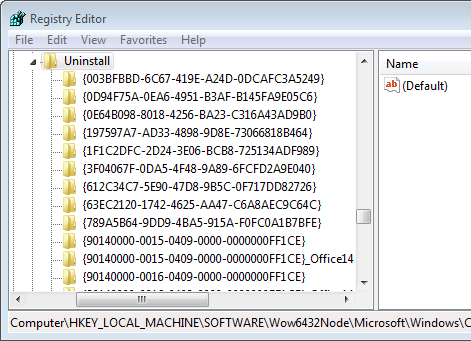
The screen capture below shows the Registry key and its values.  Note the path shown in the Status Bar along the bottom.  This is the default location under HKLM\Software\Microsoft.


When you install most 64-bit applications, this is where they will record their Uninstall information.  If you install a 32-bit application however, it puts the information under HKLM\Software\WOW6432Node\Microsoft\...


Note that the Uninstall GUID for 7-Zip 9.20 doesn't exist under the Wow6432Node tree.  It only resides under the default tree.  This can get really messy when you start installing 32-bit applications on 64-bit Windows 7.  And before you think that's easy to avoid, think again.

The problem is that CScript under the C:\Windows\SysWOW64 path only looks under the Wow6432Node tree for anything.  Even when you use the ExpandEnvironmentStrings method of the Shell object, it will expand the variable using what it finds here.

For example, if you execute the following VBScript code on a 64-bit machine...


[CODE]

Set objShell = CreateObject("Wscript.Shell")
wscript.echo objShell.ExpandEnvironmentStrings("%programfiles%")
wscript.echo objShell.ExpandEnvironmentStrings("%programfiles(x86)%")

wscript.echo objShell.RegRead("HKLM\SOFTWARE\WOW6432Node\" & _
  "Microsoft\Windows\CurrentVersion\CommonFilesDir")
wscript.echo objShell.RegRead("HKLM\SOFTWARE\Microsoft\" & _
  "Windows\CurrentVersion\CommonFilesDir")

[/CODE]

Notice the path of CScript.exe I invoke in the output capture below.  Note the impact each has on the output also...
Compare the two Value collections under each Registry key path.  The path is shown in the Status Bar along the bottom of each window...
One more example, and this is where it shows it's 2:00 AM beer goggles ugliness...
Consider the following two Registry keys:
HKLM\SOFTWARE\Microsoft\Windows\CurrentVersion\Uninstall\Dave
HKLM\SOFTWARE\Wow6432Node\Microsoft\Windows\CurrentVersion\Uninstall\Dave
Both keys have a Value named "DisplayName", but key1 is assigned "Dave123", while the same Value under key2 is assigned "Dave456" (both are type REG_SZ).
[CODE]

Set objShell = CreateObject("Wscript.Shell")
key1 = "HKLM\SOFTWARE\Microsoft\Windows\CurrentVersion\Uninstall\Dave"
key2 = "HKLM\SOFTWARE\WOW6432Node\Microsoft\Windows\CurrentVersion\Uninstall\Dave"
wscript.echo objShell.RegRead(key1 & "\DisplayName")
wscript.echo objShell.RegRead(key2 & "\DisplayName")

[/CODE]

If you execute the above code using CScript.exe from both locations on a typical Windows 7 64-bit computer, this is what you'd see...
Conclusion
I promised you a "workaround" at the beginning of this article, and here it is:  On 64-bit Windows 7 systems, to ensure you get accurate results, you absolutely HAVE to invoke the CScript.exe from C:\Windows\System32.  However, if you are are looking for installed Applications you need to invoke BOTH of them.  That's right, both of them.  Why? Because you can't get a complete picture without poking into both "sides" of the Registry of a 64-bit Windows 7 computer.
And I haven't even mentioned crawling through HKCU to find installed apps.  Some of you may be making a funny face right now, thinking "there's no application uninstall keys under HKCU" and then you check and realize that there are.  Most ClickOnce application installations, and pretty much any "per-user" installations for that matter, will hide their Registry stuff under HKCU.  So to really see what's "installed" on a 64-bit client, you need to look under the following places...

  • HKLM\Software\Microsoft\Windows\CurrentVersion\Uninstall
  • HKLM\Software\Wow6432Node\Microsoft\ Windows\CurrentVersion\Uninstall
  • HKEY_USERS (crawl every SID tree beneath it)
  • probably other locations that I'm just too lazy to dig up right now

Is this retarded?  Yep.  Could Microsoft remedy this 64-bit issue with a patch for WSH and Wscript.exe/CScript.exe?  Yep.  Will they?  Don't bet on it.  
Note:  Wrapped code lines in the above examples are for formatting only.  The actual script code used for the examples does not have the lines wrapped.

Thursday, March 22, 2012

LDAP User Account Properties: The WMI way

This is just something I ran across working on a recent project.  You can replace "." (local computer) with any valid NetBIOS name on your network (as long as you execute the script code with sufficient privileges to access the WMI Namespace)

[code]
strComputer = "." 
Set objWMIService = GetObject("winmgmts:\\" & strComputer & "\root\directory\LDAP") 
Set colItems = objWMIService.ExecQuery("SELECT * FROM ds_user",,48) 
For Each objItem in colItems 
    Wscript.Echo "-----------------------------------"
    Wscript.Echo "ds_user instance"
    Wscript.Echo "-----------------------------------"
    'Wscript.Echo "DS_objectGUID: " & objItem.DS_objectGUID
    'Wscript.Echo "DS_objectSid: " & objItem.DS_objectSid
    Wscript.Echo "DS_pwdLastSet: " & objItem.DS_pwdLastSet
    Wscript.Echo "DS_sAMAccountName: " & objItem.DS_sAMAccountName
    Wscript.Echo "DS_sAMAccountType: " & objItem.DS_sAMAccountType
    Wscript.Echo "DS_whenCreated: " & objItem.DS_whenCreated
    Wscript.Echo "DS_whenChanged: " & objItem.DS_whenChanged
Next
[/code]

Note that I commented out the GUID and SID properties.  That was for simplicity. You can fetch them to a variable, convert them to an appropriate data type, so that WSH / VBScript can correctly "echo" the results.  Cheers!

Tuesday, February 28, 2012

Making a Poor Man's Web Service

A "true" web service uses a robust and sophisticated structure.  Combining XML with SOAP and other goodies, you can unleash the power of the gods and melt down the entire Universe (or maybe just max out your NIC channel).  In any case, you can still achieve the same basic (repeat: Basic) capabilities using things like the old XmlHTTP object, or the .NET WebRequest object.


What for?

If you write scripts or do any programming, you may run into a situation where you would like to be able to pass a request to a web site via URL and get something back, without ever opening a web browser.

The old way, the "brute force" or "knuckle-dragging" way, was to open up the firehose and collect everything, the entire web page, into a bucket and sift through it. That is commonly called "screen scraping", but it's really just basic text or stream parsing.

With VBScript or KiXtart you can use the Microsoft.XmlHTTP object like this...

URL = "http://intranet.contoso.local/mypage.aspx"
Set objXmlHttp = CreateObject("Microsoft.XmlHttp")
objXmlHttp.Open "GET", URL, FALSE
objXmlHttp.Send ""
$result = objXmlHttp.ResponseText
Set objXmlHttp = Nothing

With PowerShell and .NET you can use the System.Net.WebClient object to do this.  Here is just one example...

$url = "http://intranet.contoso.local/mypage.aspx"
$wc = new-object System.Net.WebClient
$result = $wc.DownloadString($url)

Why bother?

The older you get, and the longer you work with programming, you eventually realize that you can leverage the power of existing structures without reinventing the wheel.  Let's say your best friend works in the web team and has a ASP, PHP, or ASP.NET web site that interacts with a database somewhere, maybe several.  Now let's say you're having lunch with this friend and you ask "hey, don't you have access to the hardware inventory system database?" and he puts down his sandwich and can of Red Bull and says "yes, why?"  "Oh nothing, it's just that I'd like to be able to query some information from it, but I can't wait for access approval from the DBA team."  After some more discussion you determine that the information you want isn't sensitive, but you don't really need to have the DBA folks setup a new DSN for you when your friend already has one for his apps.

Now your brain starts churning.  You think about all the pieces and what you can assemble.  What if your script, running on a remote desktop computer, could submit a query URL to a web page and get back some useful information for your script to continue on with?

What if you could fetch the computer name, or BIOS serial number, and pass that in like "http://intranet.local/computer.aspx?sn=ABC12345" and get back the Purchase Order (PO) number, and information about the warranty dates, service contract number, original owner, etc.?  Maybe your script could grab that, determine if the machine is still under contract support coverage, and go ahead and process an internal support request, or send an alert, based on some condition, all without ever popping up a form asking for user input?

$sn = "ABC12345"
$url = "http://intranet.contoso.local/computer.aspx?sn="+$sn
$filename = "c:\temp\filename.txt"
$wc = new-object System.Net.WebClient
$result = $wc.DownloadString($url)
# parse the contents of $result and do amazing things...

Get the picture?   Is this making sense yet?

You PowerShell nuts out there will obviously see where the above chunk of code can be refactored into a simpler form, but the point is what you can do with it.

This is ONLY ONE example.  Do not run with this and think I'm suggesting this is all it's good for.  There really is absolutely NO limit to where you can go with this.

As I say often:  Technological API's are like Lego building kits.  The more you have, the more you can do.

Ain't it awesome?

Thursday, November 17, 2011

Don't Forget the Eggs: ADO basic errors

I'm not a DBA, although I play one on breaks in the kitchen at work.  I have worked with various databases for quite a few years, including MS SQL Server, MySQL, and Oracle.  I don't count FoxPro or Access because I absolutely hate client-side databases due to the bullshit headaches they create for IT departments (and consultants like myself), but alas, I have already digressed on that subject in previous blog posts.

One thing I see quite a bit with ADO examples in particular is a lack of (a) error checking and (b) connection limiting.  I'm not talking about connection throttling, but rather: applying some refactoring logic to how you open and close connections to optimize the use of the open pipeline without keeping it open too long (or re-opening it too many times).

As for error checking:  This is a fairly standard/typical piece of VBscript/ASP code for running a "select" query via ADO against a database.  It doesn't matter whether that database is local to the server/host where the code is being executed, well, it does actually, it matters more if it's remote, but whatever, let's chew and digest slowly here...

[CODE]
Set conn = Server.CreateObject("ADODB.Connection")
Set cmd = Server.CreateObject("ADODB.Command")
Set rs = Server.CreateObject("ADODB.Recordset")

query = "SELECT * FROM dbo.SomeTable WHERE id=" & _
    idNumber & " ORDER BY ItemName"

conn.Open dsnString

rs.CursorLocation = adUseClient
rs.CursorType = adOpenStatic
rs.LockType = adLockReadOnly

Set cmd.ActiveConnection = conn

cmd.CommandType = adCmdText
cmd.CommandText = query
rs.Open cmd

If Not(rs.BOF And rs.EOF) Then
    cols = rs.Fields.Count
    rows = rs.RecordCount
    Do Until rs.EOF
        ' do something stupid here
        rs.MoveNext
    Loop
Else
    Response.Write "oops, no records were returned"
End If

rs.Close
conn.Close
Set rs = Nothing
Set cmd = Nothing
Set conn = Nothing
[/CODE]

This looks simple enough. But there are quite a few places that could implode here if not handled explicitly.  Granted, error handling with .NET is more robust, but indulge me here for a moment since (A) there's still 100 times more VBScript code strewn about this planet than .NET code, and (B) I'm old.  The big three problems that are most likely to occur with this scenario are...

Connection Failure
Connection Delay / Time-Out
Recordset Access Failure (access denied)

Let's handle them one by one...

Connection Failure

Prior to the "conn.Open" statement, we should override the default error system and then check for the exit code from the .Open method and see what happened.  If it was successful (exit code: 0), we continue on, otherwise we should handle the error and exit safely.


[CODE]
On Error Resume Next
conn.Open dsnString
If err.Number <> 0 Then
    ' an error occurred, so something clever here
    Response.Write "oops, cannot open a connection"
    Response.End
End If
[/CODE]

If you do your connection within a Sub() or Function() block, you should probably exit using Exit Sub or Exit Function, but that's not always true either.

Connection Time-Out

What if the connection is taking a longer time to resolve than usual?  We can handle that too...


[CODE]
On Error Resume Next
conn.ConnectionTimeOut = 15 ' allow 15 seconds to establish the connection
conn.Open dsnString
If err.Number <> 0 Then
    ' an error occurred, so something clever here
    Response.Write "oops, cannot open a connection"
    Response.End
End If
[/CODE]


Recordset Access Failure

Another common issue is when you can successfully open the connection, but cannot read from a table or view because of security permissions.


[CODE]
rs.Open cmd
If err.Number <> 0 Then
    ' do something awesome here
    Response.Write "oops, unable to access the table or view"
    Response.End
End If

If Not(rs.BOF And rs.EOF) Then
    cols = rs.Fields.Count
    rows = rs.RecordCount
    Do Until rs.EOF
        ' do something neato here
        rs.MoveNext
    Loop
End If

rs.Close
conn.Close
Set rs = Nothing
Set cmd = Nothing
Set conn = Nothing
[/CODE]


Connection Management

I've seen more situations than I can count where a single page of code (script file, web page, etc.) makes repeated requests from a database in sequential order (as the page is rendered or the script is executed).  Most often it's having to grab data from multiple tables and/or views, or execute multiple stored procedures or functions.  In a lot of cases, the code doing the heavy lifting is being included from separate files (using "includes").  That's all nifty and modular, which is a good approach, but always be VERY careful with that approach that you don't have each module do it's own connection open/close management.  This not only slows down the processing, but it requires more bandwidth and more load on the network and the database server as well.

A case in point might be a web page that renders a report of an employee, then it displays a table with performance evaluation records, followed by a table of employees managed by the employee in question.  If those data repositories are all on different database servers that may be all you can do, but if they happen to be on one server, or even in one database, you should seriously review minimizing the number of open/close requests on your connections.

A brief sample of this using pseudo code:

open connection1
open recordset1
close connection1
open connection2
open recordset2
close connection2
open connection3
open recordset3
close connection3

might work a lot faster and better as...

open connection
open recordset1
open recordset2
open recordset3
close connection

Some people prefer to open a "global" or "session" connection, whereby the connection is opened upon login or initialization by each user session.  The connection object itself is stored in the session stack and made available globally to that user throughout their session window.  Each concurrent user has their own connection opened and maintained on a stack.  Granted this makes it easier to run queries, updates, etc. without the overhead of managing connections at the more granular page/script level, but it definitely taxes the database server with a lot of unnecessary open connections.  For a handful of users that may be fine, but with hundreds or thousands of users it can be a mess and make the database server drag.

Just some random thoughts after beer.  Have any thoughts you'd like to share?

Sunday, October 30, 2011

Error Handling: An Example

Consider the following standard WMI query for a moment. Look at the code for a few seconds, at least...

[CODE]
strComputer = "computer123"
Set objWMIService = GetObject("winmgmts:\\" & strComputer & "\root\cimv2") Set colItems = objWMIService.ExecQuery("Select * from Win32_PhysicalMemory",,48)
For Each objItem in colItems Wscript.Echo "Caption: " & objItem.Caption 
Next
[/CODE]

What could go wrong? What if "Computer123" doesn't exist?  What if "Computer123" is offline, or the firewall prevents a connection?  What if your user account doesn't have permissions to query remote WMI?  What if you typed in the wrong WMI class name, like "Win32_RAM" or something else?

You might get something like this...


[OUTPUT]
C:\Scripts\wmi-test.vbs(3, 1) Microsoft VBScript runtime error: _
The remote server machine does not exist or is unavailable: 'GetObject'
[/OUTPUT]
Is that a good way to handle this failure?  What if we add some explicit error checking and then handle the error?  Let's try this...


[CODE]
strComputer = "computer123" On Error Resume Next
Set objWMIService = GetObject("winmgmts:\\" & strComputer & "\root\cimv2") If err.Number <> 0 Then
wscript.echo "unable to connect to: " & strComputer
wscript.echo "error: " & err.Number & " / " & err.Description
wscript.quit(err.Number)
End If
Set colItems = objWMIService.ExecQuery("Select * from Win32_PhysicalMemory",,48)
For Each objItem in colItems Wscript.Echo "Caption: " & objItem.Caption 
Next
[/CODE]


Now, if we run this and "Computer123" is not accessible, we should get the following...


[OUTPUT]
unable to connect to: computer123
error: 462 / The remote server machine does not exist or is unavailable

[/OUTPUT]


If we check %errorlevel% is should be set to 462 now as well.  This is an example of raising an error "implicitly" or simply passing it up without modifying it.  If we want to force our own error result value, we can simply modify the wscript.quit(value) statement to use our own numeric value...


[CODE]
strComputer = "computer123" On Error Resume Next
Set objWMIService = GetObject("winmgmts:\\" & strComputer & "\root\cimv2") If err.Number <> 0 Then
wscript.echo "unable to connect to: " & strComputer
wscript.echo "error: " & err.Number & " / " & err.Description
wscript.quit(5)
End If
Set colItems = objWMIService.ExecQuery("Select * from Win32_PhysicalMemory",,48)
For Each objItem in colItems Wscript.Echo "Caption: " & objItem.Caption 
Next
[/CODE]


Now, the exit code (or %errorlevel%) value will be 5 when it fails for *ANY* reason.  There are situations when you will want to force a static error result, and situations where you want the real error value.  It's nice to know you have that option, and YOU have control over it.

Enjoy!

Tuesday, September 27, 2011

Test ADO Connection using VBscript

Quick ADO connection test using VBscript...

[code]

Const dsn = "{your connection string or DSN name here}"

On Error Resume Next
Set conn = CreateObject("ADODB.Connection")
conn.ConnectionTimeOut = 10 ' 10 second wait limit
conn.Open dsn

If err.Number = 0 Then
	wscript.echo "CONNECTION: SUCCESS"
Else
	wscript.echo "CONNECTION: FAILED"
End If

conn.Close
Set conn = Nothing
[/code]

10 Ways to Manage Windows Services

  1. Services Console (services.msc)
  2. Command Line: sc.exe
  3. WMI / COM Script: VBscript, KiXtart, Javascript, Perl, etc.
  4. .NET Script: PowerShell
  5. WMI Class Provider: Win32_Service
  6. Group Policy Object
  7. Group Policy Preferences
  8. Utilities: PSService.exe (Sysinternals/Microsoft)
  9. .MSI installer
  10. .EXE application or installer

5 Ways to Read Windows Event Logs

  1. Event Viewer application (eventvwr.msc or eventvwr.exe)
  2. Command Line: wevutil.exe
  3. WMI/COM Scripting: VBscript, KiXtart, Javascript, Perl, etc.
  4. .NET Scripting: PowerShell
  5. Collectors and Forwarders: wecutil.exe

Monday, August 29, 2011

PowerShell vs VBscript: Part 2

I was asked an interesting question regarding my blog post on the tests that compared ADO and ADO.NET from VBscript and PowerShell:  Was it using native PowerShell ISE or "cold start" execution?

The answer:  Native shell execution

I ran the VBscript code in a standard CMD shell.  I ran both of the PowerShell code examples in the PowerShell ISE shell.

When I ran each script using a "cold start" process, it added a half-second to VBscript and 1.5 seconds to the PowerShell tests.  That tells me that the PowerShell "engine" is slower to initialize from a cold launch request, which could be a combination of many factors from .exe size, thread starts, API requests, and so on.

Wednesday, August 17, 2011

Semi-Showdown: VBscript, PowerShell / ADO, ADO.NET

Ok, so I got REALLY REALLY REALLY bored one day and had to settle a nagging question in my head (I have another nagging question involving the medical/scientific analysis of whether the metabolic rate change incurred by the caffeine in a cup of strong coffee burns off enough calories to offset a tablespoon of sugar in the coffee itself, but that's for another day). 

I posted an article on this subject a long time ago, but without any analysis, just a question about why 99.9 percent of all the PowerShell "database" examples on the Internet use ADO (via COM InterOp) rather than pure/native ADO.NET.  Since then however, the ratio of PowerShell+ADO.NET examples has grown significantly, which is a good thing.  Nothing like trying to impress a consumer with a spiffy new sports car than by showing you how well it can sit idle in a traffic jam.

The Goal:

  • Measure the performance variations between VBscript+ADO, PowerShell+ADO, and PowerShell+ADO.NET.

The Setup:

  • Query a remote SQL Server database table, for one column only
  • Query: Select one column, of type VARCHAR(255), from approximately 5,300 rows
  • The column being queried is indexed
  • The table contains four columns, of types: INT, SMALLDATETIME, VARCHAR(255) and VARCHAR(50)

The Server:

  • Hyper-V 2008 R2 SP1 guest:
    • Windows Server 2008 SP2
    • 20 GB RAM
    • 4 CPUs
    • SQL Server 2008 R2
  • Client:
    • HP 7900 Desktop
    • Windows 7 SP1, 64-bit
    • 12 GB RAM
    • Dual Core CPU

The Code:

[VBSCRIPT]
query = "SELECT ProductName FROM SoftwareExclusion ORDER BY ProductName"
Set conn = CreateObject("ADODB.Connection")
Set cmd = CreateObject("ADODB.Command")
Set rs = CreateObject("ADODB.Recordset")
conn.Open sqlConnectionString
rs.CursorLocation = adUseClient
rs.CursorType = adOpenStatic
rs.LockType = adLockReadOnly
Set cmd.ActiveConnection = conn
cmd.CommandType = adCmdText
cmd.CommandText = query
rs.Open cmd
If Not(rs.BOF And rs.EOF) Then
Do Until rs.EOF
wscript.echo rs.Fields("ProductName").Value
rs.MoveNext
Loop
Else
wscript.echo "error: no records found"
End If

rs.Close
conn.Close
Set rs = Nothing
Set cmd = Nothing
Set conn = Nothing

wscript.echo Timer-t1 & " seconds"
[/VBSCRIPT]


[PS_ADO]
$t1 = Get-Date

$query = "SELECT ProductName FROM SoftwareExclusion ORDER BY ProductName"

$adoOpenStatic = 3
$adoLockOptimistic = 3

$adoConnection = New-Object -ComObject ADODB.Connection
$adoRecordset = New-Object -ComObject ADODB.Recordset

$adoConnection.Open($sqlConnectionString)
$adoRecordset.Open($query, $adoConnection, $adoOpenStatic, $adoLockOptimistic)
$adoRecordset.MoveFirst()
$rows = $adoRecordset.RecordCount

do {
write-host $adoRecordset.Fields.Item("ProductName").Value
$adoRecordset.MoveNext()
} until ($adoRecordset.EOF -eq $TRUE)

$adoRecordset.Close()
$adoConnection.Close()

$runtime = New-TimeSpan $t1 $(Get-Date)
write-host "Runtime: "$runtime.Seconds" seconds"
[/PS_ADO]


[PS_ADONET]
$t1 = Get-Date

$SqlQuery = "SELECT ProductName FROM SoftwareExclusion ORDER BY ProductName"

$SqlConnection = New-Object System.Data.SqlClient.SqlConnection
$SqlConnection.ConnectionString = $SqlConnectionString

$SqlCmd = New-Object System.Data.SqlClient.SqlCommand
$SqlCmd.CommandText = $SqlQuery
$SqlCmd.Connection = $SqlConnection

$SqlAdapter = New-Object System.Data.SqlClient.SqlDataAdapter
$SqlAdapter.SelectCommand = $SqlCmd

$DataSet = New-Object System.Data.DataSet
$SqlAdapter.Fill($DataSet)
$SqlConnection.Close()

#output the data
$DataSet.Tables[0]

$runtime = New-TimeSpan $t1 $(Get-Date)
write-host "Runtime: "$runtime.Seconds" seconds"
[/PS_ADONET]


The Results:


  • 10 successive execution runs each


  • Average Run Times:


    • Test 1 = 1.6 seconds


    • Test 2 = 22.21 seconds


    • Test 3 = 3.9 seconds


An Official Apology about my comments on VBscript and PowerShell

Over the past year or so, I've posted several times that there is a "bug" in VBScript and PowerShell that affects how the code interprets the Windows environment variable %PROGRAMFILES% on x64 clients.  This is incorrect.  The root cause of this statement was derived from my use of a particular code editor, TextPad, which appears to have a small, but troublesome, bug.  However, regardless of that, I should have verified my findings outside of the code editor interpreter, which I failed to do.

For my shortcomings in that area:

I apologize to the folks that work on, or have worked on, VBscript, Windows Scripting Host, and PowerShell (among any others I may have blamed).

Here's a post of what I'm talking about: http://forums.textpad.com/viewtopic.php?p=37715#37715

Tuesday, July 19, 2011

KixTart+VBscript+BAT+PowerShell=zzzzzzzz

Boredom is the sugar-daddy of invention.  Necessity may be the mother, but boredom is the Yang to that Yin.  For example, while sitting around pondering the endless string of bad decisions I've made in life, I decided to build a mouse trap of script code.

KiXtart calls VBscript calls BAT calls PowerShell

You can take this and do whatever you like or ignore it and roll your eyes.  I got the inspiration from a recent discussion with a long-time colleague about a former colleague from back in the 1980's who wrote some insanity for MIT that used LISP to write C code and compiled and ran it based on environment condition tests.  In other words: it wrote the code it needed to suit the environment at that moment.  I really miss working with LISP, eh, ughg, whatever... ok, so there you have it.  Oh, each of the scripts is named "hello.xxx" where "xxx" is the appropriate extension for the language (.kix, .vbs, .bat, .ps1)... fa la la la laaaaaaa...

[CODE]

rem hello.cmd
@echo off
kix32.exe "%~dp0hello.kix"

;; hello.kix
@break on
shell "cscript.exe /nologo hello.vbs"

' hello.vbs
Set objShell = CreateObject("Wscript.Shell")
result = objShell.Run("%comspec% /c hello.bat", 1, True)

rem hello.bat
@echo off
powershell -ExecutionPolicy Unrestricted -File "%~dp0hello.ps1"

## hello.ps1
$a = new-object -comobject wscript.shell
$b = $a.popup("Hello world!",5,"Wasting Time",1)

[/CODE]