Showing posts with label t-sql. Show all posts

Tuesday, August 26, 2014

The Missing SCCM Database View

For most interfaces I've worked on over the past ten years, which involve poking a stick at System Center Configuration Manager 2007 or 2012, this is one database view (or stored proc) that I'm usually building for myself.  It basically tosses about eight built-in Views and Tables into a blender, with a dash or two of stupid sauce and provides a fairly good picture of each computer in your site database.


It spews out the computer name, client info, site code, manufacturer, model, memory, Windows flavor, chassis type (I didn't cross-join that to produce names, but you can do that, I'm too lazy right now), BIOS info and serial number, CPU, AD stuff, install date, and of course, my personal favorite: the SCCM distribution point reference.  Note that I've provided a fall-back DP name for those which are not explicitly mapped via a site boundary, so they come back home to an MP usually (not always).  I used "DP0001" but you should stuff your own name in place of that.


[begincode]

SELECT DISTINCT
v_R_System.Name0,
v_R_System.ResourceID,
v_R_System.Client0 AS ClientInstalled,
v_R_System.Client_Version0 AS ClientVersion,
v_R_System.Creation_Date0 AS ClientDate,
v_RA_System_SMSAssignedSites.SMS_Assigned_Sites0 AS SiteCode,
v_GS_COMPUTER_SYSTEM.Manufacturer0 AS Manufacturer,
v_GS_COMPUTER_SYSTEM.Model0 AS ModelName,
v_GS_COMPUTER_SYSTEM.SystemType0 AS SystemType,
v_GS_OPERATING_SYSTEM.Caption0 AS OSName,
v_GS_OPERATING_SYSTEM.CSDVersion0 AS ServicePack,
v_GS_X86_PC_MEMORY.TotalPhysicalMemory0 AS Memory,
v_GS_SYSTEM_ENCLOSURE.ChassisTypes0 AS ChassisType,
v_GS_SYSTEM_ENCLOSURE.SerialNumber0 AS SerialNumber,
v_GS_PC_BIOS.Manufacturer0 AS BIOSvendor,
v_GS_PC_BIOS.SMBIOSBIOSVersion0 AS BIOSversion,
v_GS_PC_BIOS.ReleaseDate0 AS BIOSdate,
v_GS_PROCESSOR.Name0 AS CPU,
v_R_System.AD_Site_Name0 AS ADSiteName,
v_GS_COMPUTER_SYSTEM.UserName0 AS ADUserName,
v_GS_COMPUTER_SYSTEM.Domain0 AS ADDomain,
v_GS_OPERATING_SYSTEM.InstallDate0 AS OSInstallDate,
v_BoundaryInfo.BoundaryID,
COALESCE (ProtectedSiteSystem_ARR.ServerName, 'DP0001') AS DPServer
FROM dbo.ProtectedSiteSystem_ARR AS ProtectedSiteSystem_ARR
INNER JOIN
dbo.v_BoundaryInfo AS v_BoundaryInfo
ON ProtectedSiteSystem_ARR.BoundaryID = v_BoundaryInfo.BoundaryID
RIGHT OUTER JOIN
dbo.v_R_System AS v_R_System INNER JOIN
dbo.v_GS_PROCESSOR AS v_GS_PROCESSOR
ON v_R_System.ResourceID = v_GS_PROCESSOR.ResourceID
INNER JOIN
dbo.v_GS_COMPUTER_SYSTEM AS v_GS_COMPUTER_SYSTEM
ON v_R_System.ResourceID = v_GS_COMPUTER_SYSTEM.ResourceID
INNER JOIN
dbo.v_GS_SYSTEM_ENCLOSURE AS v_GS_SYSTEM_ENCLOSURE
ON v_R_System.ResourceID = v_GS_SYSTEM_ENCLOSURE.ResourceID
INNER JOIN
dbo.v_GS_X86_PC_MEMORY AS v_GS_X86_PC_MEMORY
ON v_R_System.ResourceID = v_GS_X86_PC_MEMORY.ResourceID
INNER JOIN
dbo.v_GS_OPERATING_SYSTEM AS v_GS_OPERATING_SYSTEM
ON v_R_System.ResourceID = v_GS_OPERATING_SYSTEM.ResourceID
INNER JOIN
dbo.v_GS_PC_BIOS AS v_GS_PC_BIOS ON v_R_System.ResourceID = v_GS_PC_BIOS.ResourceID
INNER JOIN
dbo.v_RA_System_SMSAssignedSites AS v_RA_System_SMSAssignedSites
ON v_R_System.ResourceID = v_RA_System_SMSAssignedSites.ResourceID
ON v_BoundaryInfo.Value = v_R_System.AD_Site_Name0
ORDER BY v_R_System.Name0
[endcode]

To test this out, open your SQL Management Studio.  Connect to your site database server and site database instance.  Then click "New Query" and paste the code in and press F5 to run it.  Add a splash of your favorite alcoholic beverage, some Barry White music, dim the lights, and enjoy the vibe.  Peace.

Thursday, June 26, 2014

Random SCCM Database Thoughts

I ran these on a SCCM 2007 environment, but most of them should work in 2012 R2 as well.

Crack open your SSMS console, swallow your entire Espresso, crack your knuckles, inhale deep and slow, and let it out deep and slow.  Then scream something stupid and look serious.  Now, let's get started...

List the computers in a particular AD Site, and identify their makes, models, and BIOS serial numbers...

  • Join v_R_System with v_GS_Computer_System and v_GS_System_Enclosure on ResourceID (using LEFT joins to avoid dropping those which don't report inventory yet).  Then group by the AD_Site_Name0 field.
  • Step 1, filter on the following view-joins to see the general scope of data...

SELECT DISTINCT
   dbo.v_R_System.ResourceID, dbo.v_R_System.AD_Site_Name0, 
   dbo.v_R_System.Name0, dbo.v_GS_COMPUTER_SYSTEM.Manufacturer0, 
   dbo.v_GS_COMPUTER_SYSTEM.Model0, 
   dbo.v_GS_COMPUTER_SYSTEM.SystemType0, 
   dbo.v_GS_SYSTEM_ENCLOSURE.SerialNumber0
FROM dbo.v_R_System LEFT OUTER JOIN
   dbo.v_GS_COMPUTER_SYSTEM ON dbo.v_R_System.ResourceID =

      dbo.v_GS_COMPUTER_SYSTEM.ResourceID LEFT OUTER JOIN
   dbo.v_GS_SYSTEM_ENCLOSURE ON dbo.v_R_System.ResourceID =
      dbo.v_GS_SYSTEM_ENCLOSURE.ResourceID

  • Step 2, hone it down...

      SELECT DISTINCT
         dbo.v_R_System.ResourceID, dbo.v_R_System.AD_Site_Name0, 
         dbo.v_R_System.Name0, dbo.v_GS_COMPUTER_SYSTEM.Manufacturer0, 
         dbo.v_GS_COMPUTER_SYSTEM.Model0, 
         dbo.v_GS_COMPUTER_SYSTEM.SystemType0, 
         dbo.v_GS_SYSTEM_ENCLOSURE.SerialNumber0
      FROM dbo.v_R_System LEFT OUTER JOIN
         dbo.v_GS_COMPUTER_SYSTEM ON dbo.v_R_System.ResourceID =
            dbo.v_GS_COMPUTER_SYSTEM.ResourceID LEFT OUTER JOIN
         dbo.v_GS_SYSTEM_ENCLOSURE ON dbo.v_R_System.ResourceID =
            dbo.v_GS_SYSTEM_ENCLOSURE.ResourceID
      WHERE dbo.v_R_System.AD_Site_Name0 = 'DOUBLE_HEADED_DONG_FACTORY'

      Find all clients which are assigned to a particular IPv4 gateway...
      • Step 1, just for fun, filter and browse the results of round 1, using v_Network_Data_Serialized
      SELECT DISTINCT 
         DNSHostName0, ResourceID, IPSubnet0, MACAddress0, 
         IPAddress0, DHCPEnabled0, DHCPServer0, DNSDomain0, DefaultIPGateway0
      FROM dbo.v_Network_DATA_Serialized
      WHERE (IPSubnet0 IS NOT NULL)
         AND (DHCPEnabled0 = 1)
         AND (IPAddress0 NOT LIKE 'f%')

      • Step 2, go in for the kill.  Find all that are using gateway 192.168.2.11...
      SELECT DISTINCT 
         DNSHostName0, ResourceID, IPSubnet0, MACAddress0, 
         IPAddress0, DHCPEnabled0, DHCPServer0, DNSDomain0, 
         DefaultIPGateway0
      FROM dbo.v_Network_DATA_Serialized
      WHERE 
      (IPSubnet0 IS NOT NULL) 
         AND (DHCPEnabled0 = 1) 
         AND (DefaultIPDGateway0='192.168.2.11')
      ORDER BY DNSHostName0


      List the unique AD Site Names for all computers in a given Collection...
      • Join v_R_System with a sub-query on the desired Collection "ABC12345".
      SELECT DISTINCT AD_Site_Name0 dbo.v_R_System
      WHERE dbo.v_R_System.ResourceID IN
         (SELECT ResourceID FROM dbo.v_CM_RES_COLL_ABC12345)

      List all of the Distribution Point Servers in site "ABC"...
      • Filter on View named v_SystemResourceList...
      SELECT SiteCode,ServerName
      FROM dbo.v_SystemResourceList
      WHERE SiteCode='ABC' AND RoleName='SMS Distribution Point'

      ORDER BY ServerName

      List distinct Site Server Role type/names in the database, along with counts of servers for each role (keep in mind that servers can provide multiple roles, so don't sum the totals and think that's an accurate count of total site servers)
      • Filter on View named v_SystemResourceList...
      SELECT DISTINCT RoleName, COUNT(*) AS ServerCount
      FROM dbo.v_SystemResourceList
      GROUP BY RoleName

      ORDER BY RoleName

      List User Account status values and counts for each.
      • Start with a basic SQL query to identify the unique values for column User_Account_Control0 from view named v_R_User
      SELECT DISTINCT User_Account_Control0, COUNT(*) AS UserCount
      FROM dbo.v_R_User
      GROUP BY User_Account_Control0

      • Then add a dash of SQL "CASE" statement with some Oregano and Basil (for other values to match up, check out Rajnish's blog post here)...
      SELECT DISTINCT 
      User_Account_Control0, 
      COUNT(*) AS UserCount, 
      CASE User_Account_Control0 
      WHEN 512 THEN 'Enabled' 
      WHEN 514 THEN 'Disabled' 
      WHEN 544 THEN 'Enabled Must Change Password' 
      WHEN 66048 THEN 'Enabled Password Never Expires' 
      ELSE 'You can code the others...' 
      END AS UAC_Name 
      FROM dbo.v_R_User 
      GROUP BY User_Account_Control0

      List computers a particular AD user has logged onto within the past 30 days...

      • Find logins for user "doofus" on domain "contoso".  Join v_R_System with v_GS_SYSTEM_CONSOLE_USER on ResourceID and filter on the SystemConsoleUser0 column.  Then add a DateDiff() filter to restrict on logons within the last 30 days...

      SELECT 
         dbo.v_R_System.Name0 AS ComputerName, 
         dbo.v_GS_SYSTEM_CONSOLE_USER.ResourceID,
         dbo.v_GS_SYSTEM_CONSOLE_USER.LastConsoleUse0 AS LastLogon,
         dbo.v_GS_SYSTEM_CONSOLE_USER.NumberOfConsoleLogons0 AS NumberLogons,
         dbo.v_GS_SYSTEM_CONSOLE_USER.SystemConsoleUser0 AS UserID,
         dbo.v_GS_SYSTEM_CONSOLE_USER.TotalUserConsoleMinutes0 AS LogonTotalTime
      FROM dbo.v_GS_SYSTEM_CONSOLE_USER INNER JOIN
         dbo.v_R_System ON dbo.v_GS_SYSTEM_CONSOLE_USER.ResourceID =
            dbo.v_R_System.ResourceID
      WHERE 
         (dbo.v_GS_SYSTEM_CONSOLE_USER.SystemConsoleUser0 = 'contoso\doofus')
         AND
         (DATEDIFF(dd, dbo.v_GS_SYSTEM_CONSOLE_USER.LastConsoleUse0, GETDATE()) < 30)

      Need to identify Advertisements pointed at Direct-membership Collections?
      • Join v_Advertisement to v_Package, and v_Collection, and sub-query against v_CollectionRuleDirect using CollectionID as the filtering column...
      SELECT 
         dbo.v_Advertisement.AdvertisementID, 
         dbo.v_Advertisement.AdvertisementName, 
         dbo.v_Advertisement.PackageID, 
         dbo.v_Package.Name, 
         dbo.v_Advertisement.CollectionID,
         dbo.v_Collection.Name AS CollectionName
      FROM dbo.v_Advertisement INNER JOIN
         dbo.v_Collection ON dbo.v_Advertisement.CollectionID =

            dbo.v_Collection.CollectionID INNER JOIN 
         dbo.v_Package ON dbo.v_Advertisement.PackageID =
            dbo.v_Package.PackageID
      WHERE (dbo.v_Collection.CollectionID IN
         (SELECT DISTINCT CollectionID FROM dbo.v_CollectionRuleDirect)) 

      ORDER BY 
         dbo.v_Advertisement.AdvertisementName

                    Need to computers with every version of Internet Explorer?
                    • Well, you might expect to query v_GS_Installed_Software_Categorized or the ARP tables, but remember that IE10 and 11 came out as KB updates for some platforms.  So best to query v_GS_Software_Product.  Note the some entries (ProductName0 LIKE 'Internet Explorer%') OR (ProductName0 LIKE 'Windows%Internet Explorer%') will produce the version within the product name, while others will only show "Internet Explorer" and the version in the ProductVersion0 column.  Drink plenty of coffee and enjoy that.  Don't forget to filter out the double counted items (yes. they are hiding there).  Don't be surprised if you need to crack open your dusty T-SQL book and brush up on the CASE statement.  I'll let you have fun with this one, and I'll post my take on it later.
                    If I get more coffee in me and feel motivated, I may post more.  Let me know if these are helpful?

                    Friday, April 11, 2014

                    Config Manager Contusions: Finding Advertisements Pointed at Active Directory OUs

                    If you have a large "enterprise" environment, which has System Center Configuration Manager in it, and it's been in place for a long time, you could have a rather wide sprawling infrastructure, replete with Collections that point to things you completely forgot about.  Case in point: Collections based on Query rules which point at AD Organizational Units (OU).

                    So, when one of your engineers asks the respectable question: "Do we push any apps at computers in OU ", you're left scratching your head about how to compile a layer of potential Group Policy software installations with another layer of potential Configuration Manager Advertisements.  Say hello to one more Rubik's cube of the IT world.

                    Thankfully, Microsoft spent just enough time on their SQL back-end for Config Manager to make a lot of chores surprisingly simple with just a few minutes poking around in SQL Management Studio.

                    Here's one example to demonstrate how to identify which Collections are built on query-rules that point at AD OUs, and (AND) which have Advertisements pointed at them...

                    [T-SQL Query]


                    SELECT 
                        v_Collection.Name, 
                        v_Advertisement.AdvertisementID, 
                        v_Advertisement.AdvertisementName, 
                        v_CollectionRuleQuery.QueryExpression
                    FROM v_CollectionRuleQuery INNER JOIN
                        v_Collection ON 
                        v_CollectionRuleQuery.CollectionID = v_Collection.CollectionID 
                    INNER JOIN dbo.v_Advertisement ON 
                        v_Collection.CollectionID = v_Advertisement.CollectionID
                    WHERE (v_CollectionRuleQuery.QueryExpression LIKE '%SYSTEM_OU_NAME%')
                    ORDER BY AdvertisementName
                    
                    
                    [/T-SQL Query]

                    Once you start scratching the SQL surface, it's hard to stop.

                    Sunday, November 11, 2012

                    Crude But Effective: Part 2, the Electric Boogaloo

                    In my previous article I described a system for replicating some of the functionality of the ConfigMgr Right-Click Tools (aka "SCCM Right-Click Tools"), through a web interface (intranet web portal application) using a combination of HTML, ASP, and a database back-end   What I planned to do was provide a little more detail of each of the pieces in follow-on articles.  This way, if you really cared enough, you could build your own setup (and probably do a better job of it than I have).

                    In this article I'm going to expand on the part of the process which involves the database back-end  and the script that runs on a schedule to query, process and update the database table.

                    The Database Table

                    To bring all of the processing into one central "hub", I chose to use a Microsoft SQL Server database, and create a table to capture the incoming requests from the portal.   My database server is named "DB1" and is running on SQL Server 2012, but it doesn't matter what version you use really.  I've tested this setup on 2005, 2008 and 2008 R2 with equal results.  The name of my database is "AMS" (for Asset Management Services), but you can call it whatever you want, just modify the names below to suit your needs.  The table I created is named "ClientToolsLog", but again, that's not required, so you could name it "DogPoo" and it won't matter.

                    USE [AMS]
                    
                    SET ANSI_NULLS ON
                    GO
                    
                    SET QUOTED_IDENTIFIER ON
                    GO
                    
                    SET ANSI_PADDING ON
                    GO
                    
                    CREATE TABLE [dbo].[ClientToolsLog](
                     [ID] [int] IDENTITY(1,1) NOT NULL,
                     [ActionName] [varchar](50) NOT NULL,
                     [Network] [varchar](50) NOT NULL,
                     [Comment] [varchar](255) NULL,
                     [AddedBy] [varchar](50) NOT NULL,
                     [DateAdded] [smalldatetime] NOT NULL,
                     [DateProcessed] [smalldatetime] NULL,
                     [ResultData] [varchar] (50) NULL,
                    )
                    GO
                    
                    GRANT SELECT, INSERT, UPDATE, DELETE on ClientToolsLog TO amsManager
                    GO
                     
                    GRANT SELECT on ClientToolsLog TO amsReadOnlyUser
                    GO


                    The Table Structure

                    Each of the columns has a purpose, so I'll explain them each below:
                    • ID - This is used to identify the specific row in the table.  Because it's an integer value, and auto-incremented by 1, you don't specify a value for this field when inserting a new row. You only need it if you want to query, modify, or delete a specific row.
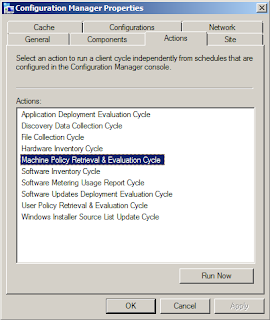
                    • ActionName - (required) This is where the specific action name is entered.  I use my own abbreviated codenames to save on space (this log can easily grow very quickly with multiple users!).  For example, I use "MACHINE_POLICY" to indicate "Machine Policy Retrieval and Evaluation", and "HWINV" to indicate "Hardware Inventory Cycle", and so on. (see image below for the list of default available actions for ConfigMgr 2012 clients)
                    • Network - (required) This is for storing the AD domain name or the CM site name, the choice is yours and it really doesn't matter, but I made it mandatory so you can modify "NOT NULL" to "NULL" if you prefer.  It's just there to enable filtering on specific environments when needed.
                    • Comment - (optional) This is for entering a comment if desired. I had initially intended this to be a [textarea] field on the web form, but decided to skip it to avoid unnecessary data.
                    • AddedBy - (required) This stores the username of the person who submitted the request from the web site form.  For this to work, you MUST enable "Windows Authentication" in IIS for the web site or the virtual folder.  If you leave it on "Anonymous" there won't be any way to track who the user was unless you build in forms-based authentication (yuck!)
                    • DateAdded - (required) This stores the date and time when the request was submitted
                    • DateProcessed - This is initially NULL until the script comes along and processes the request, at which time it enters the date and time it was completed.
                    • ResultData - This is also initially NULL until the script updates the row when the request has been processed.
                    Security

                    I chose SQL accounts for this setup, but you could use mixed-mode.  I do a lot of things by force of habit, so SQL accounts are pretty common for my work, so I tend to use mixed-mode setups.  In any case, I have two user accounts for this system:
                    • amsManager - This account has rights to SELECT, INSERT, UPDATE and DELETE data and rows in the table.  I use this account from within the web application to insert new records, and it's used in the script (discussed later) to update the rows when requests are processed.
                    • amsReadOnlyUser - This account only has SELECT rights, and is used for any applications/scripts/processes where someone needs to be able to consume (read) the data but not have the ability to modify or delete anything.

                    The Script

                    Now that the database is created, the table created and the permissions applied to the table, the next step is getting a script to work with it to do the heavy-lifting.  You can do this with almost any language, including PowerShell, VBscript, KiXtart, Perl, Python or whatever.  As long as the language you choose can do the following things it should work fine:
                    • Open a database connection to query (read) and update data in the rows.
                    • Execute shell operations to call external .exe applications (SendSchedule.exe), as well as invoke COM interfaces such as WMI and SWBEM requests.
                    Again, out of habit, I chose VBScript.  I was going to do it with PowerShell, but I got lazy.  Here's the code, but I have to mention that one key "action" is left out for now, and that's the "Re-Run Advertisement" option.  The reason is that I'm still working on this part and having some challenges.  When I get it working reliably and consistently I will post an update:

                    '****************************************************************
                    ' Filename..: ams_client_tools.vbs
                    ' Author....: David M. Stein
                    ' Date......: 11/11/2012
                    ' Purpose...: invoke ConfigMgr Agent "client actions" on remote clients
                    '             using a SQL table and WMI invocation
                    ' SQL.......: DB1\AMS
                    ' Comment...: Beware of line-wrapping!  If I wrap it I used [& _]
                    '****************************************************************
                    Dim query, conn, cmd, rs, objShell, scriptPath, recID, objFSO
                    
                    
                    ' controls DebugPrint output
                    Const verbose = True
                    
                    
                    ' database connection
                    Const dsn = "DRIVER=SQL Server;SERVER=DB1;database=AMS;UID=amsManager;PWD=P@ssw0rd$123;"
                    
                    
                    ' database table name
                    Const strTable = "dbo.ClientToolsLog"
                    
                    
                    '------------------------------------------------------------
                    scriptPath = Replace(wscript.ScriptFullName, "\" & wscript.ScriptName, "")
                    '------------------------------------------------------------
                    ' constants used by this script (abridged format)
                    '------------------------------------------------------------
                    Const adOpenDynamic = 2 Const adOpenStatic = 3 Const adLockReadOnly = 1 Const adLockPessimistic = 2 Const adLockOptimistic = 3 Const adUseServer = 2 Const adUseClient = 3 Const adCmdText = &H0001 Const adStateClosed = &H00000000 Const adStateOpen = &H00000001 Const ForReading = 1 Const ForWriting = 2 Const ForAppend = 8 Const TristateUseDefault = -2 Const TriStateTrue = -1 Const TriStateFalse = 0 '------------------------------------------------------------ DebugPrint "info: begin processing..." Set objShell = CreateObject("Wscript.Shell") query = "SELECT * FROM " & strTable & _ " WHERE DateProcessed IS NULL ORDER BY ID" Set conn = CreateObject("ADODB.Connection") Set cmd = CreateObject("ADODB.Command") Set rs = CreateObject("ADODB.Recordset") On Error Resume Next conn.ConnectionTimeOut = 5 conn.Open dsn If err.Number <> 0 Then wscript.echo "fail: database connection failed" wscript.quit(err.Number) Else On Error GoTo 0 End If rs.CursorLocation = adUseClient rs.CursorType = adOpenStatic rs.LockType = adLockReadOnly Set cmd.ActiveConnection = conn cmd.CommandType = adCmdText cmd.CommandText = query rs.Open cmd If Not(rs.BOF And rs.EOF) Then xrows = rs.RecordCount counter = 0 Do Until rs.EOF recID = rs.Fields("ID").value compName = rs.Fields("ClientName").value actName = rs.Fields("ActionName").value actCode = ClientActionCode(actName) addBy = rs.Fields("AddedBy").value DebugPrint "record id...... " & rs.Fields("ID").value DebugPrint "client name.... " & compName DebugPrint "action name.... " & actName DebugPrint "action code.... " & actCode DebugPrint "requestor...... " & addBy DebugPrint "request date... " & rs.Fields("DateAdded").value DebugPrint "network........ " & rs.Fields("Network").value If IsOnline(compName) Then retval = ExecAction(compName, actName, actCode, addBy) Else DebugPrint "result......... offline!" retval = 100 End If DebugPrint "result......... " & retval MarkRecord recID, retval DebugPrint "-------------------------------------------" rs.MoveNext Loop DebugPrint "info: " & counter & " processed" Else DebugPrint "info: no records found" End If rs.Close conn.Close Set rs = Nothing Set cmd = Nothing Set conn = Nothing '------------------------------------------------------------ ' function: return datestamp formatted for log file use '------------------------------------------------------------ Function LogTime() LogTime = FormatDateTime(Now, vbShortDate) & " " & _ FormatDateTime(Now, vbLongTime) End Function '------------------------------------------------------------ ' function: return TRUE if computer responds to a PING request
                    ' note: this features can be impacted by firewall settings!
                    '------------------------------------------------------------
                    
                    Function IsOnline(strComputer)
                      Dim objPing, query, objStatus, retval
                      If strComputer <> "" Then
                        query = "SELECT * FROM Win32_PingStatus WHERE Address='" & strComputer & "'" 
                        Set objPing = GetObject("winmgmts:{impersonationLevel=impersonate}")._
                          ExecQuery(query)
                        For Each objStatus in objPing
                          If Not(IsNull(objStatus.StatusCode)) And objStatus.StatusCode = 0 Then
                            IsOnline = True
                          End If
                        Next
                      End If
                    End Function
                    
                    '------------------------------------------------------------
                    ' function:
                    '------------------------------------------------------------
                    
                    Function ClientActionCode(actionName)
                      Select Case actionName
                        Case "MACHINE_POLICY":
                          ' Machine Policy Retrieval and Evaluation Cycle
                          ClientActionCode = "{00000000-0000-0000-0000-000000000021}"
                        Case "HWINV":
                          ' Hardware Inventory Cycle
                          ClientActionCode = "{00000000-0000-0000-0000-000000000001}"
                        Case "SWINV":
                          ' Software Inventory Cycle
                          ClientActionCode = "{00000000-0000-0000-0000-000000000002}"
                        Case "DISCOVERY":
                          ' Discover Data Collection Cycle
                          ClientActionCode = "{00000000-0000-0000-0000-000000000003}"
                        Case "RERUN_ADV":
                          ' Re-Run Advertisement
                          ClientActionCode = "RERUNADV"
                        Case "INST_SOURCE":
                          ' Windows Installer Source List Update Cycle
                          ClientActionCode = "{00000000-0000-0000-0000-000000000032}"
                        Case "UPDATE_SCAN":
                          ' Software Updates Scan Cycle
                          ClientActionCode = "{00000000-0000-0000-0000-000000000113}"
                        Case "AMT_PROV":
                          ' AMT Auto Provisioning Policy / Out-of-Band Mgt Scheduled Event
                          ClientActionCode = "{00000000-0000-0000-0000-000000000120}" 
                        Case "BRANCH_DP":
                          ' Branch Distribution Point Maintenance Task 
                          ClientActionCode = "{00000000-0000-0000-0000-000000000062}"
                        Case "UPDATE_DEP":
                          ' Software Updates Deployment Evaluation Cycle 
                          ClientActionCode = "{00000000-0000-0000-0000-000000000108}"
                        Case "SW_METERING":
                          ' Software Metering Usage Report Cycle 
                          ClientActionCode = "{00000000-0000-0000-0000-000000000031}"
                        Case "USER_POLICY":
                          ClientActionCode = "{00000000-0000-0000-0000-000000000027}"
                        Case Else:
                          ClientActionCode = ""
                      End Select
                     
                      ' list of codes for future inclusion...
                      '
                      '{00000000-0000-0000-0000-000000000010}  File Collection
                      '{00000000-0000-0000-0000-000000000021}  Request machine assignments
                      '{00000000-0000-0000-0000-000000000023}  Refresh default MP
                      '{00000000-0000-0000-0000-000000000024}  Refresh location services
                      '{00000000-0000-0000-0000-000000000025}  Request timeout value for tasks
                      '{00000000-0000-0000-0000-000000000026}  Request user assignments
                      '{00000000-0000-0000-0000-000000000032}  Request software update source
                      '{00000000-0000-0000-0000-000000000061}  DP: Peer DP status report
                      '{00000000-0000-0000-0000-000000000062}  DP: Peer DP pending status check
                      '{00000000-0000-0000-0000-000000000111}  Send unset state messages
                      '{00000000-0000-0000-0000-000000000112}  Clean state message cache
                      '{00000000-0000-0000-0000-000000000114}  Refresh update status
                    End Function
                    
                    '--------------------------------------------------------
                    ' function: 
                    '--------------------------------------------------------
                    
                    Function ExecAction(clientName, actionName, actionCode, userID)
                      Dim strCmd, result
                    
                      DebugPrint "info: executing action request for " & clientName
                    
                      If actionCode = "RERUNADV" Then
                        ' result = RerunAdv(compName, advID)
                        ' [[ I will cover this in part 4 of this article ]]
                        result = 200 ' denotes request was ignored (for now)
                      Else
                        strCmd = scriptPath & "\SendSchedule.exe " & actionCode & " " & clientName
                        wscript.echo "info: command = " & strCmd
                        result = objShell.Run(strCmd, 1, True)
                      End If
                    
                      '--------------------------------------------------------
                    
                      ExecAction = result
                    
                    End Function
                    
                    '------------------------------------------------------------
                    ' function: 
                    '------------------------------------------------------------
                    
                    Sub MarkRecord(recID, pVal)
                      Dim query, conn, cmd, rs
                    
                      wscript.echo "info: marking record completed..."
                    
                      DebugPrint "info: id = " & recID & " / result = " & pval
                    
                      query = "SELECT * FROM " & strTable & " WHERE id=" & recID
                     
                      Set conn = CreateObject("ADODB.Connection")
                      Set cmd  = CreateObject("ADODB.Command")
                      Set rs   = CreateObject("ADODB.Recordset")
                     
                      On Error Resume Next
                      conn.ConnectionTimeOut = 5
                      conn.Open dsn
                      If err.Number <> 0 Then
                        wscript.echo "fail: connection failed"
                        wscript.quit(err.Number)
                      Else
                        On Error GoTo 0
                      End If
                     
                      rs.CursorLocation = adUseClient
                      rs.CursorType = adOpenDynamic
                      rs.LockType = adLockPessimistic
                     
                      Set cmd.ActiveConnection = conn
                     
                      cmd.CommandType = adCmdText
                      cmd.CommandText = query
                      rs.Open cmd
                     
                      If Not(rs.BOF And rs.EOF) Then
                        rs.Fields("DateProcessed").value = Now
                        rs.Fields("ResultData").value = pVal
                        rs.Update
                      Else
                        DebugPrint "error: no records found"
                      End If
                     
                      rs.Close
                      conn.Close
                      Set rs = Nothing
                      Set cmd = Nothing
                      Set conn = Nothing
                    
                    End Sub
                    
                    '------------------------------------------------------------
                    ' function: verbose echo printing
                    '------------------------------------------------------------
                    
                    Sub DebugPrint(s)
                      If verbose = True Then
                        wscript.echo s
                      End If
                    End Sub


                    What The Script Does

                    As I mentioned before, each time the Scheduled Task runs, it calls the script.  The script performs the following actions in the order/sequence listed below:
                    • Opens a Connection to the database using ADO (COM) with SQL user permissions
                    • Submits a Query for all rows where the DateProcessed value is NULL (indicating the request has not been processed yet).  The results are obtained as an ADO RecordSet object.
                    • Iterates the RecordSet rows to gets the remote Computer Name, and ActionName field to determine the specific things that need to be done for the requested action (for example: look up the Action Code GUID)
                    • Initiates a WMI (Win32_Ping) request to determine if the remote computer is online.
                      • If not online, the ResultData column is updated with a value to indicate the client was offline
                      • If online, the Action is processed...
                    • Executes the requested Action:
                      • If a "Client Action" is requested: Open a Shell session using WScript Shell object (COM) and executes the SendSchedule.exe application with the appropriate GUID for the Action and the name of the remote computer.  Gets the result/exit code from the SendSchedule process.
                      • If "Re-Run Advertisement" is requested:  (to be continued)
                    • Updates the database table row by entering the appropriate result code (ResultData) and the timestamp of the completion (DateProcessed)
                    • Exits
                    Not really complicated actually.  This is a pretty straightforward and common process for interacting with database tables with ADO.  You could separate the requests and the results into two tables if you prefer, but I'm not shooting for 3NF or 4NF here.  I'm too lazy for that much work.

                    The Scheduled Task

                    This is where the Security aspect comes into play.  You need to execute the script under a context which has permissions to invoke the Configuration Manager Agent on remote computers over your network from a WMI interface.  I created a special Domain user account for this and added to the local Administrators group on every desktop and laptop computer using Group Policy and Restricted Groups.

                    Before setting up the Scheduled Task, I highly recommend testing the script directly.  Open a session (interactive login or use RunAs to open a CMD console) under the credentials of the user account you intend to use for the Scheduled Task.  Test the script until you are satisfied it works correctly.

                    As a force of habit, I use a simple BAT script to wrap my calls to VBScript to I can pipe the output (wscript.echo or DebugPrint results) to a log file if I want.  Or you can do it from within the VBScript code using basic FileSystemObject (FSO) methods if you prefer.  Either way, it can be helpful to generate a log file to diagnose issues where the database is unavailable for some reason when the scheduled task is executed.

                    The Schedule you choose is entirely arbitrary.  I run mine at ten (10) minute intervals all day, every day.  It also doesn't matter how you choose to create the Scheduled Task.  You can obviously use the GUI, or do it from the command line using SchTasks.exe, or from a script or whatever.

                    Summary

                    All of this I've covered here is essentially the "back-end" of the process.  I hope it you find it useful and helpful.  Let me know by posting a comment below?  In the next part of this article I will delve into the web form and the user interaction aspects.

                    Sunday, October 14, 2012

                    Config Manager Queries: CPU Types

                    I probably should revive my old ScriptZilla blog for stuff like this, but the heck with it.  I'm just posting all this here from now on.  After all: It is the brain-skattering blogness that I'm kicking around, if that even makes any sense.

                    This is a simple SQL query to fetch all the unique CPU manufacturers and names within your inventoried ball of confusion...

                    SELECT DISTINCT Manufacturer, Name, COUNT(Name) AS QTY
                    FROM dbo.v_LU_CPU
                    GROUP BY Manufacturer, Name 
                    ORDER BY Manufacturer, Name
                    

                    Here's an example using VBScript (example is using a DSN-less connection with an explicit SQL user account and password. You can obviously run this under SSPI or "trusted" context, or using a stored DSN)

                    dsn = "DRIVER=SQL Server;SERVER=DBServer1;database=SMS_ABC;UID=username;PWD=password;"
                    
                    
                    Set conn = CreateObject("ADODB.Connection")
                    Set cmd  = CreateObject("ADODB.Command")
                    Set rs   = CreateObject("ADODB.Recordset")
                    
                    conn.Open dsn
                    
                    rs.CursorLocation = adUseClient
                    rs.CursorType = adOpenStatic
                    rs.LockType = adLockReadOnly
                    
                    Set cmd.ActiveConnection = conn
                    
                    cmd.CommandType = adCmdText
                    cmd.CommandText = query
                    rs.Open cmd
                    
                    If Not(rs.BOF And rs.EOF) Then
                        xrows = rs.RecordCount
                        Do Until rs.EOF
                            For i = 0 to rs.Fields.Count -1
                                wscript.Echo rs.Fields(i).Name & vbTab & rs.Fields(i).Value
                            Next
                            rs.MoveNext
                        Loop
                    Else
                        wscript.echo "no records found, bummer."
                    End If
                    
                    found = False
                    rs.Close
                    conn.Close
                    Set rs = Nothing
                    Set cmd = Nothing
                    Set conn = Nothing
                    

                    I was going to post a PowerShell example, but going from v2 to v3 I'm finding all sorts of confusing recommendations about the "best way" to invoke a simple T-SQL "SELECT" query against a remote SQL Server that my head is already spinning. Even some that just recommend installing custom cmdlet extensions, and whatnot. If anyone wants to point me to a nice, simple, concise, example (i.e. equal or fewer lines of code than the VBScript example above) please post a reply. Gracias!